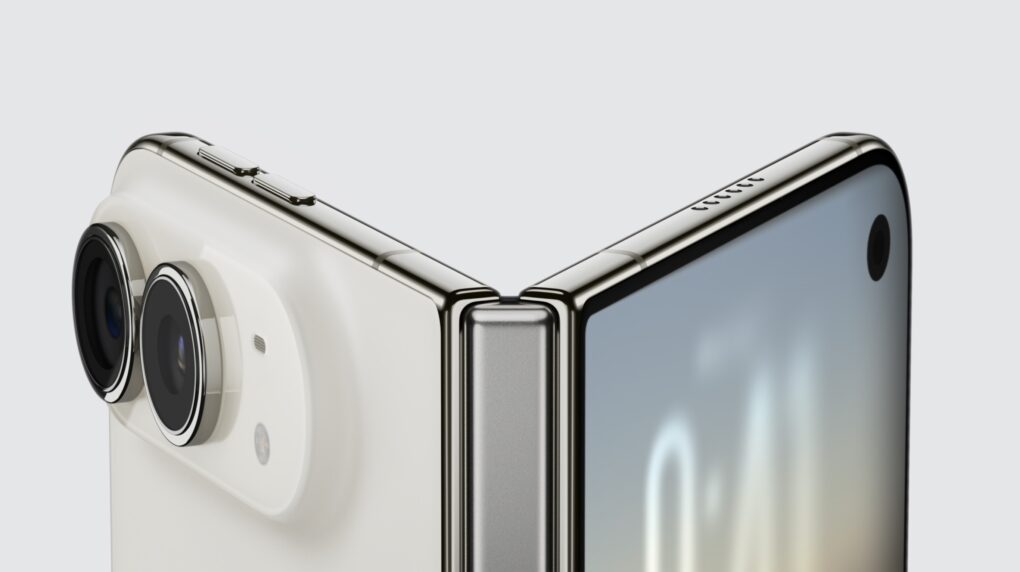
Judging by social media, the iPhone Duo looks like it will be a big hit, not least because the first folding iPhone appears to have no visible screen crease when opened to full size.
That’s a big drawback for other foldable devices. Here are some other revealing tidbits about the iPhone Duo.
iPhone Duo: No crease and other details
Before Apple announced the iPhone Duo at today’s Surprise and Shine event, expectations seemed somewhat muted. This is largely because of underwhelming folding Android devices. While on the market since 2018, foldables remain a niche product.
In 2025, about 20 million foldable phones were sold, according to market research firm Counterpoint Research. This seems like a large number, but it’s less than 2% of all smartphones shipped that year. There’s a lot of room for growth.
Apple’s new iPhone Duo looks set to change that with a great design and capable software. The $1,999 starting price tag won’t help, but Apple’s new financing plan, called Apple Upgrade, will.
Apple revealed a lot about the iPhone Duo during today’s 90-minute keynote, but here are some interesting tidbits that weren’t mentioned.
Crease? What crease?
The crease of iPhone Duo is barely visible.
Is it there, but very barely.
Video by Brian Tong pic.twitter.com/cfrnOICShu
— Amir (@WorkaholicDavid) September 9, 2026
One of the big unanswered questions about the iPhone Duo was whether the folding screen would show a crease.
It appears not. Or, at least, it’s barely perceptible, according to photos and videos from Apple’s hands-on session after the keynote.
The video embedded above, for example, shows there’s barely a crease when unfolded. This is good news for the device. A visible and tactile crease is a major criticism of folding Android devices.
However, it’s important to note that the latest Android foldables also have barely there creases at first, but a crease becomes more noticeable after regular use.
User testing of the latest Galaxy Z Fold8, for example, shows that a visible crease appears after a week or two of normal daily use. It’ll be important to see how Apple’s device holds up over time.
Nanotexture glass hides the crease (and greasy fingerprints)
The absence of a noticeable crease has a lot to do with the Duo’s deluxe inner screen.
“iPhone Duo features a wonderfully flat and smooth inner display with custom nano-texture finish technology to reduce glare and reflections for an uninterrupted viewing experience,” Apple’s website says. “The optically clear adhesives let the display layers glide as the screen folds, minimizing stress and crease.”
The nano-texture screen also reduces greasy fingerprints. (Smeary, fingerprint-covered screens also attracted criticism of folding Androids.)
Yes, Duo has MagSafe — deal-breaker averted!
Oddly, Apple didn’t mention MagSafe at all during today’s event — a surprising omission for such a popular feature. But the iPhone Duo supports the fab magnetic charging system, according to Apple’s tech specs page.
The Duo supports MagSafe wireless charging at up to 25W, the same fast-charging standard for the iPhone 18 Pro models. It’ll also support 25W Qi2 wireless charging with third-party chargers and batteries.
Faster wired charging also makes top-ups a breeze. Apple says the iPhone Duo will charge to 50% in 20 minutes, just five minutes slower than the iPhone 18 Pro and Pro Max, which charge to 50% in 15 minutes.
No Action button, but Camera Control is alive and well
Graphic: Apple
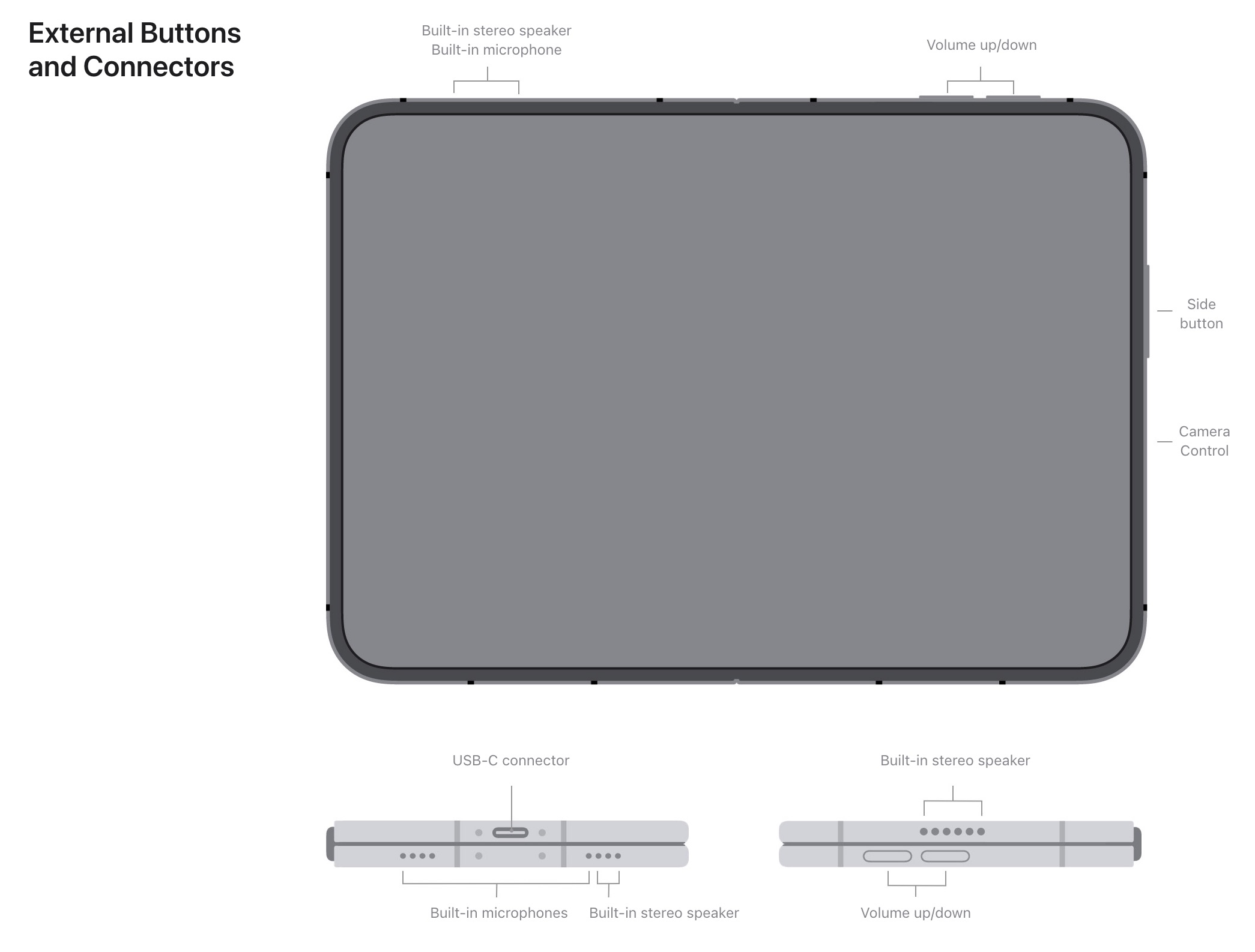
Apple’s technical specs page shows the Duo has no Action button. That’s the programmable button that replaces the traditional ring/silent switch on recent iPhone models. When pressed and held, the Action button can quickly launch a customized feature, app or shortcut.
It will likely not be missed.
The Duo does come with a Camera Control, a physical button that can quickly launch the Camera app and snap a pic.
The Camera Control started to gain fans after Apple simplified it. When it debuted, the button could be used to access all kinds of camera controls, hence the name, but a lot of users found it fiddly and confounding.
Apple changed the default behavior to simplify the button, and after a bit of self-training, the Camera Control button has become (for me anyway) a must-have. It can still be customized in Settings to access a range of camera controls.
- See also: How to use the iPhone’s Camera Control
Interior selfie camera magically disappears when not in use
The inner camera disappears when you switch apps. #appleevent https://t.co/SCR3h99X03
— Nobi Hayashi 林信行 (@nobi) September 9, 2026
It’s well worth checking out the video above, which shows the Duo’s under-screen selfie camera disappearing when not in use. It’s pretty magical!
Take the iPhone Duo to the pool or beach? Not a problem.
The launch video for the iPhone Duo showed it being used at the beach, which was a pretty ballsy move for Apple. It would seem prudent to keep such a pricey device far away from sand and dust.
But the Duo is rated IP68, which means it’s officially “dust-tight” (harmful dust or dirt is prevented from entering the device) and can even survive 6 meters underwater for 30 minutes.
Yes, it works with Apple Pencil, but only the cheaper one
Leading up to its introduction, rumors indicated the first folding iPhone would not work with Apple Pencil. That seemed to make sense: The softer, foldable interior display might get damaged or scored when poked at with a stylus.
But the iPhone Duo does work with Apple’s $79 USB-C Apple Pencil. However, it appears incompatible with the more expensive (and capable) Apple Pencil Pro. This might have to do with charging. The Apple Pencil Pro is charged magnetically by clipping onto the side of an iPad, and the Duo isn’t big enough for that. The USB-C Apple Pencil charges via a regular USB-C port.
Apple photoshopped super-long fingers?
JUST IN: Internet accuses Apple of photoshopping "freakishly long" fingers into its iPhone Duo marketing, to make the massive foldable look easier to hold one-handed. pic.twitter.com/D8C19tqlFa
— Polymarket (@Polymarket) September 9, 2026
If you go back and watch the keynote, the big hero shots of the iPhone Duo in someone’s hand do look odd, especially if you screenshot the key moments. And yes, it does look suspiciously like Apple photoshopped some extra-long fingers to make holding the device look comfortable.

Leander Kahney is the editor and publisher of Cult of Mac. Leander is a longtime technology reporter and the author of six acclaimed books about Apple, including two New York Times bestsellers: Jony Ive: The Genius Behind Apple’s Greatest Products and Inside Steve’s Brain, a biography of Steve Jobs.
Leander has written for Wired magazine, Scientific American, The Guardian, The Observer, The San Francisco Chronicle, MacWeek and many other publications.

