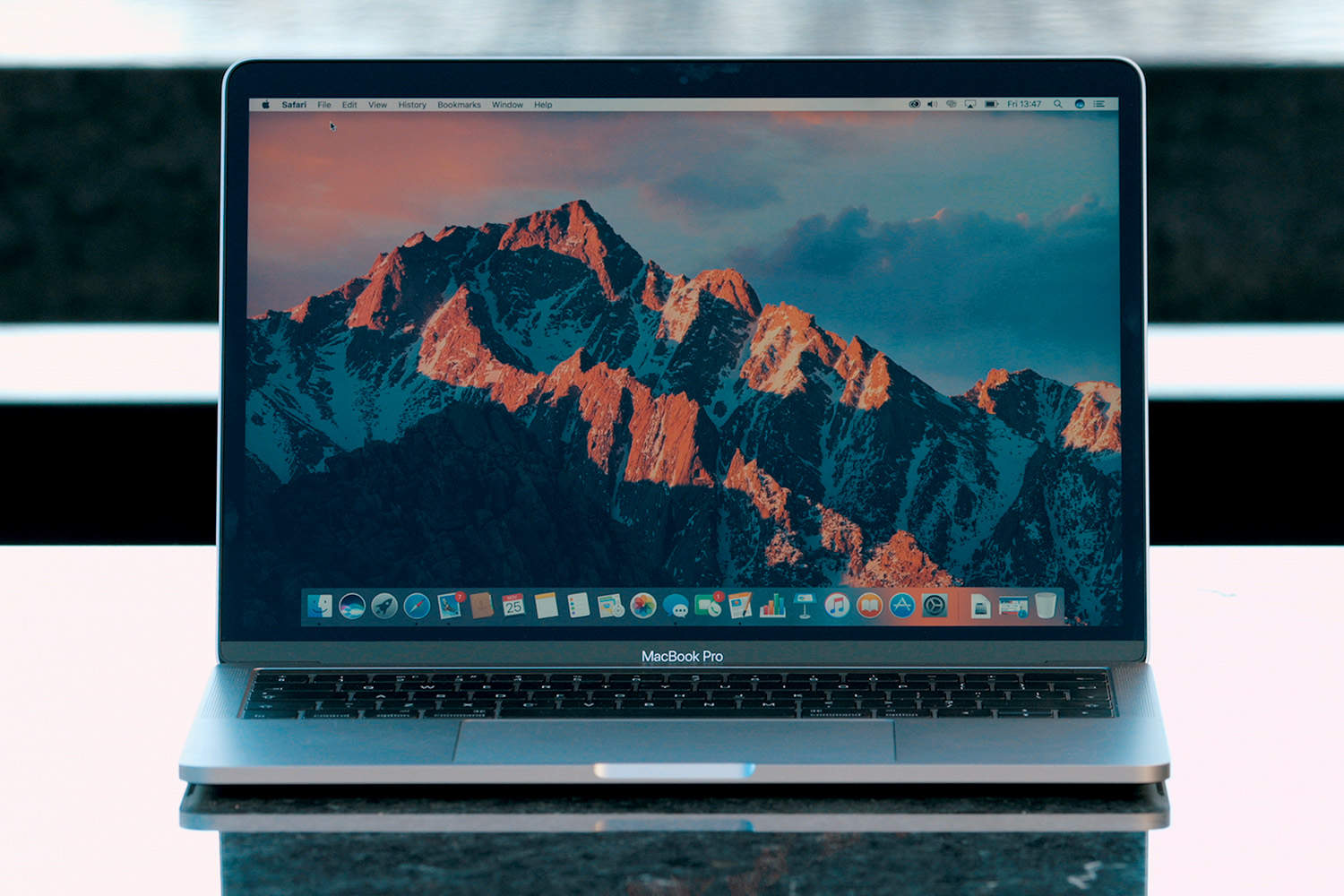
It’s been four long years since Apple’s last big update to the MacBook Pro lineup. But Apple finally answered our prayers and delivered us the brand new MacBook Pro we’ve been waiting for — or did it?
It’s a beautiful machine with an intriguing new interface element called the Touch Bar. Check out my full MacBook Pro review below for more.
Beauty runs in the family
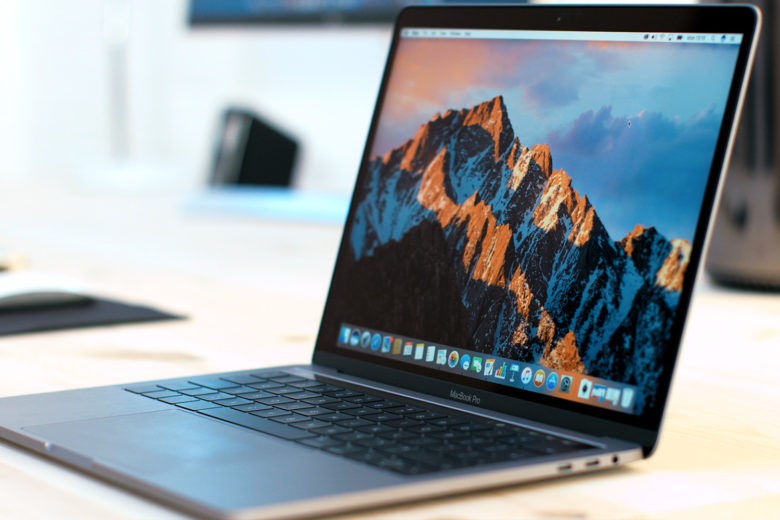
Photo: Ste Smith/Cult of Mac
Let’s start off with the design.
The new MacBook Pro takes a lot of inspiration from the MacBook range. It comes in space gray, is thinner and lighter than its pro predecessors, and boasts smaller bezels and fewer ports.
Regardless of your thoughts on this last part, the one thing you can’t argue about is how beautiful the new MacBook Pro is.
Its thinner bezels around the screen and keyboard make the new Apple laptop 23 percent smaller than the previous generation, which makes it feel super-sleek and easier than ever to carry about.
Then there’s that new, larger Force Touch trackpad. Although it’s great that the trackpad now offers more real estate for swiping and clicking, I find myself resting my palm on it from time to time.
Yes, it employs “palm rejection” technology to combat this, but it doesn’t work 100 percent of the time.
There’s also that new compact keyboard with Apple’s improved butterfly mechanism. It’s shallower than the previous MacBook keyboard, which means it has less travel when typing. Thankfully, it’s still a joy to type on.
If you’re moving from the previous MacBook Pro or even a Magic Keyboard, it’s going to take some getting used to. The keys are still nice and clicky, but it takes a few hours to build up touch typing confidence — especially with those new arrow keys.
Of course, the addition everyone wants to know about is the shiny new Touch Bar.
MacBook Pro Touch Bar is like a tiny iPad
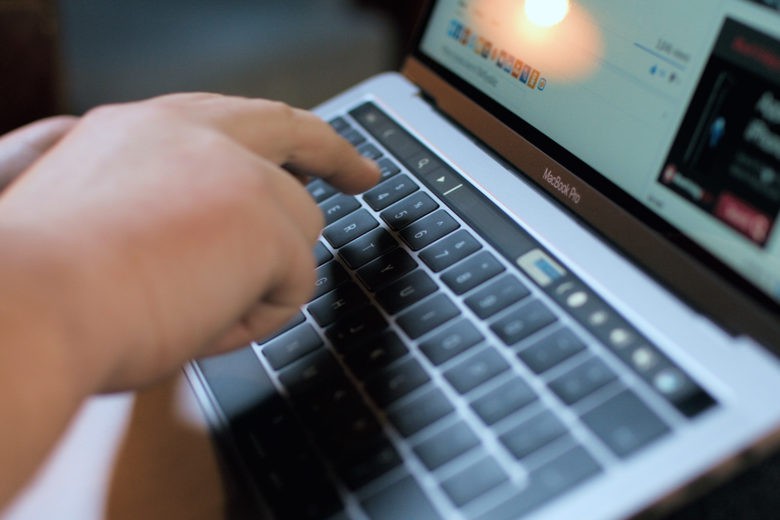
Photo: Ste Smith/Cult of Mac
Apple has replaced the top row of function keys with the Touch Bar, a super-bright and clear OLED touchscreen. In practice, it’s less a row of digital buttons and more a tiny iPad.
The standard function keys have been replaced with a row of always-present buttons — volume, brightness, escape and so on are always accessible through tapping on each button. They also extend out if you want a more traditional, full row.
The four fixed buttons can thankfully be customized to different functions, so if you’re not a Siri user you can switch it out for something like Spotlight.
It’s when you open different apps that Touch Bar truly comes alive, though. The center of the thin OLED strip transforms to become useful for whichever app you’re using at the moment.
Currently, this works better in some apps than others. For example, in Safari the Touch Bar will add tab and back buttons as well as a search bar; Pages will give you formatting options; Messages offers you emojis; and Photos helps you out with some edit keys.
However, the Touch Bar fails on typing suggestions. This functionality works great on an iPhone, but on the Mac it feels strange and out of place. I found it just slowed me down.
In all, the Touch Bar is a nice idea, but it still feels a little bit like a gimmick. Most pro users tend to already know traditional keyboard shortcuts they utilize on a daily basis. I never find myself looking down at the keyboard when working, as I know all the shortcuts I need when editing videos or images. As a result, whenever I was working on my new MacBook Pro, I’d actually forget the Touch Bar was there.
[contextly_auto_sidebar]
It’ll be interesting to see in coming months what third-party developers such as Adobe come up with, but at the moment I don’t think the Touch Bar is there just yet.
Also hidden within the Touch Bar is the power button with Touch ID.
I didn’t think too much of it before getting my hands on the new MacBook Pro. But at times when I had to switch back to my old Pro, I really missed Touch ID. Being able to log into my Mac without a password or wearing my Apple Watch was bliss. This is the perfect way to access my Mac.
Is the MacBook Pro still for pros?
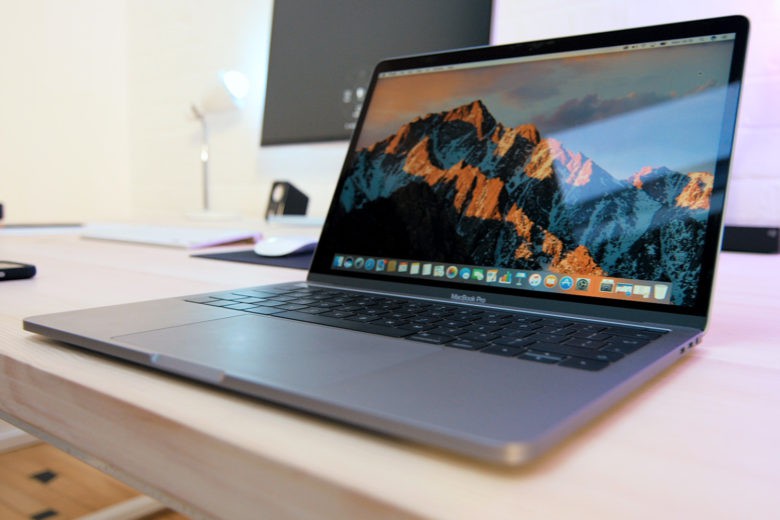
Photo: Ste Smith/Cult of Mac
Surely, the most important thing about a pro MacBook is performance, right?
If you’re a day-to-day average user, the MacBook Pro is going to be super-snappy.
However, if you’re a pro user, the news isn’t as great. When editing a 1080p video project within Premiere, the MacBook Pro handles it no problem. But when I start adding 4K video and try to layer shots on top of each other, it all falls to bits. The MacBook Pro simply can’t handle it.
Even export times aren’t significantly faster than my old MacBook Pro. Geekbench scores have clearly shown that the new MacBook Pro is faster for single-thread tasks, but when it comes to multithread it’s actually a little bit slower.
Users are reporting that Apple’s own video editing software, Final Cut Pro, handles 4K no problem — but if you’re editing commercially, chances are you’re not using FCPX. And no one should have to change their workflow for their laptop.
I’ve also noticed little glitches here and there. The MacBook Pro will seem to freeze on certain apps, not allowing me to click on anything unless I swipe off the app and back again.
Whether this is due to my hand resting on that larger trackpad or it’s a software bug that can be fixed down the road, it’s not something I want to see in an $1,800 laptop.
Plus, limiting the MacBook Pro to just 16GB of RAM seems a little bit strange, as 32GB would have benefited a lot of people. (Apple defends this controversial choice, saying adding more memory would turn the MacBook Pro into a battery hog.)
The MacBook Pro boasts a 10-hour battery life. I’m getting around six to eight hours depending on what I’m doing, which is about the same as my previous MacBook. It’s by no means bad, but there’s no big improvement.
Liveing the #DongleLife
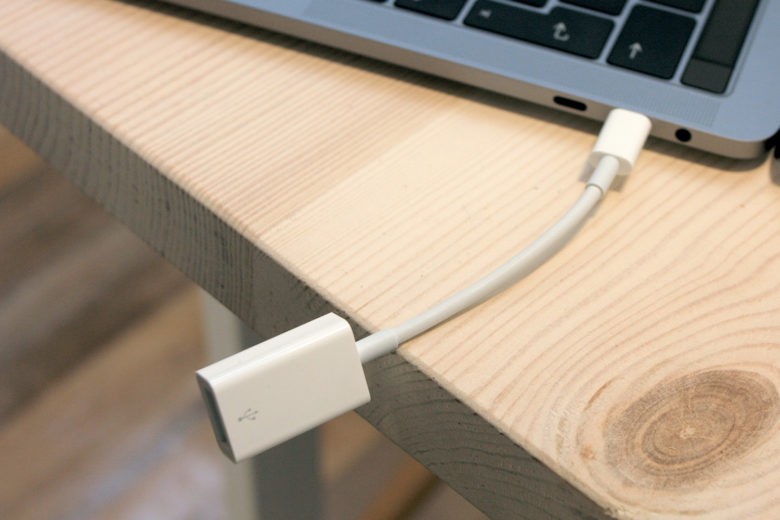
Photo: Ste Smith/Cult of Mac
First Apple took away the headphone jack with the iPhone 7. Now it’s taken away all of our USB ports, HDMI ports and SD Card slots from the new MacBook Pro in favor of four USB-C ports and (surprisingly!) a headphone jack.
While it’s great that USB-C lets you charge your MacBook, transfer data or plug in displays at the same time, but it’s still a huge pain in the arse for everyone like myself who uses a load of peripherals.
I know there are a growing number of native USB-C products, but the port is still in its early days. There’s no doubt that you’re going to need some adapters and new cables.
Thankfully, Apple has cut the prices of its dongles for a limited time. It’s still an extra cost you should factor in before picking up the new MacBook Pro, though.
The entertainment factor

Photo: Ste Smith/Cult of Mac
Two features I have absolutely no complaints about are the display and speakers.
The display itself is super-crisp. The colors are noticeably more vibrant, with deep blacks and increased brightness. And the speakers on the new MacBook aren’t necessarily a lot louder but deliver a much fuller sound.
(If you’d like to see a full, side-by-side comparison between the new MacBook Pro and the 2015 model, make sure to stick around as that’ll be up soon after this video.)
MacBook Pro review: The verdict
So the main question, is the new MacBook Pro worth its premium price tag? To be honest, I’m a little bit split. For a starting price of $1,799 for the base model, you want to be sure you need the upgrade.
If you’ve got an older MacBook Pro without the Retina display, then definitely go for it. The amazing display and killer speakers are worth it alone, plus you’ll see definite speed improvements in everyday tasks.
If you’ve got a more recent MacBook Pro with the Retina Display, however, I’d say hold off.
The Touch Bar isn’t enough of a reason to make the switch, especially until we truly see what developers can do on the platform. Apple’s integrations are nice, but whether I actually use them is a little hit and miss — plus I’m still kind of waiting for the novelty to wear off.
In terms of performance — which is what I’d really like Apple to concentrate on for its Pro lines — the new MacBook Pro Doesn’t offer a massive increase over the 2015 model.
I may sound really harsh on the new MacBook Pro, but that’s because I expect a lot of it.
Despite its flaws, I genuinely like this laptop a lot. It is an upgrade over the previous model: It’s quicker and sexier, with an amazing display and speakers. And it easily remains one of the best laptops Apple ever made.
But for now, I’m going to hold off on upgrading.
Thanks to Paragon Pictures for helping to produce the video.
Photo: Ste Smith/Cult of Mac

Ste Smith is Cult of Mac’s video guy based in the UK. Ste has been working in the media industry for over 8 years and is a keen Apple fan. Follow Ste on Twitter @stesmith10 and Facebook.


88 responses to “MacBook Pro: Too slow and not enough ‘pro’ [Review]”
Glad you pointed out those random freezes ! I have gone to the Logitech MX Mouse with its controller and it is 95% better. I thought it was a bluetooth related thing, if you use the trackpad it unlocks the freeze. Just updated to beta 4 of MacOS 10.12.2 so I am hopeful I am over this issue.
I am going to not bother down grading either. I know they say its sold more than any other MacBook through the launch phase but ‘phase’ is being the operative word. I have no doubt it will do okay and I understand Apple want to change how we use devices etc but this time they simply have got it so wrong in my opinion. As for the prices especially if you are in the UK well its pure greed before pure customers.
I think part of UK pricing is related to Brexit and if that’s the case, then it’s not Apple, it’s Brexit. Sure the TouchBar models are a little more, but not drastically more.
Im afraid it´s not brexit, because in my country you can buy the cheapest macbook pro for 1749 euros and in US you can buy it for 1499 dollars.
And in UK you buy it for 1449 pounds = 1699 euros.
I agree with Lee, its pure greed.
What about VAT? I’m not aware of the U.K. Vs EU member country levels.
It went up more in the UK than everywhere else, there was also a bit of an increase in price due to the fact that they have essentially the parts of an Apple watch in them now in the form of the touch bar and have a higher base level SSD for most of them so personally I think the overall gigantic price increase in the UK can mainly be attributed to Brexit, I would also put money on it that the MacBook Pro 2017 (if there is one) will have a further UK price hike, if and only if it is announced after April
This is a massive increase. Brexit has nothing to do with the reason they charged more they did it because they know the value of the pound to the dollar has decreased. Basically if anything they should of reduced the cost in sterling but instead hiked up the costs which is taking advantage of a weaker pound. Microsoft have also greedily done the same thing with their subscription services but not their hardware. And other hardware manufactures have lowered their costs instead of trying to squeeze more. Apple are using their so called name to hike the costs up.
I believe the costs on average have gone up by 290 to almost 500 depending on which size and spec. That is insane. I guess if people are desperate to have an Apple device then they will willingly payout for it.
I have a mid-2012 MBP retina and I absolutely love it. It works as good today as the day I bought it. Based on this review and others of the new MBP, I have zero interest in making the upgrade. My MBP is perfect for everything I currently do.
I have an early 2013 15 inch pro fully loaded and the thing is amazing. Couldn’t ask for better in a laptop. Is the new one better? Yes, but it’s not worth upgrading to, not at all.
Which MacBookPro are you using? The 13inch or the 15inch for 4K video editing? I’m sure there is a difference due to the processor and GPU differences.
For the pix in the article it looks like the 13″ which is way less powerful than the i7 quad core in the 15″. Not sure what the reviewer was expecting running on a dual core…
it doesn’t matter.. he was comparing the old 13″ with the new, and the new was SLOWER in multi-threaded mode.
Was he talking about Premier and editing in 4k video?
He talked as if FCP is not used commercially and I believe he is wrong.
He is wrong. He’s a CC fanboy…and that’s preventing him from properly reporting.
As I understand it, FCP lacks some industry standard features that enable other programs to read, for example, edit marks etc.. It is a closed system. So it can be used to make money , but if you’re collaborating with others, or send files out for special post processing, you’re headed for a world of pain.
It seems like you don’t quite understand it. There are no such issues. No more then any other NLE.
I’m the stills shooter on the crew – so yeah – but I asked this very question of the vid guy and got a very detailed answer. It’s a closed loop, and would you trust apple with pro stuff. How’s that MacPro update coming? Aperture’s looking good…..
How much time has your vid guy spent using FCPX? My Mac Pro 2013, Mac Pro 2010, Mac Pro 2010, MacBook Pro, MacBook Pro, iMac, iMac, iMac, iMac and iMac are all doing very well, editing on FCPX, in a collaborative environment, over ethernet, sending audio back and forth from ProTools, Logic, graphics back and forth from Photoshop, Pixelmator, After Effects, Motion…filming on xdcam, fs700, dslr, GoPro, etc…editing about 16 feature length documentaries and about 6 doc TV series for broadcast with a new series starting in January for a network with a reach of 5 million viewers. Our shop is almost completely MacOS AND iOS, and we edit exclusively on FCPX. I have edited on Avid for years, FCP for years and now FCPX since day one. All have there strength and weaknesses, but not a single NLE is a closed loop. NLEs by their nature are very open programs. Any vid guy who hates an NLE lacks good experience and is most likely just reluctant to try new things. I hope your vid guy doesn’t get the ear of other as easy. As for Aperture, it’s unfortunate. But, the photos app is excellent. The app is simply where a photo lives, the true power of photos comes from the extensions that allow 3rd party apps to build into the app. Also, the photos app is on all devices, this makes for a great workflow. I was disappointed with the decision to end work on Aperture, but in the end, I’m very happy with the decision.
“editing on FCPX, in a collaborative environment, over ethernet, sending audio back and forth from ProTools”
Not without third party software. Another pro feature that Apple neglects which forces users to move to pro software from Adobe and Avid
A yes, using third party software means it’s not a pro software. Forgive my ignorance. It’s terrible that these affordable, capable, powerful, flexible plugins and apps are able to fit perfectly into the FCPX ecosystem and bring the overall quality and usefulness of FCPX to a level that it is. Clearly PP, AE, PS all operate independently of each other, right?
Most professionals use FCPX, by now (they didn’t use to 2-3 years ago).
Seems pretty obvious that he doesn’t understand FCPX, or even how to use Premiere, properly – as you’d use proxy’d footage to edit 4K (or even normal footage) when working on a laptop.
Furthermore, as was pointed out elsewhere, the 13″ MacBook Pro with the i5 processor is a ridiculous choice to use for video editing, as the i7 processors have optimizations that help with video work.
Lastly, bemoaning the USB-C ports, and the dongle hell from having to buy Apple dongles really illustrates what a Luddite the author is – smart people would just buy a single dongle that combines many of the older interface ports (available for around $50 – a lot less than having to buy Apple’s dongles) and be done. USB-C provides much more flexibility and Future-proofing, including the possibility of supporting future interfaces without having to buy a new MacBook. I was surprised he didn’t complain about not having a 56K modem.
This is, at best, a misleading ‘review’.
I agree!
Good point about proxies, even an audio guy (like me) knows that. My 2013 15″ rMBP didn’t have enough ports for me, so I bought an OWC TB2 dock. With my new 2016 15″ maxed out MBP, I still use the dock – connected with a TB3 to TB2 adapter. The transition was as easy as pie. I also picked up 1 USB C to USB adapter for travelling light. The whole port thing is overblown IMO.
I want to know this as well. What’s the configuration of your old MacBook vs the new MacBook.
I got a new MBP with no touch bar and stay for 10 days = good battery…many many hours. Then I decided to exchange to a new MBP with touch bar. The battery lasts bw 2 to 3 hours only !! and the touch bar is very very very useless ! First I use to pay attention on the screen, never on the keyboard ! I liked the touch id. But this battery is really really bad ! And sometimes my mac freezes when I disconnect or connect the USB-C cable on my usb-c LG monitor. Performance ?? my prev mac was a MBA Mid 2013…I barely fell any difference on the performance. Wanna a good advice ? Buy a new one with no touch bar ! it’s have the best coast/benefit.
Or go with 15″ if you need power.
I don’t need much power.
no such issues for me. battery lasts 9+ hours easy. 2-3 hours for you? certainly something is not right with the lappie you got! I have also had zero freezing issues! maybe i won the silicon lottery?
Maybe I was in bad lucky, buddy ! Next week I’m going to genius bar…maybe they will replace my laptop. I freeze just in occasions where I’m using my usb-c display (LG 38 ultrawide). When I connect or disconnect the cable , this can happen.
aah! I have not connected mine to ext monitor.. so possible that I may see it too. please let us know what you find.
I think you got a glitchy MBP. I get 9-10 hours out of mine. No freezing either when connecting/disconnecting to my monitor.
If you’re saying the new MBP has no performance advantage over a MBA mid 2013 then I start to doubt you even have the MBP with touch bar. Processor and RAM on even the entry level 13″ MBP with TB is at 50% better than the offerings of the 2013 MBA.
I don’t perform operations like 3D rendering and others, dude…For my daily basis…I barely feel the diference. I just can feel a better performance when I need to launch the iOS emulator. But according with all your defences regarding the new MBP, my assumption is that you are an Apple Fag. A Typical teen that’s bought an equipment using papa’s money ;)
Wow…..
Sorry but spec for spec even basic operations would be faster from boot up to opening apps, etc. The faster SSD, RAM and Processor would definitely show. I know because my 2008 MBP tanked in June and I was using my wife’s 2013 MBA until they announced the new ones and I could decide which way to go. I went for the 13″ MBP with Touch Bar, 8GB of RAM and 512GB SSD.
Oh and since you want to go all personal attack mode, I’m 34 years old and used my own money to buy my computer, I was just challenging obviously absurd statements.
Disappointed with this will definitely wait for the next one. This one does not do it for me with all the dongles terrible idea!
everyone keeps yelling “dongles! dongles!” as if you’re going to be swallowed alive by them. how many do you *ACTUALLY* need? do you have an iPhone? buy a USBC-Lightning cable, no dongle required. same for iPad. sd card reader? buy a USB-C SD card reader, they’re seriously $5.99 on amazon. USB-C to HDMI cable, USB-C to whatever you want cable – no dongles required.
stop polly-parroting the bullsh*t you’re being spoonfed by windows lusers, and wake up: it’s nowhere near as bad as everyone makes it sound!
i agree. Very rare for me to attach Hoo Too to transfer something from a USB or install something … also, in another year everything will be on usb-c …windows is already moving there. the thunderbolt 3 ports enable you to connect to multiple 5K displays. come people,
There are hubs out therein various configurations for $50 or less that cover the ports most people use/need. All this dongle dongle dongle business is just BS.
Honestly I have no idea why people want to upgrade from 2015 MBPs.
My late 2013 MBP is still going strong and works great. One of the reasons I went with Apple was the reliability. You pay $3000+ but only once every 4 to 5 years.
I will change my 15 rMBP 2013 in 2020, it works perfectly after 3 years
yeah.. it would be better to buy the 2015 while you can still find one.
if you don’t want the touchbar, you will find great deals on 2015 MBP for sure. I absolutely wanted it and its lighter and thinner. I love it…but its a personal decision. nothing universal about me liking the new version of the MBP
I got a new MBP 2016 TB…because my prev mac was a MBA 2013…And I’m not sure if I did the right thing !
Um did it ever occur to anyone that maybe the reason that Premier isn’t that much faster than on the previous laptop is that it isn’t as optimised as it would have been for the previous hardware? Also who the hell is needing 32Gb RAM in a laptop? If you need that much at this stage in tech it’s a desktop you need not a laptop. Also random freezes is software not the hardwares fault and can be fixed. Also all this bullshitting about “oh but what about the dongles, oh me, oh my” is getting a bit stupid, seriously, it’s USB C, it’s LITERALLY a universal standard and you can get adaptors for 1 or 2 quid on amazon that will work equally as well as Apple’s, also you will have to switch over eventually anyway so at some point this was coming so why everyone is so shocked I don’t know, plus it adds extra customisability to the new mac, like now an eGPU is actually a viable option via USB. In addition anything like a hard drive you could just replace the USB A to connector type cable your HDD or SSD uses with a USB C version rather than pointlessly carrying around another cable just to bitch about.
dude.. if you don’t know why someone need 32gb on a laptop, you’re not a Pro..
Go back to using the Air.
I run out of RAM all the time. That was maybe OK in 2012.. but I’m not going to dish out upwards of 2K in 2017 for a machine with 2012 RAM.. I’m bound to run out in 3 years
Here are some reasons:
– Software developer IDEs, Databases, Profilers, Debuggers
– VMs
– Machine Learning tools
– Video editing
Etc.. MacBook Pros were embraced by many software developers. Now they’ve been left hanging with this Air model.
so, yeah – if you’re using software developement IDEs, databases, profilers and debuggers, with VMs and machine learning tools and editing video all at the same time and while mobile – you’re doing it wrong.
buy a desktop, use the laptop for laptop stuff. laptop means mobile, means portable, means battery life – and i guarantee you’re not going to get acceptable battery life doing all that on ANY notebook.
and if you’re only doing one at a time, how are you exceeding 16gb? it’s almost as if you and every other moron flipping out over 16 vs 32 memory options has no sense of reality.
Or, you know, you could go back to the nightmare that is Windows 10. good luck with that.
I agree. I am a software developer myself and even with my 2012 rMBP I hardly ever had performance issues (usually using Parallels desktop to run my Windows ‘machines’). 16GB will double my RAM, the larger and faster SSD drive (I ordered the 1TB one) will make my life even easier. The USB-C ports will simplify my peripheral connections (in the long term) and make them faster. Even at work on my Windows 10 desktop machine I rarely feel the need to have more than one VM open at any time. You can rarely be productive with so many machines all open at the same time – and in any case you’d be better off with a powerful desktop PC or Mac if your demands are so high.
And the writer of the article (as many other reviewers seem to do) seem to think that the only ‘pro’ use is with video editing. :-)
Ok, I run a mid 2012 MBP 15″ with 16 GB. One of the main applications is a VM (Parallels + Windows 10 + Excel with large scale models with >5 MB and vast number of macros. So far so good. My MBP is a great machine and as performant as 4 years ago. What else could you wish for?
The only thing is, that I run Windows on 3840×2400 resolution and I experience a) latency and b) even some black squares while scrolling fast through thousands of excel lines … so my question is:
a- Would 32Gb solve this problem?
b- Or is that problem already solved by the ‘new’ architecture of the MBP 15″ 2016?
AND: No f**** way I am moving back to a native Windows environment or even hardware EVER. I only need Redmond for xls and ppt.
To me is sounds like a graphics issue, so really the new GPU in the 2016 MBP should fix that
No.. not at the same time, but we often hit limits.
I don’t need a 2012 configuration for 2017+..
I can get that already with the 2015.
But if you want to buy.. go ahead do so.. I’m keeping my money.
And yes.. in spite of your preaching what people can or should do.. there are people that use this stuff on the road.
We had a machine that was awesome in 2012. We expected a proportionally awesome machine in 2016. I guess we need to wait or switch.
This 32GB RAM thing is so stupid. I cannot even get my machine loaded up so much that I can see any performance hit due to swapping. OSX handles the memory and the only way I would even know there is an issue is to birddog my monitor programs. I just use the machine for work and stop worrying about RAM.
If you really need 32GB, use an imac. Apple has come out repeatedly and told you the reason no 32 GB is architecture. No DDR4 32 gb low power. Intel is consistently late. You gotta test new chips and chipsets when they come out and the FAA mandates the max battery a laptop can have on a plane. if they did somehow get 32gb in, there would be an entire horde denouncing apple for the four hour battery life vs. a small percentage increase in performance. Not everyone edits 4K video. Maybe the MBP is not teh right tool for them, but for some reason this vocal minority needs to have some kind of external validation that their snowflake needs were not met.
I upgraded and this is the best laptop apple has ever made. I love my MBP.
I’ve run out all too easily.. not even doing very sophisticated stuff.. Maybe Chrome is hogging too much.
The point is I need a future proof machine. But if you’re happy with your new Air, that’s fine. I want a MacBook Pro..
Come uses a ridiculous amount of RAM so to be honest that may actually be you’re issue if you’re having a RAM problem
I ran out of ram yesterday just using Mac’s Preview feature and Chrome. (both ram hogs apparently)
Anyway.. I guess a lot of people here haven’t heard of Moore’s Law and find 64K to be enough RAM forever.
no, you’re just stuck in the past and unable to accept change. like most of the whiny bastards in I.T. that i have to deal with. grow up, accept change, or get the hell out of the workforce and let someone who hasn’t outlived his usefulness have your job.
oh and furthermore, the 2012 MacBook pro was 4gb or 8gb. 16gb wasn’t an option; so you dont even know what you’re talking about.
actually you’re right my MBP is a 2013 not a 2012.
Its not that I can’t accept change.. its that there is not enough change in this laptop. I need a future proof laptop.
But I seem to have offended an Apple fanboy here.
you haven’t offended me, you’re not that important. i’m just sick and tired of seeing so much vitriol over a computer, and i’ve reached my breaking point, and i’m calling people out on it.
I have a mid 2012 15″ MBP with 16 GB. Not sure if this option was available for 13″ as well
https://uploads.disquscdn.com/images/46f923a7a77169965c816e622538e89c3f88149c89f245220b41c392d24e1f8e.jpg I’ve had 32 gigs since 2013 on my 2010 iMac. 32 gig makes an ENORMOUS difference if you use Photoshop with large files or multiple images open or multiple programs or do video editing or animation – even Safari is a ram/processor hog! I exceed 16 on a normal basis as I am a cartoonist who appreciates fine line work… Look at my ram usage – almost always at 24-28 gigs.
key word: iMac. that’s why you have an iMac. if you want portability, you make sacrifices. that’s just all there is to it. otherwise, you run a desktop, which is what you’re doing: you’re the intended use-case scenario for the iMac.
1. I have used multiple IDE’s on an iMac with half the RAM this has and it works perfectly fine, to be frank I’d love to know what IDE your using that needs over 16Gb RAM as I would suggest something more minimalist than it like maybe Visual Studio which needs about 8Gb to run smoothly 2. VMs can easily work with 8Gb of RAM and if you want more it’s really not difficult to give a VM 10Gb or 12, again if it’s for software development you should be looking for a new IDE if it struggles with 12Gb 3. Machine learning isn’t an area that I’m particularly familiar with but I would imagine from what I know a typical ML algorithm used by a dev that would be running off a laptop would be fine on this, otherwise you would need essentially to be using AWS, Microsoft cloud or something of that ilk. 3. These machines can easily edit 4K footage, just google any of a number of reviews on youtube and you’ll see them doing it live.
Really the only use case there would be an issue with is ML and even that would have no issue with regards to writing it, it would be training it would be the issue. To which I would point out to train most ML algorithms you need something more in line with what I said earlier, essentially a server
How can you call this a review?
I can’t even know which model has been “reviewed”…
Forgot major flaws: no magsafe, RAM soldered, SSD soldered, no mat display option, no 17″ model, glued batteries. My 2004 PowerBook G4 and 2010 17″ MacBook Pro, my kids iBook G4 and MacBook Pro 15s all got their hard drive dead and those machine are still running because storage was user-replaceable. Now those will have to go to the landfill…bad move for the environment!
SSD’s will last nearly forever, the HDD in your powerbook G4 was A) not drop proof and B) made of magnetic material and spinning bits.
17″ model? buy a friggin’ desktop, dude. 17″ is too big for a mobile, and i don’t care what you say about that.
matte display? personal preference; deal with it. few PC’s are offering matte displays these days.
glued battery… so? there’s always ways around that, and you’ll likely upgrade before the battery is an issue anyway.
your kid’s iBook G4 may still be running today, but i guarantee you’re not doing anything useful on it. same with this computer, in ten years it’s time to buy a new one; if you dont like it, you can lump it. or you can go buy a cheap PC and deal with the total hell that is windows 10.
Personally, i recommend you grow up and move out of your parent’s basement – you’ll realize that your polly-parroted nonsense complaints about this unit don’t amount to a hill of beans then.
The PowerBook and iBook are running gel-capture equipment in a molecular genetics lab…I guess that scientific research is not useful. Many research lab has invested lots of $ in Apple and I and my colleagues leaving the ship will have an impact! (our students are taking note as well)
A larger touch pad makes no sense.. touch pads are annoying enough when typing.
i actually prefer larger trackpad. it helps when you are dragging and dropping … giving you more room. no it does not come in your way when you are typing. Their palm rejection algorithms are really wonderful. Yes .. i love apple but honestly, you will like it. try it. you got 14 days to try. nothing to loose.
You obviously haven’t ever used this computer nor seriously considered purchasing one. You literally have no perspective on this piece of hardware.
Apple’s trackpads are the only tolerable trackpads on the market. i can’t ever imagine going back to an inferior specimen of hardware, and i only wonder why the hell PCs can’t do it better.
R.I.P. MacBook amateur.
Firstly anyone who is a professional editor is not going to be editing 4K on a laptop and if so would do an offline edit and online it later on proper professional sound equipment and a high end desktop for colour and whatever secondly adobe software has always generally been a memory hog and is problaby not optimized properly ? If it works from what I’ve seen smoothly and fast by allot on fcpx I’d be asking adobe why not wining about it ?basically if you’ve noticed laptops and computers have been basically gradually speeding up over the past 5 years so if your happy with what you have fine you can wait but I love the design and footprint of this laptop I looked at all the windows options they’re ok but if faster and more graphics ability they usually still weigh 3 more lbs then you my as well get a desktop then so stop wining appreciate the design and engineering and phone adobe and ask them why they’re software is a slug
“Liveing the #DongleLife”
Maybe you can use the new MacBook Pro’s power to turn on the FRIGGIN’ SPELL CHECKER!?!?!
How do you still have this job and aren’t working in Tesco stocking shelves?
The number of people who would kill for a writing job, and stupid articles with stupid mistakes like this are all you can do.
Shame on the management team for continuing to allow this.
They get paid around $10-$50 per article depending on length—some feature articles get a little more. Believe me, nobody should kill for a writing gig for a blog.
Well some people shouldn’t be doing the job in the first place. His is case in point.
I have a early 2011 MacBook Pro that has been upgraded with 16GB of RAM and 500GB SSD. Not the least bit impressed as a pro model. Top end consumer model…very nice. I shall wait.
Might it be that, unlike Final Cut, Adobe Premier hasn’t been optimized, perhaps worse is slower on the hardware?
“limiting the MacBook Pro to just 16GB of RAM seems a little bit strange, as 32GB would have benefited a lot of people. (Apple defends this controversial choice, saying adding more memory would turn the MacBook Pro into a battery hog.)”
Apple has nothing to do with “limiting the MacBook Pro to just 16GB of RAM”. It is Intel’s CPU which doesn’t support more then 16GB of RAM and hasn’t s suitable CPU.
So you are trying to edit video on the base model? That has never gone well on any macbook pro…
More of a MacBook Plus than a MacBook Pro
On semantics, when a reviewer in the 21st century refers to a ‘headphone jack’ in a computer he has in mind the 19th century switchboard in a telephone exchange. When he refers to the ubiquitous hole as a ‘digital audio output’ he re-aligns his narrative with the audiophile’s Peachtree, Niles, Emotiva and Marantz. 2. A review peppered in the first person is a tad conceited. It is not that everyone needs a DED tutorial but, given we are not icons, if the narrative is all about … I am this and I am that … it comes across as an experience that belongs to a private blog, rather than one that seeks to influence an audience in a public one.
Cherry MX switches FTW. I dock mine 99% of the time and the touchbar and weight were negligible. The negligible performance gain is important, however. Picked up the early ’15 model with the GPU and 512gb of storage for a cool $600 savings over the entry-level 15″. Got a 1070 for my desktop to help ease the mental blow of buying old hardware. Big upgrade in both departments for me and I think well played.
FCP-X not ‘commercial’? Try telling that to ppl making a living from FCP. Including cutting features.
“Users are reporting that Apple’s own video editing software, Final Cut Pro, handles 4K no problem — but if you’re editing commercially, chances are you’re not using FCPX. And no one should have to change their workflow for their laptop.” Ummmm, says who? My team has edit 16 long form documentaries and 6, 13 part TV series for broadcast on FCPX since its release. Where are you hearing this nonsense. I’m actually thinking about skipping all articles by Ste. Appalled.
I’d wait for the 2017 upgrade…
apparently early adopters are reporting graphic corruption on the models with AMD graphics. There is a whole article over at MacRumors.
I’m thinking the refurb market is about to dry the heck up.
Are you seriously trying to compare a 1.5 inch thing and over 8 pound laptop that’s designed for something totally different to the new MacBook Pro? Really?
I think Apple has lost touch with its pro user group. This model is really aimed at consumers not pros. With cameras now shooting 50 megapixels and 4k and file sizes growing exponentially, power, speed, space and functionality are prime factors for the pro user. Also many of us are on the road a lot of the time and it becomes cumbersome to carry sd card readers, etc. As a pro user I’m less concerned about the weight and bulk (I don’t want a Macbook air) and more concerned with functionality and a tool that helps me with my workflow. I welcome the couple of extra pounds for functionality!
The main reason the performance hasn’t increased more is that Skylake isn’t much faster than Broadwell. Heck, even Kaby Lake isn’t much of an improvement except for h.265 encoding. It seems everyone complaining about how “outdated” the 2015 MacBook Pro was is now complaining that the 2016 isn’t much faster.