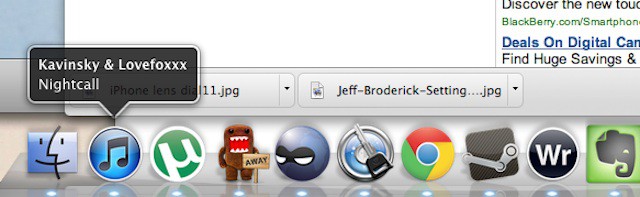
There are a lot of great apps out there that will alert you to what track is currently playing in iTunes by flashing a notice on your Mac’s desktop; Coversutra and Growltunes, to name just two. But did you know that iTunes has a secret option to display track information on your desktop every time the track changes? It’s true. It’s attractive. And it’s just a terminal command away.
Enabling iTunes track notifications is simplicity itself. Here’s how to do it, although we hear this is Lion-only from the commenters:
1. Open Terminal in Applications > Utilities
2. Cut-and-paste this code into the Terminal window:
defaults write com.apple.dock itunes-notifications -bool TRUE;killall Dock
3. Your dock will close and then reopen.
4. Open iTunes and select a track. Play it, and you should see a track notification pop up in your Dock above the iTunes icon. The notification will display for a few seconds, then fade away.
This is pretty great hidden functionality, and I can only imagine that Apple didn’t make it an official option because they were worried it would be distracting. Personally, though, if you added a couple of play controls and some stars to that pop-up, I’d never need to use something like GrowlTunes again.
[via Macworld]
38 responses to “Display Music Track And Artist Information In The Dock With This Secret iTunes Terminal Command [How-To]”
One thing that I really hate about CoM is that you guys don’t give credit to your sources and the websites you get the information from. and that really disappoints me because I like CoM, and expect good ethics from you guys. look at osxdaily.com, they had the same article but they gave credit to the website where they got it from, and thats TheNextWeb, and these guys gave credit to osxhints.com and the guy who posted it there. please learn from them.
you are posting it as if you were the ones to find this hint.
Great song! Driver!
Thanks! This is cool. Oh, and I have much love for Lovefoxxx too :D
hey why don’t you guys at CoM give credit to original posters and your sources, I am sure you guys didn’t come with this hint. i mean look at osxdaily.com they had the article before you and they gave credit to TheNextWeb which gave credit to macosxhints.com and the guy who originally posted the hint on the site. I like CoM, but some of your practices disappoint me
didn’t work for me? (snow leopard)
Lion only I’m guessing? Tried it on my G5 iMac and it didn’t work.
nice choice for the screenshot. Drive is the best movie/soundtrack of 2011 by far.
This is pretty cool. now if they could at least include the album also
John.
You want me to cut and paste the code from this page. But, if I cut and paste, the code will be removed from this page, and no one else will be able to see it.
How about if I copy and paste it?
Does not work with Leopard 10.5.8 and iTunes 10.5.1
Perfect! Thanks for the tip, I was looking for something that might give me exactly this functionality.
Maybe you didn’t realize that John was tricking you into doing the impossible?
I like the concept, but it is a bit distracting when it changes for every song. I’d love to have the option to hover over the iTunes icon and have the same information available on demand, rather than by default.
Well spotted.
Dock closed and then reopened, but nothing happened when i played the track. Am using Snow Leopard.
how do i reverse this then?
What’s the app in the dock next to uTorrent? Is it an IM app or a custom Adium icon?
Works great on Lion. Thanks!
replace true with false
And how to uninstall it?
It it’s only useful if you don’t have your dock hide. The title only appears for a couple of seconds. The get rid of this just paste the following in Terminal:
defaults write com.apple.dock itunes-notifications -bool FALSE;killall Dock
Custom Adium icon.
totally awesome!
Very cool, thank you!
It doesn’t work for me. I have mac OS 10.6.8 and latest itunes 10.5.1 (42)
@13fb9a49b0341447c09eebd6078dff06:disqus this only works on lion, not snow leopard :)
Thanks, I’m going to do a spot of customisation!
This is really sweet. Thanks for the tip.
displays the previous track artwork???
Awesome thanks so much for the enrichment.
Tried it, didn’t like it, deleted it. Too distracting and when I would listen to the local sports radio station it always notified me of some BS that had the now fired GM of the 76ers name in it…weird…
This is cool, but Indeed please tell how do you reverse that if necessary!!??
This is cool, but indeed how to reverse this if necessary??!!
….by writing FALSE instead of TRUE in the code, got it!
This no longer works in Mountain Lion :( Really loved this tweak, if anyone can find an alternative please let me know!
Anyone discover how to Display Music Track And Artist Information in 10.8 Mountain Lion ?? This trick no longer works .. :(

