 You’re probably excited about all of the fun new emoji characters that you just got in iOS 9.1, but one of the new additions won’t show up on any of your keyboards.
The “Left Speech Bubble” emoji isn’t part of the official canon yet, but Apple went ahead and added it, anyway. Here’s what it looks like and how to add it to your pictorial lexicon.
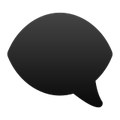 Left Speech Bubble is just that: a speech bubble with the word space on the left. It’s also completely black, which is also weird. It’s actually one of the two emojis that Apple used to create its once-mysterious anti-bullying symbol, but it’s slightly nicer because it doesn’t have that weird eye staring at you. In practice, Left Speech Bubble looks like this:
🗨
We noticed a listing for this newcomer on Emojipedia but couldn’t find it anywhere. So we contacted that site’s founder, Jeremy Burge, for some help.
“Like the Vulcan Salute previously – this emoji is supported for the first time in iOS 9.1, but it’s not shown on the emoji keyboard,” Burge told Cult of Mac via e-mail. “I’m counting it, as I tend to count any emoji that works on a system – regardless if it’s shown on the keyboard or not.”
Burge is referring to the previously invisible “Raised Hand With Part Between Middle and Ring Fingers” emoji, or the Vulcan Salute from Star Trek. Apple has supported that particular symbol since iOS 8.3, but you had to take some steps to get it into your phone. You’ll have to do the same to get Left Speech Bubble working for you. Here’s how:
1: Open this tweet on your iPhone
2: Copy the Left Speech Bubble emoji
3: Go to Settings > General > Keyboard > Text Replacement and click on the +.
4: Paste the emoji into the Phrase section
5: Create a shortcut, and then hit Save
Now, whenever you type that shortcut into your text keyboard, it will give you the option of inserting the emoji.
We aren’t sure what you can do with this one, though. It could be shorthand for being a downer, we suppose, but we’ll leave it up to the creativity of the Internet to figure out what it will ultimately mean.

Evan Killham is a freelance writer who lives in Nebraska and isn’t interested in football, so he has plenty of time to play and think about video games. He has written for Bitmob and GamesBeat and sometimes, he even goes outside. But not too often because he’s heard there are bees out there. Occasionally, companies send free units for review. Evan subscribes to Cult of Mac’s Reviews Policy and also does not keep the items he receives for possible coverage.


2 responses to “Cast a dark shadow with iOS 9.1’s hidden emoji”
This is something really interesting that is worth paying your attention right now,a superb online opportunity to work for those people who want to use their free time so that they can make some extra money using their computers… I have been working on this for last two and half years and I am earning 60-90 dollar/ hour … In the past week I have earned 13,70 dollars for almost 20 hours sitting ….
Specific qualification, degree or skills is not necessary for this, just keyboard typing and a good working and reliable internet connection ….
Any Time limitations or boundations to start work is not required … You may do this work at any time when you willing to do it ….
How I have been doing this?…..….see this (site-Iink) on my !profile!` to know how I am working` on this`
^b
The emoji with the eye and the chat bubble (the one that caused confusion earlier) is actually an emoji that represents anti-bullying. How do I know? I asked Siri! Also, if you have been using SnapChat recently, you will notice that the same symbol has appeared in one of their filers with the “Anti-Bullying” caption below. Just thought I’d shed some light on the mysterious emoji