Leander Kahney is the editor and publisher of Cult of Mac.
Leander is a longtime technology reporter and the author of six acclaimed books about Apple, including two New York Times bestsellers: Jony Ive: The Genius Behind Apple’s Greatest Products and Inside Steve’s Brain, a biography of Steve Jobs.
He’s also written a top-selling biography of Apple CEO Tim Cook and authored Cult of Mac and Cult of iPod, which both won prestigious design awards. Most recently, he was co-author of Cult of Mac, 2nd Edition.
Leander has been reporting about Apple and technology for nearly 30 years.
Before founding Cult of Mac as an independent publication, Leander was news editor at Wired.com, where he was responsible for the day-to-day running of the Wired.com website. He headed up a team of six section editors, a dozen reporters and a large pool of freelancers. Together the team produced a daily digest of stories about the impact of science and technology, and won several awards, including several Webby Awards, 2X Knight-Batten Awards for Innovation in Journalism and the 2010 MIN (Magazine Industry Newsletter) award for best blog, among others.
Before being promoted to news editor, Leander was Wired.com’s senior reporter, primarily covering Apple. During that time, Leander published a ton of scoops, including the first in-depth report about the development of the iPod. Leander attended almost every keynote speech and special product launch presented by Steve Jobs, including the historic launches of the iPhone and iPad. He also reported from almost every Macworld Expo in the late ’90s and early ‘2000s, including, sadly, the last shows in Boston, San Francisco and Tokyo. His reporting for Wired.com formed the basis of the first Cult of Mac book, and subsequently this website.
Before joining Wired, Leander was a senior reporter at the legendary MacWeek, the storied and long-running weekly that documented Apple and its community in the 1980s and ’90s.
Leander has written for Wired magazine (including the Issue 16.04 cover story about Steve Jobs’ leadership at Apple, entitled Evil/Genius), Scientific American, The Guardian, The Observer, The San Francisco Chronicle and many other publications.
Leander is an expert on:
Apple and Apple history
Steve Jobs, Jony Ive, Tim Cook and Apple leadership
Apple community
iPhone and iOS
iPad and iPadOS
Mac and macOS
Apple Watch and watchOS
Apple TV and tvOS
AirPods
Leander has a postgrad diploma in artificial intelligence from the University of Aberdeen, and a BSc (Hons) in experimental psychology from the University of Sussex.
He has a diploma in journalism from the UK’s National Council for the Training of Journalists.
Leander lives in San Francisco, California, and is married with four children. He’s an avid biker and has ridden in many long-distance bike events, including California’s legendary Death Ride.
You can find out more about Leander on LinkedIn and Facebook. You can follow him on X at @lkahney or Instagram.

91 responses to “iPad Not Charging Over USB? You Need a New Computer”
It is really not good that we can’t charge ipad using normal usb. If I know that advance, I may not buy it.
If I had known I couldn’t charge my ipad through USB I wouldn’t have bought it either.
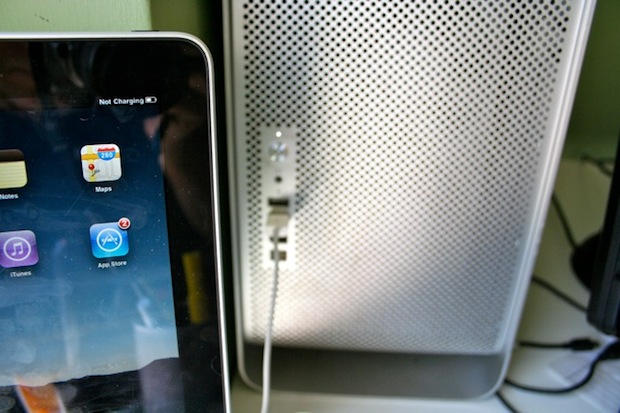
A little clarification: iPads charge through USB on a computer, just not as fast. USB on a computer only has to provide 5 watts of power to meet spec. iPads need 10 watts, provided by the included power adapter. Even though the iPad says “Not Charging” when it’s in use, it will charge slowly if it’s in sleep mode. The power adapter is the best way to charge your iPad.
It wont work with aftermarket USB cards from Belkin either…
Install this program to make your computer charge through USB. You’ll thank me later :)
http://event.asus.com/mb/2010/…
Thank you!! it’s working with my iPad…of course it’s very slow, but at least it’s working.
Yes I know its a bit slower, but its better than nothing. I think it charges at 60% of the speed of plugging it in the power outlet. The motherboard of older computers usually only output about 6 volts.
ah man, shut up..not a big deal…
thnx man it works now…using it temporarily till my new charger ships in appriciate it
No worries, enjoy!
thanks so much for posting that link :-)
Works for me too. My motherboard isn’t even that old (Asus P6TSE). Synched fine but wouldn’t charge. Also had to bypass a usb 2.0 hub (powered); iPad2 wouldn’t charge through it either until I installed that program, but then still had to bypass the hub. iTunes hung when the ipad was docked with it plugged into the hub.
No problem :)
Read my post just above yours. I have found a solution.
do NOT use the program in the next post-it messed up my ipad really badly, and the ipad people won’t help u bc it’s not their program-which u can’t blame them.
No, you didn’t. That link is for PCs.
If you plug in your iPad to your Mac even though it says not charging it is, but you have to put it to sleep in order for it to charge. It will take twice as long because your older Mac only outputs 5 watts as oppose to the 10 that is needed.
And as for your comment YES, I did post a solution. He did not clarify that he had a Mac so stop being a smart ass.
Are you referring to the link that I posted??? That is straight gibberish, the program installs on your computer so how can it affect your iPad?
I have a brand new laptop with USB 3.0, is this too advanced for the iPad, because it is not charging
Obviously it tweaks the firmware settings on the PC so that it puts out more power on its USB.
If the particular PC ends up putting too much power through its USB, that will damage the iPad.
Not true, the iPad regulates the voltage before it is charged.
Im not sure how Cliffbarbara’s iPad became damaged.
He did not have to tell the Apple reps how it was damaged, he just had to say that the iPad is not charging. Mine is working just fine thank you.
Try installing the program I linked up above.
That’s not how electricity works, amigo.
If you provide more current source at the same voltage, the device still only takes what it needs. If it didn’t work that way, everything you plugged into a wall socket (which typically provides 15A) would fry instantly if it used less than 15A.
It’s the *voltage* that’s relevent here – if that’s different (say 12V vs 5V) – THAT would fry your device (but only when MORE – less, it just won’t work). All USB 2 ports provide 5V at 500mA – it’s the standard for USB. It’s also part of the standard that the port downshifts to 100mA if you plug in a USB 1.1 device.
Now.. forcing your motherboard to provide an amp on its USB ports could damage the motherboard – or the USB controller at the very least – because the device will try to draw more current than the hardware is designed to handle, but USB has overpower protection… which is probably what this software is shutting down, or it’s overriding the port USB level detection forcing the port to USB 2 @ 500mA rather tan USB 1.1 @ 100mA.
So this patch cannot damage your iPad – but it might damage your motherboard. I’m assuming not, though, since Asus is a major company who makes motherboards and they’d be kind of suicidal to release a utility that’s going to fry motherboards….
My Mac mini can’t charge the iPad either. To be fair, my Viewpad 7 Android tablet can’t be charged by my Mac or my PCs for much the same reason. I’m going to give the app Anthony999 points to a try – but another solution is to use a dual USB cable which essentially uses two USB ports to double the available power… alas, these typically only come in mini-B USB which works for the Viewpad (since it uses a standard connector) but not the iPad (which uses a proprietary connector). There might be a similar cable, or a dual B to USB A cable that can be used with the iPad’s cable.
It’s worse that that, actually.
USB 2 is 5V @ .5 A = 2.5W
The fact that the charger is 10W doesn’t actually mean the iPad *needs* 10W – they make these for several different products and it makes sense to overdesign so you can use one for many uses.
You need one of these: http://www.amazon.com/Apricorn…
It will let you use two USB ports for power and lets you plug your iPad cable into it.
wont charge on the usb port of my 2011 KIA Soul or my Toshiba laptop
This worked for me. Thank you :)
Yea I have had issues using a hub as well, even when its powered.
Not a problem glad I could help out a fellow iPader. :)
Thank you for that coherent response :)
Apple finds new ways to screw people over, every year :)
I like how every time some new gadget comes out, oops you’ll have to buy a new laptop or oops you’ll have to upgrade cuz you’re getting screwed over and over again!!! Thanks Apple,Sincerely From-One of your many faithful idiots using ALL of your electronic devices!
I don’t think Apple’s inability to predict the future is rooted in their inherent desire to screw us over. I think our deep faith in Apple to be able to design products that always work together may be a little unrealistic at times. :)
It’s working for my Toshiba laptop and ipad 2…thanks for the link!!

