UPDATE: I added a short statement from stylus-maker Adonit below.
SAN FRANCISCO — Tim Ritchey is an expert in iPad styluses — the pressure-sensitive digital pens that draw with pinpoint accuracy on an iPad.
Ritchey works for Adonit, a company that makes a line of Bluetooth styli for the iPad. His job title is “OS architect.” He knows his stuff.
In the middle of a session at this week’s Worldwide Developers Conference, he heard something that prompted him to send a panicky note to his colleagues in Slack, the popular messaging system.
“Oh shit!” he said.
Steve Jobs famously pledged that Apple would never ship an iOS device with a stylus, but there’s mounting evidence that the company is working on a new and bigger work-oriented iPad that will come with a stylus.
A couple of big clues dropped this week at WWDC.
As the explosive growth of the iPad slows, Apple seems keen to expand the market into the professional space. On the software side, Apple is teaming up with IBM to develop apps for enterprise. In hardware, there are clear signs of a bigger iPad with a 12.9-inch screen, including hardware leaks out of China. A bigger iPad with a stylus would be well suited for precision work in a range of creative professions, from graphics to 3-D.
Earlier this week, Ritchey was watching the “What’s new in Cocoa Touch” WWDC session, which details some of the new technologies added to iOS 9. Cocoa Touch is the underlying UI framework used by software programs that run on iOS.
Presented by Jason Beaver, a senior engineering manager in Apple’s iOS group, a video of the talk is available online.
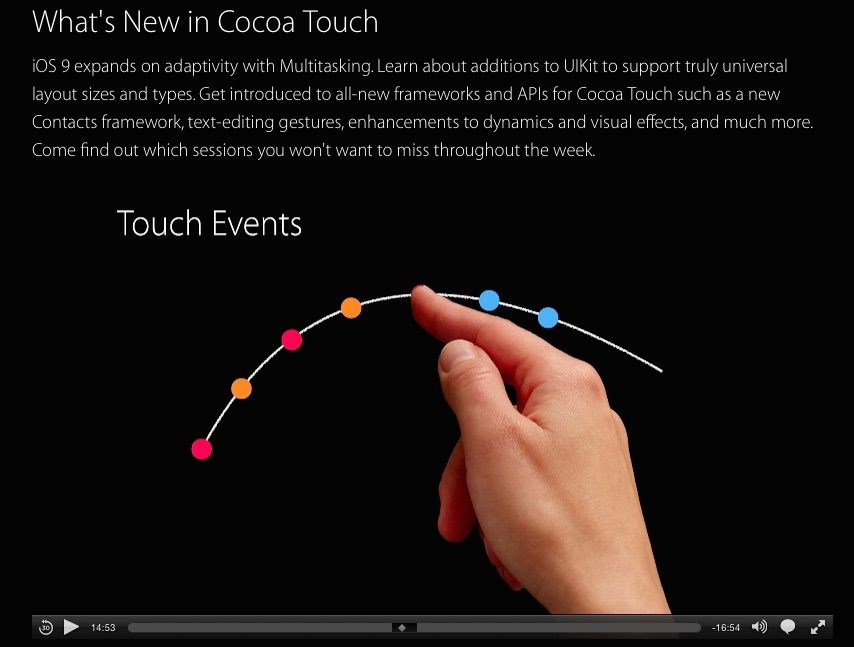
In the middle of the talk, Beaver describes a couple of major changes to the way touch-sensitive screens handle finger touches (scrub to the 13:54 mark in the video). Beaver said iOS 9 “dramatically reduces” what’s known as the touch-to-display latency, a millisecond lag between when you touch the screen and the screen reacts to your touch.
Under most circumstances, the touch-to-display latency is imperceptible, but it’s there, and it can sometimes be seen if you move your finger fast enough.
In addition, Beaver said iOS 9 now includes “touch prediction,” which he described as “a very sophisticated algorithm that looks at a touch’s velocity, acceleration and curvature to see where the touch is headed.”
This is what caused Ritchey to send his “oh shit” message on Slack.
Predictive touch technology is the key technology behind all styluses — both computer and iPad. Touchscreens and drawing tablets generally aren’t accurate enough for precision work unless they have predictive touch technology. Predictive touch dramatically improves the speed and accuracy of a pen.
“A lot of the software that drives styluses is predicting where the touch point is based on the movement of the stylus, its angle and other factors,” Ritchey said.
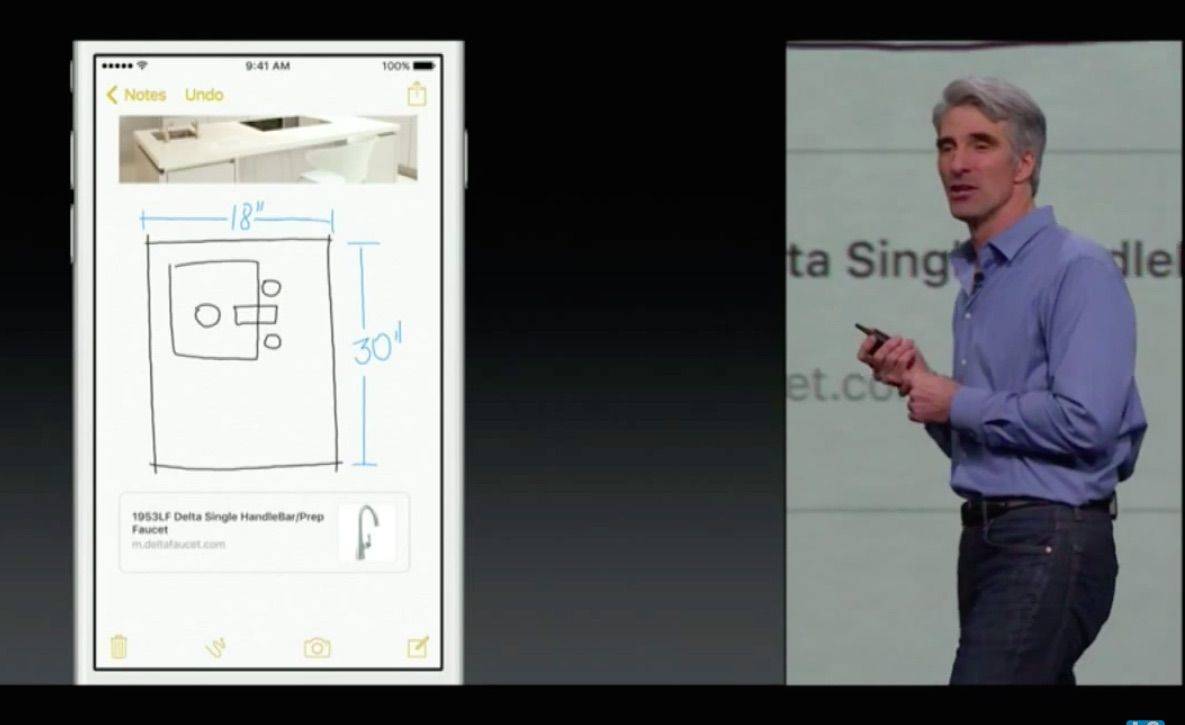
Another big clue was revealed earlier this week. During Monday’s WWDC keynote, Apple showed off new drawing capabilities in iOS 9’s Notes app. The Notes app, which is currently used to make, well, notes, has gained support for drawings and doodles. Users can make drawings and squiggles with their fingers. A selection of tools allows different brush styles and colors, and there’s a ruler to keep sketches straight.
It’s unlikely the Notes app will be used for the kind of serious work Apple is prepping the iPad Pro for, but it shows iOS 9 includes a drawing engine.
Taken together, these are strong indications that Apple is looking at styluses, Ritchey said.
“These are the kinds of things you want in place if you were going to come out with a stylus,” he said.
Developer Giovanni Donelli agreed with Ritchey’s assessment. Adding drawings and predictive touch to iOS are clear signs that Apple is preparing for a precision stylus.
Donelli is the co-creator of Astropad, an app that turns an iPad into a graphics tablet for the Mac.
But where Adonit, Wacom and other stylus makers should be nervous, an Apple stylus is great for Astropad. It will make their app even better.
“It will really help with creative tools,” Donelli said. “An Apple stylus will really help us compete with Wacom.”
Update: A spokeswoman for Adonit said the company “actually welcomes an Apple stylus,” and forwarded the following from Ian Shirey, Adonit’s Chief Strategy Officer:
At Adonit, our products turn the iPad from a consumption device into a productivity device. Based on current rumors, it appears Apple shares our thinking and is staging a major shift in how we use tablets in the workplace. We welcome the possibility of an Apple stylus entering our market, it would only reaffirm our belief of the need for such tools exists among consumers and the workplace.
I don’t want to be cynical, but this is what incumbents always say. Nonetheless, they are right. It does validate the market and if Adonit and others differentiate their products from Apple’s, or innovate faster, they might do better than ever. I sincerely wish them the best of luck.

Leander Kahney is the editor and publisher of Cult of Mac.
Leander is a longtime technology reporter and the author of six acclaimed books about Apple, including two New York Times bestsellers: Jony Ive: The Genius Behind Apple’s Greatest Products and Inside Steve’s Brain, a biography of Steve Jobs.
He’s also written a top-selling biography of Apple CEO Tim Cook and authored Cult of Mac and Cult of iPod, which both won prestigious design awards. Most recently, he was co-author of Cult of Mac, 2nd Edition.
Leander has been reporting about Apple and technology for nearly 30 years.
Before founding Cult of Mac as an independent publication, Leander was news editor at Wired.com, where he was responsible for the day-to-day running of the Wired.com website. He headed up a team of six section editors, a dozen reporters and a large pool of freelancers. Together the team produced a daily digest of stories about the impact of science and technology, and won several awards, including several Webby Awards, 2X Knight-Batten Awards for Innovation in Journalism and the 2010 MIN (Magazine Industry Newsletter) award for best blog, among others.
Before being promoted to news editor, Leander was Wired.com’s senior reporter, primarily covering Apple. During that time, Leander published a ton of scoops, including the first in-depth report about the development of the iPod. Leander attended almost every keynote speech and special product launch presented by Steve Jobs, including the historic launches of the iPhone and iPad. He also reported from almost every Macworld Expo in the late ’90s and early ‘2000s, including, sadly, the last shows in Boston, San Francisco and Tokyo. His reporting for Wired.com formed the basis of the first Cult of Mac book, and subsequently this website.
Before joining Wired, Leander was a senior reporter at the legendary MacWeek, the storied and long-running weekly that documented Apple and its community in the 1980s and ’90s.
Leander has written for Wired magazine (including the Issue 16.04 cover story about Steve Jobs’ leadership at Apple, entitled Evil/Genius), Scientific American, The Guardian, The Observer, The San Francisco Chronicle and many other publications.
Leander has a postgrad diploma in artificial intelligence from the University of Aberdeen, and a BSc (Hons) in experimental psychology from the University of Sussex.
He has a diploma in journalism from the UK’s National Council for the Training of Journalists.
Leander lives in San Francisco, California, and is married with four children. He’s an avid biker and has ridden in many long-distance bike events, including California’s legendary Death Ride.
You can find out more about Leander on LinkedIn and Facebook. You can follow him on X at @lkahney or Instagram.


42 responses to “At WWDC, clues that Apple is adding a stylus to the iPad abound”
“Steve Jobs famously pledged that Apple would never ship an iOS device with a stylus,”
When EXACTLY was this famous pledge. I want to go back and watch Steve actually say that apple would never ever ship a stylus.
Not that it really matters since Steve is dead and Tim can do what he wants but if you are going to say that Steve said something you can tell us exactly when and where
It’s completely irrelevant to even mention that he said that. Steve also said he wouldn’t ship a phone with a massive screen. However he said that like half a decade ago when big phones were actually no good. Can’t use outdated statements to correlate them with current events.
He said something to the effect of “if you have to use a stylus, you’ve already failed.” People interpret that to mean “we would never sell or ship a stylus.” Fact is, Steve is gone. This is no longer “his” Apple. His spirit is still alive, but no longer making decisions. If Tim Cook and/or Jony Ive decide to ship a well made stylus, then ship one they will.
No! If you NEED a stylus you have failed.
Steve was commenting on the tech and ui’s in use at the time that needed a stylus to be effective. It is like having an is that is effective with a single button mouse but still supporting multi button mice.
I see what he means. And with the iPad I don’t think anyone would say you “need” a stylus. But having an option doesn’t mean they’ve failed.
He also said nobody wanted to use an iPod for video, or photos, and that no one reads anymore yet under his watch iPod Photo, iPod video, and iBooks were created. He said people wanted to own music, not rent it, but that thinking is also obviously outdated today. There are various pieces of literature attesting to one of the man’s greatest strengths being the ability to change his mind on the fly when he realized he was wrong (even if he was bad at admitting he’d been wrong in the first place).
All correct. Which is why I laugh when I see somebody quote a “Steve-ism” like that. Nothing he ever said was completely set in stone. He changed his own stance when he was at the company, and the company changes his stance now that he’s gone.
It cracks me up when people take marketing comments Steve made and try to use them to “prove him wrong”. When competitors were touting poor quality tiny video on MP3 players as a compelling reason to purchase their product over an iPod, Steve dismissed them publicly but researched the options privately.
A decade ago, when he said people want to own their music….he was correct! Still today more people pay to own music than Pay to rent music. But market forces are pushing music rentals and there is no reason for Apple to ignore that market. That said, from a profit standpoint selling music is still the way to go, but Apple only sells music to sell hardware so why not rent if people want it.
Times, change and Apple has no problem adapting to new things. IMHO
It doesn’t make Jobs wrong, but it makes some people who feel he
His actual quote was: “It’s like we said on the iPad, if you see a stylus, they blew it. In multitasking, if you see a task manager… they blew it. Users shouldn’t ever have to think about it.”
He said this in 2010 at the launch of the original iPad.
And yeah, you and the others commenters here are totally right. He’d often change his mind. And he’d often steer people in the wrong direction too. And he’s no longer there, of course. So whatever he has said in the past isn’t gospel.
I put it in mainly just for color — spice the story up a bit!
That’s faaaar from a “pledge to never ship an iOS device with a stylus”.
Steve’s point was that you shouldn’t be required to use a stylus all of the time. I don’t think he would have been against using a stylus where it was appropriate.
The only news here is that iOS 9 seems like it might support a stylus. Apple has been filing patents for stylus designs for years.
I switched from my iPhone 4S to a Samsung Galaxy Note 3 specifically because I wanted a phablet with a stylus. I really like it. If there were a technologically good stylus available for the iPhone 6 Plus, I’d change back in a NY minute.
If you want to get this big screen experience with stylus, please do try the galaxy note pro 12.2. Its a fantastic tablet and because of Samsungs rubbish marketting didn’t sell well at it’s original high price. Now being knocked out for a 324 pound in PC World. the level of pressure sensitivity on the note taking and art apps is incredible. Also has great multitasking, with 4 resizeable apps on screen at once and ample power/RAM. Have not yet found anything it won’t do that a PC can. Being able to connect to TV with a cheap cable is also great, with no need to have to buy apple TV. I know this is an apple site, but while waiting for the new pad,give it a try, well worth a look, or look on you tube at the features.
Personally not a huge fan of samsung asthetics (except new S6), but since owning the original galaxy note phone, I’d never consider anything without a stylus. Its just so useful day to day.
@disqus_wUdspRUyT9:disqus What do you use the stylus for?
Use it for loads. Minor things like I have reminder widgets stuck to my home screen like post it’s, easy to just jot something when you think of it. Great for shopping lists, just jot things when you think of them, no scraps of paper to lose and always on you when at the shops. The art app on the note pro is great, a specially designed version of sketchbook pro. My daughter is a keen artist and the level of detail and accuracy you can get is far greater than using a finger.
Great for using in meetings at work. I have all my notes in one place, can sync with my phone, or convert to pdf etc and email to my work. They can be neatly organised in folders. Also used often as a great tool for students to organise lecture notes, daughter wants one to take to university. There are some great 3rd party apps too.
The S~pen also has a number of other functions, which are displayed when you get it out. For example you can draw an area on the screen and open an app within it, resize it, and open multiple apps at once like this, as you would on a PC/Mac.
Fun things are editing photos, you can crop in detail any size/ shape paste it on another picture, and add your own artwork to pictures with full colour pallette.
The handwriting recognition also works really well, though with my messy writing, typing is faster.
It’s one of those smartphone / tablet features that if you never use, you don’t miss or may not see the point, but once you try it you don’t want to be without it. Several people at work (ex apple and other android tabs) now have one as a result if trying mine. One friend who just bought the latest Sony z tablet, which is a top tablet, sold it within weeks to get the note pro when he saw mine.
I think when Steve jobs was talking about apple products never having a stylus, he was referring to the rather clunky offerings for use on the old style pressure sensitive screens, but things have been developed and moved on since then. He didn’t get everything right, having famously said that 3.7 inches was the optimum screen size for a phone and no one would buy larger screens.
I’ve bought Adonit’s Jot Touch with Pixelpoint, Jot Script 2 and Paper 53’s Pencil, just because I like the idea of being able to jot things down, but, like my Evernote Moleskin note book, all of them go completely unused, its just much easier to type things out in Clear or Evernote for me. Much faster for all the above things you mentioned that involve note taking.
If I was better at art and had the time to do it, id love Paper 53’s Pencil though. Its lovely to hold and use.
Pencil is an amazing tool. I hate rubber tipped styli, but Pencil changed my opinion (about Pencil, not rubber tips in general) the minute I started using it.
For note taking, my personal combination is OneNote and the Bamboo Fine line on the iPad Mini – it’s a great combination (though the Adobe Ink works just as well in OneNote). Neither match the quality experience of taking handwritten notes in OneNote on the Surface Pro 3, but it’s close enough in most circumstances.
The problem with the Note 12.2 is the cost – for the price you can get a Surface 3 (previously a Surface Pro 3 was only slightly more expensive) where you can run the full version of Photoshop and a better version of Sketchbook Pro.
Putting the Surface aside, it’s going to come down to ecosystem – what OS are you comfortable with, where do you already have an investment in apps, etc. The styli currently available for the iPad aren’t bad, they’re just not great and don’t work as well as the Samsung devices (or the Surface).
For me, personally, I can’t work efficiently in Android. I gave up my Note 8.0 because of the User Experience on the device (I really disliked it in general and TouchWiz made it even worse). iOS has a much friendlier UX for me, as does Windows 8. When Windows 10 comes out, that will change – they’re recalling killing a lot of the UX I liked about Windows 8 (though far from perfect, I like the feeling of it… though I understand non-Tablet users were frustrated).
These days, the styli for the iPad have reached the ‘good enough’ point where I can do what I want to do for sketching and note-taking. For serious drawing and art projects I go to the Surface Pro.
I think having to use a stylus to interface with something like the iPad is a complete failure. However, if you want to draw something, a stylus can be a very cool way to do it. Last time I checked, the renaissance artists weren’t finger painters. Apple has a product that is just screaming to be painted on. Clearly Apple isn’t just going to throw a simple stylus out there. They’re going to reinvent it and make it a wonderful tool for artists. Bring it on!
Try the note pro features as described above. They won’t need to reinvent the stylus, it’s already been done
Like I said… they’d have their own take on it that will bring something new to the table. It may be available on other platforms, but I could care less. A platform isn’t a set of features, it’s how it works and how it integrates. I like what Apple does so I expect them to have a high standard if they do in fact make a stylus and I do not expect them to make it a required accessory that will be needed for the interface. We can look at a feature list and talk about what’s already been done. However, nobody selling the product with the features on that list EVER said that ANY of them work. Move along troll…
They do work, I have one. iusers I’ve shown have switched, That’s what I’m saying. It’s so sad to be so blinkered to think that of all these great tech companies out there, only apple is worth looking at. How dull and one dimensional it must be in your walled garden. I dare you to try one, or even check out the you tube demo. What harm can it do? But you wont though will you? Like I said, sad.
Are you really going to come on this board to spread F.U.D. like a child? The REASONS why I’ve come to enjoy Apple products is because of the complete and utter failure of Microsoft products and Google’s business model. As part of a marketing company myself I KNOW to stay away from the very types of tracking that both we and Google do as a business. Keep on trolling sad boy…
Sorry, just trying to have an intelligent conversation with am adult. I will as requested move on after your pathetic rant. Don’t bother replying, now I can see how pointless you are, I won’t read it.
If you won’t read it how do you reach such conclusions? Speaking of paranoid…
iOS 9 now includes “predictive touch” that predicts where touches are going. It’s an essential prerequisite to supporting a stylus.
So… Every OS that supports a stylus does predictive touch? Really? This is news to me. Or is it just a prerequisite when Apple wants to do it?
No they don’t. There are lower latency screens aimed at helping bluetooth styluses but they don’t do the predictive nature. I think what they’re suggesting is for it to be a worth while “ink like” experience it’s and essential addition. Eg screen’s can only get so low latency before you have to employ software to take things to another level.
“These are the kinds of things you want in place if you were going to come out with a stylus,” he said.
Let me fix that for Mr. Ritchey…
“These are the kinds of things you want in place if you were going to come out with native stylus SUPPORT,” he SHOULD HAVE said.
Done.
I’ve been freelancing from home for quite some time now, working simple jobs which only require desktop or laptop computer and internet connection and I am happier than ever… Six months have passed since i started this and i had profit so far total of 36 thousand dollars… Basicly i make about $80 each hour and work for 3 to 4 hrs on daily basis.And awesome thing about this job is that you get to choose yourself when to work and for how long and you get paid weekly
He also said no bigger screens.. Soo.. irrelevant much..
Galaxy note devices have just that differention. You can rest your hand on it and it will only detest the pen, unless you choose otherwise
To be fair, as has the iPad been able to do for years – Palm rejection is nothing new with bluetooth styluses, and more advanced things that that (such as knowing when its your finger and blurring instead of painting etc)
Ehhhhhhhhhh….. I have used a Galaxy Note 8.0 for drawing for over a year and a half. It’s a pretty good device for drawing and writing notes, but Palm rejection is not a standout feature – it works about as well as any other device (including the Surface Pro and the iPad with a BT stylus) – meaning “okay”. Palm rejection works best on the Surface Pro. On the iPad the best is Paper/Pencil from 53.
This is needed for business adoption. The older crowd just can’t function without a stylus because of the familiarity of using a pen.
Yes, but when you’re at a meeting taking notes, young or old, the idea of 8 people around a table all typing into their computers just isn’t as acceptable as 8 people quietly writing notes on a tablet or paper, not to mention the noise factor.
Have you ever heard a stylus on tapping away on a glass tablet screen? Its much noisier than typing!
Good point, especially with some active styluses out there, but there are some that work well and are very quiet including the Apex rechargeable stylus that has a rubbery tip to cut down on the “tap, tap, tap” syndrome.
If you’re using an Active Stylus on the iPad, then yes. There is zero noise writing using a stylus on the Surface Pro 3.
“Needed” is a strong word – desired, maybe.
Needed if apple wants to expand business adoption. Nothing but food and water are needed.
Well, Windows tablets have had a stylus way before 2002. However it’s only recently that the stylus/touch have been done right. Pre-Surface/Windows 8, the stylus was REQUIRED (no touch) and the stylus was decent, not great. They have made some HUGE strides in both the Samsung ATIV (with Samsung’s stylus tech) and the Surface (with Wacom/NTrig).