

Mobile menu toggle

Quickly Add Missing Contact Info To Your Address Book By Syncing Contacts With Facebook [iOS Tip]

By

IMG_0693-1

Adding contact information to your phone can be a tedious task, especially with devices like the iPhone, which allow you to add a whole lot more than just a name and a phone number. But there is one quick and easy way to add missing information to your address book without even touching your device’s virtual keyboard: Syncing your contacts with Facebook.

If you’re a Facebook user — and who isn’t these days? — and you have the official Facebook app installed on your device, you can add birthdays, URLs, and even photos to your address book in just a few taps.

To sync your contacts with Facebook, open up the official Facebook app and tap the button in the top left-hand corner to show the navigation pane. Then select the ‘Friends’ tab.
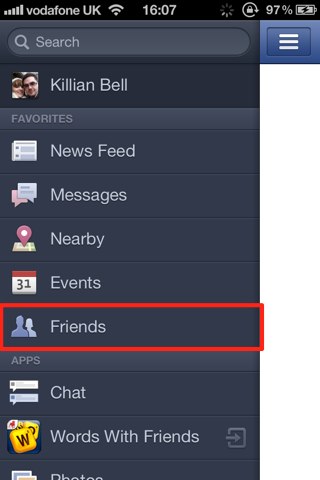
Now tap the options button in the top right-hand corner and select ‘Sync Contacts’, then toggle the ‘Syncing’ option on.
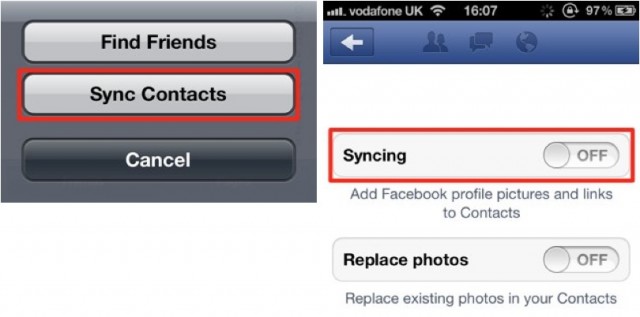
You will be presented with a notice that tells you how Facebook uses your contact information. If you’re happy with this — and you’ll need to be to get syncing — tap the ‘Sync Contacts’ button and the process will begin.

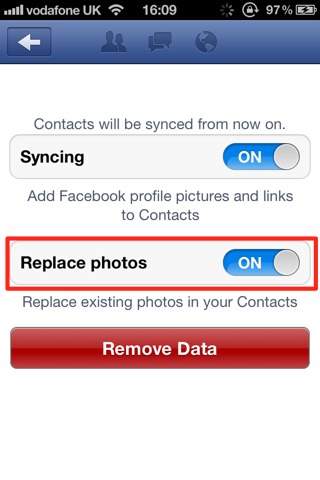
To ensure that photos from Facebook are added to all of your contacts, make sure you also have the ‘Replace photos’ option toggled on.
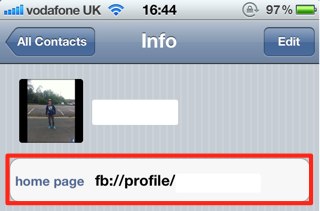
Bonus Tip: After syncing, you’ll find a ‘home page’ field has been added to each of your contacts with a link to their Facebook profile. You can tap on this to be quickly taken to the Facebook app, and to that user’s profile.
  • Subscribe to the Newsletter

    Our daily roundup of Apple news, reviews and how-tos. Plus the best Apple tweets, fun polls and inspiring Steve Jobs bons mots. Our readers say: "Love what you do" -- Christi Cardenas. "Absolutely love the content!" -- Harshita Arora. "Genuinely one of the highlights of my inbox" -- Lee Barnett.

11 responses to “Quickly Add Missing Contact Info To Your Address Book By Syncing Contacts With Facebook [iOS Tip]”

  1. CJ Miller says:

    How is this newsworthy? It’s such an old known about thing.

  2. prof_peabody says:

    Kind of bad that you didn’t mention the fact that Facebook has had major security issues in the past that affect users who use this feature.  

    They managed to release everyone’s personal information to some very nefarious folk in the past because they basically upload your entire Address book to their servers when you do this and their servers aren’t secure.  

    It was a huge security breach and I think you guys even reported on it.  The only people who *weren’t* affected were those who chose *not* to sync their contacts with Facebook.  So, yeah … if you don’t really care about privacy or security, this is a good move.  

  3. FriarNurgle says:

    NOOOOOOOOOOOOOOOOOOOOOOOOOOOOOOOO!!!

  4. KillianBell says:

    Well, Facebook’s warning makes it pretty clear you data is uploaded to its servers.

  5. KillianBell says:

    It doesn’t need to be newsworthy; it’s a tip.

  6. Tim says:

    I have had mixed success with this, at one time losing all my current contacts in the Address book.
    Instead I have been using this free program instead:
    http://danauclair.com/addressb

  7. N/ A says:

    It’s still irresponsible to let something like that happen. The average user doesn’t think about it from a ‘What if they are hacked?’ stand point when they share this type of data. 
    Also, the data isn’t necessarily yours to share; many people in your Address Book probably don’t want their personal information shared with Facebook and were just expecting you to have it.

  8. BreinVanMartijn says:

    Yes, by all means: sync all your contact info with Facebook. Why not talk to human resources, maybe they will post your monthly salary statement on Facebook rather than mailing it to you. Then, ask your doctor to consult with you via your Facebook wall. You can upload pictures of that rash and he can get a second opinion from, well, just about anybody. Don’t we all love Facebook.

  9. Martin Saint-Macary says:

    If you want to have facebook information, right inside your address book, and without uploading any data to facebook servers, I recommend you to use RichContacts

    the app only pulls information from facebook servers, and the matching between your contacts and your facebook friends is done by the app itself. (disclosure, I’m the developper)

    Furthermore you can have status, work history and events as well.
    appstore link: http://bit.ly/RichContacts

  10. bobcooley says:

    Unfortunately, if you already have a URL for your contacts’ website, it will replace it with the fb URL…. (fail)

  11. adrian farouk says:

    android version?

Leave a Reply

