Top stories

Journalists Cover Microsoft, Using Macs

It’s not an easy time for Microsoft — with Steve Ballmer having to field questions about being “buffoons” and an “evil empire”  at the shareholder’s meeting (.doc) — so when they get together “the world’s most influential technology pundits and online writers” (nb: we weren’t invited) for Mobius to discuss super-secret mobile tech you’d think [...]

Guide To Black Friday Apple Bargains: Cheap MacBooks, iPods and Accessories Galore

Here’s a guide for finding the best bargains on Apple-related gear during the infamous Black Friday sales on November 27. We’ve compiled a comprehensive list of gear from leaked photos of sales flyers and descriptions of sales.
The bargains include a 2.26 GHz MacBook + $150 gift card at Best Buy for $999.99 ; a 32GB [...]

Review: Voices Is Today’s Best Thing Ever, Grab It Now While It’s Cheap

New on the App Store is Voices from the clever folk at Tap Tap Tap. You can guess what it does.

Open it up, pick a silly voice. Helium is pretty silly. A microphone appears and the app even clears your throat for you (try it, you’ll see what I mean). Now speak your brains, and [...]

Review: Sony Walkman S540 Series Video MP3 Player

Press releases, you will hardly be surprised to hear, are rarely very interesting. But one arrived in my inbox a couple of weeks ago that made me double-take.
“Sony’s S Series Walkman,” it chattered, “is a serious challenger to the iPod Nano.” Gosh, really? Perhaps the Cult had better have a look at one, then, despite [...]

Video: 27-Inch iMac in Action as External Monitor

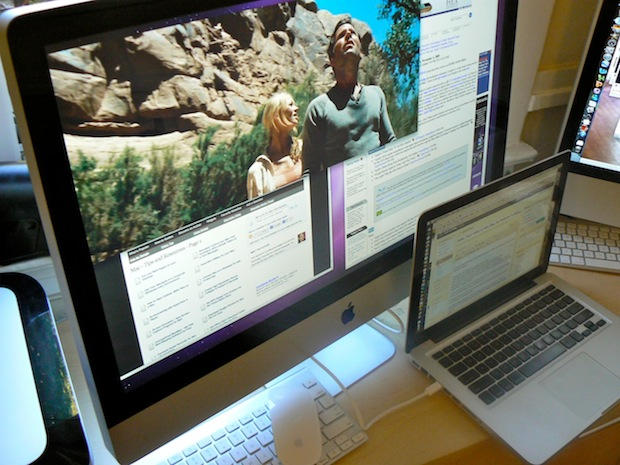
imac_external_display

Here’s a couple of videos of the new 27-inch iMac in action as an external display. The new iMac is the first that can act as a monitor for another machine, but will only work with devices that output DisplayPort video, like newer MacBooks.

In these videos I’ve hooked my MacBook Pro (13-inch) to the iMac using Belkin’s Mini DisplayPort to Mini DisplayPort cable, which is available from Apple’s retail stores for $29.99.

Previously I tried to hook up the iMac using DVI and HDMI cables (and appropriate adaptors), but it didn’t work.

See the monster iMac in action after the jump.

Thanks Emil. And thanks Dane for fixing the videos.

BTW: Don’t miss our comprehensive review of the humungous new 27-inch iMac.

Here’s how to hook up the iMac an external monitor; you simply the Mini DisplayPort to Mini DisplayPort cable into the back of the iMac, and then into the MacBook. The iMac auto detects the connection and switches into “target display mode.”

Note: the iMac needs to be booted to act as an external display.

Here’s the iMac in action as an external display. As you can see, it’s simply huge. You can have two full-size documents open on the iMac and a third on the MacBook, and there’s still plenty of space on both screens for background windows.

The Command/F2 key combination flips the iMac between target display mode and normal mode. Here’s how it works:

About the author

Leander Kahney

Leander Kahney is senior editor of Cult of Mac, editor of two books about technology culture, Cult of Mac and Cult of iPod, and has written for Wired, MacWeek, Scientific American, and The Observer in London. Follow Leander on Twitter @lkahney and Facebook.

Email the author | Read more posts by Leander Kahney.

18 comments

    Perhaps they can fix the video? Unless the MacBook Pro has flipped the ports to the other side, the apple logo has changed and the Belkin box is printed backwards – the video is flipped horizontally.

    Cool, but will it work with older MBP’s with DVI?

    @Joe — that’s me. the video was recorded using Photo Booth, which flips the video. I didn’t have a tripod handy.

    I assume the MBP would output to the iMac if it (the MBP) were closed and you were using an external keyboard? Just as you can do with a conventional external monitor?

    Who’s gunna watch 5 videos at once? I wish my G5 could play one without stuttering… =(

    You followed my tip! Great! Even though the text above the last video doesn’t match with whats on the video. :P

    Great test btw, not technical tests like others do but simple tests that will happen to “ordinary people”. Thats very good!

    Each day, the iMac look like a TV, very fishy by !

    Um… flip the video in iMovie.

    Out of curiosity.. Why on earth would you use the iMac as an external monitor in the first place?

    I understand that it is nice to have an external big monitor for a small laptop like the 13″ MBP, but why not work on the iMac instead if you got both?

    I am sure the iMac would be faster in most ways, so I simply don’t get the point of it?

    I was thinking of trying a slightly different set-up. I want to know if it would work (or work but be slow) to start the MBP in drive mode, connect it to the iMac as a USB or Firewire drive, and run the apps installed on my macbook from the iMac. Then, when I travel, I would disconnect the MBP and all docs and apps would be up to date. I would gain speed and monitor size while at my desk and have a fully in sync PB while on the road.

    Hi, awesome this new imac!!!
    Thanks for the test! Could you tell me the name of the movie trailer in the second clip?

    Thanks

    can you confirm that processes continue to run in the imac when in traget display mode? and that all functions are available?

    -Rab

    yeah i’m going to use my quad core imac as a monitor for my macbook ASAP

    makes total sense to ‘upgrade’ this way

    @ Thomas

    I look forward to getting my next iMac because then I can use my old 27inch iMac as a secondary display with a handy built in Mac.

    Hi. Just googled this external monitor issue and ended up here, and I was wondering if you could test something. Assuming that you own or know anyone who owns a regular PC with a native DisplayPort output on their graphics card, can you try it with a Displayport -> Mini-Displayport cable? I’m kind of on the edge of my seat until I can figure out if this works.

    Thanks in advance :)

    Neat, thanks. Is there something special about the Belkin cable or would a generic version from monoprice work the same? http://www.monoprice.com/products/product.asp?c_id=102&cp_id=10246&cs_id=1024602&p_id=5991&seq=1&format=2

    I see that you can use the external display when the iMac is on and booted up into the OS. Can the 27″ be used as an external monitor even when the iMac is shut down?

    Related… does cmd-f2 work from bootcamp? If so, I could run Windows on the iMac side and OS X on the laptop and switch between them.

    A few questions

    - Does it all work when macBook is in clamshell mode?
    - I assume no tri-cable yet that allows the same easy connection as the 24″ Monitor does? I.E can you power the Mac off the iMac
    - I assume the keyboard and the mouse of the iMac are used for both?

    Thanks

Add your comment

Name(Required)

Mail (required, but not published)

Website

Comment

Buy Inside Steve's Brain Buy from Amazon.com Buy from Barnes & Noble

