Top stories

Apple Devotes Entire Home Page To Jerome York Obituary

20100318-york.jpg

If ever you needed a sign that Apple was a different kind of technology company, this is it.
What other computer manufacturer would remove its top-selling, hype-inducing, industry-altering new product from the prime spot on its website home page, and replace it with an obituary to an investor?
This is one of those “Here’s to the [...]

Coming Soon: Steve Jobs, the Sitcom

Fake Steve creator Dan Lyons just signed a deal to bring Steve Jobs to another small screen near you.
The half-hour series called “iCon” is billed by the presser as “a savage satire centering on a fictional Silicon Valley CEO whose ego is a study in power and greed.”
Making sure the barbs prick will be the [...]

What’s Next For the iPad? A Tabletop iPad, According to Xerox PARC Circa 1991

Way back in 1991, just as Apple was transitioning from 68k to PowerPC chips, the braniacs at Xerox PARC were predicting it’s entire iPod, iPhone and iPad strategy. And next up for the iPad is a blackboard-sized device.
Nearly 20 years ago, just as personal desktop computers were taking off, researchers at Xerox started thinking about [...]

iPhone App Arms Users With Silent Panic Button

A new app called Silent Bodyguard features a panic button that sends an SOS distress signal with GPS coordinates to potential rescuers without alerting onlookers.
While the $3.99 app, available on iTunes, isn’t the first ICE (in case of emergency) app, this one is backed by Dr. Clint Van Zandt, former FBI chief hostage negotiator and criminal [...]

Using iMac As Monitor Requires Very Specific Cable

P1040511

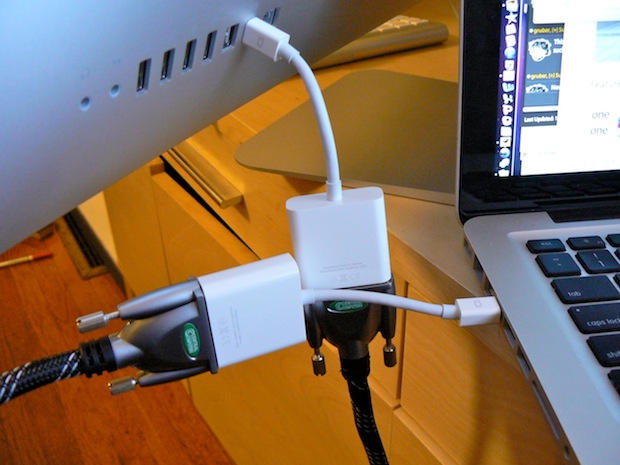
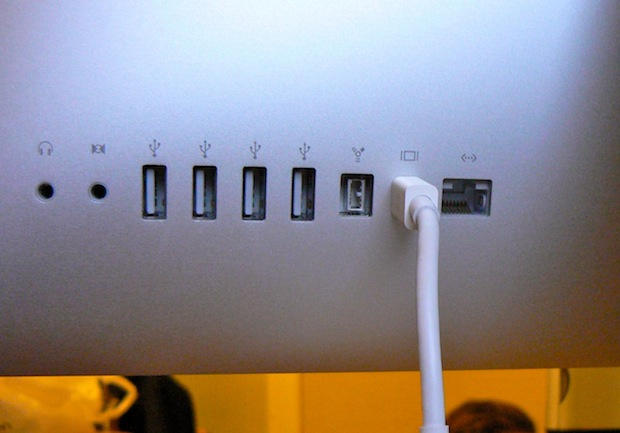
To use the new 27-inch iMac as an external monitor requires a very specific cable to work: a Mini DisplayPort to Mini DisplayPort cable, to be exact.

It does not work with a HDMI cable or a DVI cable, even when they are strung between a pair of Apple-branded Mini DisplayPort adapters.

There seems to be a lot of confusion about the issue on the web and even at Apple’s retail stores.

The staff at the main San Francisco Apple store were confused about the cables needed to use the iMac as an external monitor for a compatible MacBook Pro. The iMac works only with devices that output video through DisplayPort, which the MacBook does.

To use the new iMac as a monitor, it must enter “target display mode,” which appears to happen automatically when the correct DisplayPort cable is plugged in.

There appears to be only one cable on the market capable of connecting compatible devices to the new iMac: Belkin’s Mini DisplayPort to Mini DisplayPort cable, which is available from Apple’s retail stores for $29.99.

The store didn’t have any in stock, so the staff happily sold me a pair of Mini DisplayPort to DVI Adapters ($29 a pop) — and told me to string them together with a standard DVI cable.

I had to go to another store to find a DVI cable to connect them (another $20). At this store, I found a pair of DisplayPort to HDMI dongles, so I picked them up (another $15 each) and a $12 HDMI cable to connect them.

Neither of these MacGyver solutions worked.

I’ll try to pick up one of the Belkin cables tomorrow and will post the results here.
P1040502

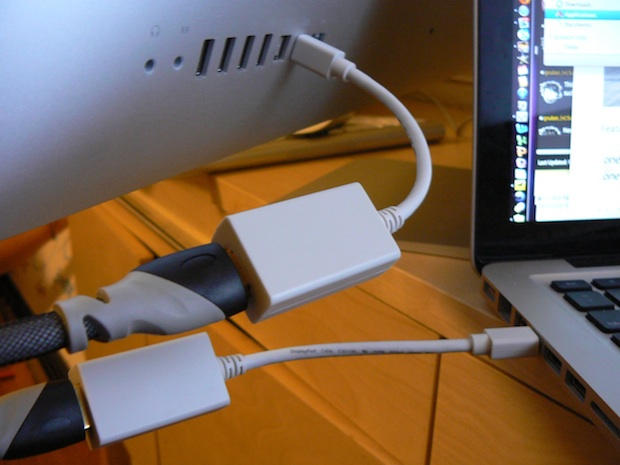
I tried to use a new 27-inch iMac as an external display for a compatible MacBook. I connected them with a HDMI cable connected to two Mini DisplayPort to HDMI adapters. It didn't work.

P1040504

Neither would a DVI cable strung between two Mini DisplayPort to DVI Adapters.

If you enjoyed this article:
Subscribe via RSS or email, or follow us on Facebook and Twitter

About the author

Leander Kahney

Leander Kahney is the editor of Cult of Mac, and author of three books about technology culture: Inside Steve’s Brain, the New York Times bestseller about Steve Jobs; Cult of Mac; and Cult of iPod. Leander has written for Wired, MacWeek, Scientific American, and The Guardian in London. Follow Leander on Twitter @lkahney and Facebook.

Email the author | Read more posts by Leander Kahney.

21 comments

    The downside of Apple secrecy.

    A product comes out and the staff haven’t been able to kick the tires and learn how it really works.

    I hope this isn’t a stupid question

    Is it possible to take a external blu-ray player/burner drive and hook it up to the new 27″ monitor and rip a movie to the system or is that also out of the question?
    Is it even possible to watch a movie through a blu-ray drive on the new 27″ system via the external hard drive?

    In those bottom two pics your lovely new iMac appears to be precariously balanced on the edge of the table. Scary stuff.

    In answer to question one, no. It would appear the video signal is bypassing the iMac’s CPU entirely and just goes straight to the monitor, so ripping from that input would not be possible without serious hackage.

    In answer to question two, it would appear from Leander’s testing that the ONLY video input the 27″ can receive is from another Mini DisplayPort, so if you had a PC laptop with a Blu-Ray player, the iMac is still not the external monitor for you.

    You might want to try one of these and let us all know how it works.
    http://www.atlona.com/Atlona-DVI-to-Mini-DisplayPort-Converter-p-17859.html

    Yeah, I researched this when the new iMacs were first announced and found that Atlona converter. I believe Belkin also makes one as well. Both were at least $200. I am trying to connect an older MacBook that only has miniDVI out.

    I concluded that I could get an external 24″ monitor with DVI and HDMI inputs for the cost of the $200 converter, so it wasn’t worth it for me.

    What I really want is an iMac and then a second display that looks exactly like the iMac. The best solution I’ve found is having two computers and using Teleport.
    http://abyssoft.com/software/teleport/

    Is there any way that iMac could be used as an monitor for a PS3 ?

    I should buy the new iMac soon,and i dont know should i buy a ps3 with it or not

    1. But I read somewhere (Apple website?) we could attach an external Video Source (BR, DVD Player, etc) with what cable configuration is this possible?

    2. And how about the other way around … having a 2nd screen attached to the iMac 27”? normal Mini-Displayport / DVI or Mini-Displayport / HDMI will do?

    or there’s a secret as well ?

    I’m so sorry… I’m so rude!

    Thank you for the wonderful images :) I’m in love with the iMac 27” and here is where I stand up minutes and minutes looking to all the rendered pixel of your pictures Leander :)

    Thanks a bunch !

    Use this one:

    http://store.apple.com/us/product/TX706VC/A?fnode=MTY1NDA3Ng&mco=MTMzODYwNzk&p=2&s=topSellers

    It is $29.95 and supports for resolution from any Mini DisplayPort capable Mac.

    The reason why the adapters won’t work is because mini display port technology is packet based. Other connector types (such as DVI, HDMI, VGA, etc) all transmit images in lines.

    Previous macs with Mini Display ports have worked with adapters because they internal video had the ability to also transmit out in the older line-based transmission – essentially the mini display port just became a carrier for an entirely different type of signal.

    The new macs no longer have this capability. The only way it can be performed is with much pricier converter boxes, which can be had for 200$-400$.

    Mini display port technology definitely has some advantages, however. Because it is packet based you are able to daisy chain multiple displays without regard to the video card’s capability, where as with previous technologies this is not possible.

    Apple is just way ahead of the industry curve.

    Thats to bad that you can’t hook up a blu ray drive to the new Mac. I’m sure if you did the ripping on some low end PC there’s a way you could get the data onto the mac though. Just got to be creative.

    I use a KVM switch with as many as four computers, and our top-end computer is due for an upgrade. Apple gave me hope with its limited ability to render video from other machines on the beautiful iMac screen, but to shut out older video streams (vga, dvi, etc.) is a deal-breaker.

    As much as I’d love that iMac, I can’t justify having two screens on my desk. Unless this gets fixed, it’ll have to be a Mini and a third-party flat-screen monitor.

    The reason the adapters don’t work is that they aren’t bidirectional. It’s not about packet-based tech or anything else (sorry ZacPro!). You can go out, just not in. The cables work, because with cables having the same ends, they are inherently bidirectional.

    If I hook a MacBook Pro to the iMac 27 inch and use it as a monitor only, is the iMac smart enough to power down its internal computer parts, saving energy and just use my MacBook Pro as the CPU?

    I asked this very question to several employees at the Apple stores and I got several blank looks. :)

    Forgive me if I am being stupid but I read that if you connect the iMac and the Macbook with a firewire cable, start the Macbook in target mode and then start the iMac whilst holding down the alt key you can use the iMac as a monitor for the Macbook.

    Kind of topic here but I was wondering if you have had any issues using you Imac mini display to hdmi dongle to a LCD TV or Plasma? My mouse seems to start acting funny when I use it.

    Does this connection by-pass the motherboard of the iMac totally? I ask as I have a dying iMac which would cost $500+ to fix – but could I cat a new Mac Mini and transfer all my files etc to that and use **just** the monitor of the iMac?

    Did you try pushing CMD+F2? (long shot, but you never know) Had to ask. I have ready many successful attempts at this, not quite sure yours isn’t working. Must be your cables.

Add your comment

Name(Required)

Mail (required, but not published)

Website

Comment

Buy Inside Steve's Brain Buy from Amazon.com Buy from Barnes & Noble