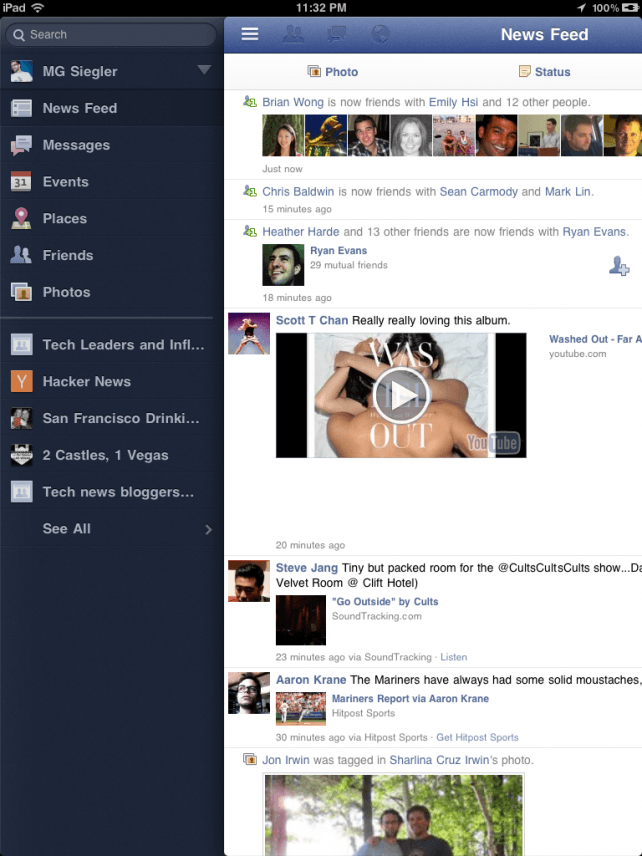
Many of us are patiently awaiting the official Facebook app for the iPad to hit the App Store, having tried a number of third-party alternatives that just aren’t quite as good as the official app for the iPhone. Well now the Facebook app for iPad is here — but it’s hidden inside the iPhone app and you’ll need to do a bit of tinkering to install it.
The treasure was discovered by @AeroEchelon on Twitter:
If you change the UIDeviceFamily to 2 for iPhone on the Facebook app you get an iPad version!
Some of you may instantly understand what that quote means and you’ll now be off to work your magic, but for those of you who don’t, iClarified has provided a handy step-by-step guide on how to install the official Facebook app on your iPad. It’s the same little trick that has been used for some time to get iPhone-only apps running in full-screen on the iPad. Which means, unfortunately, you’ll need a jailbroken device to perform this hack.
Firstly, go to iClarifieds tutorial and follow steps one through ten. At step 11, rather than adding a new line, just scroll to the bottom and find the ‘UIDeviceFamily’ line already provided by Facebook. All you have to do is switch it to 2 and hit save, then restart your iPad and enjoy the official Facebook app in all its glory.
If you’ve gotten the official Facebook app working perfectly on your iPad, let us know in the comments.
Update: One AppAdvice reader has created a quicker how-to in the video walkthrough below!
httpv://www.youtube.com/watch?v=xYsjjAss5XQ&feature=player_embedded
[via AppAdvice]

Killian Bell is a freelance writer based in the U.K. He has an interest in all things tech and also covers Android over at CultofAndroid.com. You can follow him on Twitter via @killianbell.


46 responses to “The Facebook App for iPad Is Already Here, But Hidden Inside the iPhone App — Here’s How to Get It [Updated]”
I use Facebook, but I really wish it could be wiped off the face of the earth. It’s only plausible use in my opinion is for catching up with old friends or relatives and for our older generation to see pictures of their grandchildren. I was definitively not anticipating the launch of a Facebook app for the iPad. Who was?
This guy has it working without jailbreaking, but it doesn’t work for me http://holgr.com/blog/2011/07/…
It would be a good idea to get this info out there to the masses. Google+ is building steam and many of my FB friends have made the switch. Of course there is still no Google+ app for iPad either…
-Chris
http://friendsofmac.net
looks just like MyPad!
You clearly aren’t my age.
(seventeen)
Seriously. I’m 18, and I know I sound like an old man, but you can’t deny that Facebook is a waste of time and no substitute for the real thing.
Tried the video hack, didn’t work for me that well.
Umm basically the same as full force + retina pad, just a little easier. Don’t think it’s any better than just using mobile safari on the iPad. All this is, is a super sized iPhone app.
Still holding out that Facebook will eventually release an iPad optimized app.
Also it’s buggy as hell
Update, remove full force and retina pad if you have it installed
For realzy realz?
I am so glad for facebook you have no idea.
Not to blow one’s own horn, but I’m a pretty funny guy. The thing is, in one-on-one face-to-face situations (at least for people I don’t really know), I can be pretty shy.
Facebook’s got me talking to people at school who I wouldn’t have a couple of years ago.
Thanks to facebook; I’m actually pretty popular at school, I’m school captain, taking one of the best looking girls in my grade to the formal and am friends with pretty much everyone (whether they’re in my grade or not).
Sure, facebook is not as good as the real thing. But its seriously helped me socialise more in real life.
My god, I sound like an infomercial for facebook haha
Facebook iPad Official App – How to Install on iPad Get
onto http://www.worldshotcake.com/a…
Got it working, had to uninstall facebook app, redownload it, and then make the changes. Seems pretty slick.
Great! Then maybe it’s time to leave, with your new found confidence!
I feel that it has worsened social contact. Since everyone is on it, people spend less time actually out and about like they used to when we were all younger.
Great! Then maybe it’s time to leave, with your new found confidence!
I feel that it has worsened social contact. Since everyone is on it, people spend less time actually out and about like they used to when we were all younger.
whoever wrote this is an asswipe… you could have mentioned you must have a jail broken device for this to work in the title, instead of burrying that tidbit halfway through the pointless article
Use iFile from Cydia to edit the info.plist file – much easier.
Its already been fixed, you can’t log in anymore if you try to use iPad version.
WOH thats lik e properly designed for the ipad funny they already have all the ipad on it
i followed the instruction. somehow i cant login. i still can login using my laptop, but not from ipad. what gives???
I installed but still unstable. it keeps crashing on my old ipad.;/ the pains…
The usual idea is that you would use NFC to set up the link between the two devices and then do an automatic hand over to a different protocol for doing the actual transfer of data – eg Bluetooth,iphone 5
The usual idea is that you would use NFC to set up the link between the two devices and then do an automatic hand over to a different protocol for doing the actual transfer of data – eg Bluetooth,iphone 5
I follow the steps perfectly and it still doesnt work :(
why the hell is it that the only way to get good apps to work on the ipad is to jailbreak it?