Tethering, MMS Hack Broken By iPhone 3.1 Update
9:48 am, September 11th, 2009, Leander Kahney

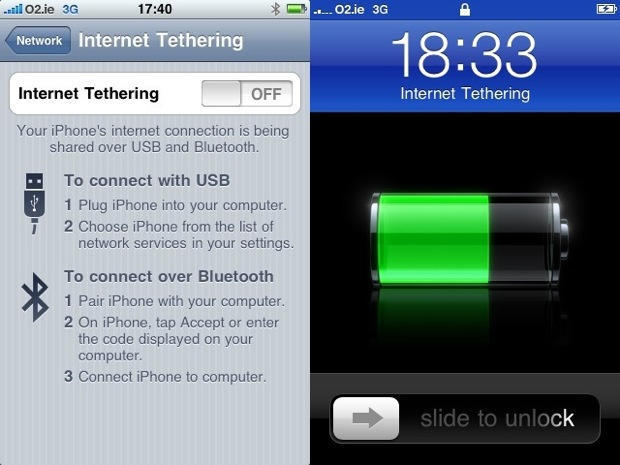
A popular tethering hack that allows your computer to access the internet via your iPhone’s cell connection is broken with the iPhone 3.1 update. The update also disables MMS messaging enabled by the same hack.
The hack is enabled by changing iPhone’s AT&T carrier file. It’s easily enabled by visiting sites like BenM.at using mobile Safari on the iPhone, and appears under the Network settings. The option is removed under 3.1.
AT&T will roll out multimedia messaging for the iPhone on Sept. 25, but hasn’t given a release date for tethering, saying only it will be available “in the future.”
Posted by Leander Kahney in Apple, News, iPhone | Comment on this article


I used this same hack under 3.0.1 to enable tethering, and after updating to 3.1 I still have the tethering and MMS functions.
Coty, on September 11th, 2009 at 10:00 am
I have updated to 3.1 and I still have tethering as an option in the Network Menu.
Phillip, on September 11th, 2009 at 10:35 am
The option under network shows up, but disappears as soon as you try to use it.
Slapguts, on September 11th, 2009 at 10:46 am
Hmm.
I have a stock, unhacked, un-jailbroken 3GS.
3.1 added a new section for tethering data transferred to General > Usage.
Gene, on September 11th, 2009 at 10:51 am
Upgrading to 3.1 will also break voicemail if you had applied the tethering hack. There is no longer an option to change the voicemail server to acds.voicemail.
jb, on September 11th, 2009 at 2:28 pm
I have a 3G with 3.1 and I still have the tethering without any issues. My phone has never had MMS, but also my phone is not unlocked or hacked/jailbroken in any way.
James, on September 11th, 2009 at 4:07 pm
FYI
I have 3.1 and an iPhone 3Gs. I upgraded and my tethering still works 100%. I used it yesterday with no problem when the wifi went down during a power outage during last nights storm in Dallas. Even with the storm I still had a pretty decent connection speed tethered to my 3Gs.
Matt P, on September 11th, 2009 at 4:49 pm
I upgrade to 3.1 today, and i’m lost my tethering option… , and my ohone never been jailbroken…. any suggestion to have tethering again???
Josue O, on September 11th, 2009 at 9:37 pm
I will be happy to upgrade to 3.1 if and when AT&T adds official tethering or there is a workaround that is reliable. Until then, unofficial on 3.01 will do just fine, thank you.
Rob, on September 12th, 2009 at 8:14 am
Tethering works here in Hong Kong with 3.1. Using it now to post this comment. “Three” is the operator here. Don’t know how long this will last since tethering pulls a lot data & Three’s plan goes to 500MB/month before going unlimited so they don’t expect many people to go over 500MB. I can go 500MB in a day.
Leung, on September 12th, 2009 at 6:43 pm
I use to have thetering on my iPhone 3g 3.0.1 but now with the new 3.1 I losted and I realy wann it back, someone can helpmeet to get it againg ….
Ivan213, on September 13th, 2009 at 9:45 am
I use to have thetering on my iPhone 3g 3.0.1 but now with the new 3.1 I losted and I realy wann it back, someone can help me get it back ? i really need it for work please
PHILIP, on September 13th, 2009 at 8:46 pm
after upgrading to 3.1 tethering will still be enabled but once you sync it for the first time with itunes 9, it will disable it and remove it.
macjunkie, on September 13th, 2009 at 10:01 pm
jb, I’m having the same problem (no option to change back to acds.voicemail). Have you found any solution?
Jay, on September 14th, 2009 at 3:27 pm
I update to 3.1 and I cant to use Internet Thetering, please HELP!!
YO1, on September 15th, 2009 at 2:55 pm
For anyone who has had their visual voicemail broken since the 3.1 update try this solution. I do not know if this will work outside of AT&T.
So the problem seems to be that if you installed the hacked ipcc file (either through help.benm.at or manually uploading the file through iTunes) and then updated to 3.1, not only would the 3.1 update disable the tethering/mms, but it would also corrupt the carrier file, therefore breaking visual voicemail. I have tried every method out there including resetting the network settings, removing Profile settings, restoring my iPhone (seven restores including a downgrade to 3.0) as well as spent more than four hours on the phone with AT&T and Apple but to no avail. Here is what finally worked for me. And for those interested, this was done on my iPhone 3GS 3.1OS.
1. Perform a system restore on your iPhone.
2. After the restore, choose the option to setup as a NEW iPhone.
3. Perform a “Restore from Backup…” in iTunes (in iTunes, right click on your iPhone and select Restore from Backup…)
4. Open safari on your iPhone and navigate to http://help.benm.at/generator.php
5. Enter wap.cingular in the APN field for both Mobile Internet and Visual Voicemail. Leave the rest of the fields BLANK and click GENERATE!.
6. When the Install Profile page opens, click Install and the then Install Now on the confirmation warning.
7. After it finished install, go back to your home screen.
8. Perform a HARD RESET by holding down the Lock and Menu buttons (power and home buttons)until the iPhone reboots and the Apple logo appears on the screen.
You should now have visual voicemail AND mms working on your 3.1 updated iPhone! I understand the frustration of the whole process and sincerely hope this works for you!
Michael Masek, on September 16th, 2009 at 2:18 pm
Ahhh!!! I use my iphone for business and my customers are wondering why the heck I haven’t returned their voicemails for days. Turns out that Apple broke my voicemail and the precious tethering that lets me work on the go. ATT and Apple both suck. I’ll have to try Michael Masek’s directions on fixing this. If it doesn’t work then I’m screwed and will need to jailbreak or something.
Hate ATT, on September 17th, 2009 at 12:26 pm
I’m still on 3.0 and itunes 8.2, but having problems.
I purposely chose to nut update as I didn’t want to lose tethering. One day, my voicemail just quit. ATT / APPLE were no help, so I uninstalled the modded carrier profile. Voice mail came back after having ATT reset it and tethering was still there. The profile just unlocks it and I read that you dont need to keep the modded profile once the feature is unlocked.
Anyway, my tethering just disappeared!. I’ve not updated anything on my macbook, still on old 8.2 itunes, no syncs, and iphone 3.0. it went away over the air somehow.
Jeff, on September 17th, 2009 at 11:28 pm
hmm…… TO: Michael Masek, thank you for the instructions but my phone VVM is still not working…… I do have MMS working though…… and Tethering option is still not there……
Z, on September 18th, 2009 at 3:20 am
I have a iPhone 3g updated with 3.1 and my tethering and vvw was broken. I tried Michael Masek’s instruction with no luck but I went into Settings – General – Profiles and deleted both profiles in there and now i have my vvw but no tethering and still no mms.
Randy B, on September 19th, 2009 at 11:04 am
I just tried Michael Masek’s solution and it DID restore my vvm. (thanks, Michael!) Btw, I called AT&T multiple times and they were useless. I haven’t yet tested MMS, though I don’t use it much anyway so don’t really care. Tethering still doesn’t work, at least until someone figures out a good hack for it on 3.1…
LJ, on September 19th, 2009 at 4:21 pm
i tried 2 or 3 times did not work for me. so i reset my phone back tp factory settings. i tried another one and had the option to send mms and add the pic andall worked but would not send
ike, on September 19th, 2009 at 7:29 pm
Can we move back to 3.0.1 from 3.1 or are we locked in?
Scott, on September 20th, 2009 at 6:04 pm
masek’s instructions worked on my 3GS 3.1. although obviously i lost tethering capabilities. if i didn’t add the mms hack before, can i add it now or did the update cancel that functionality as well…
guy, on September 20th, 2009 at 8:44 pm
I did what Randy b suggested with deleting the profile and my voicmail now works again… Very simple
Kristi s, on September 20th, 2009 at 11:37 pm
Forget all the restore crap. Go to settings, general, then profile and remove the profile. I removed it and got 17 vvm from the prior week.
Apple, on September 21st, 2009 at 12:02 am
I’m in the “lost tether” camp, too, using the 3G (no “S”) phone.
I did notice that in addition to losing the tethering activation switch, I also GAINED an information subsection in the “Usage” summary specifically for sent/received tethering data.
This is encouraging as it suggests the option may come back some day “soon”…but also discouraging since one reason you’d need to track it by itself (beyond just calling it “data”) is because it’s being billed separately. This will make me very, very angry, given what I already pay for a data enabled phone.
Still, it’ll probably be cheaper than getting $4 blends just to use the coffee shop wireless. Ho hum…
JaeD, on September 21st, 2009 at 9:19 am
Restore back to your 3.01 IPSW file and then re-apply the tethering hack.
To do that in Itunes, press the shift key on your pc or laptop while clicking on the update button and browse for the file on your computer.
pgurlatl, on September 21st, 2009 at 5:43 pm
I just removed the help.benm profile and got my voice mail back and still have tethering. (apple 3g)
trick, on September 21st, 2009 at 7:43 pm
I’m lost without teathering… Most iPhone
users from the rest of the world tether… And
is included in thier plan… I heard that AT&T is
going to charge 60$ on top of the iPhone
plan!!! Someone pls hack 3.1 already!! Or let’s
make a revoution!! Hehe
Lindo, on September 21st, 2009 at 8:45 pm
@ Michael Masek. Thanks mate thats the only thing that worked for me.
Liam, on September 22nd, 2009 at 6:29 am
if you lose your visual voicemail from this…
go to settings, general, profiles then delete profile
then go to settings, general, reset, then reset network.
very simple and quick : )
Ted, on September 22nd, 2009 at 6:49 pm
I enabled mms and tethering. not jailbroken. 3.01 updated phone, not 3.1.
I deleted the profile. Stil no VVM. Still have mms/tether.
Reset network settings per Ted above. Phone reboots.
Now — says “searching” instead of “ATT”. So follow that advice with caution. Now I’m fixing a bigger problem.
Mikey V, on September 23rd, 2009 at 12:01 pm
Ok. Another reboot fixed it and I can connect to ATT
Lose MMS and Tethering, VVM back.
Mikey V, on September 23rd, 2009 at 12:54 pm
Just delete the AT&T unoffical carrier file from your phone after updating from 3.1 and VVM will work again.
Crimson, on September 24th, 2009 at 6:27 am
Updated iPhone to 3.1 and the latest iPhone configuration. Lost my internet connection, but now could send MMS.
Thanks to Michael Masek, my internet connection was restored. Tethering disappeared from the Network Settings, though after I tried to use it.
Jack Lantern, on September 26th, 2009 at 6:31 pm
I so much cherished the Tethering on my iphone 3.GS but after upgrading from 3.0 to 3.1 I lost this feature. I will appreciate any help to get it back. At&t sucks!
Keem, on September 27th, 2009 at 10:17 pm
How’s this for any easy way to get your iphone tethered!
I have an 3GS iphone 3.1 which I had unlocked through Telstra for a fee and while Telstra is not providing the tethering service I found a way around it.
All I did was to purcahse another carrier’s pre-paid SIM that does provide the service and then connected to iTunes and presto tethering was up and running. It’s still working even when I put back my original SIM card.
What this proves is that tethering is BUILT IN already on your iPhone and when you connect to a carrier that does provide tethering it activates it automatically when you are charging your iphone.
BelfastBobby, on October 2nd, 2009 at 9:33 pm
As everybody has been stating, tethering is now gone with the upgrade. Visual VM also was broken. Per Ted’s Advice (thank you Michael Masek for your detailed advice as well) I removed the ATT profile and then reset the network settings. VVM did not work completely at first. It would just search when I tapped the VM to play. I had to do a hard reset (Perform a HARD RESET by holding down the Lock and Menu buttons (power and home buttons)until the iPhone reboots and the Apple logo appears on the screen.) and then the VVM worked fine. Whew! I have also tested the MMs and everything works now. Thanks to everyone for the advice and help. This type of collaboration is what the internet is all about!!
Sinjin, on October 12th, 2009 at 10:11 am
I think it is criminal to sell a phone with tethering, and then just take it away at will. Apple should be charged for theft!
Uwe, on November 8th, 2009 at 1:30 pm

