Snow Leopard’s Beautiful, Giant, Obsessive Icons
10:50 pm, August 27th, 2009, Pete Mortensen

One of the more, um, INTERESTING, design choices in Snow Leopard is the option to show icons in the new Cocoa-based Finder at an insane 512×512 pixels. Here’s how big that is: on a unibody 13.3″ MacBook Pro, you can display exactly two of them without either overlapping or running off the screen. The 30″ Cinema HD Display can only display 15 of them, and it’s significantly higher resolution than a 1080p television. The original Mac, at 512X342 pixels, could only display the width in full.
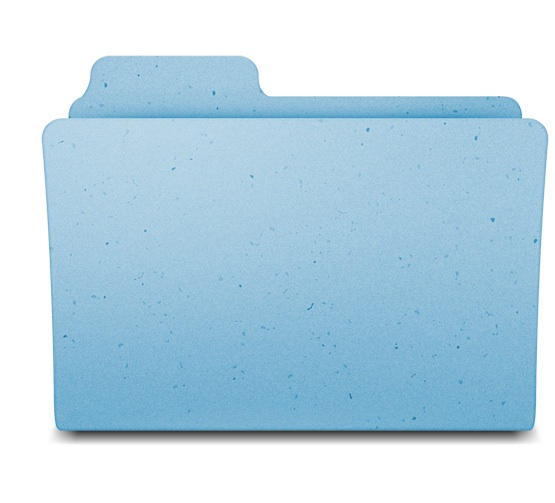
They’re enormous, and only possibly practical if you want to read documents without opening them, in which case Quick Look is a way better option anyway. Regardless, the new high-definition icons are fascinating viewed at full size. I’ve put in just the Folder icon, which is now big enough to have discernable flecks of dark blue in the grain. Amazing. Totally obsessive. And totally Apple.
The Register has more. Check them out.
Posted by Pete Mortensen in Apple, Software | Comment on this article
If you enjoyed this article:
Subscribe via RSS or email, or follow us on Facebook and Twitter


It doesn’t make perfect sense if you are working with folders, but it starts to make a lot of sense of you are browsing high resolution pictures or video files as thumbnailed previews. I imagine SL just didn’t want to compromise its icns quality for larger sizes…
Pete Mayhem, on August 27th, 2009 at 11:01 pm
well i know my blind as a bat grandmother will love it. she says the icons aren’t bigger enough on leopard
Lucas, on August 27th, 2009 at 11:28 pm
They’ve been like this for quite some time.
Jack, on August 28th, 2009 at 4:25 am
Leopard has 512×512 icons… Granted you can really only see them using cover flow, but they are there.
John, on August 28th, 2009 at 8:18 am
Personally, file folders cannot be big enough for me.
And I use Google Quick Search Box to open my files/apps.
Peter Kennedy, on August 28th, 2009 at 9:43 am
What? No one told you? Boy, are you out of the loop. LOL
Apple has been moving toward Resolution Independence since Mac OSX 10.3, but it hasn’t been making a big deal of it. It will be interesting to see what Snow Leopard adds to this process.
Before Apple could make Resolution Independence happen, it had to patiently place many ducks in a row. What this meant was that Apple has been making it easier and easier for developers to create code that doesn’t care what the screen resolution is. The operating system controls that.
This was necessary before Apple could start selling monitors using 163 dots per inch which is the same resolution as the iPhone. Other resolutions leap out at us. 72 dots per inch is Apple’s current standard, 150 DPI is 2X that, 220 DPI is 3X and 300 DPI is 4X.
What this means that you will eventually be allowed to select the refresh rate and the DPI that best utilizes your screen resolution and application.
The current problem with having a higher screen resolution is the text size and the icons get so tiny that they are unreadable. The larger icons will take of that. Fonts will become much finer. No more jagged edges in fonts. Yea!
You will have a single control in system preferences. Move the slider and all your fonts and icons change in accord.
Louis Wheeler, on August 28th, 2009 at 1:20 pm
The icons!
They very pretty!
UGH!
CaryMG, on August 28th, 2009 at 7:35 pm
Hey folks,
you do’nt get it! This is the preparation for the iTablet with a new, cover-flow-dock-pseudo-3d-style user interface needing BIG icons for the multitouch interface! Coming soon in 2010 …
johannes, on August 29th, 2009 at 5:59 am
Some really beautiful icons out there! Check out your Applications folder in Cover Flow.
Partners in Grime, on August 29th, 2009 at 8:21 am
If you are interested, here are nearly all the Icons as huge PNGs: http://blog.tice.de/icons.php?sprache=englisch
Tice, on August 31st, 2009 at 12:59 am
They’re pretty, and I appreciate the attention to detail immensely. But what I’d really like to see is icon independent scaling. In the current situation, because all icons are the same size, there is no hierarchy even though most of the time, not all files or folders are of the same importance (which is often compensated for with different icon designs and colours). But if you could independently scale icons, you could make the important ones stand out. A very important advantage is that not only you’ll be able to more quickly spot the correct icons, but because it is of a bigger size you’d also be able to more quickly position the cursor above it (Fitts’s law).
Tycho, on September 3rd, 2009 at 1:47 am
Nothing new here, we could do this since leopard.
Brian, on September 5th, 2009 at 10:20 am
[...] Snow Leopard’s Beautiful, Giant, Obsessive Icons (cultofmac.com) [...]
First Thoughts on Mac OS X Snow Leopard :: Scraps of My Geek Life, on September 25th, 2009 at 2:10 pm

