Top stories

Microsoft’s My Documents Folder Makes Triumphant Return – On iPad

20100209-mydocuments.jpg

Earlier today, I was reading Infoworld’s article, The iPad questions Apple won’t answer. The first question they listed was “Can you save and transfer documents to the iPad?”, and their assumed answer was “No”; they suggested that the only way to do this would be to open a document from an email message.
I read that [...]

Top 5 Things To Check Out at Macworld 2010

Macworld 2010 opens today. It is the 25th annual gathering of Mac users. That’s right, 25 years!
But thanks to the absence of Apple this year, this “Mecca for Mac Heads” may be the last. So check it out while you can.

The show runs for 5 days. The Expo showfloor opens on Thursday at noon.
For the [...]

Opinion: MacBook, or iMac + iPad?

20100208-imacipad.jpg

The announcement of the iPad has done a lot of things: it’s stoked up excitement in the Mac using community, it’s got a bunch of developers feverishly coding exciting new stuff, and it’s got retailers and cell phone companies the world over drooling over the money they can make from it.
And it’s also somewhat upset [...]

In Depth: 30 Days with the Nexus One

It’s been a month since my review of Google’s “SuperPhone”, the Nexus One. Since that time, we’ve surfed, updated facebook, navigated, called, played endless hands of cribbage and even tried to freeze it to death on a trip to Dayton Ohio. Follow me after the jump to find out does the “SuperPhone” stand the [...]

Review: 2009 MacBook Pro 13-Inch Is Freakin Awesome

macbook_pro_13_22

Last fall I bought a 13-inch unibody MacBook, and I fell in love. For the last seven months I’ve been head-over-heels with the machine. But now there’s a new love in my life: a brand new 13-inch MacBook Pro, which is shaping up to be the perfect laptop.

Released last week, Apple’s MacBook Pro 13″ is an amazing machine. It’s priced as a starter, but it’s now truly a “Pro” laptop. It’s worthy of real work. It adds many of the “Pro” features previously reserved for its higher-end siblings, but costs hundreds of dollars less.

It now has an awesome, all-day battery; a bright, energy-sipping screen; and a backlit keyboard. Firewire is back, and there’s an indispensible SD Card slot. And yet it starts at just $1,200. For a computer of this quality and power, that’s a steal.

Full review after the jump, including real-world benchmarks and tons of pics.
macbook_pro_13_01

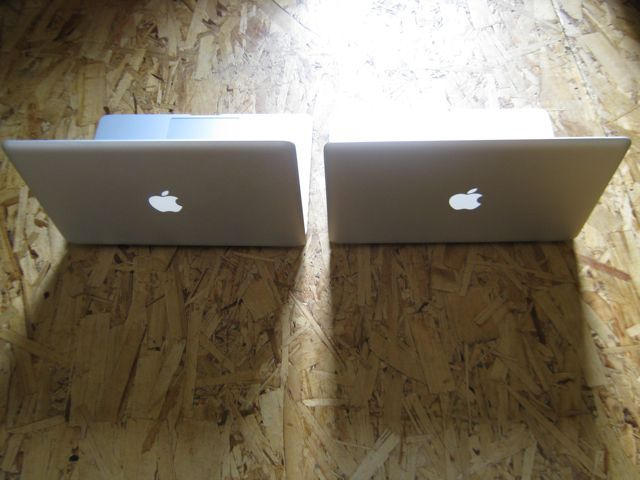
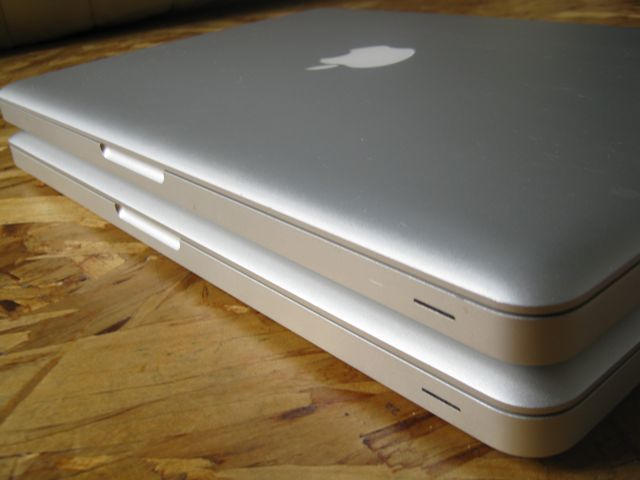
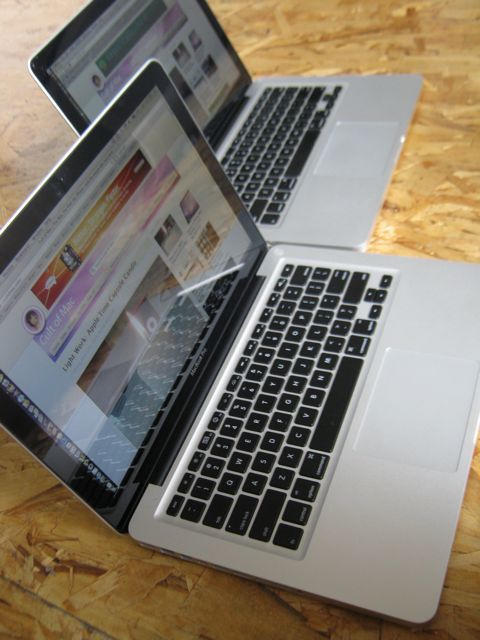
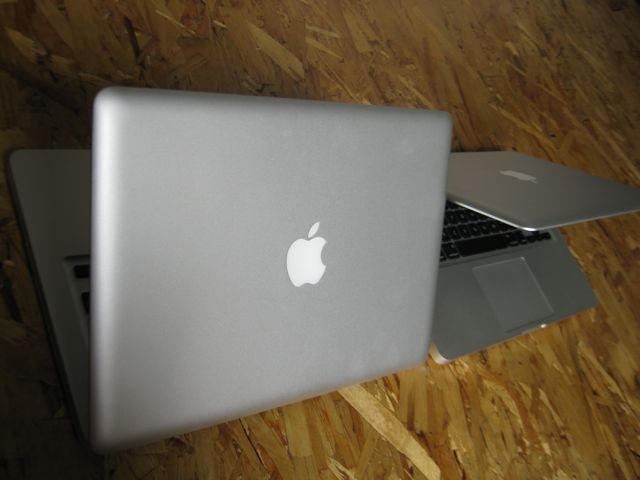
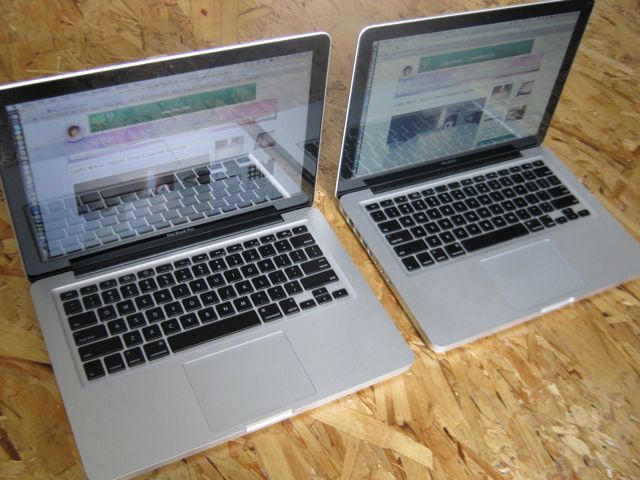
Spot the difference: The new MacBook Pro and the 2008 MacBook Unibody. The new one is much improved, and cheaper to boot.

There’s been some puzzlement about the “Pro” label applied to this formerly entry-level laptop. But Apple’s done a great job with the MBP 13″. It’s lowered the price while bumping the specs. One of the best ~$1,200 laptops just got a lot, lot better.

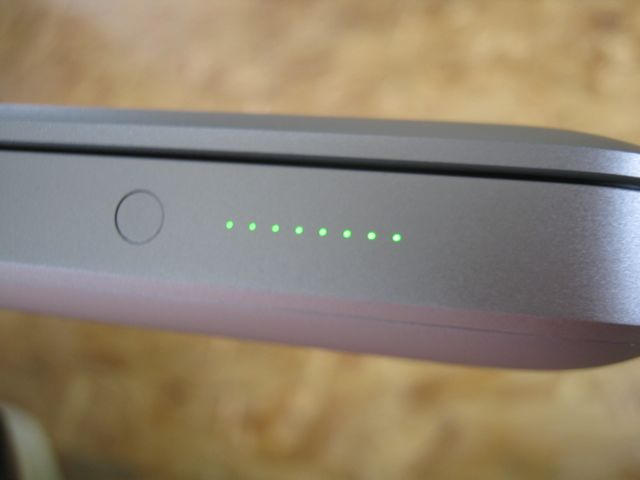
There’s a lot to love about the MBP 13″, but the best thing is the new built-in battery. This battery lasts forever.

In an afternoon spent working — Word, Firefox, Photoshop and Wordpress, all while listening to iTunes, I’ve gotten 6 hours and 20 minutes from a single charge (about 70 percent brightness, WiFi on, 20 tabs in Firefox. It was working so hard, the MacBook got hot and the fans kicked in).

This is not just impressive, it’s awesome! I can spend all morning at the Ritual coffee shop, which has covered up all the electrical outlets, and spend only $2 on coffee!

This kind of battery life is reserved for iPods and mobile phones, not laptops. The 2008 MacBook got undr 2 hours in such conditions. Apple and others have gotten 8 hours plus in light usage.

And who cares if the battery is sealed in? You can’t change the battery mid-flight, but why worry when it’s good for crossing the entire continent?

Instead of standard lithium ion batteries, which are cylindrical and waste a lot of space, Apple is using a flat-pack battery. The flat pack efficiently squeezes a lot more power into the cramped case. Eliminating the battery compartment also saves space, making for a bigger battery. The new battery gives an extra 46% of battery capacity with no additional weight.

The beefier, built-in battery is inherited from the MBP’s big brother, the 17-inch MacBook Pro. The battery will last for 1,000 charge cycles, which if charged 200 times a year, would last five years. Even if it were charged every day, it would chug longer than three years.

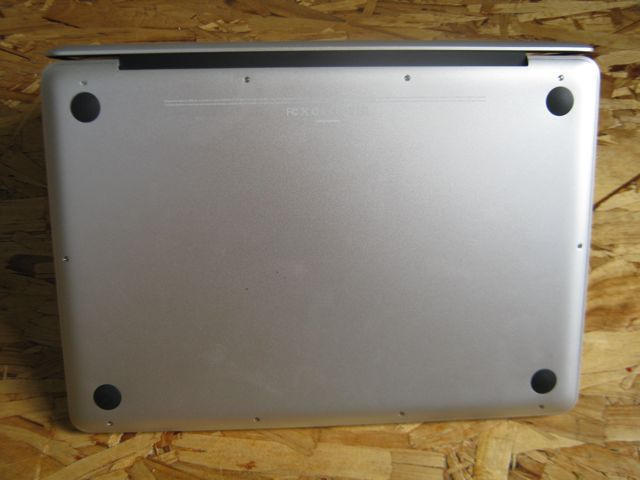
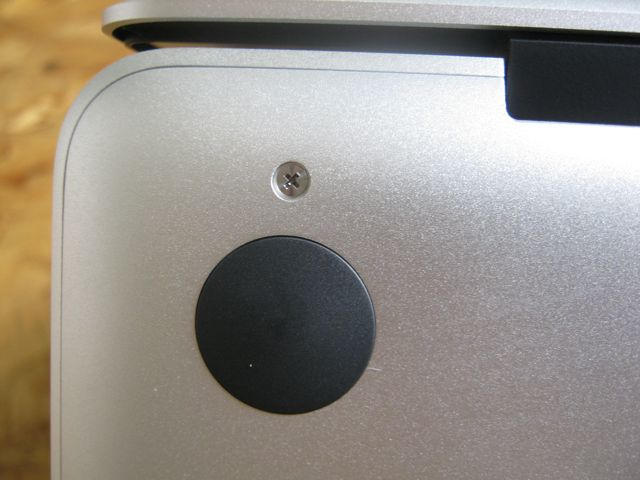
Apple will replace the battery and dispose of the old one for $120, but it’s a trivial operation, and third-party vendors will have cheaper, DIY alternatives. The battery, RAM and hard drive are accessed via a screwed-on panel. All are easily swapped out in a few minutes.
macbook_pro_13_04

macbook_pro_13_05

Design

The MBP 13″ is nearly indistinguishable from its 15-inch and 17-inch siblings, but is hundreds of dollars less expensive. That may sting those who coughed up for the pricier machines: there’s little to show they dropped the extra scratch. And it packs most of the other Pro’s most desirable features — the long-lasting battery, the better screen, the backlit keyboard.

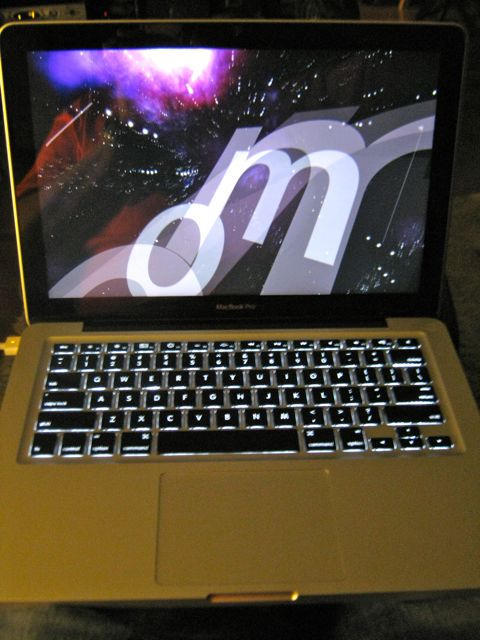
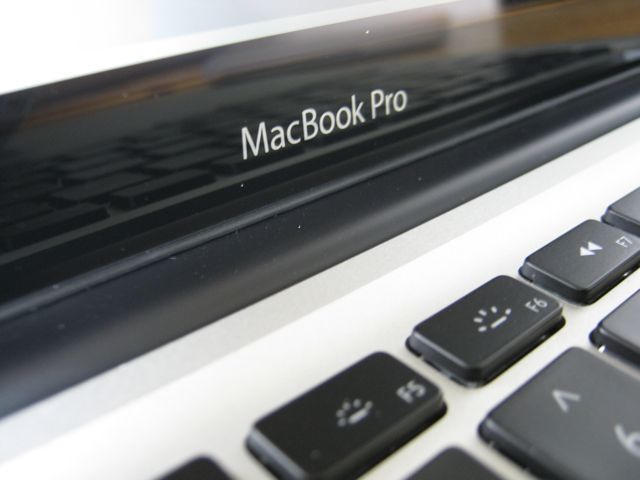
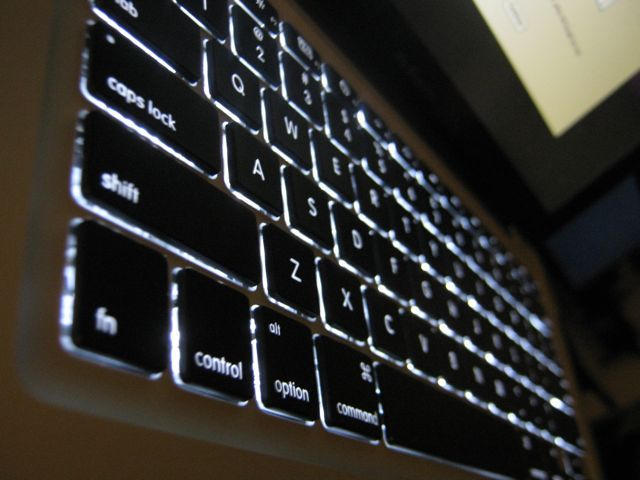
The backlit LED keyboard is a fantastic addition. It’s so bright, it lights up like a Christmas tree. On the previous MacBook, I was forever tilting the screen forward to see the keys in the dark. Now the keys are so bright, I can almost see the blood through my fingers.
macbook_pro_13_2

The backlit keyboard is bright.

Green chops

The first thing you notice about the MBP 13″ is that the packaging has been reduced to almost nothing. The box is so small; my son asked if it was a mini computer. Gone are the Styrofoam and the separate, fussy boxes for all the components.

Apple has at last started to get its green act together. Apple was a laggard, trailing even hick Texas companies like Dell — but it has done a lot to catch up.

Even though it’s a contradiction in terms, the MBP line is as about as green as it gets (how can modern, mass-produced products ever be “green?”). The machines use about a third of the power of a light bulb, and many of the toxins have been eliminated from manufacturing, Apple says.

Made from aluminum and glass, the MBP 13″ is highly recyclable. Its new, backlit LED-display draws about 30% less power than the previous MacBook’s display, and auto dims in a darkened room. It’s earned the highest EPEAT (Electronic Product Environmental Assessment Tool) Gold rating

Screen — 68fps in World of Warcraft

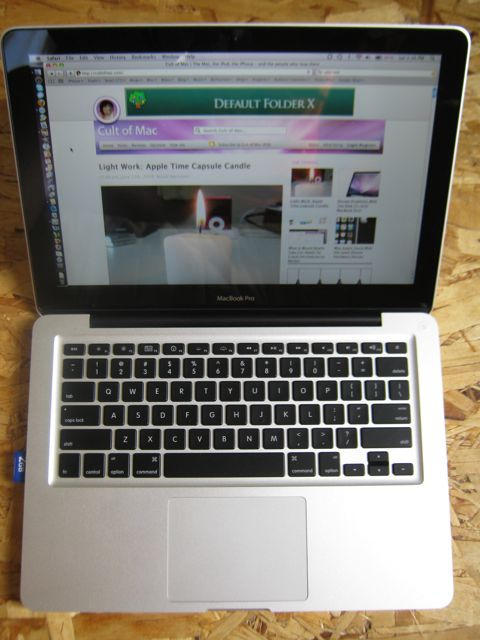
One big improvement over the previous MacBook is the backlit LED screen. Though the same res (1280×800), the improved backlit LED display has a 60% better color gamut than the previous screen. Side-by-side, the new screen is clearly better looking with a wider viewing angle.

It’s the same primo screen used in the 15-inch MBP, but the 13″ is a lot cheaper. Of course, the MBP 13″ has integrated graphics, and doesn’t rock a dedicated graphics card like the 15- and 17-inch MBPs. But if you don’t play games or do 3D modeling, the system is perfectly capable of most day-to-day, like watching high-def video.

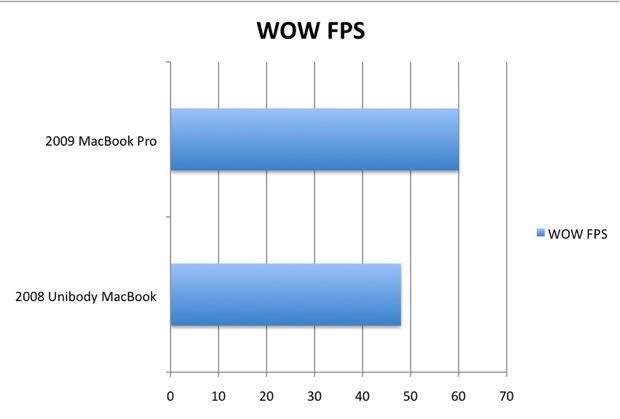
Still, it scores very well in World of Warcraft. The new machine rocks a frame rate of about 60fps (max 68fps), compared to about 48fps (max 51) on the older machine (2.26Ghz Core Duo, 2GB RAM versus 2Ghz Core Duo, 2GB RAM)
wow_fps

Slots

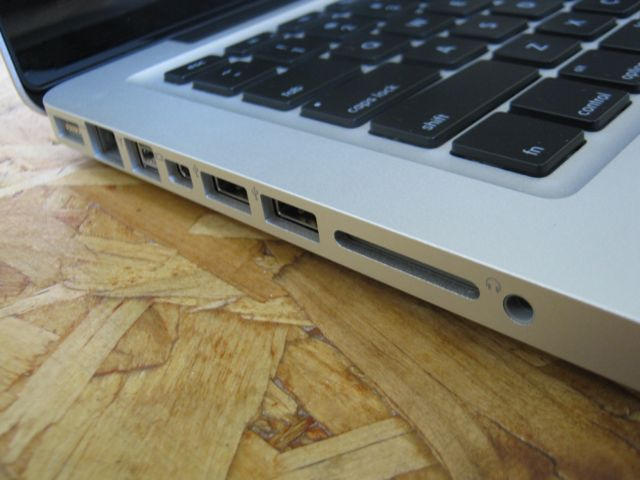
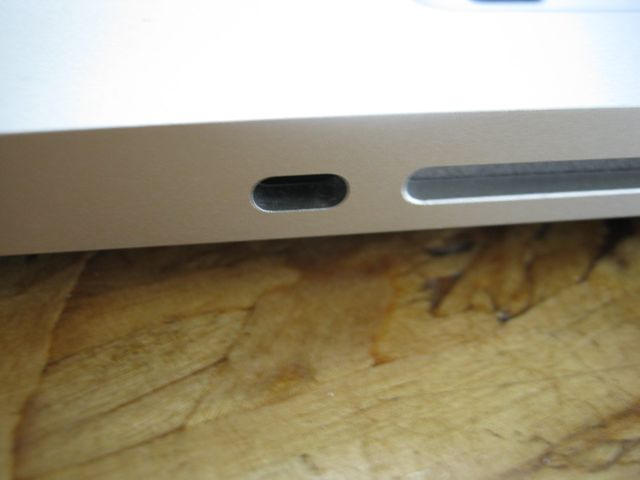
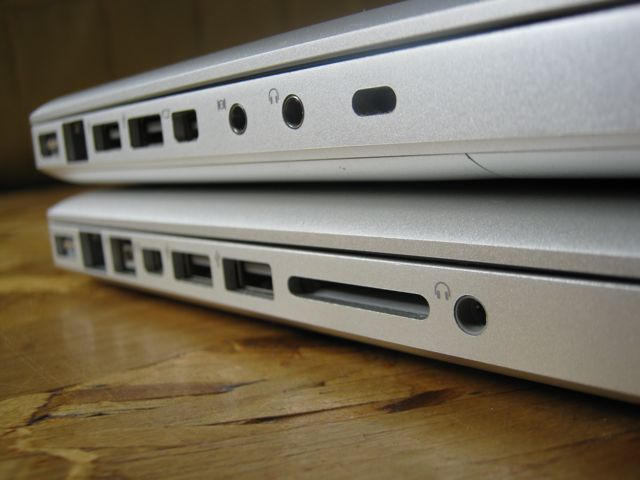
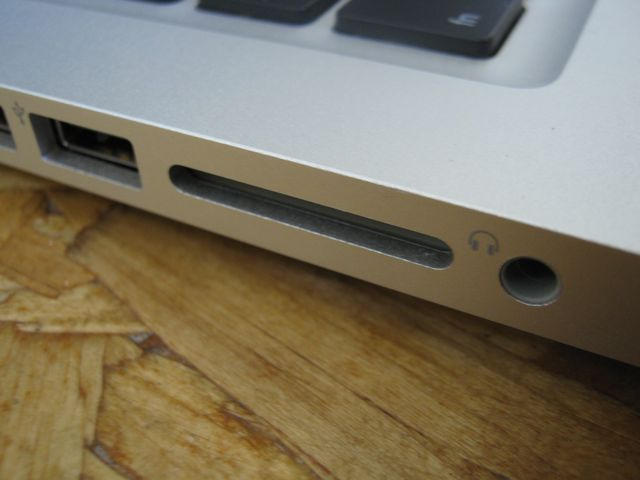
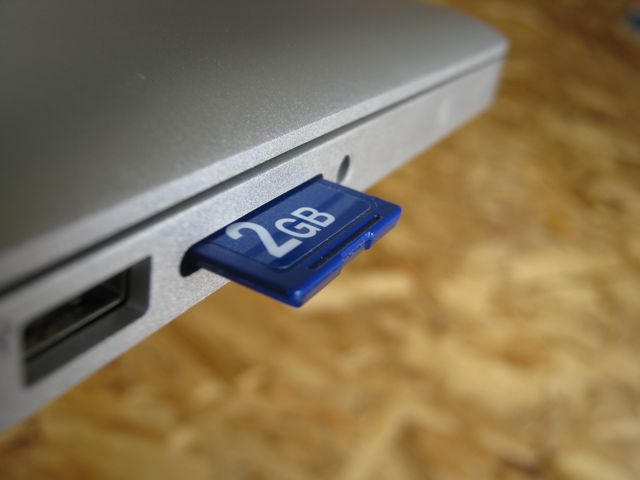
The other big diff is the SD Card slot — the previous model didn’t have any card slots. The SD Card is a welcome addition. I hate carrying a card reader; I always forget it; and one of the most useful features of my EEEPC hackintosh is the built-in SD Card slot. You can even boot from it.

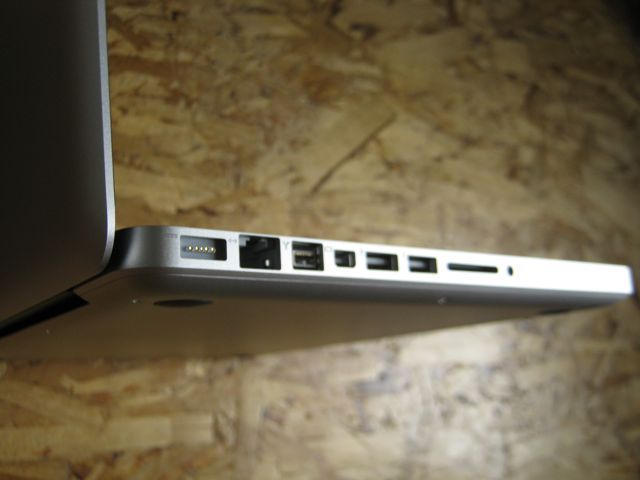
One downside is the audio ports have been combined into one. The single jack now handles both audio in and audio out. So no recording and headphones at the same time. And while it supports both analog and digital out, there’s only analog in — no digital in. However, there are lots of inexpensive USB audio adapters on the market.
macbook_pro_13_08

macbook_pro_13_13

Security slot

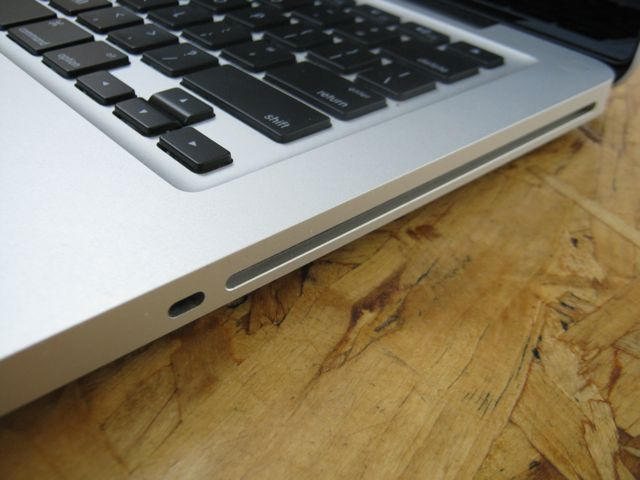
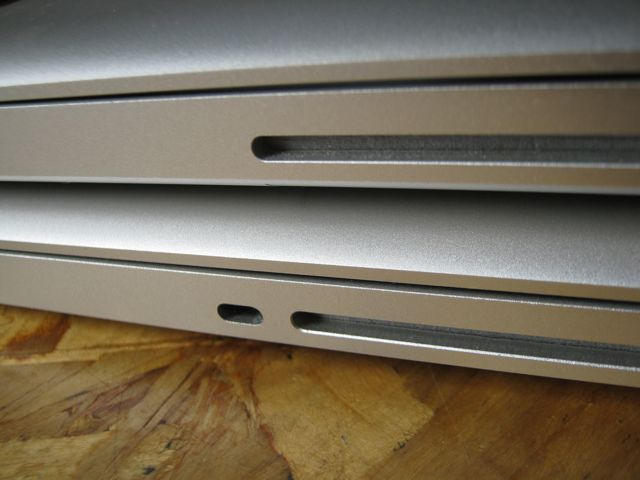
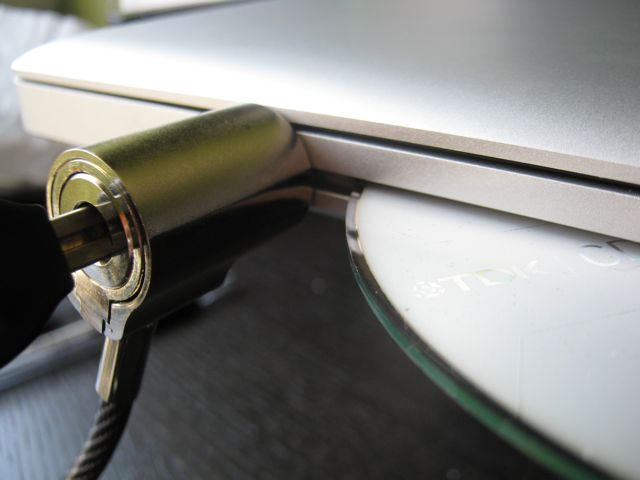
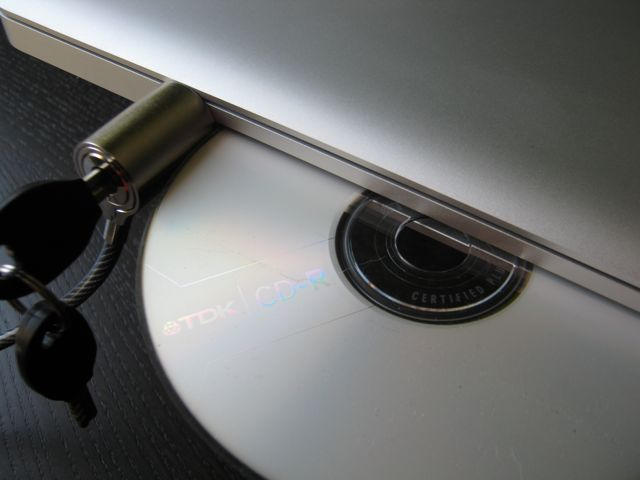
The Kensington security slot does not block the optical drive — but it’s very close. The disk rubs against the security lock but isn’t blocked from sliding in or out.
macbook_pro_13_23

macbook_pro_13_24

Firewire

I never noticed the lack of Firewire on the old MacBook until migrating from one machine to another. Instead of using Firewire Target Mode to transfer files, I used the Migration Assistant software over Ethernet. Applications transferred OK, but  files did not, so I’m back to the minor inconvenience of using an external disk.
macbook_pro_13_03

Quality

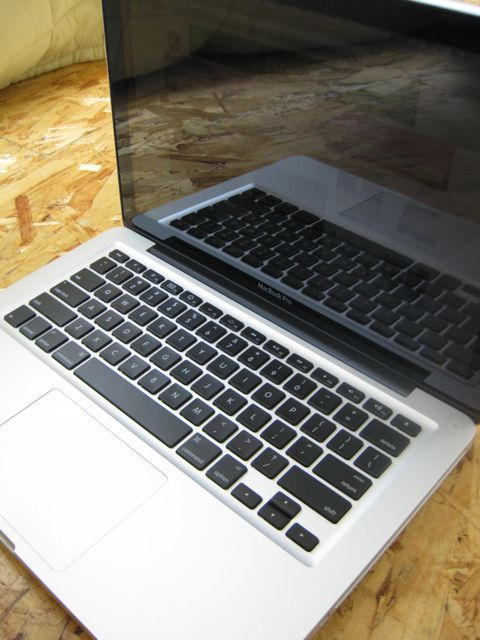
The build quality remains impressive and true. The unibody MacBooks exude quality. They’re very well built. In terms of looks and materials, the MBP 13″ is more or less indistinguishable from the higher priced machines. It’s as good as the 15-inch or 17-inch, but at a fraction of the price.

Despite abuse from the kids, including several drops, the previous MacBook suffered only scratches and a small dent on the lid. It still looks awesome, and the battery has 95 percent of its original capacity

The buttonless glass trackpad is a fantastic innovation, a pleasure to use.

macbook_pro_13_21

Downsides

Yeah, I’m in love, so I’m not rational. Maybe in a couple of months there’ll be stuff getting on my nerves. If so, I’ll report back here. But so far, the honeymoon is in full swing. I’ve seen some complaints about wimpy graphics, but I don’t play games or do graphics work. All I need is a screen that can play HD video — and this screen handles that beautifully

There are also complaints about the price: $1,200 is not the cheapest laptop. But it is one of the cheapest quality laptops. My brother bought an $800 Asus last year at the same time as I bought my unibody MacBook. His Asus has fallen to pieces, and now he’s inheriting my old machine.

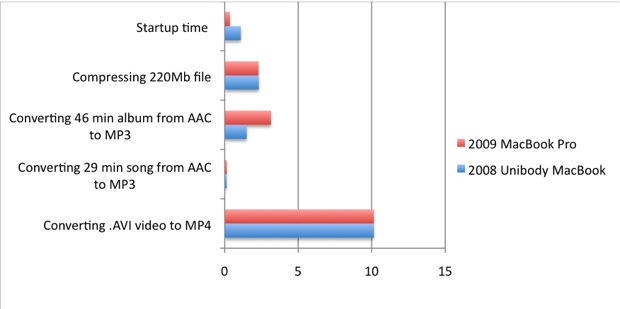
Benchmarks

2008 Unibody MacBook (2Ghz Core Duo, 2GB RAM, 160GB hard drive)
Converting .AVI video to MP4 — 10.15
Converting 29 min song from AAC to MP3 — 13 seconds
Converting 46 min album from AAC to MP3 — 1.50
Compressing 220Mb file — 2.32
Startup: 1.10

2009 MacBook Pro (2.26 Ghz Intel Core Duo, 2GB RAM, 160GB hard drive)
Converting .AVI video to MP4 — 10.15 (same!)
Converting 29 min song from AAC to MP3 — 14 seconds
Converting 46 min album from AAC to MP3 — 3.15!
Compressing 220Mb file — 2.30
Startup: 35 secs
macbook_benchmarks

Summary

9 out 10 black turtlenecks

black_turtlenecks

* The 13-inch MacBook Pro truly deserves its “Pro” label. But it’s priced at a “consumer” level.
* It’s cheap, but not cheap junk like a Netbook.
* It is fast, capable, and a ton of fun to drive.
* Battery life is amazing.
Apple link: 2009 MacBook Pro 13-inch.

Get the MBP 13″ at the lowest price from DealNews.

More MacBook Pro Porn:

macbook_pro_13_15

macbook_pro_13_02

macbook_pro_13_06

macbook_pro_13_07

macbook_pro_13_09

macbook_pro_13_10

macbook_pro_13_1

macbook_pro_13_11

macbook_pro_13_12

macbook_pro_13_14

macbook_pro_13_16

macbook_pro_13_17

macbook_pro_13_18

macbook_pro_13_19

macbook_pro_13_20

About the author

Leander Kahney

Leander Kahney is the editor of Cult of Mac, and author of three books about technology culture: Inside Steve’s Brain, the New York Times bestseller about Steve Jobs; Cult of Mac; and Cult of iPod. Leander has written for Wired, MacWeek, Scientific American, and The Guardian in London. Follow Leander on Twitter @lkahney and Facebook.

Email the author | Read more posts by Leander Kahney.

169 comments

    I was still hesitating as I already have a 13-inch 2008 macbook unibody
    but now it is sure that I am going to spend 1,200 bucks on this one.
    Better screen, better battery and backlit keyboard…

    Damn article…I was almost forgetting about buying one

    Cool. I’m just about to buy one. Good to hear you think it’s a great machine.

    I just got mine 2 days ago & i’m loving every minute of it! It’s fast AND it looks great. It’s even making my wife jealous. :-)

    The 13-inch MacBook (Pro) does *not* use an integrated graphics chip, ya git — it’s a dedicated Nvidia graphics chip that came out during the last refresh … Do you *really* cover the “cult” of Mac and not know that … ?!

    I bought a MacBook about 5 days before the upgrade and was lucky enough to get my money back to place an order for the pro with extra 90gb storage taking it to 250gb. I normally wouldn’t have bothered but it was cheaper and better than the MacBook even with extra space and a remote which took the wind out of my sails with my shiny new MacBook. Anyway, I digress, having looked at all the reviews on the net (all of which love the new pro) I have to say that your review was hands down the best. Thank you so much for the pictures, benchmarking and detail. A proper review, thank you. I am now more than ever, glad that I decided to wait until the week before the conference so I could upgrade.

    Clarification: The GPU is on the Nvidia-supplied motherboard, rather than the previous Intel-supplied motherboard (and sharing memory with the main RAM), so it’s not ‘integrated’ in the same sense as it was when it was using Intel’s motherboard and shite graphics chip …

    Not to bring you down, but I was also in love until I saw that Apple dropped the SATA II down to SATA I on the new 13″. Check it out in the System Profiler. (Hardware -> Serial ATA) : 1.5Gigabit. Bummer.

    Great Review, and I do really feel the same kind of attraction with my 2.53 MBP 13″! I think it’s perfect – as much as a notebook can be perfect at all, and until now. It’s the first notebook I really can have all day out without looking out for power supply. the screen is amazing. and I’m glad FW is back, and SD in. And it’s super quiet and not too warm.

    OTOH, there’s just the SATA downgrade from 3.0Gb in the unibody Macbook to 1.5Gb in the MBP. Not that it would change much, but it’s nevertheless a downgrade people care, if reading macrumors forums.

    While I hope Apple will fix this SATA thing for future SSD use, I just enjoy this MBP completely!

    I really had to laugh seeing the cat sitting on your MacBook. It was so familiar (my cat has the same habit)…

    They “the first unibody MacBooks” were simply stunning, and these just take it to the next level.

    Thanks for the review.

    docking for pro users? i saw a hacked version with a (dell) docking in my dreams .:) 2 x DVI/HDMI and esata….

    Are you sure those benchmark numbers are correct? As I read it the new MBP is barely faster for most tasks, and takes twice as long when converting from AAC to MP3?

    Yeah, the numbers are correct. That they are basically the same is not surprising because it’s more or less the same hardware with a small bump in processing power. And you’re right about the MP3 encoding — for some reason it took twice as long! I think it must have been a glitch. If I had time, I’d do it again, but I’ve got to leave on vacation in about 10 minutes. I’ll check it when I get back.

    Hello Leander,
    Thanx for this great early review! While reading your article I noticed something that I had to comment on – the quality of the 13″ LCD panel. You wrote:
    “Though the same res (1280×800), the improved backlit LED display has a 60% better color gamut than the previous screen. It’s the SAME primo screen used in the 15-inch MBP, but the 13” is a lot cheaper”

    I definitely agree that the panel is better than the Macbook Unibody but saying that the 13″ and 15″ are the same is incorrect. Apple announced that the MBP did get a better LCD panel with 60% improvement, but never actually said that it was the 13″ that got it.

    I went to an Apple store this week and kindly asked the staff to line up the laptops: Macbook, MBP 13″ and MBP 15″ next to each other.

    I can tell you that the LCD panels are NOT the same on the new 13″ and 15″ MBP. The brightness, contrast and “whites” are a lot different on these two models. The 13″ was darker even though brightness was set to full and the “whites” were sort of an “off-white”. Something in between white and yellow. Both laptops were connected to AC power so it wasn’t question of power saving features.

    I’m just wondering if you noticed the same thing? And what your opinion is?

    Regards,
    Zvon

    Please pardon me being a total mac idiot, but what are the advantages that the 13″ pro has over the regular white macbook that justifies the price increase?

    Cheers

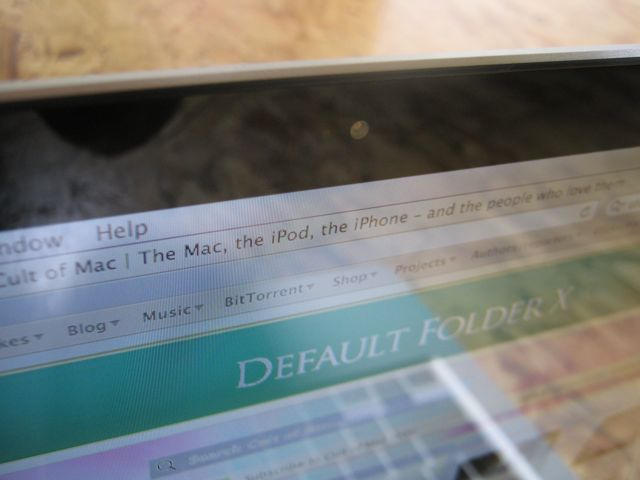
    As evident in the very nice pictures that are posted, the glare on this display is something I could not live with. Until Apple reverts back to an anti-glare (matte) display option for the 13 or 15.4″ MBPs, I will not be upgrading my 3-yr-old MBP (2.33 Core2Duo). As a developer, glare is very distracting when trying to read text/code. I can hardly read the web pages on the displays in the pictures above because of all of the glare.

    Great review, Leander, MacBook Pro 13″ is sure a killer notebook!! :)
    Is it maybe that the double MP3 encoding time because of the SATA downgrade from 3 Gb to 1.5 Gb?
    Aside of SATA and Audio In/Out “downgrade”, are there any other things that are missing from unibody MacBook to MacBook Pro 13″ as you know?

    I am interested in purchasing the 13in and dropping in a 500GB HD.

    I understand that you need a screwdriver to take the back off now, but–once the back is open–is the hard drive as easy to replace as on the previous unibody Macbooks/MacbookPros?

    Damn those screens are glossy! I am dying to buy a new laptop but just cant tolerate massive reflections. My iBook cant last forver. Come on Apple!

    Regarding, frontrow since it looks like the remote infrared port is missing in the new mbp. Do these remotes go away. I have a usb attachment from macally anyway, but was wondering if those who have been using the built in port will miss it in the new mbp?

    Ok Someone help me out…I am loving this new MacBook Pro 13″ but with the price drop on the MacBook Air…..makes it very tempting.

    Which way should I go?

    Macbook Pro 13″ or MacBook Air?

    The graphics on the 13 inch (and some 15 inch models) ARE integrated.

    There are two types of gfx systems: “discrete” meaning a separate card on a desktop and “integrated” meaning built onto the motherboard.

    With a notebook the distinctions are slightly blurred because either way the gfx are built onto the main board. But the NVidia 9400 is an integrated chipset. It’s just a very fast integrated chipset. I’m sure that’s why Apple switched. 9400 is cheap AND fast.

    IMHO it’s best to check facts before calling someone a git.

    Ex2bot
    Mac fanbot with built-in discrete gfx

    Replaced my 3-year-old CD 1.83 white MB with a refurb 2.4GHz UMB a few months back. It shipped with 4GB of RAM when it said it had 2, so that was a nice bonus.

    It has the AU Optronics B133EW04 V0 screen, which was supposedly one of the better screens for the MB’s, but a trip to the Apple store to see the new MBP’s showed that the new screens are better. They have better viewing angles and are consistent when viewing blacks across the screen. The new screen is the number one reason I would upgrade so soon.

    The downgrade to 1.5 SATA Gigabit from 3 Gigabit SATA has me scratching my head. I want to see how this shakes out first as I’ve installed an Intel X25-M SSD and don’t want to lose any advantage it brings to my MB.

    The SD card slot is a nice edition, although only one of my cameras uses SD, so I still need a reader for my CF cards. For a “Pro Level” machine there are still many cameras that use CF cards. The ability to make a boot drive off an SD card is a potential “save the day” option.

    The return of FW is welcomed, but in my case not a deal breaker that stopped me from getting the UMB.

    If I could replace the screen in my UMB with one used in the new MPB’s for the same amount of money I’d lose in selling my UMB, I would be really tempted to go that route.

    Longer battery life is nice but in the three years I owned my Polycarb MB I never ran into battery time issues with that machine.

    Too bad the MPB was not the machine they released the first time around — with 3 Gigabit SATA, of course.

    FYI, the lower-end 15 MBP only has the NVIDIA GeForce 9400M graphics. That machine lost the 9600M GT.

    [...] via Review: 2009 MacBook Pro 13-Inch Is Freakin Awesome | Cult of Mac [...]

    I bought 2 weeks ago a 2008 Unibody macbook and it’s so sexy. My first mac btw. I didn’t feel screwed by apple with the new macbook.

    Jim, you better wait for Apple to respond on the SATA I problem – at the moment a lot of SSD users can’t even install Mac OS X. Don’t know if it affects the Intel SSDs though.

    you got a type ;-) I think:

    “There are also complaints about the price: $1,200 is not the cheapest laptop. But it is one of the cheapest quality laptops. My brother bought an $800 Asus last year at the same time as I bought my unibody MacBook. His Asus has fallen to pieces, and now he’s inheriting my old machine.”

    I believe it should say it isn’t one of the cheapest quality laptops, atleast mine doesn’t feel cheap :P

    WOo!!! I can’t wait until September when Snow Leopard gets released. Then i’ll make the move and buy An MBP before Sept 8 with a free Itouch. All these goodies and not enough money to purchase them! Apple makes me happy every June and September. =)

    Thank you for giving such a spectacular review. I hope most buyers of the MacBook see it as you do, so I don’t have to listen to haters squawking about too much money for a weak upgrade. I think upping battery life on a portable computer is a very great upgrade. Much more useful than extra USB port or a fingerprint reader. And a battery that’s longer than the average computer lifespan is fantastic.

    One of the first things I did when I got a MacBook Pro 2.33 C2D was to get an SDHC adapter to go into the Express 34 slot. So I’d prefer getting a built-in SDHC slot than an Express 34 slot. I don’t see much of a loss there.

    I hope you enjoy your MacBook for many years. Those unibody Macs are a designer’s dream. I just don’t know why Wall Street is so down on a company that builds excellent quality products just because they’re not as cheap as some Dell or Acer.

    I just came home with a 17 MBP yesterday. I would have bought the old model, but they were only discounting it $200.

    I love it, but I hate it….. The trackpad is the problem. I live in Texas (along with those Dell hicks!). It’s humid here. It’s virtually impossible to glide across this sticky little glass trackpad unless you keep the A/C down to 72. Anyone else have this problem or a solution?

    Also, I don’t like the “whole trackpad is a button”. I can’t seem to click accurately with it. Every time I try to click, the pointer moves.

    Otherwise, WOW. This machine is absolutely stunning. The batter life is amazing (9 hrs doing light surfing). The build quality is unreal. These machines are just amazing.

    [...] UPDATE: The security lock on this device does not block the SuperDrive. See our review [...]

    [...] UPDATE: The shield lock on that device does not block the SuperDrive. See our review [...]

    Leander originally wrote, “Of course, the MBP 13” has integrated graphics, and doesn’t rock a dedicated graphics card like the 15- and 17-inch MBPs.”

    And ex2bot wrote, “The graphics on the 13 inch (and some 15 inch models) ARE integrated.”

    The graphics card are integrated in that they aren’t separate (user replaceable) gfx cards. But both the MBP 13″ and the 2.53 Mhz 15″ models have a dedicated NVIDIA 9400M processor, and the faster 15″ models (as well as the 17″) also an additional NVIDIA 9600M processor. None of the MPBs (nor the white MB) use the intel CPU integrated graphics processor anymore (which was much slower).

    Git or not, readers should always verify the technical specs on Apple’s web site.

    Replaced my trusty 5 year old G4 iMac 17″ with a 13 inch MacBook Pro on Friday, and am just thrilled. This little laptop has everything I have ever wanted in a computer, and made it worth the wait. I had been sitting on the fence for months about getting a MacBook, but decided to wait until WWDC, and am so happy I did.

    What an amazing value for the money.

    [...] testers are experiencing up to 8 hours of battery life (Apple claims 7!)! This is huge: There’s a lot to love about the MBP 13”, but the best thing is the new built-in battery. This battery lasts [...]

    “trailing even hick Texas companies like Dell”

    Hick, huh? LOOK you elitist mocha drinkin son of a bitch. just because your pimple-poppin, sister-kissing, WoW playin with half a hot pocket hanging outa your mouth tail is too threatened by the testosterone down here in Texas, doeasn’t mean you have the right to insult us. Get your nose out of the air and slide your pipe out of your ass and don’t talk down to people different from you.

    This a website for Mac lovers everywhere. Texan, New Yorker, Canadian, San Franciscan, etc. Doesn’t matter. Don’t hate.

    “That may sting those who coughed up for the pricier machines: there’s little to show they dropped the extra scratch.”

    The 17″ is a far superior laptop than the 13″ for these 2 simple reasons: 1) 5 more inches of screen real estate, and a true high definition screen. Not to mention an express card slot. Need a couple extra USB connections? Solved.

    CORRECTION:

    4 more inches, not 5 more inches.

    So I bought a new Macbook unibody 2008 about 22 days before the new MBP came out, but God was looking out for a poor soul like me b/c the first one I got was a bad egg. Coming from using PC’s I was terrified and took it back a week later and traded it for another Macbook. Thankfully I did that b/c tho the 2nd one worked beautifully it put me in the 14 day return window when the new MBP came out. So 13 days after I got the 2nd macbook I returned it and exchanged it for a MBP and walked out the store skipping with $200 of my money back in hand. Thank goodness that that first macbook was a bad one b/c then I would never know the joy of my MBP. So much more for a cheaper price….awesome!

    Beautiful machines, but these damn mirror display keep me away from buying one.

    Just recieved mine this morning first thought screen to small but i was wrong to judge screen resolution is beautiful and it is very fast aswell im loving macs at the moment
    it is my first time buying any sort of mac and I am right to leave the pc now I am a Mac user!

    Same here Tice. I WONT buy Apple until they give me a matte screen option. I’ll switch back to windoze before I buy a laptop with a mirror.

    One thing I haven’t seen in reviews of the 13″ Macbook Pro is that I believe this is finally the machine that old 12″ Powerbook G4 owners who were holding out for: a truly professional machine with a small screen. 12″ G4 owners were a prickly bunch and some are still holding onto their machines (they do run Leopard). The 12″ PB G4 had great dedicated graphics, a small footprint (10.9×8.6″) and 1.18″ thick, superdrive, FW400, and rated 5 hour battery life.

    The new 13″ MBP is wider by nearly 2 inches but considering that the old 12″ variety was a 4:3 screen and the new one is a widescreen, this is understandable. The MBP is thinner (.095″) and lighter (4.5 lbs vs. 4.6 lbs). The MBP doesn’t have dedicated graphics but I think its safe to say that the MBP’s graphics run rings around the older Nvidia Go5200. Not to mention that the larger G4s of the day used a more powerful ATI 9700 chipset anyway, much like now.

    The new MBP loses the old modem (not needed) and gains gigabit Ethernet. The bigger deals are that you get 802.11n wireless, a battery that lasts for 7 hours in the field, and FW800 versus the older Macbook’s no Firewire at all (unacceptable for the Pro customers). With a modern Intel chipset and Snow Leopard ready, this is new Pro machine for the small laptop customer…no excuses.

    “That may sting those who coughed up for the pricier machines: there’s little to show they dropped the extra scratch.”

    Yeah, there’s only the size of the screen: the MOST VISIBLE CHARACTERISTIC OF A LAPTOP.

    Rick, there is one excellent excuse and its call MATTE. Not EVERYONE likes glossy. As a 20 year Mac user, my time with Apple will be over once my iBook dies (assuming Apple STILL fails to offer a matte 13″ notebook).

    I am not going to be forced by Apple to buy a glossy screen. The color accuracy I require simply cannot be done on glossy screens.

    Hey FANBOY ! you said :”It’s cheap, but not cheap junk like a Netbook.”
    don’t be so blind and foolish, the samsung NC10 is of excellent quality and it costs $ 400…better than the stupid cheapo white macbook and half the price…I have both…

    Ah, this review kind of makes me sad :(

    I spent months convincing my father to purchase me a Mac and finally got my 13″ Unibody at the end of May. Just over a week later, the upgrade comes out! Ah well, it’s still a beautiful machine.

    “My brother bought an $800 Asus last year at the same time as I bought my unibody MacBook. His Asus has fallen to pieces, and now he’s inheriting my old machine.”

    Priceless.

    BTW, how in the hell do you afford to upgrade every time Apple releases a new set of Macs/iPhones/iPods? Do you get paid that much for blogging here? If so, sign me up. =D

    [...] life is reserved for iPods and mobile phones, not laptops,” gushed Leander Kahney in Wired’s Cult of Mac. “Who cares if the battery is sealed [...]

    Has anyone tried one of the anti-glare films with their glossy screens? I do not like the glossy screens but would consider buying a MBP if this can be solved for less than $30. E.g.

    http://media.macworld.com/media/vodcast/mwvodcast103.mp4

    welcome Chris!!
    and thanks to everyone for this amazing comments that really convinced me about getting my own MiniMacbookPro..
    Blessings!

    Dude, was the Texas comment really necessary? You can criticize Dell all day if you want, and you won’t hear any complaints from me, but c’mon. And for what it’s worth, Apple has a very large presence here in the Lone Star State.

    Hi Leander – just wondering how loud/clear the speakers are on the new model? I have an older MacBook and I’ve never been that impressed with the sound from it.

    Cheers.

    Texas people, get over it. Even if you doubled the size of your state, it would still be #2.

    Everyone else – I’m a 12″ Powerbook user, and I’ve been holding out for a long time or Apple to make a suitable replacement. I think this 13″ Macbook Pro is it. I’m not crazy about the screen format (I prefer the 4:3 style), and I HATE that it is a glossy screen (HATE, HATE, HATE it). However, I don’t think Apple is going to come out with a matte screen – and I’ve given up on them listening to their users with respect to what they want. If Snow Leopard would run on my 12″ PB, I’d keep on using it. However, one can only hang on to the past for so long. I think the inability to watch Netflix movies on-line (non-intel) and the inability to run Snow Leopard are going to put an end to my use of this machine. I’ve made arrangements to sell it for $350. I’ll put that money toward a new machine.

    Eye:

    Amen brother. To add to your comment. last time I checked, Texas is one the very few states not dying right now in the recession.

    Bob Jones:

    It was an insulting remark that was completely out of place in a Mac review for pete’s sake. The author went out of his way to jab southern folks. Not cool at all.

    Why hasn’t Apple given the 13″ and 15″ MacBook Pro the option to have a non glossy screen (like you can with a 17″)? I have 15″ MBP from the last serious with a non glossy screen… and let me let you, it makes a WORLD of difference. For me and for those standing around me when I’m trying to show them something there’s nothing better than a non glossy screen to deliver crisp picture at any viewing angle. The glossy screens are nothing short of awful. It’s a deal breaker for me until they give every MBP the feature of every other size MBP.

    finally, someone who isn’t whining about the “limited functionality” of having an sd card slot and whining about losing the expresscard slot that very few people ever used.

    OK, got my 13″ MBP today. Freakin’ awesome. The colors are amazing, the fit and finish is superb. Runs beautifully except for a couple of hangs in Sys Prefs. Gonna have to get used to the touchpad.

    My iBook was stolen and a desperately needed af new Mac, so I bought the unibody MacBook only a week before they revealed the MBP :-(

    I picked up a refurbished 2.4 GHz UMB about 6 weeks before the new 13″ MBP was announced. I love my MacBook and I’m happy to see Apple take what I thought was already a perfect machine and make it even better.

    I’m not disappointed that I didn’t wait, though I might have been a little irritated had I paid $1600 instead of $1300 refurbished. I spent $200 upgrading the HD (320 GB 7200 rpm) and RAM (4 GB), which puts me at about the price of the new 2.53 GHz model but with a faster/larger HD and a 250 GB external HD (the old one in a portable case). I’m OK with that since I never use FireWire and don’t have any cameras which use SD. The only thing I would really like is the longer running battery, but it’s not like I’m often hitting the limits of this 5 hour battery.

    One thing I would not like is having the Kensington lock on the other side. That would be very awkward on my desk. Minor complaint, but if you’re short on desk space you will want all of your connections on one side for desktop use.

    I think this review over plays the upgrade a bit, particularly the “professional” angle. My UMB replaced one Mac and two PCs and is now my sole work machine for software and database development on Mac OS and WinXP (via Fusion), as well as for my hobby, digital photography. It makes me plenty of money. Trust me, it’s a “professional” machine.

    This review also lists some UMB feature firsts as if they were MBP feature firsts. But I’m nitpicking…

    Regarding an earlier post: “It’s humid here. It’s virtually impossible to glide across this sticky little glass trackpad unless you keep the A/C down to 72. Anyone else have this problem or a solution?”

    I notice the difference when my hands are sweaty, but it doesn’t make the pad unusable. Don’t take this the wrong way, but does washing your hands in cold water help? It did for me when I was working in a client’s warm home office one day.

    “Also, I don’t like the “whole trackpad is a button”. I can’t seem to click accurately with it. Every time I try to click, the pointer moves.”

    Use tap click. Or use the bottom just as if a button was there. On my old HP laptop I would sometimes move the cursor with my right hand while clicking with my left. I do this on the UMB as well and if one finger is already controlling the cursor, clicking with another at the bottom of the pad does not affect the position.

    Oh yes, on the topic of glossy screens: I was really worried about this until I actually got my UMB and tried it out. Photographs of notebooks show reflections you don’t actually see or notice that much head on in real use. Plus the LED back lighting over powers reflections that rendered the matte screen on my HP laptop useless. I consider this an excellent screen and the MBP screen is even better.

    I picked up the new 13″ unibody MBP from the local Apple store the 2nd day they were out. I had previously owned the fall 2008 unibody MB and I agree with Leander’s review 100%. This machine is awesome! I love the integrated battery, not only for the longer battery life, but because there is no longer a loose hinge or the rattling battery compartment cover. The loose battery bay cover was incessantly annoying because it rattled every time I put it down on a table. It could have been a fluke, but the quality is definitely better this time around, considering my late 2008 unibody came out of the box with a dent on the palmrest and a slightly tilted/misaligned screen lid.

    Isn’t Dell based in Austin, TX. Austin?!?! http://www.theonion.com/content/news/texas_constructs_u_s_border_wall?utm_source=onion_rss_daily

    “The final section of the barricade, a reinforced concrete enclosure containing the city of Austin, will be finished by August 2009.”

    Austin is probably more liberal than most of New England, it barely qualifies as hick. SxSW happens every year along with every other indie hispter schloozefest.

    I live in New York just so you know.

    Could kill for a unibody!

    I took delivery of the previous uniblock 13″ Macbook on Friday the 5th…JUST 5 DAYS BEFORE THE NEW ONE CAME OUT!!! But, my brother said to call Apple about an exchange. Though they don’t exchange computers, I did get to return it and get an almost full refund (small restocking fee). Now, I’m counting the minutes until I get the new one. Apple to the rescue!

    Great review – thank you. I have a late 2006 15 in MacBook Pro and it’s time for an upgrade. The new 13 in has really caught my eye primarily for the sake of portability – lighter and added battery life. The extra storage and the added SD slot make my current 15 in MBP look like a dinosaur – twice as many features and half the cost of what I paid in 2006! My main concern is the downsizing my screen real estate from 15 to 13 and the SATA down grade but I don’t think either will be a deal breaker for me.

    Nice review, thanks. I’m considering getting the same computer. I had to replace my white Macbook due to the reflections and low screen brightness. I considered getting the 15″ Macbook Pro with matte display when that was an option, but couldn’t justify the extra cost, so picked up a Thinkpad instead. However, I would like to get back to OS X and wonder if the new 13″ MBP with its brighter display would make it usable under very brightly lit conditions despite the ultra-reflective surface. If there any 13″ MBP owners using your machines next to large windows, how do you find the screen under such conditions?

    “There are also complaints about the price: $1,200 is not the cheapest laptop. But it is one of the cheapest quality laptops.”

    I think you meant to say that it is “not one of the cheapest quality laptops.” Unless I’m reading it wrong.

    Waiting with bated breath for my new Macbook Pro 13″ to arrive. Thanks for the review. Firewire had been the deal breaker in the past. Now, Apple has gone beyond my expectations. No holding back anymore. Just hopeful, the Mac doesn’t arrive with scratches and tilted screen, not that I doubt them. You see, I live all the way down in KL, Malaysia, and delivery takes, at least, 2 full weeks.

    Looks good but the glossy display is so bugging! Hanging on until they get it just right for me. Will stick with my super slow to boot 5 year old 15″ Powerbook G4 until they sort that out..

    I think that higher/same times in aac mp3 and mp4 conversions were due to the SATA downgrade. It would be interesting to benchmark an MBP 13″ with the new firmware unleashing the full power of its HD

    I am confused as to why you are under the impression that $1200 is a STARTER laptop. Seems pretty expensive to me. Nothing breakthrough here…. moving right along.

    “Pro” should be reserved AT LEAST for a discrete graphics card. This is incapable of playing any decent games or rendering graphics… so it should not be called a Pro. They are diluting the line.

    As well… almost nothing has changed since the late 2008 model. You are just figuring out now that it is a good laptop??

    Don’t quit your day job.

    Excellent Review… great Product..

    can we run windows xp or vista in mac pro?

    does it support windows files? could somebody plz suggest me..

    [...] Acá les dejo un review sobre este equipo (aunque es de la versión con procesador de 2.26 GHz): http://cultofmac.com/review-2009-mac…-awesome/11850 [...]

    I’m wondering about the wireless speed of the MBP 13.

    I’ve got a 2Ghz Core Duo white MacBook and despite the fact that the wrist pad has been replaced 3 times and the battery has been replaced once under warranty, it’s been a pretty good machine. The one thing that stands out (besides the exhaust fan that jumps to warp when you watch YouTube) is the Wi-Fi reception, which is absolutely amazing.

    Does the MBP 13 have similar reception?

    Hey, can anyone tell me how much the SATA downgrade effects the MBP, in terms of speed? Thanks.

    Which one should I buy?
    The highest model of 13″ Macbook Pro or the lowest model of 15″ Macbook Pro?

    Anybody please give me your advise…

    Thank you.

    Bursabaju.com
    Indonesia

    If you can stretch the extra price, get the 15′. It gives you more viewing space, and it has better speakers. The 15′ also has seperate audio in/out and headphone jacks, while the 13′ only has one jack for both. As a musician, this is annoying because i prefer to be able to record and use headphones at the same time. Ive also heared that the 15′ gets better average battery life, and the screen is better and more vibrant. Im not sure if this is all true, however. Can anyone clarify this? Other than that, they are basically the same.
    The only downside is that its about 500 Grams heavier, and therefore harder to take around.

    TBR; Well the single jack on the 13′ works both in/out simultaneously, great for using Skype etc. When using Apple’s headphones for the iPhone you can also control iTunes like you control music on the iPhone.
    I’m sure a third-party developer will make an adapter so you can use non-Apple mics and headsets simultaneously.

    Author: This should be updated.

    “One downside is the audio ports have been combined into one. The single jack now handles both audio in and audio out. So no recording and headphones at the same time. And while it supports both analog and digital out, there’s only analog in—no digital in. however, there’s lots of inexpensive USB audio adapters on the market.”

    Like Dave, I am still at a loss to which MacBook Pro to purchase; the high end 13 inch or low end 15 inch. It’s a REALLY tough choice for me to make! I’ve been spending hours in store but still can’t decide!! It’s my first Mac and want a great experience. Hmm, decisions desicions…

    13 VS 15
    Obvious things like Screen size and cost aside..

    Spoke to Apple sales person today. he said the 13″ is just a slight upgrade from the UMB, and doesn’t understand himself how they can call it a macbook pro.
    I’m looking at purchasing a Macbook Pro for producing music, so i’m sure the 13 ” will be fine, as graphics aren’t such a big issue for me.
    Currently I have the late 2006 15 MacBook Pro, but tempted by this 13 MBP, and starting to think i’m getting sucked into Apple’s incredibly clever hype machine, so could do with some clear and objective advise.

    Could someone clarify clearly, as it has been quite confusing reading through the post, if the 13 and the lowest 15, have the same graphics set up, in that they both use intel’s memory?? I’m a bit confused on this point.

    Also important to remember that the hard drive is now serial I, and not II.
    I’m thinking if i get the 13 MBP, i would upgrade the hard drive from an external party..besides effecting my warranty, are there any other technical issues i should be aware of doing this?
    Is it possible to purchase a sata hard drive to replace the 160gb that comes with it, say on ebay for example?

    Also, does anyone know how this 13″ would compare in all technical aspects to last years lowest 15″ MBP?

    Would really appreciate some advice on whether the 13 MBP, is professional enough to record using Logic, and how it compares in performance to the current lowest end 15 MBP, as well as the late 2006 MBP 2.16 15″

    Any responses would be greatly appreciated

    Confused London

    Charlie,

    The SATA issue has been resolved by Apple.

    I myself am currently deciding what laptop to buy, the high-end 13 or low-end with upgraded ram and hd. Or a windows machine, i’ve never owned a Mac before.
    I still am unsure whether i want to spend 1400 euro (nearly 2000 usd) on a laptop, i mean, it’s just a luxury device, and i’m still a student. I have the money for it, but am not entirely sure it’s worth it.

    Charlie,

    I think that the higher spec 13″ will be plenty for your needs. Keep in mind, though that it doesn’t have a digital input, so you’ll need to use USB or Firewire, which you probably do anyway.

    Go to: http://forums.macrumors.com/forumdisplay.php?s=2637603e0982c60b1282c775df0926de&f=90 and you’ll find lots of answers to your questions, or can post your specifics.

    One more – Charlie here is a geekbench chart with some of the MB Pro models:
    http://cache.gawker.com/assets/images/gizmodo/2009/06/geekbenchnew.jpg

    [img]http://cache.gawker.com/assets/images/gizmodo/2009/06/geekbenchnew.jpg[/img]

    I have bought the Macbook pro 13″ 2.53Ghz Saturday, and am now trying to get used to using Mac instead of Windows. It’s quite different, but i like it already.
    The batterylife is indeed awesome, my sister was using her laptop as well, she constantly needed to plug in the powercable, as for me i just used it for a day, without recharging.
    Once Snow Leopard is released i will receive it for free, great service!

    I would recommend it to anyone that’s looking for a great laptop that’s great looking, portable, fast and easy to use.

    This review contributed to my buying decision btw.

    Planning to buy MBP 13,but what games can I play with Nvidia 9400..??
    COD 5..? GTA..?

    whatever on the texas hick company comment… typical arrogant apple-centered, loser comment…. prob never even been to texas let alone austin.. loser.

    MAcBook Pro is sooooooooooooooooooooooooooooooooooooooooooooooooooooooooooooooooooooooooooooooooooooooooooooooooooooooooooooooooooooooooooooooooooooooooooooooooooooooooooo good!

    Awesome review and comments everyone!

    I want a MacBook Pro for video editing with preferably Final Cut Pro, not Express. So I am really in doubt if the 9400M GeForce would be enough or if I should better get the one with the additional 9600 GT?

    I would so much want the smallest, lighter 13″ but it doesn’t have the 9600 GT.

    Since I never play games, apart from Second Life once every 3 month, I am not aware if the 9400M would be absolutely enough for Final Cut, oh and on 13″ I can’t install FCPro, does anyone know if FCPro can be installed on the 15″ or only the Express versions would work?

    Also I am wondering how much better are the Solid State Drives…?

    The 3.06GHz that one can order with the 15″ is also something I’d wish the 13″ would have as option…

    Last but not least, I join the glare haters, is there a chance Apple will come out with a matte version in a month or two? Did they ever do that?

    PS. hope you had a great vacation Leander, where did u go?

    I’m glad you love your MBP! I got mine as an anniversary present, I enjoy every second I’m with it! This machine has converted me fully to Mac, I hardly ever touch my pc now.

    Hey Leander, thanks for the great review. I’m actually trying to decide on what laptop I should be getting, and I need your help. I think I’ve already decided to get a Macbook Pro, but I really have no idea which size I should be looking for. The 17″, I assume, would be a little too heavy, so I guess what I’m trying to say is that I need to know the differences between the 13″ and the 15″. Price considered, which laptop do you recommend? I’ve been hearing that there do exist differences between the two MBP’s.

    Bought a 13″ MacBook Pro after 20 years with a PC. It’s really hard work to make the change and Mac makes some easy PC tasks so difficult (and yes some things are better).

    The quality of the Mac seems 1st class; very robust feel. Battery life seems great.

    My only issues (besides betting used to a Mac) are:

    - 2 USBs is 2 too few. I use 4 every day at the same time.
    - The 2 USB’s are too close together, so if I want to use my 3G dongle (essential) then the dongle covers part of the other USB slot making it redundant.
    - I now need to carry a bag of spare cables because connectivity is so poor; VGA & AVI adapter, male/female USB so I can connect my 3G, USB port replicator so I can use a keyboard, mouse and memory stick.
    - I don’t need an optical drive built in; it wastes space and once the machine is set up will hardly every be used. Apple should get rid of it and give me 2 more USBs, a dedicated VGA, AVI and CF card reader for my SLR.
    - Give me a home, end and delete button to make it easier to migrate form a PC.
    - it’s fine not to have touch pad buttons, but make the top of the touch pad clickable.
    - Sell me a docking station / port replicator so at home I can connect all my cables in a second.
    - Tried the Mac office but it’s very inferior to Office ‘07 Ultimate on my PC.
    - Tried Parallels but wouldn’t let me load Office (XP was fine however!). Fusion was okay though. But the image quality when running Fusion is not as good as my old PC and certain functions, like ‘ctrl v’ often doesn’t let me paste, I can’t select multiple rows in Excel by holding the Ctrl key.

    So, if I were a Mac user I’d love it. As a PC user, I have 5 days to decide whether to keep it or reject it and buy another PC, and it’s 50:50 so far.

    Apple, if do the above small changes you’ll get millions of people off PCs far quicker than you are doing today.

    Aww Man! I also can’t tell you enough about how much I love my MBP 13 Inch! The thin profile, glossy display, back-lit KB, power and speed, they all are beautifully mixed together! I for one is a very happy camper! :)

    I had an accident with my original 13inch white macbook. and now that it’s time to go back to school soon, I’ll be ordering my new 13inch pro within a week or so.. I absolutely loved the white one, but i figured it was time to upgrade a bit and i’m just psyched that it comes at such a good price… Just waiting now for the day i can order it =)

    I’ve had my MacBook Pro for about 5 days now; I’m extremely impressed with the build quality. Migrated from a white MacBook, which felt kind of cheap, and was a pain to keep clean. After the palm rest started cracking (which was replaced by Apple Care), I sold it and upgraded to this machine.

    I love it. Absolutely phenomenal. However, as soon as I got it, I installed Snow Leopard (the latest build, 10A421a); the speed is unbelievable. The whole OS is so responsive; I can join a wireless network within 2 seconds (literally instant), Finder is incredibly fast, it comes out of sleep INSTANTLY, and I can reboot the OS in less than 30 seconds, starting at clicking “Restart”.

    I love love love love it. I can’t see how the average user would settle for anything less.

    I came here to read this review since I am considering making the switch from PC to a Macbook. However, I leave insulted. Whatever feelings you may have about the state of Texas does not justify insulting readers who are proud to be from the state, not to mention insulting a company that seems to have done amazingly well for being “a hick Texas company”. Really, what makes Dell a hick company? The fact that it’s based in Texas? Funny considering it’s based near Austin, Texas, the most progressive city in the state, not to mention Austin is the hub for a number of major technology companies. There really is no need to insult an entire group of people just to prove your point about one company.

    By the way, the name Leander is also the name of a town not too far from Austin. I wonder if that makes you hick.

    I just got my new MacBook Pro on Monday, and I must say it is just plain awesome.
    Apple has packed a top of the line processor, 4 gigs of uber-fast memory, an excellent GPU, and the best LCD I’ve ever seen, into a notebook that is just a little thicker and heavier than the display on my old Dell Inspiron 1501. And that’s not to mention the backlit keyboard, superdrive, webcam, auto display/keyboard brightness, huge multi-touch trackpad, firewire, SDHC reader, every type of networking I’ve ever heard of (WiFi, Bluetooth, IR, Ethernet, FireWire), and the world’s best operating system, Mac OS 10.5.

    I hope to get at least 5 years of use out of this machine, and it seems tough enough to survive at least that long. The aluminum unibody is very solid and feels like it could take a serious hit before if would be damaged. I bought an Incase sleeve as well, so that it will have even more protection.

    I have installed Adobe CS4 Master Collection, Aperture and Final Cut Pro. All of them run great, with no lag and under 5 second start-up time. I have yet to do any serious video editing (just a few test runs), but it looks like there will be much less lag (if there’s any at all!) than on my 2006 iMac 17″. The machine it’s self boots in 30.58 seconds exactly; something I thought was only possible with an SSD. The battery seems to last about 3.8-4.5 hours, when I am working with 3D models, browsing the web, playing with Google Earth, and listening to music. It lasts about 3.5 hours when playing DVDs. One thing no one mentions, is the battery charge time. It charges completely in about 1.5-2 hours, even while your using the computer. 802.11n is great. It seems a lot faster than g, when used with an n router. As of yet, the only thing that took a while to do was when I synchronized my iPod touch for the first time. It took forever to transfer all my apps and songs, then it took forever again to back it up. I expect that was a one time only ordeal.

    Anyway, this is a great computer. It is my 5th laptop and first Apple laptop. I have used other people’s old MacBooks and MacBook Pros, though, and this one beats them all into the dust. As for my Inspiron 1501, well, this makes it look like a piece a trash I pulled out of the city dump…! Even my iMac doesn’t compare; the display is not as good, and it certainly isn’t as fast.

    Comment on the “hick Texas company” thing: Ok, so we all know Dell isn’t nearly as good as Apple, but they aren’t that bad. My Inspiron might not have been the best computer of its time, but it did last 4 years and is still going strong. And I have a 8 year old Latitude that still works great too. Also, I live in Texas (don’t worry, I’m not offended!) but, I’m sure some people will be!

    Final word: if you have the money, BUY A MACBOOK PRO!

    @Charlie
    The specs are exactly the same on everything, except the screen, in the high end MBP 13″, and the low end 15″. Graphics, processor, memory(1066MHz), front side bus(1066MHz), and hard drive. Also, you can easily replace the hard drive with any 2.5″ disk drive or SSD, as far as I know. I have talked to people who have done so, anyway.
    I personally decided on the 13″, so as to be more portable. And it is really easy to carry a 13″ laptop around rather than a 15″ one. And, as I said, you have to buy the 2.66Ghz model MBP to upgrade the hardware. The 9400M GPU is very powerful by it’s self. I am not a gamer, so I don’t know how it preforms with serious games, but it runs Google Earth at maximum settings without lag. It also plays HD video full screen without a glitch, so it does everything I want.

    Hope that info helps!

    I’ve had mine for about a month, and I absolutely love it. The TrackPad is a joy to use. I need to have multiple Word and Excel files open simultaneously, and it’s a breeze with the TrackPad and Spaces. Syncs with my iPhone and iPod are unnervingly fast. I bought MS Office for it, and it works perfectly fine for my simple needs.

    I have had my new macbook pro 13, 2.53 ghz for about a week. I am pissed to find that watching movies on this really sucks lag, spinning beachball of death at almost every video I play either from hard drive or dvd. Its hard to find an honest review of products these days. No mention of hard-drive clicking ect. As far as your “hick texas” comment I was born in Texas haven’t lived their for more than 40 years but you comment leaves me hoping that you never have to pass through or you way to “elitist land” for fear that someone down there will put some south in your mouth. Nothing like beating the breaks off some smart mouth to be him back in check.

    Can anybody help me with advice? In two months I’ll be leaving on an extended trip to the Gambia (1 year, maybe more). I know that the compound I’ll be staying on does not have wireless connection. Is there any device that I could get (something likeUSB key – I think I have seen it somewhere) that I can purchase & use it as a router? Or, any other suggestion?
    Thanks for your help

    Wow, do texans have a sense of humor? It was a playful jab at a rival company. Yes, you’re proud of your state, that’s fantastic, but there is a difference between taking a jab at you and taking a jab at a company. Did he say everybody and everything in texas sucks? No.

    Yes, dell is an ok company, some of their computers last quite a while but in my experience when I have a problem with a dell they don’t do too much to help, but when I have a mac problem, apple bends over backwards.

    I’ve lived in MANY states around this country and every state has another state it makes fun of in good humor. In Ohio, it’s West Virginia; In Minnesota, it’s Iowa: In Georgia, it’s Alabama; In South Dakota, it’s North Dakota; In North Dakota it’s well….North Dakota. Not really sure which one makes fun of Texas, but if you guys are THIS sensitive about it, I guess I see why the surrounding states can’t have any fun with you guys.

    Grow a funny bone folks.

    Ok, Now that I’ve probably pissed off all the texans (though it wasn’t my intention), I’m looking for some advice from the rest of you.

    I currently have a 13″ MB 2.0Ghz circa 2006. Well, I’m CONSTANTLY getting the ol’ “I don’t want to wake up after I go to sleep” problem (taking it to the apple store tonight), so I’m thinking of selling it on ebay. But I was looking at my new 13″ macbook options and I’m torn! Which one of these should I get?!

    Unibody 2008 Macbook
    2.4Ghz, 2GB of RAM, 250GB HDD
    $1000

    Or the

    2009 Macbook Pro
    2.26 Ghz, 2GB of RAM, 160GB HDD
    $1200

    What do you guys think? Is it worth an extra $200 to get a slower processer and less HDD space, but have a better screen and longer lasting battery?
    Having a REALLY hard time with this one. Don’t be shy ;)

    Hey, great review. My question is about the WoW framerates, as they seem much higher than what I am experiencing. On full Ultra video settings, with shadows turned all the way down, I am still only getting an average of about 20-23 fps running around Dragonblight. Mine is the standard 13″ MBP, 2GB of RAM. I’m assuming that doubling the RAM would clear it up, but should I really have to do that considering it’s a pro? Any help you can offer would be awesome!

    Sigh. The glossy screen might be a hinder to me buying. I hate the reflectiveness on the one I have now and it’s not even a glossy screen. That would irritate me I’m sure. But everything else looks so badass that I might live w/ it.

    I’m currently awaiting the arrival of my 13.3″ 2.56Ghz MBP, and cannot sleep. My 5 year old VAIO has finally died and keeps dying even after a full reformat, but to be honest I have never been that impressed with the functionality of it even though it cost £1300 initially, so I was happy to have an excuse to upgrade. Initially I was looking at PC notebooks (not VAIO!) but eventually succumbed to the influence of the Apple PR machine and it’s many unpaid zealots. I have an iPhone and find it works so well that a laptop from the same manufacturer seems to make sense.

    My only concerns are that perhaps I should have got the larger 15″ screen, but having spent a lot of time in the Apple store decided it simply wasn’t portable enough. Also, I decided to go with iWork instead of office as it was so much cheaper and I only need to do the occasional essay/presentation for work. Does anyone know if you can truly save files as .doc/.ppt/.xl files without loss of format as Apple claims?

    My delivery date is a full 2 weeks after I ordered the computer, despite being despatched within 3 days. For delivery in London this seems excessive. Are they shipped direct from China? Has anyone else had a similiar issue?

    What is Snow Leopard and will I get it free if i bought the computer so recently?

    Many thanks

    To be honest, there IS a world of difference between the 13″ MacBook (aluminum or not). The 13″, 15″ and 17″ screens are essentially the same.

    Bobloblaw,

    Apples new OS, Snow Leopard, will be close to free. It is coming out next month and will be a $10 upgrade for those who recently purchased their macs.

    BTW, Love the screen name, nice AD reference. ;)

    Now I see that Apple has released the option for matte screens on their 15″ MBPs, so I’m probably going to hold out for a while longer than I like for that option on the 13″ MBP.

    Hopefully my iBook G4, which has so faithfully served me for the last 5 and half years tolerates all the crap I throw at it.

    Oh how i HATE those glossy screens!

    [qoute]My only issues (besides betting used to a Mac) are:

    - 2 USBs is 2 too few. I use 4 every day at the same time.
    - The 2 USB’s are too close together, so if I want to use my 3G dongle (essential) then the dongle covers part of the other USB slot making it redundant.
    - I now need to carry a bag of spare cables because connectivity is so poor; VGA & AVI adapter, male/female USB so I can connect my 3G, USB port replicator so I can use a keyboard, mouse and memory stick.
    - I don’t need an optical drive built in; it wastes space and once the machine is set up will hardly every be used. Apple should get rid of it and give me 2 more USBs, a dedicated VGA, AVI and CF card reader for my SLR.
    - Give me a home, end and delete button to make it easier to migrate form a PC.
    - it’s fine not to have touch pad buttons, but make the top of the touch pad clickable.
    - Sell me a docking station / port replicator so at home I can connect all my cables in a second.
    - Tried the Mac office but it’s very inferior to Office ‘07 Ultimate on my PC.
    - Tried Parallels but wouldn’t let me load Office (XP was fine however!). Fusion was okay though. But the image quality when running Fusion is not as good as my old PC and certain functions, like ‘ctrl v’ often doesn’t let me paste, I can’t select multiple rows in Excel by holding the Ctrl key.[/quote]

    First, use the COMMAND key on a mac, it works as the Ctrl key.

    The Macbook isn’t a PC laptop, don’t expect it to be like one.

    [quote]
    - 2 USBs is 2 too few. I use 4 every day at the same time.
    - The 2 USB’s are too close together, so if I want to use my 3G dongle (essential) then the dongle covers part of the other USB slot making it redundant.
    - I now need to carry a bag of spare cables because connectivity is so poor; VGA & AVI adapter, male/female USB so I can connect my 3G, USB port replicator so I can use a keyboard, mouse and memory stick.
    - I don’t need an optical drive built in; it wastes space and once the machine is set up will hardly every be used. Apple should get rid of it and give me 2 more USBs, a dedicated VGA, AVI and CF card reader for my SLR.
    - Give me a home, end and delete button to make it easier to migrate form a PC.
    - it’s fine not to have touch pad buttons, but make the top of the touch pad clickable.
    - Sell me a docking station / port replicator so at home I can connect all my cables in a second.
    - Tried the Mac office but it’s very inferior to Office ‘07 Ultimate on my PC.
    - Tried Parallels but wouldn’t let me load Office (XP was fine however!). Fusion was okay though. But the image quality when running Fusion is not as good as my old PC and certain functions, like ‘ctrl v’ often doesn’t let me paste, I can’t select multiple rows in Excel by holding the Ctrl key.[/quote]

    First, use the COMMAND key on a mac, it works as the Ctrl key.

    The Macbook isn’t a PC laptop, don’t expect it to be like one.

    [...] As reported by Electronista, Canada now has 10% share of the Canuck PC market. I know that I’ve been a loyal Mac user since the early 90’s, with my very first purchase a PowerBook 170. Since then, I’ve owned more Macs than I care to mention with my latest purchase being a Mac Book Pro 13-Inch. [...]

    I like this product….very good product, want to have,,,

    Texans sound like a bunch of little whiney cry-babies. time to grow a backbone

    I’m going to get one tomorrow – my first mac, I’m making the change! Hopefully I’ll get the touch as I’m a student (or deferring my entry student) too! Very excited to becoming an apple convert. I’m not too hot on specs, but I’m keen on learning.

    By the way, Texans? Progressive. My arse – homosexual relationships are banned are they not? Go to Venezuela, now THAT’s progress! ;-)

    Leander, I enjoyed this review quite a bit. I’m a graphic designer looking to purchase a new Mac [upgrading from my tiny, yet lovable, G4 ibook] and i found mostly everything i needed to know, right here! thanks so much for the in depth review, taking the time to evaluate it and for giving us your honesty. After reading this i believe i’ve decided to go with the exact model and feel it will suit my creative interests perfectly! =]

    thanks again!

    Hi Leander,

    Just a quick question, is the sound quality on the new MBP (the one with the 2 speakers running down the sides) EXTREMELY better than the MBP that came out early 2009? I sort of like the old design more. Any information would be great, thanks!

    Hi Leander,

    Thanks for this great review! I already wanted to buy the MBP 13 inch, but now I’m absolutely convinced I won’t regret it. I don’t even have the MBP yet, but I’m already in love… Can’t wait to buy it! Thanks again.

    [...] I finally got the go signal to buy a 13″ Macbook Pro. I was so excited as I went inside the store to purchase it but happiness was shortlived when the [...]

    Thanks for the review a lot man!, although am kind of screwed.. I just bought the macbook pro 13″ and as I was plugging in the earphones I realized something terrifying that freaked me out! … … I usually do the same silly mistake every time, I plug the earphones in the microphone port, but this time I only saw 1 port!!

    My entire work with the macbook pro 13″ will be affected as I will be using Logic studio. My main work on Logic studio will be using MIDI (Musical Instrumental Digital interface), and so I am not quite sure if this Laptop will be a great choice for me to keep. I am currently thinking of returning it for the regular Macbook, as it has an audio-in/out.

    I know I will be only using Audio out for the main speakers, and MIDI interface via USB / Firewire, but still, something might come up and make it hard for me to use Audio-in by using an accoustic instrument.

    Please help me take the decision, I would be very glad if you reply me with a compatible setup.

    Best Regards, and thank you very much for reading this and helping me out!
    Mark.

    Thanks for an excellent review and all the positivity about the MacBook Pro. I’m planning to buy one tomorrow and can’t wait now!

    i live my new little macbook pro13, i will tell you its way better than i thought it would be.

    i had a troublesome very 1st addition macbook, and it had to many problems …. and other issues happened.

    Apple replaced my laptop with a mbp13, and now i see they have fixed all the issues that were in my macbook, i think they downgraded things so it wouldn’t get so damm hot and the fans come on.

    I am convinced that the way it runs they have fixed everything in the 1st design process, that makes me feel way better.

    If you looking to upgrade, buy this, you can be there will be a “whole new machine” soon but you might want to wait until they work out the bugs, i think this mbp13 is that they worked out the whole macbook bugs entirely and you will have a machine that will last many years.

    thanks apple,

    ps, people wonder why i have a small screen but i bought a exteranl one for $200 for at home, that WAY cool setup.

    ps i wish they didn’t combine the audio ports, but if you want to do serious work you should have a audio interface anyways, i guess that what they where thinking, and there is those cheap usb imic things (perhps crap them little plastic things though) , wait that imic was a waste of cash

    buy one folks, its like a perfect breast in your hand.

    Very Interesting Writeup. The Cat on Mac Pic was humorous! Lol You really love your mac… Was thinking of getting one for my recording studio as a backup system. My Mac Pro just fried a couple of days ago. An interesting read. thanks.
    Peace.
    Josef Horhay
    mixing engineer
    http://www.acoosticzoo.com

    The lack of enough USB ports is a complaint from many of our clients although the return of a firewire 800 is a bonus especially for data restores and fast transfers to existing (older) external hard drives. Why was it missing from the Macbook unibody? The LED display screen is truly gorgeous as is the aluminium casing carved from one piece. We’ve had one or two in for repair already and both times it was a magsafe or I/O board issue… and the usual accidental damage screen and liquid damage repair! All in all we think it’s a worthy addition to Apple’s MacBook Pro range…

    this is one of the worst articles ive ever read about the macbooks…
    first of all, you ARE clearly in love – and not thinking clearly.

    how was the new macbook clearly improved? you failed to demostrate this, other then going on for a hour about the battery…
    figures, a feeble minded fool writes a apple article – and everything he says is good – im not a apple hater or a fan. but heres some interesting fact for you to consider before you attempt to write another article (maybe change professions, and leave writing reviews to professionals)

    the new updated battery is not user-servicable… well, Leander Kahney demonstrates his inabilty to reason and judge value… did you even call apple to see how much the new batteries cost to get replaced? ($159)- whereas i can just go buy 2 removable ones – and keep them in my backpack – they dont weigh much anyways. (and cost like $60)

    The LED backlighting is the only “real” improvment. and even then, they claim to have increased thier gamut by replacing the crap LED backlighting they used before (45% NTSC), to a more advanced one, which offers a much improved colour gamut, similar to your 5 year old television set (yes, much improved). now offering 72% ntsc colour!!!! AMAZING!
    you dont even mention apples testing methods – and how they managed to milk 7 hrs out of a battery real people will only get 5 hrs of use out of. (no brightness, 9400m only, disable all unused features, and idle or dvd watching)

    APPLE HAS BEEN SUED OVER FALSLY ADVERTISING THIER DISPLAYS BEFORE – they settled out of court in 2007 wehn sued by 2 professional photographers for falsy advertising thier claim of 16.7m colours on thier equipment (imacs and macbook pros). they settled out of court. (all macbook pros have 6-bit displays, making thier maximum colour palette 256k colours)

    SD cards can be used in expansion slot adapters. (even in usb adapters)

    I mean, even in your own benchmarks the Unibody 2008 did WAY better then the FASTER 2.16ghz uMBP…. are you retarded?!

    Leander Kahney has writen articles for scientific american? how does somebody who cant even comphrehend the scientific method write an article for a science journal? im going cancel my suscription…

    so for the record…

    no macbook pro has a 8-bit screen actually giving it 16.7m colours.
    no macbook pro has a RGB backlighting, thier all LED backlite crap TN panels.

    Unremovable battery costs $159 here to get changed, and the 17″ costs over $200. (I live in Canada)

    solid state drives can no longer get high speeds in macbooks…
    they changed thier sata interfaces to 1.5Gbps therefore halfing the maximum speed of the hard-drives… ive gotten into many arguements about this… heres the facts:

    a Mechanical drive is generally limited to around 105MB/s or so, (ive tested this myself, using everst on my Core i7) – and thats your maximum. (and im using samsung spin-points with 32mb cache and 7200RPM).

    I also have OCZ solid State Drives, which i run in RAID0. in testing, they can achieve linear reads of 280+ MB/s

    3000Gbit/s = 300MB/s (10 bits per byte on SATA interface)
    1500Gbit/s = 150MB/s
    making the SSD slightly faster in the new uMBP then a mechanical hard-drive.
    but nothing compared to what i get in my PC (true SSD potential).

    and seeing as i can buy a 2.4ghz Macbook aluminum, i would have tested the new 2.26, old 2.4 and new 2.53 against one another –

    I still cant understand how you managed to prove the old one faster in every task except a file transfer… (which it was off by 2 sec on 2.5 min)
    and most importantly, the old one started up 2xs as fast..

    PEOPLE NEED TO DO THIER OWN RESEARCH SO WE CAN FINANLY RID OURSELVES OF ALL THE FALSE ADVERTISING, AND MISREPRESENTATION WERE SUBJECTED TO – BECAUSE THE VAST MAJORITY DONT KNOW THE DIFFERANCE

    there is nothing wrong with Asus laptops, the one i have is great other than it gets hotter then hell, i would sell this thing in a heart beat and get the newer macbook pro 13inch, i still have my old white G3 ibook that i got when i graduated high school back in 01 and it still runs like the day i got it.

    i work for apple and i own a dell, i hate the new macbooks, they are crap

    @ x0r-lord

    First of all, if you are going to critique someone else about their faqs and argumentative skills, then make sure yours are at least up to par.

    -1st off, if you look at the chart, the new MBP beat the UMB in startup times, you got your numbers reversed (aka the bigger bar was worse for that category).

    -2nd, this is a computer review and not a company review, it is not about whether or not a company got sued over some small detail, it is about the quality of a specific laptop (so poor argument choice for 1/2 your rant)

    -3rd, you claimed that the reviewer mainly mentioned the battery and LED screen, however in your critique you just primarily complain about the LED court case and the hard drive issues, out of how many things the reviewer mentioned… so was it a really bad review because you couldn’t have something specific that really didn’t need to be cluttered. (I know I don’t want to read a review of a computer that is comprised primarily of a court case)

    So maybe you should take your own advice and “maybe change professions, and leave writing reviews to professionals”

    FYI, great review

    I bought this Exact Machine and on the whole i like it. HOWEVER
    I get about 3 – 4hrs out of my MBP 13 battery TOPS, and thats with just web browsing keyboard back lighting off and Screen brightness at at around 10 -20 percent. Please give me some feedback about your MBP13 battery life results, cause this 7hr claim apple makes is just wrong. or have i bought a faulty machine its 3weeks old and has done about 6 charges/dicharges. Owners please let me know how long you get from this machines battery.

    Is MBP 13″ good for graphics softwares such as 3ds max, photoshop, corel draw etc ???

    The new MacBook Pro is a beautiful looking machine. However, its beauty sadly is skin deep. The performance really isn’t very good at all.

    I really want a MacBook Pro 13 inch but i can’t afford it!!! im still a secondary school student that and i hve had a Dell laptop for 2 years and i REALLY want an upgrade to the MacBook Pro. I mean, the design is just unique and its beautiful. But i’m thinking about waiting till more of the upgrades come out and the price goes down so amybe next year although i would kill to have a MacBook Pro 13 inch NOW!!! im gonna start saving up till i have enough. Great review!

    Great review!

    Is it possible to change the graphics NVIDIA GeForce 9400M for the NVIDIA GeForce 9600M GT, in the MBP 13?

    Could the NVIDIA GeForce 9400 be enough to rock on several graphic design applications, such as Photoshop, Illustrator, Dreamweaver, Flash? And some games like Warcraft 3 and Starcraft 2 (both uses 3D technologies).

    Thanks

    I just got an entry level 13″ MBP and I am very happy with it. The speed of the processor, battery life. I was about buy to the Lenovo 2.53Ghz 500GB 4g DDR3 but changed my mind and got MBP 13″ 2.26GHz. No need to upgrade the ram as of the moment. :-) Perhaps, this will be my laptop for the next 3 years or more…..

    I have it and i think it work properly

    5 Days after I left a comment, I purchased the 2.53 13″ MBP from the online store.

    Did a minor upgrade, instead of the standard 250GB HD, I opted for the 500GB so I’m likely NOT to complian about HD space in the few years :)

    All I have to say is this machine is freakin’ awesome! I can do my design work peacefully, hot having to worry about it crashing, run multiple applications at the same time, and it’s still smooth & breezy.

    Sold my iBook G4 for a decent amount, too, esp since next April, I would’ve ha that machine for 6 years!

    Well, I’m just happy. This a is truly wonderful product and it’s so classy, even my sister who just inherited a 2008 Dell laptop (barely used!) from my dad was going on about how gorgeous my machine is.

    The glossy screen is a minor problem; it does hurt my eyes from time to time, so I’ll probably get one of those matte screen protectors if and when necessary.

    i have the MBP 13′, and it is a god. i absolutely love it! this is a dream computer! oh, my god! i LOVE apple and i feel so privaledged 2 have a computer like this. i switched over from windows ( i don’t like windows), and the mac is a godsend.
    LOVE U APPLE! ;)

    Me gustaria tener una :( pero no tengo dinero, soy pobre, pero me gustaria muchisimo tener una macbook, creo que nunca podré adquirir una a crédito y mucho menos al contado, quisiera que alguien de aqui si es millonario y le sobra el dinero me regalara una. me da risa decirlo pero es la verdad, sueño con tener una, mejor que un auto, pero en fin solo son sueños, sueños.

    I agree that the first unibody Macbook was perhaps the most beautiful and well built notebook computer in history. The new ones do what Apple does so well: improve. I bought one of the first generation Macbooks from a life of PC laptops all the way back to ‘88 and now I understand why fanboyism is so prevalent among Mac users. Apple Macbooks totally rock. I almost want to trade up to the new model. 7 hour battery, better screen, and all those extra slots, and no battery bay makes me want one so bad. And now with Snow Leopard. A person can only pity the poor PC user with their ugly poorly built machines running Windows. Compassion is the right response.

    [...] wonder why I decided to order the recently discontinued Macbook Unibody instead of going for the firewire/SD-slot/7-hour battery Macbook Pro that just released?  Well, and it may come back to bite me, but I think the Macbook is on its way [...]

    HEy,

    I just purchased this one as well, i’ve it about 2 days now and I LOVE IT!!! it is perfect. I coud’nt image something better:)
    James

    PS: I’m from The NEtherlands

    Noting that they released a new MacBook this week, do think a new MacBook Pro is imminent and it’s worth waiting to buy one? The new MacBook and MacBook Pro now are pratically the same other than casing, SD, and Firewall Port. Is it worth the extra $200 for the Pro?

    I haven’t read all the comments here but I’m wondering about the SATA I vs SATA II comments. I purchased my Macbook Pro 13″ with a 250 GB upgrade to the HD and it is a SATA II – 3 GBS transfer. Did they change it back to SATA II after the first ones came out, or is this a result of the upgrade to 250 GB?
    It’s a great machine.

    Nice Cat, I LOVE mine!

    Being a PC user till 7 days back, i decided to buy a MBP last week. Now, I am finding it hard to use my windows powered laptop as the bright screen, the back lit keypad, the massive multitouch trackpad…. now i am in love with mac… thanks for the good review…
    how ever, one idiotic question, can u leave the charger connected to MBP? does it spoil the battery?

    since my sony vaio is about to die (battery have a life of 7min, and the sreen is kind of dark and yellow) I’m going for this mac! and with the student discount of 10% it’s not more expensive then my pc was!
    I’m just tired of all the crashes of windows, and virus, ans other stuff… i realize that macs are not perfect… but it’s a little more stable then windows…
    and I’m an historian, not an artist lol the most heavy program I will work with is the sims lol XD

    My dad bought me this computer for my birthday, and he rode to pick it up on his bike. Then he noticed it came with a free printer.
    *********************************************************************************
    Wow, this computer is really something. More then that- it’s the best computer I’ve ever touched, and I touch A LOT! If your debating this or ANY OTHER LAPTOP then buy this one. I’m sure of it! If your used to a PC this is a bit confusing with no left clicks to copy and paste, but I love it!

    In response to “Hugh” comment about the battery, I too experienced that problem. Barely get 3 hours… I took it back to Apple, and they showed me how to turn things off, and it has helped so far, but for sure not getting 7 hours! I’m starting to think I got a faulty battery or something, but Apple did a “test” and showed the battery is OK.

    Other than that, it is a great system!

    I have a PC (Toshiba) and i was thinking about getting a MBP 13”, but i want to run a few 3D design softwares, but cant really afford a MBP 15”… so how bad is the 3D design on the MBP 13”????

    i frickin love my macbook pro

    Not sure what all of the people are talking about with the SATA-I downgrade. I’m looking at the system profiler on my 13″ MBP right now and it says 3Gbit which means SATA-II. Maybe they changed it somewhere along the line and I just happened to get the good one. :)

    NVidia MCP79 AHCI:

    Vendor: NVidia
    Product: MCP79 AHCI
    Speed: 3 Gigabit
    Description: AHCI Version 1.20 Supported

    ST9160314ASG:

    Capacity: 160.04 GB (160,041,885,696 bytes)
    Model: ST9160314ASG
    Revision: 0004APM2
    Serial Number: 5VC7R5PY
    Native Command Queuing: Yes
    Queue Depth: 32
    Removable Media: No
    Detachable Drive: No
    BSD Name: disk0
    Rotational Rate: 5400
    Partition Map Type: MBR (Master Boot Record)
    S.M.A.R.T. status: Verified
    Volumes:
    main:
    Capacity: 129.13 GB (129,126,010,880 bytes)
    Available: 23.98 GB (23,980,498,944 bytes)
    Writable: Yes
    File System: Case-Sensitive Journaled HFS+
    BSD Name: disk0s2
    Mount Point: /

    Are you being prejudiced against Texans when you call them hicks? By the way. Apple has a huge facility in Texas as well. Does that make Appletonians hicks also?

    I just ordered one as a graduation gift to replace my 2006 MacBook. I was lusting after it for a while, and it seems everyone else is too. I’m glad you’ve reported its performance is as good as its looks, and the long battery life will be very useful in lectures next year. Thanks for the review!

    I just want to point out that it is never a good idea to transcode AAC to MP3 as both are lossy formats. Please spread the word.

    Hi guys, is there any one can give me a “true” advise, how good Macbook can work with those Windows software? I got too many positive assurance from Mac shop.
    I know there will be some problem and accept it, but can Mac can see and transfer files over LAN when my other colleges using Windows?
    how can i transfer and see and use those Win Access data in Mac? (I got a huge data base that got to access every day)
    If i can overcome these 2 thing, then I am So Willing to escape from the crappy Windows!!
    anybody help me??

    uuummmm….has anyone noticed that the sharp edge is not only annoying, it’s freakin oppressive. I’ve had the machine for two hours and my palms are sore, red and tender….whhaat? I just left my PC because I needed to run .MOV files. Got the Macbook 13 for christmas. This stupid machine will not run it’s own .MOV files hhhuuuuhhh?. What the hell is wrong with this piece of crap. It won’t even recognize my home wifi…wwhhhaaattt??? I’m running on DSL cable right now while my PC picks it up from down the block. Track pad click is like heavy as hell….what happened to the silent light double tap of my PC.

    I am having some serious doubts about this machine….

    For the Macbook Pro, Macrumours.com advises ‘do not buy’ as an upgrade is coming soon. Does anyone here have any idea when or what an upgraded 13″ MBP might be, as I’m on the verge of buying the current one…

    I’ve been wanting a Macbook for a year, and this year I received a Macbook Pro 13″ for Christmas and was over the moon. It is the best laptop I’ve had by far, and when I went to use my previous laptop (HP Pavilion 15″) I found it extremely frustrating and wondered how I survived on it.

    The Mac operating system took only an hour or two to learn how to use, and within the first few hours of opening the laptop I was able to transfer all of my documents, pictures and entire iTunes library, and also download a bunch of programs I use like Yahoo messenger, Microsoft Word and Skype.
    The hardest thing was installing programs – being used to Windows, I didn’t realise that installing an app on a mac is as simple as dragging and dropping!

    The keyboard took a day or two to get used to and originally I thought that the keys didn’t have enough travel, but now that I’m used to it it’s one of the best keyboards that I’ve typed on – love the separated keys especially, and how it’s backlit (I do a lot of work in the dark; plus watch movies frequently on my laptop). The trackpad is also awesome – the multi-finger features makes it so easy to get around the screen and sort through running apps.

    Battery life, which is the main reason I wanted this laptop, is beyond my wildest dreams. At the moment I’m sitting on 89% – six hours and twenty four minutes remaining. AMAZING. This is going to last me the entire school day, while my one year old HP couldn’t even make it to two hours away from the power adaptor.

    iLife is also a fantastic feature of this laptop – I’ve been using iPhoto a bunch and it’s awesome. All the programs I used on Windows work just as well on here, if not better, and everything is simple and easy-to-use.

    Start-up time is AWESOME. I timed it a few times, and it takes me under a minute from the time I turn on the laptop to when it starts running applications. On my old laptop It took a minute to start up, then a further three minutes to connect to the internet – the Macbook takes a quarter of this time, which is great because I can get working so much quicker.

    A few small things that I’ve found pleasure in are the MagSafe power adaptor, the CD/DVD drive that you simply put the CD into (no clunky CD trays like on a PC), the seamless screen, the magnetic catch, and how light and thin the laptop is. Even my Dad, who didn’t want me to get a Mac, was admiring how sleek and thin my new machine was.

    I thought for a while that a 13″ screen would be too small for me – but I can’t even tell the difference.

    The biggest drawback for me is that I can’t close the lid without the laptop going to sleep – so when I carry it around the house or classes at school it’ll sleep when I don’t want it to. However, if this conserves battery life, then within a few weeks I’ll get used to it. Also, it took a while to get used to the new commands of the Apple keyboard – I’m so used to hitting Ctrl-S or Ctrl-C that it was difficult to remember to move my fingers to the Command key. But now, four days after getting the laptop, I’m having no trouble whatsoever.

    Overall, this is one cool laptop. If you get the chance, get it. You will have no regrets.

    Ok big surprise Texans are hicks.. get over it. If not Texas then where??

    Hello Leander!

    This has nothing to do with Mac… almost (I’m taking a chance here…): I am trying to find out where Steve Jobs buys his cool rim- and nosepadless circular eyeglasses. As you seem to know all about Apple, and probably a lot of people there as well, could you please help me find this information?

    With many thanks in advance,

    Henry Norman
    MicroTech Consulting

    First of all, i disagree on the Audio Jack(if you have the headphones that come with iphones, you can record and listen at the same time) it works with mine so yeah. All the other commentary is good though. :) Just wanted to tell you that.

    I’m just about to buy one they look absolutely awesome! I love the improvements form the old macbook and the price is great for a quality laptop. I’m buying mine duty free for about $200 less, which is really good. It also look really durably do i should be able to take it to and from school and home. Thumbs up from me

    Bought my MBP in October of 2009. This thing is a beast. Being the technical user I am, I bought into the 13″, but decided to go with 8 gigs of ram and a 250 gig HD, AND the stronger processor. And I have got to say, OH MAN, this thing screams. I can run all of my music editing software, and adobe CS3, and there is is zero lag what so ever. and guess what. I didn’t break 2,000 $!

    mate actually im working with my macbook pro 13″ since june last year and can just agree with your words fine thing, best laptop ever had.

    cheers

    It’s reviews like this, that make me cringe. The arrogance of the elitist Mac users and their hatred of anyone who is not ‘drinking the kool-aid’ is astounding.

    Just as Obama was a cult of personality, so is the Mac. Until that changes, it will never be a mainstream machine; and those “hicks” in Texas will keep kicking Mac’s ass.

    It makes me wish sometimes I had NOT purchased a Mac.

    I’ve had mine since 7/1/09 and must say that I agree with everything Mr. Kahney said in his review! This 13″ unibody MacBook Pro replaced my old G4 and just kicks butt! Best computer I’ve ever owned, period.

    The SD card slot is a great idea, and I think Apple will regret not incorporating that into the new “i-Pad” device. I don’t see any reason why someone would want an i-Pad when this machine is so convenient to use.

    Hi,
    I am about to change my laptop (13″XPS Dell) to a MacbooK Pro 13″. So far, I have not been a Mac user, thus I am a little bit stressed. What would you recommend me to consider in my shopping. Thank you.
    Saeed

Add your comment

Name(Required)

Mail (required, but not published)

Website

Comment

Buy Inside Steve's Brain Buy from Amazon.com Buy from Barnes & Noble