More Evidence That Snow Leopard Is a Touchscreen Operating System
1:45 am, September 1st, 2009, Leander Kahney

The more I play with Snow Leopard, the more it looks like it’s designed to run Apple’s upcoming tablet.
Look at Expose in the Dock — the new feature that reveals all an application’s open windows when you click and hold the application’s icon. It’s tailor-made for fingers. Even more convincing is Stacks in the Dock. Hit a folder icon in the dock, and up pops the folder and all its files. Each icon is a big target for your finger, and the window has a big, fat slider for scrolling up and down (no more fiddly little arrows at the top or bottom). Both of these UI tweaks scream ‘touchscreen.’
And then today I discovered an unheralded feature that the minute I saw it, I thought, “Game over! Here’s rock-solid proof that Snow Leopard is designed for touchscreens. This is a tablet operating system.”
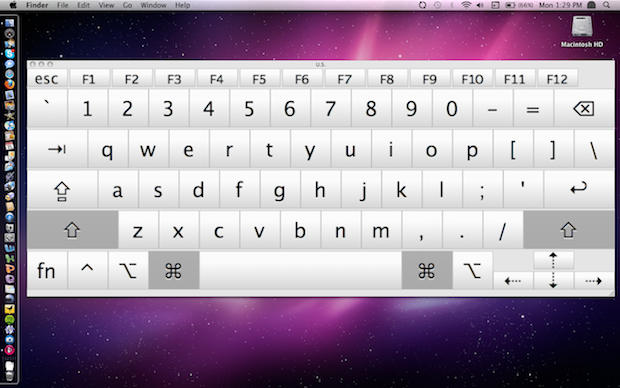
The new UI element s a virtual keyboard, a must-have for a tablet. Snow Leopard includes a big virtual keyboard that looks clearly designed for typing on a touchscreen. It’s a big, bold version of the iPhone’s virtual keyboard with large keys that scream “type me!”
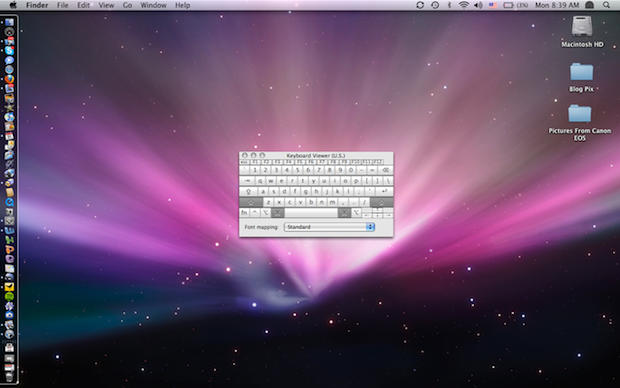
The Mac OS has long contained a virtual keyboard, but previous versions were half-sized (see below). The old virtual keyboard was clearly not designed for actual typing, and was hidden away in the “International” tab of System Preferences. (Yeah, the keyboard could be enlarged by hitting the green button in the upper left of the folder toolbar, but still, it expanded to only three-quarter size).
The new virtual keyboard in Snow Leopard now lives under “Keyboard” in System Preferences, and is clearly put there as an alternative input method.
The virtual keyboard can be made as big as your screen — 30-inches wide, if you have a big Cinema Display — by dragging the window resizer at bottom left.
Of course, it can’t be used as a real virtual keyboard until Apple introduces a touchscreen device. At the moment, it just records the keystrokes on your physical keyboard and shows the characters that will be typed when the Option key is held down, and so on.
Yeah, I know, this isn’t proof that Snow Leopard is designed for a touchscreen device — IE. the tablet everyone knows Apple is working on — but I got pretty excited when I saw it. It looks like a key touchscreen UI element to me.
Here’s how to see it yourself:
* Go to System Preferences>Keyboard
* Click the box “Show Keyboard & Character Viewer in menu bar”
* Go to the menu bar at top right and click “Show Keyboard Viewer”
For comparison, here’s the old soft keyboard in Leopard. This is not a touchscreen keyboard.
Posted by Leander Kahney in Apple, News, OS X, Opinions, Top stories | Comment on this article
If you enjoyed this article:
Subscribe via RSS or email, or follow us on Facebook and Twitter


Wow, that really does scream Tablet Mac! I don’t think I’ve seen that nice of an on-screen keyboard, and that expands the entire width of the screen.
manda.j, on September 1st, 2009 at 2:49 am
I’d say some more evidence (though this might have been in Leopard) is the use of two finger tap to be right click. Makes it very easy to navigate between menus, expecially with spring loaded folders. The 3 folders (apps, downloads, documents also facilitates getting to and manipulating files.) The App menu icons are pretty large – with no resize too.
Couple this with the ability to link to HDMI and get High Def resolutions…
Tom, on September 1st, 2009 at 2:53 am
May not be a home run, but it’s definitely suggestive. I saw the “Show Keyboard Viewer” up in my taskbar, as I’ve got the Character Viewer up there, as well, but never thought to open it. It certainly does seem to be indicative…
Chris W., on September 1st, 2009 at 3:01 am
I don’t believe the on-screen keyboard is that indicative of being a touchscreen keyboard. Apple would have a better design! At least have a semi-transparent keyboard that will auto hide like the dock.
Markus F, on September 1st, 2009 at 3:36 am
-You say that the sliders of the stock-windows are big and fat, but they actually have the same size of all other scrollbars in mac os x.
-The iphone-virtual-keyboard is very different than that of snow leopard (adaptive vs. fixed standard layout), but you say “It’s a big, bold version of the iPhone’s virtual keyboard”.
-If you press the zoom-button of leopards virtual keyboard you get a much larger version. Why do you show just the small version? Are you trying to obfuscate that?
mrjazz, on September 1st, 2009 at 4:35 am
Evidence definitely seems to point to a tablet. I wouldn’t purchase one, as it would be no use to me – I’m happy with my 13″ MacBook Pro and my iPhone – but I am very excited to see what Apple has come up with.
@Tom: the two finger tap to right click was available in Leopard.
Meghann, on September 1st, 2009 at 5:48 am
Agree w MrJazz: you may be trying a bit hard to stretch a pt. Indeed, the keyboard viewer does display full screen by default, but the real change is the modality of the viewer in SL: it is now resizable like other windows.
In Leopard, the keyboard was tiny or small, modes chosen by the usual green window button. In SL, the green button simply preserves last two sizes, and the keyboard viewer is resizable like any other window. In fact, if you do resize it, you can restrict full size if you wish.
Not sure how you would manage touch on a keypad that can be freely moved about the screen, as well as freely resized.
rougerobot, on September 1st, 2009 at 8:31 am
This isn’t what Apple would use for a touch screen keyboard for it’s “rumored” tablet. It would be more refined like @Markus suggests.
To me it goes along with the 512 icons. They have made it much larger than Leopard. Now imagine if you are someone who actually bought a ModBook?
Chris P., on September 1st, 2009 at 8:33 am
The 2-finger tap actually dates back to even Tiger. My 3.5-year old MacBook Pro still runs Tiger and can do it.
I also agree with mrjazz…. this sounds like a lot of wishful thinking instead of “hard proof” or whatever you want to call this. I was especially thrown for a loop when you said the scroll bar in the stacks grid view were big and fat.. they’re actually quite thin. Besides, when has Apple ever made us use scroll bars on the iPhone? If we used stacks on a tablet, we’d just flick our finger anywhere in the stack to scroll down, no need for clunky scroll bars.
Daniel, on September 1st, 2009 at 8:45 am
You call this an Apple news blog? The keyboard viewer has been around forever, and its certainly expanded to that size already, I used to use it just like that on my mini hooked up to the TV so I could used a wii mote as a remote to type.
Kariudo, on September 1st, 2009 at 8:53 am
[...] like my most frequently-made prediction is finally coming true. (Props to Cult of Mac and 9to5Mac) ipod computer security Gadgets dell cellphones technology news monitor laptop review [...]
Looks like Apple’s Snow Leopard is a multi-touch OS | Gizmo Addiction, on September 1st, 2009 at 9:11 am
Touchscreen evidence? I only see a big Keyboard for handicapped.
And I see now in Apple.com: More accessible than ever…that help people with disabilities…
Regards
caras, on September 1st, 2009 at 9:20 am
The old keyboard viewer was a nugget of Carbon code, built out of bitmaps and tracking regions, and not readily rescaled. The new one, built as part of the 64 bit conversion, is Cocoa, with NSControl objects backing each ‘key’, so it gets dynamic resizing and scaled tracking regions essentially for free.
That means it can be resized over a wide range.
Just zis guy, see, on September 1st, 2009 at 9:52 am
I’m trying to but it just doesn’t save… I go to System Preferences>Keyboard then click the “Show Keyboard & Character Viewer in menu bar” but it doesn’t stay clicked once I change to a different system preference thing.
Here’s a quicktime video of the problem…
http://www.youtube.com/watch?v=fhzTKcO2aaM
Anyone else having this issue?
Alex, on September 1st, 2009 at 10:15 am
For me, the most clear evidence of the upcoming iTablet is the size of the new 512 pixel icons. They could be very useful on a full 10″ or 12″ or 15″ touch screen with coverflow.
johannes, on September 1st, 2009 at 10:32 am
I did EXACTLY as you said but when I close the System Preferences window there’s no new icon in the menubar & when I reopen the System Preferences window the SHOW KEYBOARD & CHARACTER VIEWER IN MENU BAR box has magically unchecked itself.
CaryMG, on September 1st, 2009 at 10:38 am
How Full size ( Keyboard) can you get on a tablet devise?
Bill, on September 1st, 2009 at 10:46 am
I’m seeing the same thing as CaryMG. Strange… I’m on a two year old MacPro.
Andrew Ariotti, on September 1st, 2009 at 10:58 am
Hmmm …. I am not convinced at all!
Did you ever try to click the green enlarge button on the keypad with 10.5 ???
It resizes to a big keyboard as well.
So , no proof , not even a hint in that direction for me … sorry
HolgerHH, on September 1st, 2009 at 10:58 am
[...] Cult of Mac believes the features confirm Apple’s intent to release an OS X-based tablet device sometime in the near future (or, near enough that Snow Leopard will still be relevant, at least). And when you consider the signs, its hard to believe that isn’t what the company is planning. [...]
Snow Leopard Features Suggest It’s a Touchscreen OS, on September 1st, 2009 at 11:01 am
Also, you’ll notice that Apple has touted the increased size of the Keyboard Viewer on Snow Leopard’s Accessibility page, suggesting that it’s more a feature intended for visually-impaired users.
Dan Moren, on September 1st, 2009 at 11:05 am
That keyboard has been there for a while. It’s in Leopard too.
mac user, on September 1st, 2009 at 11:56 am
” by dragging the window resizer at bottom left”
Isn’t that bottom right?
0_o
Church of Apple, on September 1st, 2009 at 12:22 pm
Some interesting little nuggets turn up on this site from time to time, but this is another one of those articles that says to me “I’m desperate to get get that magical scoop that will send Mac addicts flocking to my site, hopefully get a few more book sales…”. I really don’t see any of the above as evidence of Snow Leopard being designed for touchscreens.
It’s sort of like LK’s slightly odd advice that there’s only one way to install a new Mac OS, and that’s the way that Apple specifically took out of the default options…
owen-b, on September 1st, 2009 at 12:48 pm
“Look at Expose in the Dock”
By the way, this virtual keyboard should have made it easy for you to find the accented letter “e” as in “Exposé”.
Gilles, on September 1st, 2009 at 12:58 pm
[...] mais e veja imagens no artigo completo de Kahney. Tags:Mac OS X, Snow Leopard Tópicos relacionadosInfoWorld: Snow Leopard [...]
Surgem mais evidências do caráter touchscreen do Snow Leopard » AppleMania.info, on September 1st, 2009 at 2:15 pm
I think it’s interesting to see which way the house and cart lie – is the iPhone OS dictating the direction of the MacOS ? Are they merging together somewhat? As Andy Ihnatko intimated – 10.6 seems a lot about wrapping up 10.x to date, to shore up Leopard, whilst simultaneously bringing the 1st versions of a lot of stuff – GCD, OpenCL, QT X, QT Player.
Snow Leopard by it’s history will likely move towards being more touchscreen friendly, as its going to likely be the basis for the Touch (next week perhaps) and the iPhone next year.
Tom, on September 1st, 2009 at 2:16 pm
[...] like my most frequently-made prediction is finally coming true. (Props to Cult of Mac and 9to5Mac) // Loading… @import [...]
Looks like Apple’s Snow Leopard is a multi-touch OS | Superstars Of Gaming, on September 1st, 2009 at 2:22 pm
[...] levanta essa possibilidade é Leander Kahney, autor de livros como a A cabeça de Steve Jobs, um renomado conhecedor da Apple, [...]
Será o Mac OS X 10.6 Snow Leopard o sistema operacional da iTablet? | MacMagazine, on September 1st, 2009 at 6:04 pm
[...] gets me excited about the possibility of an Apple tablet that can run Mac OS X. The folks over at Cult Of Mac point out a few new features in Snow Leopard that would be ideal for a larger touchscreen [...]
Snow Leopard – A TouchScreen Operating System?, on September 1st, 2009 at 6:29 pm
This isn’t necessarily an indication of upcoming touchscreen Macs, while many would like to believe so. This option was previously available in Mac OS X 10.5 Leopard. If you are still running leopard then go to System Preferences>International and click on the Input Menu tab. Click on the Keyboard Viewer check box and then you can access the keyboard viewer from the International Menu Status icon in the Menu Bar. It only gave you two sizez, so the newer one appears to be a bit more flexible.
Regards,
James, on September 1st, 2009 at 6:58 pm
This *is* wishful thinking, at least about Keyboard Viewer. I mean please, it’s been around since OS 9 *and* has been re-sizable all thru OS X.
Drunken Economist, on September 1st, 2009 at 7:34 pm
Sorry (for next post, and to say,) Leander, but if you hit the (+) button in Leopard not Snow, it also resizes to fullscreen. I just did it on my Leopardized Mini 9, which is as close to a New ^h^h^h^h Tablet as we’re going to get in the near term.
Dun dun dun!
I do tend to eat a lot of blackbird 6 months later….
Drunken Economist, on September 1st, 2009 at 7:47 pm
This is hardly concrete “evidence”. When/if Apple releases some kind of a tablet, it will still account for only a small fraction of their hardware sales. It would be silly to presume that the entire Snow Leopard effort was a Tablet OS in disguise, why rush it out ahead of the tablet itself if all these refinements are only for the tablet? While some things might indicate UI elements that are tablet optimized, why are these UI elements present in the same way in the OS on “regular” machines? It would seem more Apple-like for them to have least have a UI mode for normal and a mode for tablet use. Also, you didn’t seem to do much research on the virtual keyboard beyond opening it up and getting all giddy. It already works as a virtual keyboard, not just a what-key-you-pressed indicator.
NotoriousBRK, on September 1st, 2009 at 8:00 pm
[...] Cult of Mac believes the features confirm Apple’s intent to release an OS X-based tablet device sometime in the near future (or near enough that Snow Leopard will still be relevant, at least). And when you consider the signs, its hard to believe that isn’t what the company is planning. [...]
Snow Leopard Features Suggest It’s a Touchscreen OS » Snow, Keyboard, Viewer, Leopard, Wacom, Dock » Mac OS X Fans, on September 1st, 2009 at 8:38 pm
naaah, the keyboard gets blurry (pixelated) when you make it very big.
If it was designed for touch input they would have made it look very sharp when maximized.
pablo Viale, on September 1st, 2009 at 9:44 pm
[...] taking a good look at the features of Apple’s new Snow Leopard OS, Leander Kahney at Cult of Mac finds a massive on-screen keyboard tucked away in the OS Control Panel. (see [...]
Pining for Apple’s Tablet and Apple TV upgrades « Hard Drive Life, on September 1st, 2009 at 10:39 pm
Not to burst your bubble anymore than everyone else has probably done already, but Mac OS 1.0 had a desk accessory that showed the keyboard & keystrokes being made.
It was called Kep Caps I believe.
Gib Wallis, on September 1st, 2009 at 11:50 pm
[...] like my most frequently-made prediction is finally coming true. (Props to Cult of Mac and 9to5Mac) | « The Spark: "I Still Never Have … [...]
Looks like Apple’s Snow Leopard is a multi-touch OS | Damxe, on September 2nd, 2009 at 12:00 am
[...] Läs hela artikeln. [...]
Snow Leopart touch screen? « spielbrot, on September 2nd, 2009 at 12:28 am
The smaller installation footprint could also be evidence for a tablet with flash memory.
“A clean, default install (including fully-generated Spotlight indexes) is 16.8 GB for Leopard and 5.9 GB for Snow Leopard.”
http://arstechnica.com/apple/reviews/2009/08/mac-os-x-10-6.ars/3
Name(Required), on September 2nd, 2009 at 1:06 am
Snow leopards are known for having ENORMOUS paws… they need those enormous paws to keep from sinking in the snow. I think this was a clear indicator that this revision was made for LARGE paws.. big mitts! People’s hands! Also, snow leopards are small… someone also pointed out how small Snow Leopard was. They cut tons of GB out of it and paired it down to almost nothing. This portends use on a tablet.
But I also think that this indicates that a KEYBOARD is not for primary use on a the tablet. It is just improved slightly for alternate use on the tablet. I imagine the tablet will have some revolutionary app that has a revolutionary interface added onto it for use on a tablet. This keyboard is just backup tech for emergency situations when you don’t have the tablet user interface installed properly or something.
ChocoTaco, on September 2nd, 2009 at 1:26 am
I wrote about a few other examples in Snow Leopard that scream tablet including the new icon resizer and Stacks as the primary file navigator:
http://www.onlyjoel.com/2009/06/apples-touch-future.html
Joel Majka, on September 2nd, 2009 at 2:01 am
I’m not buying (yet). No doubt apple fiddled around with Mac OS on a tablet, and in the process improved the older cruddy virtual keyboard. But that doesn’t mean we are getting a Mac tablet.
But I sure hope I’m wrong, and we do get it.
Chris, on September 2nd, 2009 at 3:46 am
[...] like my most frequently-made prediction is finally coming true. (Props to Cult of Mac and [...]
Looks like Apple’s Snow Leopard is a multi-touch OS | PC Badge, on September 2nd, 2009 at 3:57 am
[...] Hello there! If you are new here, you might want to subscribe to the RSS feed for every latest post.Interesting article here, its all speculation, but will, perhaps, Apple release a tablet [...]
Cult of Mac: Snow Leopard is a Touchscreen OS – Rob Parker - robparker.org.uk, on September 2nd, 2009 at 4:30 am
[...] [...]
Snow Leopard Has Concealed Full Screen Virtual Keyboard (For A Tablet?) - MacTalk Forums, on September 2nd, 2009 at 6:39 am
@ChocoTaco You sir, are a true GENIUS!!
That is all.
PS: I reckon that SL is optimized for a Tablet. I can’t wait to see what’s instore for the next few months/whatever.
Shaun_R, on September 2nd, 2009 at 6:57 am
[...] Snow Leopard y ya conocéis las funciones de las que hablaremos en este post, pero realmente me parece que en Cult of Mac tienen razón y algunas de las nuevas funciones incluidas en esta revisión de Leopard, podrían estar pensadas [...]
Snow Leopard podría estar preparado para pantallas táctiles, on September 2nd, 2009 at 8:00 am
[...] Källa Cult of Mac [...]
Fler bevis på att Apple utvecklar en Tablet-Mac | Real Blogg, on September 2nd, 2009 at 8:44 am
Ummm… problem: “The virtual keyboard can be made as big as your screen — 30-inches wide, if you have a big Cinema Display — by dragging the window resizer at bottom left.”
How does one exactly drag that tiny little corner point with a chubby finger?
Game over. Not a touch UI here. Everybody can move along now.
Jack Campbell, on September 2nd, 2009 at 9:02 am
[...] More Evidence That Snow Leopard Is a Touchscreen Operating System | Cult of Mac 〈タッチスクリーンへの対応が Snow Leopard の秘密〉 [...]
2009年9月03日(木) « maclalala:link, on September 2nd, 2009 at 10:04 am
What is needed is a full Mac that is light and small. 400 g or less and pocketable if possible. With video-out and USB. The ultimate Keynote and PowerPoint presentation Mac.
CuX, on September 2nd, 2009 at 12:36 pm
[...] big Mac sites, 9 to 5 Mac and Cult of Mac, are now running with the story that, since the new virtual keyboard is so big and fluffy, [...]
Snow Leopard’s much bigger virtual keyboard makes it a great touchscreen operating system, right? | Stoth, on September 2nd, 2009 at 12:48 pm
There is another way to display this keyboard. In System Preferences, go to Language & Text. Click on Input Sources. Under “Select input methods to use,” the first item is the Keyboard & Character Viewer.
What’s it doing here?
I have been very skeptical of the tablet rumors until just now.
Ken Collins, on September 2nd, 2009 at 1:10 pm
[...] Cult of Mac posted a pretty compelling picture of a new full screen keyboard feature in Snow Leopard that certainly looks like it’d be handy if you had a touchscreen Mac. With all the rumors of the Tablet Mac floating around, this just may be some evidence that the upcoming Mac Tablet will be running Snow Leopard rather than some version of the iPod Touch / iPhone OS. Here’s how you can see the screen keyboard yourself, courtesy of Cult of Mac: [...]
Evidence Snow Leopard Built for Touch Screen Macs? - OS X Daily, on September 2nd, 2009 at 1:19 pm
[...] At this point we would be hard-pressed to find anyone who still doubts the impending release of an Apple tablet — or even several Apple tablets — but a little more supporting evidence never hurt anyone. Cult of Mac spent some time compiling a collection of conjecture surrounding Snow Leopard and the variety of new touch-friendly features found within. While none of this is concrete proof of the Apple tablet’s existence, combining these tidbits with the plethora of existing evidence leads us to believe that Snow Leopard will be Apple’s tablet OS of choice rather than the iPhone OS as had been rumored. Starting with the most in-your-face evidence, the OS X soft keyboard has gotten a touch-friendly overhaul. As you can see above, the tiny on-screen keyboard from Leopard has been replaced with an expandable board that should end up being very finger-friendly. To see it for yourself, hit System Preferences > Keyboard and then click on “Show Keyboard & Character Viewer in menu bar”. Now just click on “Show Keyboard Viewer” under the menu bar icon and enjoy. Other UI tweaks, such as a new scrolling layout for dock stacks that features nice big icons just begging to be touched, further support the claim that 10.6 will likely find its way to a tablet in the coming months. So boys and girls, any interest in a $700-$800 Macblet running snow cat? Read [...]
Snow Leopard looking like the OS of choice for Apple’s tablet | Stoth, on September 2nd, 2009 at 2:04 pm
Leander,
While my money is squarely on Snow Leopard being the (as yet unannounced) conduit OS for Apple to formally start converging their device matrix (iPhone, iPod touch, Macs, Apple TV, iPad Tablet) from an application run time and developer tools perspective, the “evidence” cited by you is fairly weak.
As others have noted, it’s far more likely for Apple to iterate from their best practices approach to virtual keyboard (iPhone/iPod touch) than simply tweaking the virtual keyboard that has been part of Mac OS for years.
Btw, if interested, here is the expanded analysis of the forthcoming Apple iPad Tablet device.
Apple, the ‘Boomer’ Tablet and the Matrix
http://bit.ly/DwziS
Cheers,
Mark
Mark Sigal, on September 2nd, 2009 at 2:25 pm
[...] Read [...]
Snow Leopard looking like the OS of choice for Apple’s tablet · TechBlogger, on September 2nd, 2009 at 2:41 pm
Actually,if you hit the green Zoom button, you will see the keyboard goes to a fairly large size
John MacKay, on September 2nd, 2009 at 3:17 pm
“Of course, it can’t be used as a real virtual keyboard until Apple introduces a touchscreen device. At the moment, it just records the keystrokes on your physical keyboard and shows the characters that will be typed when the Option key is held down, and so on.”
You must be new to the Mac. KeyCaps has been around since Mac OS 1 or whenever Apple introduced Desk Accessories (which was VERY early on). Oh, and when you played around resizing the window did you happen to click on any of the virtual keys with your mouse? KeyCaps throughout all versions of the Mac OS has always been a virtual keyboard that could be typed on with your “mouse.” Heck, the “Classic” version even had a little text editor field to type in! And its window could be resized as well.
Screen shot of Key Caps in “Classic,” “resized”: http://files.me.com/scottkitts/lpfuud
jsk, on September 2nd, 2009 at 4:02 pm
In Leo (and I suppose Tiger…) open the virtual keyboard, and click on the (+) item in top left…
Regards.
Un Vrai Type, on September 2nd, 2009 at 5:15 pm
[...] leads this latest charge with the keyboard while Cult of Mac points also to the new Dock Expose, and all new, all-touchable Stacks grid. (See Apple’s [...]
Snow Leopard Virtual Keyboard Renews iTablet Mac Rumors « Everything iPhone, on September 2nd, 2009 at 6:37 pm
[...] of a resizable Keyboard Viewer, these changes have Cult of Mac’s Leander Kahney seeing tablets running Mac OS X in the near future, though we’re not entirely sure we [...]
Do minor UI changes mean Snow Leopard is tablet-ready? | Wilsonbroadcast, on September 2nd, 2009 at 7:29 pm
[...] leads this latest charge with the keyboard while Cult of Mac points also to the new Dock Expose, and all new, all-touchable Stacks grid. (See Apple’s [...]
Snow Leopard Virtual Keyboard Renews iTablet Mac Rumors | My Apple iPhone, on September 2nd, 2009 at 8:08 pm
[...] of a resizable Keyboard Viewer, these changes have Cult of Mac’s Leander Kahney seeing tablets running Mac OS X in the near future, though we’re not entirely sure we [...]
Do minor UI changes mean Snow Leopard is tablet-ready?, on September 2nd, 2009 at 8:51 pm
[...] of an Apple tablet—and even with the surprising XL tablet rumours—I have to dismiss Leander Kahney’s thoughts on Snow Leopard as a step for a full Mac OS X [...]
Mac OS X’s Scalable Keyboard Is Not A Sign Of The Apple Tablet | Gizmodo Australia, on September 2nd, 2009 at 9:11 pm
[...] idea of an Apple tablet—and even with the surprising XL tablet rumors—I have to dismiss Leander Kahney’s thoughts on Snow Leopard as a step toward a full Mac OS X [...]
Пресата presata.com» Blog Archive » Mac OS X’s Scalable Keyboard Is Not a Sign of the Apple Tablet [Apple], on September 2nd, 2009 at 9:17 pm
[...] leads this latest charge with the keyboard while Cult of Mac points also to the new Dock Expose, and all new, all-touchable Stacks grid. (See Apple’s [...]
Snow Leopard Virtual Keyboard Renews iTablet Mac Rumors - Iphone Study Blog, on September 2nd, 2009 at 10:00 pm
[...] leads this latest charge with the keyboard while Cult of Mac points also to the new Dock Expose, and all new, all-touchable Stacks grid. (See Apple’s [...]
Snow Leopard Virtual Keyboard Renews iTablet Mac Rumors - Iphone Study Blog, on September 2nd, 2009 at 10:00 pm
[...] idea of an Apple tablet—and even with the surprising XL tablet rumors—I have to dismiss Leander Kahney’s thoughts on Snow Leopard as a step toward a full Mac OS X [...]
Mac OS X’s Scalable Keyboard Is Not a Sign of the Apple Tablet [Apple], on September 2nd, 2009 at 10:01 pm
[...] Friday includes some amazing new features integrating Apple’s touch technology. First off, as Cult of Mac point out: The more I play with Snow Leopard, the more it looks like it’s designed to run [...]
Apple Tablet: When & What if? | JB's Personal Portfolio, on September 2nd, 2009 at 10:22 pm
To me Snow Leopard in itself is just all of the apple employee dev. having a good time improving stuff without jobs, bcause jobs would normally have them release some crazy awesome new thing, but the tablet ideas are very reasonable, they do scream for me!
Wolf, on September 2nd, 2009 at 10:37 pm
[...] idea of an Apple tablet—and even with the surprising XL tablet rumors—I have to dismiss Leander Kahney’s thoughts on Snow Leopard as a step toward a full Mac OS X [...]
Пресата presata.com» Blog Archive » Mac OS X’s Scalable Keyboard Is Probably Not a Sign of the Apple Tablet [Apple], on September 2nd, 2009 at 11:17 pm
[...] At this point we would be hard-pressed to find anyone who still doubts the impending release of an Apple tablet — or even several Apple tablets — but a little more supporting evidence never hurt anyone. Cult of Mac spent some time compiling a collection of conjecture surrounding Snow Leopard and the variety of new touch-friendly features found within. While none of this is concrete proof of the Apple tablet’s existence, combining these tidbits with the plethora of existing evidence leads us to believe that Snow Leopard will be Apple’s tablet OS of choice rather than the iPhone OS as had been rumored. Starting with the most in-your-face evidence, the OS X soft keyboard has gotten a touch-friendly overhaul. As you can see above, the tiny on-screen keyboard from Leopard has been replaced with an expandable board that should end up being very finger-friendly. To see it for yourself, hit System Preferences > Keyboard and then click on “Show Keyboard & Character Viewer in menu bar”. Now just click on “Show Keyboard Viewer” under the menu bar icon and enjoy. Other UI tweaks, such as a new scrolling layout for dock stacks that features nice big icons just begging to be touched, further support the claim that 10.6 will likely find its way to a tablet in the coming months. So boys and girls, any interest in a $700-$800 Macblet running snow cat? Read [...]
Snow Leopard looking like the OS of choice for Apple’s tablet | GADGET BUZZ, on September 3rd, 2009 at 12:20 am
[...] idea of an Apple tablet—and even with the surprising XL tablet rumors—I have to dismiss Leander Kahney’s thoughts on Snow Leopard as a step toward a full Mac OS X [...]
Mac OS X’s Scalable Keyboard Is Probably Not a Sign of the Apple Tablet [Apple] | 0t4.net, on September 3rd, 2009 at 1:21 am
It’s been my contention for some time that the primary differentiator for the upcoming Mac tablet device, the thing which will blow the socks off the netbook market and allow Apple to demand a premium price, will be its ability to run a full-fledged OS – an “iPod Touch on steroids” runing iPhoneOS will not be the kind of game changer Jobs is shooting for. I’ve also felt for some time that the main motivation behind Snow Leopard was not some benevolent desire to streamline operations and free up hard drive space, but to optimize OS X for small, portable touch operation. Seems now that others are coming around to the same mode of thinking.
Steven, on September 4th, 2009 at 2:23 am
[...] Via | Cult of Mac [...]
È Snow Leopard pronto per i display tattili? | LaMelamozzicata, on September 5th, 2009 at 9:23 am
[...] was giving hints that it was ready to be a touchscreen operating system. Cult of Mac is revealing some of these hints, Ars Technica also has a piece with other elements suggesting the same thing (for a mysterious [...]
The Apple tablet, rumor or reality? | Designer Daily, on September 8th, 2009 at 11:22 am
[...] like my most frequently-made prediction is finally coming true. (Props to Cult of Mac and [...]
Looks like Apple’s Snow Leopard is a multi-touch OS | Electronics 411, on September 9th, 2009 at 9:53 am
We all know a Touchscreen Mac is on it’s way but this keyboard proves nothing, a screen keyboard has been in the Mac OS since at least OS 7.
Sorry
Gillman, on October 2nd, 2009 at 8:45 pm
It’s even better than you said. This is also evidence that it is designed for a touch screen. You CAN type on this KB. Just use the mouse to left click on the key you want. To me, this shows that it is designed to be a working KB and all it needs is a touch screen. Tablet PC, come on. I WANT!
James Smith, on October 3rd, 2009 at 8:25 am
[...] 1: More evidence that Snow Leopard is a touchscreen operating system (Cult of [...]
A history of the elusive Apple tablet, in links | Tech Sanity Check | TechRepublic.com, on October 5th, 2009 at 7:10 am
Actually, IT really is a Touch Keyboard. How do you do a CMD+S to save a text?
think about it.
Steve, on October 6th, 2009 at 9:28 pm
the on screen keyboard is the same as in 10.5 you can resize it to be bigger or smaller like any other window
when i open the keyboard in snow leopard it first opens small but then u can resize it to be as bis as you made it
slavik gurmeza, on October 10th, 2009 at 1:10 am
[...] idea of an Apple tablet—and even with the surprising XL tablet rumors—I have to dismiss Leander Kahney’s thoughts on Snow Leopard as a step toward a full Mac OS X [...]
Mac OS X’s Scalable Keyboard Is Probably Not a Sign of the Apple Tablet [Apple], on November 12th, 2009 at 3:15 am
[...] Read | Permalink | Email this | Comments [...]
Clonick news » Blog Archive » ¿Es Snow Leopard multitáctil?, on November 27th, 2009 at 6:59 pm
[...] Snow Leopard’s new onscreen keyboard (From Cult of Mac) [...]
Is the Apple Tablet Coming Next Year? Why I Think (and Hope) So | TeenTechBlog, on December 4th, 2009 at 2:03 am
Apple d*ckw*ds, I bought a new Macbook because my Iphone was not big enough to browse the net. I have a feeling I will be scrapping the Macbook for this.
Wilhelmia Rosacia, on January 4th, 2010 at 10:29 pm
[...] cultofmac Related [...]
Apple Tablet to Run Snow Leopard? : Cellphone News and Review, on March 15th, 2010 at 7:04 am

