Top stories

Journalists Cover Microsoft, Using Macs

It’s not an easy time for Microsoft — with Steve Ballmer having to field questions about being “buffoons” and an “evil empire”  at the shareholder’s meeting (.doc) — so when they get together “the world’s most influential technology pundits and online writers” (nb: we weren’t invited) for Mobius to discuss super-secret mobile tech you’d think [...]

Guide To Black Friday Apple Bargains: Cheap MacBooks, iPods and Accessories Galore

Here’s a guide for finding the best bargains on Apple-related gear during the infamous Black Friday sales on November 27. We’ve compiled a comprehensive list of gear from leaked photos of sales flyers and descriptions of sales.
The bargains include a 2.26 GHz MacBook + $150 gift card at Best Buy for $999.99 ; a 32GB [...]

Review: Voices Is Today’s Best Thing Ever, Grab It Now While It’s Cheap

New on the App Store is Voices from the clever folk at Tap Tap Tap. You can guess what it does.

Open it up, pick a silly voice. Helium is pretty silly. A microphone appears and the app even clears your throat for you (try it, you’ll see what I mean). Now speak your brains, and [...]

Review: Sony Walkman S540 Series Video MP3 Player

Press releases, you will hardly be surprised to hear, are rarely very interesting. But one arrived in my inbox a couple of weeks ago that made me double-take.
“Sony’s S Series Walkman,” it chattered, “is a serious challenger to the iPod Nano.” Gosh, really? Perhaps the Cult had better have a look at one, then, despite [...]

Make Free Calls on your iPhone with Google Voice and Fring

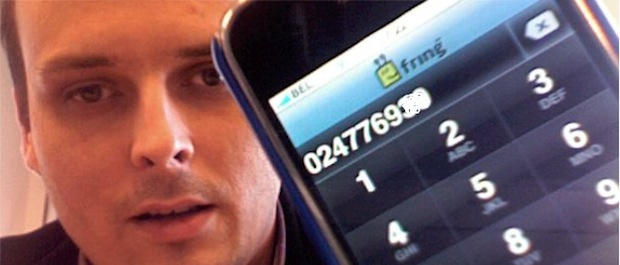
Make free calls on your iPhone with Fring and Google Voice. CC-licensed pic by damienvanachter on Flickr.

Make free calls on your iPhone with Fring and Google Voice. CC-licensed pic by damienvanachter on Flickr.

If you have a Google Voice account, you can make free VoIP calls on your iPhone. You’ll need to sign up for an account at Gizmo.com and download the free Fring app for your iPhone, but after that you’re done. You can make free outgoing calls to (up to three minutes) and receive unlimited incoming calls through Google Voice.

Hit the jump for instructions.

Ingredients

To do this you’ll need the following:

The following are optional but will optimize your experience (though Apple will hate you for it):

  • jailbroken iPhone
  • Backgrounder
  • 3g unrestrictor

Sign Up for Gizmo

All you need from Gizmo is the VoIP part of the puzzle. You don’t need to download the Gizmo desktop client, but you will need to change some of your settings.
Gizmo

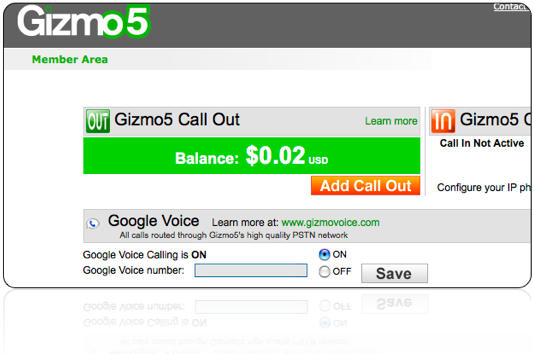
When you’ve signed up for Gizmo, login to your account and turn Google Voice on. Add your Google Voice account number and you’re set. On your way out, be sure to grab your Gizmo number, which is two headings below in the Account Overview section. You’ll see a heading called SIP Number. Copy it. We’ll need to add it as a phone in Google Voice.

Set up Google Voice

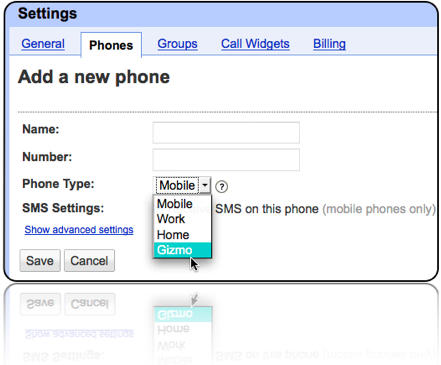
Navigate to your Google Voice settings and click on the phones tab. At the bottom of the tab is an add another phone link. Click it and select Gizmo as the phone type from the drop down menu.
GoogleVoice

Once you’ve added your Gizmo number, it’s time to open up Fring on the iPhone.

Set Up Fring

Open up your Fring app and click on the SIP selection in the Add-ons menu. Use the Gizmo option to login to your account.
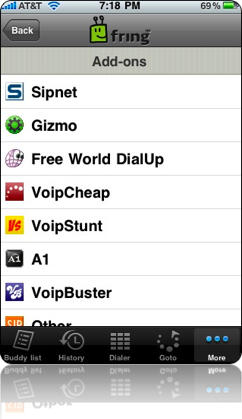
fring

Enter your Gizmo credentials and you’re set to make calls with Google Voice on your iPhone. Fring allows you to select contacts from your iPhone and hit SIP to dial. You’ll need to be on a wifi network to make outgoing calls, and you’re limited to 3 minutes, but you can receive incoming calls and talk for as long as you want. The incoming caller just needs to dial your Google Voice number and you need to disable Google Voice from forwarding your calls to your iPhone phone number.

Always Available

push1

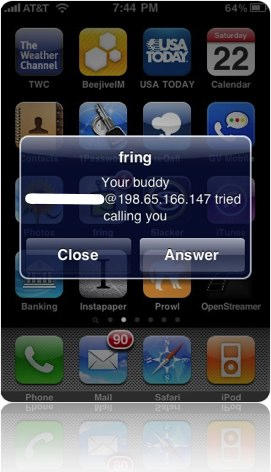
Fring now has push notifications so you can be notified when someone is trying to reach you. It isn’t the most reliable way to take incoming phone calls, but it’s the only way for an un-jailbreaked iPhone to handle incoming calls without having the Fring app open constantly. So this system isn’t dependable for switching to VoIP just yet, but you can make 3 minute calls for free and have your friends call you back for unlimited interaction time.

Either Way, a Smart Move

Using this system of Google Voice->Gizmo->Fring will help you cut down on your minutes, and it’s just the thing to keep you connected when you’ve run out. Jailbreaking your phone allows you to keep Fring open in the background to receive calls, and it also lets you wander off of wifi. Using the 3g network for VoIP means you can lower you minute plan to nil. All you need is data. Isn’t that a Beatles song?

About the author

Tim Cox Tim Cox is the social media and communications coordinator for a private university in the Los Angeles area. He has written for a number of online and print publications and has presented on technology and social media at the national level. One of his greatest accomplishments was networking a Mac Plus with a Mac Pro. In his spare time he writes music, poetry, and trains for Street Fighter IV tournaments. He is married with 5 beautiful kitties. He encourages you to read his blog and connect with him on Twitter, Brightkite, and Facebook.

Email the author | Read more posts by Tim Cox.

30 comments

    Will this work with a 2nd Gen iTouch?

    exactly what i do

    How do you verify the Gizmo phone through Google Voice?

    I press the Connect button on Google Voice, answer the call on Fring, but then Google Voice does not recognize the numbers I press on the Fring dialer.

    Any suggestions?

    There is a(n old) video on fring showing SIM-less phone calls on (free) wi-fi.
    What changed?

    Great article, I’m sure Fring downloads are going to skyrocket.

    I too would love some input about whether this will work for iPod Touch (and if so, which generations).

    Tom, I had the same problem. I was able to verify by downloading the Gizmo application on the mac and verified it then.

    The Fring client does not support DTMF (Touch tone generation), so there is no way to verify the Fring “phone” for Google Voice. It appears users have been asking for this feature for over 2 years, according to the Fring Forums. I even tried a tone generator applet and held it up to the iPhone, which didn’t work either.

    How did you get this to work?

    I found a solution. You must download the Gizmo desktop client and answer the Google Voice verification call from the client, which does support DTMF tone generation.

    @Michael, Nate, Tom

    You can make the call directly from Fring. You don’t need to initiate anything in Google Voice.

    In Fring, just select the contact who you want to call and press SIP Call and you’ll be using google voice to connect.

    @ Tom,

    What we are talking about is the initial call from Google Voice to the SIP # when you add the Gizmo service to the Google Voice account.

    You also need to disable the Call Screening and Call Presentation features, as the Fring client can’t generate the tones to put any incoming calls through.

    Cool. I used on an iPod Touch connected via my wifi to call my mom and wish her happy birthday.

    I just got this hooked up, and finished my first phone call, of about half an hour. I few thoughts;

    - While the sound quality is good, it stalls everyone and a while, especially as the call went on.
    - My iTouch (second gen) slows down considerable when fring is active. I just re-booted, which will hopefully help performance for the next call.
    - If a call comes in when the fring app is open it works fine, when the app is closed, fring alerts me to a call … then puts me in a (useless) text chat.

    Over all this is a promising technology, which with a little refinement will be very useable.

    I’ve done this 2 days ago however incoming calls are not unlimited the Gizmo SIP system will cut the conversation after 3 minutes. It is written on Gizmo settings that only allows the incomin google voice call to 3 minutes.

    Is GV and Fring only offers peer to peer free calls like all other skype, Vopium and Truphone or they offering free calling to landline and mobile phone ?

    i have read abt it long back, and it works… http://bit.ly/wgBVm

    So after reading through the comments a few times I finally got everything working.

    While I was setting this up I also found out you can send free SMS messages with Google Voice and either GV Mobile or Voice Central.

    So I guess the only question left for me is: Is there a program that can do both?

    I don’t know if GV Mobile or Voice Central are supposed to be capable of calls like Fring is but I wasn’t able to get either to.

    this works great but cant verify thru google voice not picking up the code to verify number

    I have downloaded the desktop client but the verification call is not ringing on my desktop (it did on my iphone). Can anyone help?

    you can download the desktop version, but you can also call your iphone, answer and then click “back” which will give you the option to enter the keypad or any other tab while staying connected. I believe this should work (I used the desktop version before I discovered this myself)

    awesome little trick. it kinda blows my mind trying to figure out everything thats happening, so props to you for doing the brainwork.

    On second thought, that probably won’t work, as the Fring keypad still doesn’t send DTMF tones. therefore you would still have to use the desktop client.

    sorry, I tried.

    I couldn’t have found this any sooner though, I have like 5 mins left on my account for the next 5 days.

    Incoming calls don’t work for me – fring just opens a text chat for some reason.

    Salam how are you

    Everything works. Dont worry about the Dtmf tones, all you have to do is go change your settings in google voice account and turn off call screening and call presentation. When you first have to activate the phone though go to gizmo site and foward the call to a regular phone and from there press the tone to verify.
    It all works if any of you want to see me do a youtube video on it ask or check to see if one is on there already.

    hello yes to answer ur question log into gizmo5 so that the phone appears onyour computor.then have them conect to verify.all u have to do is pop up gizmo and answer the call then enter in code.and this does work on ipod touch 2g

    hey when u answer a call tho it says press 1 to accept the call however i dont believe this is possiple.is it?

    nvrmnd i disabled it

    There is no need to download the desktop client. Just go to the Gizmo site and have it forward all calls to your home number. (There are two settings to check: one for the forwarding and one for which number to receive the calls.) Then go back to Google Voice and have it verify the number. Your home number (or whatever you chose) should ring. Once you’ve verified, go back to Gizmo and turn off call forwarding.

    I want to know how i can receive call when people call my google number using fring. people call my google voice # on my fring and what i see two box cancel or accept and once u accept it on my iphone 3gs they ask me to press one i dont know how to press one when i accept it,please can u tell me how to go about it thanks

    @yvonne: turn off call screening and call presentation in google voice settings

    Might as well change this blog post. Google bought Gizmo5, and they’re not taking any new subscribers now.

Add your comment

Name(Required)

Mail (required, but not published)

Website

Comment

Buy Inside Steve's Brain Buy from Amazon.com Buy from Barnes & Noble