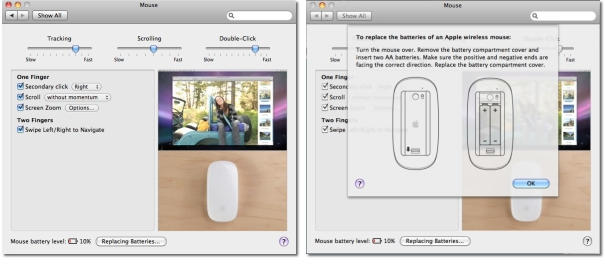
Magic Mouse power management software reports batteries dead at nearly half charge
7:16 am, January 13th, 2010, John Brownlee
Magic Mouse users over at the Apple.com Discussion Board have been complaining that their multitouch mice require almost weekly battery swaps for a couple of months now. Apple has yet to officially acknowledge the problem, but an experiment by Softpedia confirms the issue.
The good news? It’s not really the Magic Mouse: it’s an issue with the Magic Mouse’s power management software. The bad news: that doesn’t really change anything until Apple issues a fix.
The experiment was simple: Softpedia plugged a fresh set of batteries into their Magic Mouse then let the batteries drain until the Magic Mouse software reports the batteries are dead. Softpedia then took these “dead” batteries and plugged them into an old Mighty Mouse. Voila! According to the Mighty Mouse software, the batteries still had as much as 40% charge remaining.
That’s a pretty astonishing bug. According to Softpedia, even a 50% charge isn’t sufficient to power a Magic Mouse in some cases. If Softpedia’s experiment is true, Apple needs to fix this bug, pronto.
Now, I’ve long since sworn off trusting Apple to sell me a mouse, so I can’t confirm this: that leaves it up to you. Anyone willing to give Softpedia’s experiment a shot and let me know how it goes for them in the comments?
Posted by John Brownlee in Apple, Hardware | Comment on this article
If you enjoyed this article:
Subscribe via RSS or email, or follow us on Facebook and Twitter


I’ve been using my Magic Mouse for 3-4 weeks now (daily about 4-6 hours) it still has 67% battery left.
When I don’t use the Mouse, it’s turned off.. that might increase it’s endurance
Luuk, on January 13th, 2010 at 7:31 am
I’ve had a Magic Mouse for a bit over a month now and and it says its down to 43% charge, and it’s still going strong.
I thought the battery problem was with MM and Apple BT keyboards? BT keyboard batteries run down in a week or so ’cause MM stops the kb from going to sleep when it’s not in use, was what I heard. I have a wired kb and so no problem.
P.S. The Magic Mouse is the BEST mouse I’ve ever used, it simply cr*ps on the Logitech V470 BT mouse I had previously. It responds instantly, there’s none of the delay that used to plague the V470 after a period of inactivity. While it’s a pity to not have the middle button/scroll ball the old Mighty Mouse had it’s better to not have the damn thing constantly clog up and fail to scroll. And momentum scrolling rocks!
David S., on January 13th, 2010 at 7:36 am
I have had a magic mouse for about two months, it gets used all the time and so far no battery issues. Love it.
Richard, on January 13th, 2010 at 7:38 am
I’ve had my batteries in for six weeks or so and they just died. The only problem was the mouse management software in SysPref told me I still had 50% battery life when they were completely dead. Changed the batteries and all is well.
I agree that this is the most fantiasticalist super-duper mouse I have ever owned. Coupled with the Better Touch Tool app (http://blog.boastr.net/), this thing rocks. I can tap for left and right click rather than clicking, three finger tap to open Finder, three finger swipe up for spaces and down for Expose. BTT really opens up the numerous possibilities of the touch interface on the mouse. One you get used to all the gestures a normal mouse feels archaic. Nice thing is that I can set my trackpad on my Macbook to the same gestures.
thanx_al, on January 13th, 2010 at 7:55 am
After reading this
Magic Mouse = 38%
Same batteries into
Mighty Mouse = 23%
put batteries back in
Magic Mouse = 28%
Stupid! Just stupid!
That said, I do like my MagicMouse
Stewart, on January 13th, 2010 at 8:07 am
Magic Mouse purchased 12/13/09 and put into service that evening. The mouse is used daily on a MBP w/o an external keyboard. Battery Level is 73% on the included batteries.
On the usage front, MM is a great mouse by any standard. Add MagicPrefs and it’s an outstanding mouse. It’s better than my Logitech wireless, my Microsoft wireless and significantly better than my Mighty Mouse (no !@#$ ball to clog up). My wife now has one as well.
Scott, on January 13th, 2010 at 8:33 am
It’s a well known fact that battery meters aren highly unreliable and subjective. What do you people expect? You think this is the first device in the world to offer precise battery measurements?
Darcy McGee, on January 13th, 2010 at 8:45 am
In no world (other than Microsoft’s) would 50% error be considered accurate. Its accuracy we’re discussing here, not precision.
thanx_al, on January 13th, 2010 at 9:05 am
I have been having battery issues since buying my Magic Mouse. The product description states upto 4 months between battery changes. Im changing by batteries without fail every 2 weeks.
Really starting to piss me off now.
Andrew Macdonald, on January 13th, 2010 at 9:59 am
I’ve been using a Magic Mouse since they were released. No battery problems at all. Best mouse I’ve ever used. Couldn’t use anything but a track ball prior to the Magic Mouse. No cramping, stress or strain. I give it an A++
Leland H. Jones, on January 13th, 2010 at 10:15 am
I bought my Magic Mouse the day it was released at an Apple Store near me. It still has the original batteries.
Matt, on January 13th, 2010 at 11:29 am
I average 5-6 weeks on my Magic Mouse. It is used for 8+ hours daily. I DO turn it OFF every evening before I leave.
I have run my work and home Magic Mouse down to less than 12 percent before changing the batteries.
No issues other than I greatly preferred the ergonomics of the Mighty Mouse.
Sully, on January 13th, 2010 at 11:53 am
Apple’s silence is not shocking. they rarely speak until they know exactly what the issue is and have a fix already under way. Particularly on problems that are not 100% universal (because that sometimes complicates things with the variables)
10.6.3 is due soon yes. perhaps a fix will be included. or at least an attempt to fix.
Charli, on January 13th, 2010 at 2:19 pm
I have not yet run into the issue of the “50% and mouse is dead” issue, but I do find that the non-rechargeable batteries I’ve been using do expire rather quickly in the Magic Mouse. I am using the Magic Mouse separately and not in conjunction with the 2007 Aluminum wireless keyboard, but I do have a wired (Aluminum) full keyboard with side numeric keypad in use. I wish Apple would’ve gone the route of a dockable rechargeable mouse like what is available via Logitech. I also have had to deal with occasional loss of bluetooth connectivity. Other than that the mouse is a decent device and has some very cool features.
Robert, on January 26th, 2010 at 8:37 am

