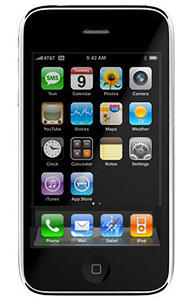
Is Apple Finally Addressing iPhone 3G Performance under iOS4?
By Adam Rosen (4:00 pm, Jul. 28, 2010)
Hope for iPhone 3G users running iOS4: after weeks of suffering under the radar, the Wall Street Journal blog Digits reports today that Apple is aware of the performance issues plaguing 3G users running the latest update:
Apple is investigating reports that the latest iPhone operating system causes problems for users of the iPhone 3G, after a series of complaints on Apple support forums and technology blogs. Apple is aware of the reports and is looking into the matter, a spokeswoman told Digits.
iOS4 performance on an iPhone 3G can be a painful experience – sluggish performance, poor battery life, many more reboots, along with vastly increased levels of user angst. We’ve covered this issue before, as have many other websites, and Apple’s own support forums are buzzing on the topic.
Things are bad enough to even warrant the inevitable YouTube parody (which isn’t too far off):
I’ve been plodding along with my iPhone 3G and iOS4 for a few weeks now. The Double Hard Reset has gotten things back to usable – though far from optimal – and I’m greatly enjoying having app folders and the unified inbox in Mail. But please let this news be true!
My iPhone is my office in my pocket: email, calendar, maps, phone, solitaire – it’s got it all. Even if my 3G is not cutting edge, it’s worth keeping around. I really just want it to work.
Posted by Adam Rosen in Apple, News, Top stories, iOS, iPhone 3G | Comment on this article
If you enjoyed this article:
Subscribe via RSS or email, or follow us on Facebook and Twitter
![The Evolution of the iPod Nano [Infographic]](http://www.cultofmac.com/wordpress/wp-content/uploads/2010/09/ipodnano6g_evolution-250x150.jpg)


Glad to hear that Apple is looking into this. Until the install of iOS4 on my iPhone 3G, I’d been really happy with my iPhone. However, the flashes of irritation that I’ve recently felt with my now sluggish iPhone remind me all too much of how frustrated I’d feel when my Mac would crash under System 6, System 7, System 8 and System 9. I have to remind myself that I wouldn’t feel any better if I tossed my iPhone across the room, out an open window, etc. I’d be delighted if Apple fixed this thing before I upgrade to the iPhone 4 next month, because I hate the surge of adrenalin I experience as I wait for my iPhone 3G to do what it used to do so readily under iOS3.
Rod Richardson, on July 28th, 2010 at 5:24 pm
The 3G problem is an indexing problem because of spotlight mostly. Try to disable all items under Spotlight setting. Many have reported that all performance issues are gone once done. Try it, it worked for me.
got2trythis, on July 28th, 2010 at 5:45 pm
I have an iphone 3g, and its not very slugish running ios4 (actually 4.0.1) its actually faster than ever.Battery life i great.i forgot to mention its also jailbroken. the only problem is that the springboard keeps crashing, but its over all great. my Iphone 3g running 4.0.1 jailbroken 8gb is great.( Im hoping to switch from at&t gophone(prepaid) to t-mobile sidekick plan.
iAppleNewsReporter1, on July 28th, 2010 at 5:51 pm
The Video Is Funny Though.
iAppleNewsReporter1, on July 28th, 2010 at 5:53 pm
I’ve had a terrible experience overallwith ios 4. I depend on my phone to run my business on the road, just checking calenders while on the phone is an effort. Extremely sluggish, even unlocking phone is an effort. Pretty dissapointed that iphone 3g was supported (??) for these reasons, I thought that testing would’ve shown the obvious effect ios 4 had. As stated the new features are great, but not at the expense of performance. I’ve been hoping to downgrade to iphone os 3, but no bother, will be upgrading to iphone 4 tomorrow (hopefully) with the Australian launch. Live and learn.
Hillbillybear, on July 28th, 2010 at 7:26 pm
Does this apply to my 3G s also? Is that a stupid
question?
Bg
Bg22, on July 28th, 2010 at 11:01 pm
Bg, I think the 3g s has twice the amount of ram and almost double the processing speed. My wife has upgraded to ios 4 on the 3g s with no fuss and the only negatives I’ve read about are some cases of battery drainage.
Hillbillybear, on July 28th, 2010 at 11:13 pm
I noticed the slowdown after updating my 3G to iOS4. I was about to restore it to 3.13, but then iTunes installed 4.0.1 and it’s much better.
Keith, on July 29th, 2010 at 4:43 am
When you say the parody isn’t far off, I’d be HAPPY if my phone was working as well as that. Trying to retrieve an email to get a postcode, then look for that postcode on maps took two restarts and about 10 minutes of pain and gnashing of teeth.
I am surprised there’s not been more noise about this.
JC, on July 29th, 2010 at 7:24 am
Interesting thread–ditto for my experience with the “upgrade”–
I am curious about the “disabling” spotlight–how do you do that?
Edie Patterson, on July 29th, 2010 at 8:42 am
I’m using a 3gs iPhone with iOS 4, and all i can say is it’s a bag of shit. It keeps locking up.
Fin Devious, on July 29th, 2010 at 11:40 am
I doubt that Apple can do anything but offer a software DOWNGRADE back to 3.1.3 for iphone 3G users. The upgraded OS , like all other OS upgrades needs more CPU and RAM resources, which iphone3G does not have.
Disabling Spotlight on my 3G makes it marginally faster, but it still lags.
YK, on July 29th, 2010 at 12:19 pm
My 3g is now slower than a geriatric snail on valium after the upgrade.
Turning off spotlight search helped a bit but it still struggles to do more than one thing at a time.
Give it a go, it might work for you.
Settings > General > Home Button > Spotlight Search > uncheck everything
jeff, on July 29th, 2010 at 3:12 pm
Meh – whatever they do will be too little too late. I’ve already regressed back to 3.1.3 and I’m staying that way until the end of my current contract.
Marky Mark, on July 29th, 2010 at 5:00 pm
Try disabling Spotlight search. Settings>General>Home Button>Spotlight Search. Not as fast as when I was on 3, but its an improvement.
Eric, on July 29th, 2010 at 8:15 pm
I’m with the author: “please let this news be true!”
Andrew Davis, on July 30th, 2010 at 7:22 pm
As an unofficial tester of iOS 4.1 beta 2, I can tell you that 4.1 has made my iPhone 3G usable again. Apple is definitely working on solving the issue.
Macfreqt, on July 30th, 2010 at 8:44 pm
My issue(s)… I have an iphone 3G 8gb. where do i begin. Slow as… well u know. Dropped calls, not rcving calls sometimes they go straight to voicemail… but dont show up and not mention thesporadic ability to send and/or rcv txt msgs. never ever had a problem until i went to iOS 4. Reverted back and my 3G is still acting like a piece of stinking crap. I never had an issue until this ios update. I called Apple and was told to backup the iphone (3.1.3 now) and restore it and then go to General Settings Reset Network Settings and that it would be fixed… i will let you know if that works.
Brian Simon, on July 31st, 2010 at 8:50 am
When I first upgraded my 3G to os 4 I had to reset network settings to get online. I have noticed some sluggish apps opening but overall not that bad.
Not upgrading to 4.1 because I just jailbroke again so I could tether my wifi iPad and use my Bluetooth keyboard. Works perfect.
Mark, on August 1st, 2010 at 6:35 pm
My 3GS battery only lasts about2/3 of a day since the new version. Also the map program that used to work great no longer finds where I am located most of the time and is now totally unreliable. I wish this could be fixed along with all of the other problems for my phone which is still LESS than a year old!
S katz, on August 9th, 2010 at 6:41 am

