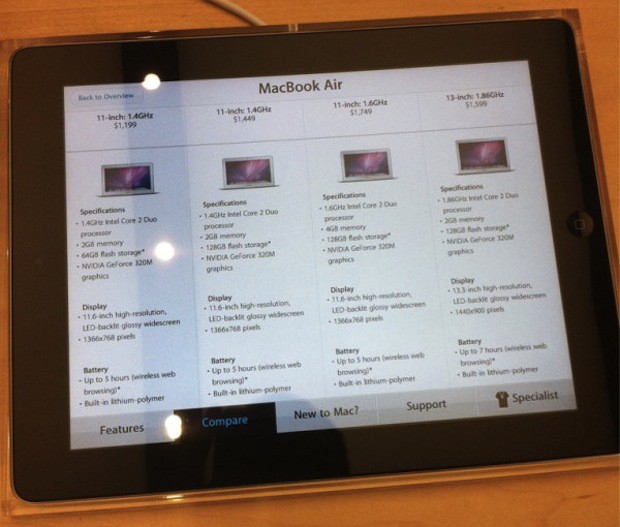
A couple of YouTube videos have surfaced demonstrating the new interactive iPad software located next to all Apple products in the Apple Store 2.0 retail layout. Each iPad acts as a kiosk that customers can use to explore product features, perform product comparisons, and summon help from a sales associate.
Another video from the Sydney Apple Store: (courtesy of @glasshouseapps)
https://www.youtube.com/watch?v=U6DbXYSjEco
Video of the interactive iPad displays in action below. [via Mark Gurman]
[via Macstories]
32 responses to “Interactive iPads Are Apple Store 2.0 Kiosks [Video]”
So, isn’t it kind of ‘stupid’ to say interactive iPad… when they’re always technically interactive…?
What do they do for the iPad section?
There is an iPad for the iPads as well
There are iPads describing iPads :D
Now we know why apple had so huge shipping problems with the iPad 2. They just buy over 1 Mio of them for their retail stores.
Had a look in the West Edmonton Mall location – much better than the old paper ‘inactive’ methodology. Will also sell a ton of iPads, I bet. Rolled out this weekend to get America ready for next. Store was busy, people seemed to be enjoying the changes.
yeah, apple buy their own Ipads….. facepalm.jpg
Lennox in Atlanta has Ipads all over side by side with the products.
They are going to sell SO many iPads if people have to use one at every display. Awesome.
hopefully this is just the calm before the storm and apple announce something like buy an ipad2 now and get another free!
this is probably interactive on a more cleverer AI scale
Great ‘glossy display’! [/end of humor]
No offense to apple whatsoever, i love apple and im a proud mac owner but….
this is kinda useless there’s a few reasons it doesn’t make any sense:
-people touch, germs, they have enough with the other devices. and no im not a germaphobe-.-
-the home button doesn’t do anything which will make -some- people that the iPad is not working.
-i don’t see how this wastes less energy than paper
-non-neat/confusing
-people will confuse them with the other iPads
-people will call specialists, and will find a way to annoy them
And to round it all up, it’s a wasted iPad
no use for camera, no use for home button, no use for anything other than displaying info that could’ve easily been displayed on an imac for example..
ok let me describe it….
*application in Mac’s desktop that’s named “Click for more info about this computer”*
and make that application’s icon HUGE.
sorry if my description doesn’t make any sense. im sleepy
How do the iPads charge?
First video: short, low quality video.
Second video: in Japanese.
Here’s a good, HD video:
http://obamapacman.com/2011/05…
I think Apple is trying to demonstrate to businesses that iPads can serve so many purposes. We see so many new and inventive uses for the iPad everyday. Pretty cool, but yah it does look a bit confusing at first in this set up. We have come up with a distinctive way to display and secure the iPad here: iPad Kiosk
Checkout iPad Kiosk for Retail: http://www.ipadkiosk.com
KIOSTECH offers wall mount, desktop/countertop, and freestanding platform bases to attach the iPad kiosk enclosure. Our stands are constructed of special material to make sure the iPad kiosk light & safe including quicker delivery and simple design, and will retain their professional appearance for years!
http://www.koskiosk.com
Email:[email protected]

