How To: Jailbreak and Unlock Your iPhone / iPod Touch Using Blackra1n
2:27 pm, November 3rd, 2009, Sayam Aggarwal

George Hotz a.k.a GeoHot has released blackra1n RC3, which is an update to a 1-click jailbreak that adds activation options and an add-on blacksn0w, which unlocks latest iPhone 3G and iPhone 3GS baseband version 05.11.07. To use blacksn0w, make sure you have this new baseband (check under Settings –> General –> About –> Modem Firmware) and if not, then update to a stock 3.1.2 firmware.
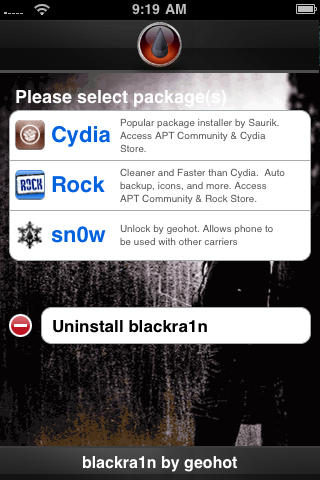
It is pretty easy to use and worked perfectly with my iPhone 3G. Besides the tool, there’s a blackra1n application that gets automatically installed on the iPhone after jailbreak, which gives you option to install Cydia and some other alternatives like RockYourPhone and the ’sn0w’ option to use blacksn0w unlock solution as well.
Please note that if you have an iPhone 2G, you can still jailbreak using blackra1n but blacksn0w will not unlock for you. You must use BootNeuter available in Cydia for that purpose. Also, if you purchased an iPhone 3GS or iPod Touch (any capacity) in October or later, there is a high probability that you have a new model. Blackra1n currently performs only a tethered jailbreak for these new devices, which means you need to use blackra1n every time you boot the device, otherwise all your jailbreak data gets wiped.
Here’s see how it works.
Ingredients:
- An iPhone / iPod Touch (any model)
- Blackra1n tool available at blackra1n.com
- iTunes 9.0.2
- A wireless internet connection (to install cydia etc.)
Now, let’s get started with the procedure:
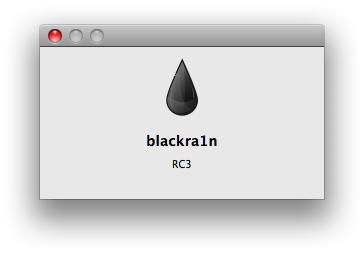
1. Download the blackra1n tool and double-click to open it.

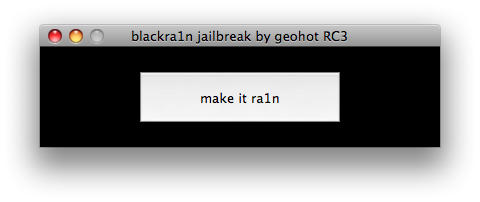
2. Make sure your iPhone / iPod Touch is attached to the Mac / PC and click ‘make it ra1n’.
3. Blackra1n will tell you that the device is booting into Recovery Mode. Check the device’s screen and it should turn off and then show an iTunes logo with cable, indicating it is in Recovery Mode.
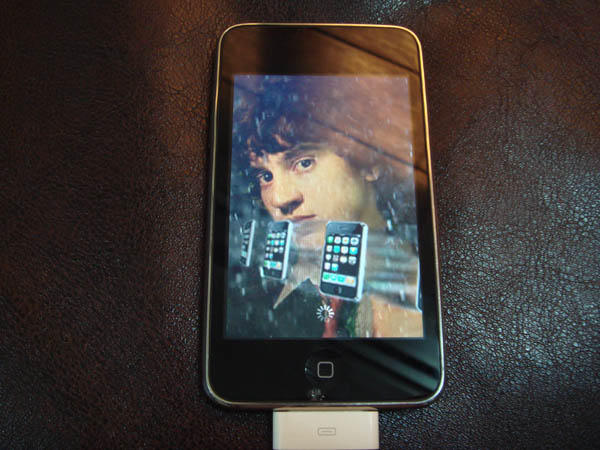
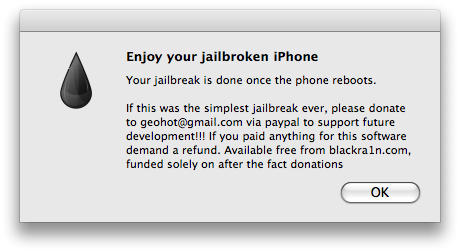
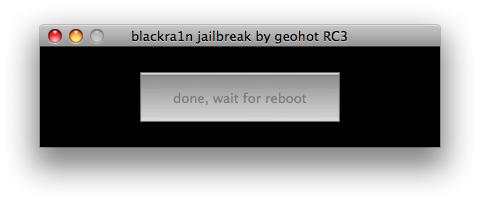
4. A few seconds later, you will get an image of GeoHot on your device’s screen. The Blackra1n program on your Mac / PC will request you to donate to GeoHot, click ‘OK’. Now it will tell you to wait, till the device reboots. You can now close the program.
5. After the device reboots, make sure you have an active internet connection on it.

![]()
6. Navigate to the last page of the device’s springboard and open the blackra1n app.
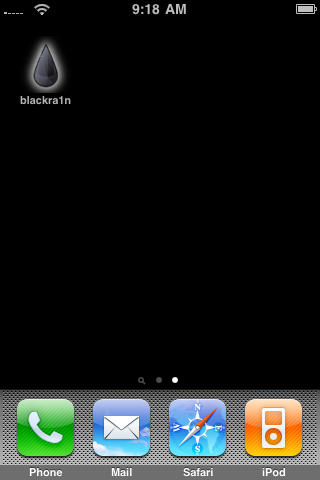
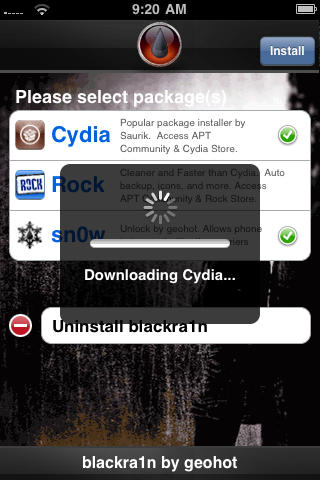
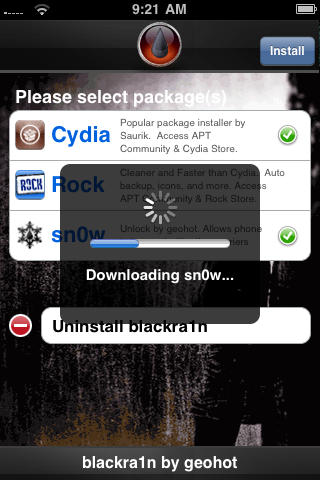
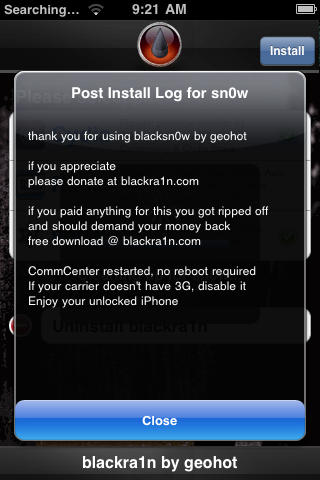
7. Now select any or all of the two installers and / or ’sn0w’, if you want to unlock as well and tap on ‘install’ button in the navigation bar. It will now download the desired application(s) and if you chose ’sn0w’, it will show a release log, tap close. It will then re-spring (refresh).
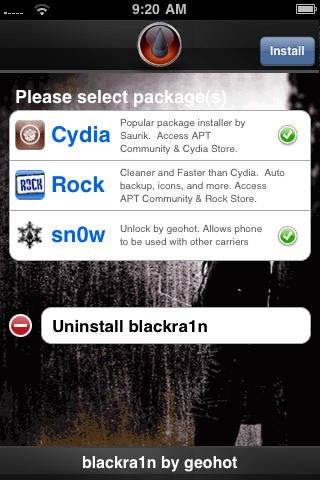
8. After the device re-springs, you will have the selected application(s) installed and will have an unlocked iPhone if you choose to. Congratulations! You’re now successfully jailbroken and / or unlocked.
Optional:
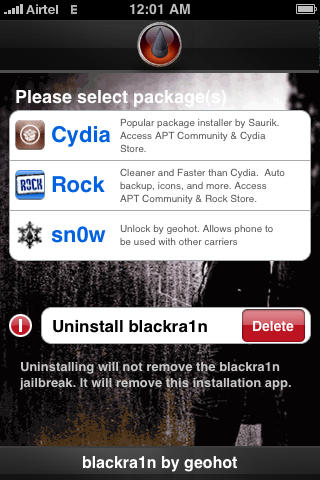
9. If you want to remove the blackra1n application from the device, open the application again and tap ‘Uninstall blackra1n’, this will NOT undo the jailbreak by any means. The device will now re-spring and you will no longer have the application.
All the credit for the great tool goes to George Hotz a.k.a GeoHot.
Posted by Sayam Aggarwal in How tos, How-To, OS X, Top stories, iPhone, iPhone 3G, iPhone 3G S, iPhone Apps, iPod Touch | Comment on this article


Can this work for version 2.2.1
Brandon, on November 3rd, 2009 at 2:41 pm
@Brandon to use blacksn0w, make sure you have this new baseband (check under Settings –> General –> About –> Modem Firmware) and if not, then update to a stock 3.1.2 firmware.
Sayam Aggarwal, on November 3rd, 2009 at 3:13 pm
shouldn’t that bio read “Sayam Aggarwal is a 16-year-old student living in India who has been an Apple fan for almost 5 years AND yet supports the violation of the company’s IP via his dissemination of hacking instructions.”
and shame on Cult of Mac for being so tacky as to allow the posting of such information in violation of the DMCA.
Charli, on November 3rd, 2009 at 3:38 pm
Come on now, are people who read Cult of Mac still on the anti-jailbreak high horse? All it does is get people past the layer of stupid-user protection Apple puts in place that keeps those that know what they are doing from making full use of their device.
Sek, on November 3rd, 2009 at 4:23 pm
Mil gracias… Acabe de liberar mi telefono…. Lo habia comprado hace ya mas de un mes…un 3gs que bien…Gracias por la guia y gracias a Geohot…
Juan M., on November 3rd, 2009 at 4:34 pm
Hi
Did everything .. have a Vodaphone SIM , still shows – NO SERVICE .
CAn you help
acronim, on November 3rd, 2009 at 4:44 pm
LOL @ “Charli” talking about a myopic corporate American interest like the DMCA, and then throwing it at a kid in India! Think for yourself once in a while, fool. Jailbreaking is and will remain legal.
Charli's Uncle Roger, on November 3rd, 2009 at 5:01 pm
hi sayan , thanks for the great unlock guide. I bought my iphone just about a week back from the us. It is a brand new phone bought from the AT N T.Please help me as i have few querries before i go ahead with the unlock procedure.I have firmware 3.1 is it the same as 3.1.2 though the baseband is the same 5.11.07.secondly what is the tethered jailbraik as you mentioned since i have a new otb iphone does the jailbraik and unlocking differ from the above procedure if so how?Also a few people have mentioned that once black rain is installed they cannot establish a wifi connection and are stranded. Please help me as i am very eager to go ahead with the procedure Thanks n regards Dr Aman.
aman, on November 3rd, 2009 at 10:25 pm
Is this blackrain thing still being pushed here? It’s completely unreliable.
Shawn Pero, on November 3rd, 2009 at 11:27 pm
Trying to unlock Iphone 3gs 3.1 with black rain but phone is not rebooting, the phone is kocked to O2 network and i dont have a 02 sim does this matter ? do i need a sim in it ? I have tried my 3 mobile sim but no luck just getting emergeny call screen. PlEEEEEase help me.
Jim, on November 3rd, 2009 at 11:43 pm
u guys are just jealous because u had to get att.
Edgar, on November 3rd, 2009 at 11:46 pm
heyyy quick Q…do we need an at&t sim to do this?? also i hear people complain that the internet isnt working after they do this…should i be worried?
sam1588, on November 4th, 2009 at 1:18 am
I just realized he works for Apple, hence the break apart. I just ran BlackRain and the first thing it does is download your phone statistics and presumable collects/emails them.
cell phone reviews and comparisons, on November 4th, 2009 at 2:11 am
took about two weeks but I ran it under vista home 32 . it worked unlocked also.
donation to follow!!!
thank you
for thoes that are having trouble keep trying it will work!
kev, on November 4th, 2009 at 3:18 am
Thank you for this.
Frank, on November 4th, 2009 at 3:28 am
hi i follow the step and my phone is jailbroken but not unlock i tried installing snow over and over but it still wont work can you help?
david, on November 4th, 2009 at 3:32 am
Guys, try the ‘Reset Network Settings’ option to get rid of no service. Also, the wi-fi problem seems to be a unique case as that was not what happened in my case at least
Sayam Aggarwal, on November 4th, 2009 at 5:46 am
hello. I know most questions don’t get answered unfortunately and this is totally understandable but I have to ask one more.
Is this working? I have an O2 iphone and now I have moved to greece and need to unlock it. Please answer this as I have the phone like this for 2 months now and it is totally useless..
pan, on November 4th, 2009 at 7:47 am
Thanks for your guide! I have a question related to the whole process. I am attempting this with an iPod Touch 3g with firmware 3.1.2. After I see the picture of Geohot and get the message about enjoying my jailbroken iphone i get a screen on the ipod touch with the itunes icon and a usb cord on it. This does not go away. After that I can only restore the ipod via itunes, which makes me do a factory restore because it detects an ipod in recovery mode. What am I doing wrong? Is this exploit intended to work with the ipod touch 3g, or is their a seperate process to jailbreak this device. Many thanks in advance for at least reading my problem.
Alec, on November 4th, 2009 at 9:30 am
Sayam, you’re a genius. I just bought my iphone yesterday, Nov. 3rd from an AT&T store. It was quite simple and the directions were perfect and very fast. I did have to reset my network settings in the iphone as it wouldn’t work on my home network. Now it works perfectly.
Thanks again, and I did make a donation!
Blessings!
Ric
Ric, on November 4th, 2009 at 12:45 pm
hi dudes i seem to have the problem of no wifi after installing snow from the latest blackra1n RC3 anybody else got the same problem as I am getting cheesed off
taz uddin, on November 4th, 2009 at 9:05 pm
If you apply the jailbreak, but don’t perform the unlock can you restore the iPhone to an unbroken factory state?
mfaulkenberry, on November 4th, 2009 at 10:22 pm
I have a o2 phone.What i did was did a upgrade of itunes then did a factory restore on the iphone by opening itunes first then holding down round button at the same time inserting usb cable into phone.itunes will detect it and then you pick factory restore ! once phone has restored install Backra1n and follow steps as shown.I closed of i tunes when installing Blackra1n ! for those who dont have wifi i just went into Mcdonalds and used ther free wifi conection !all has worked well for me hope this can help the novices like me.
Jim, on November 4th, 2009 at 11:35 pm
One thing that I am unclear on…
If I jailbreak my clean AT&T iPhone 3GS, will I still be able to buy apps from the iTunes store/keep the apps that I have already purchased from iTunes, or will I only be able to use Cydia?
Nat, on November 4th, 2009 at 11:52 pm
“No Wi-Fi” is not a unique case. It’s doing it to plenty of phones.
x y, on November 5th, 2009 at 12:08 am
Blacksn0w for the world!!!! Brilliant, works in less than 7 minutes, the whole process. Balls to the other jailbreak options, this is the SHITTE!!! Fully recommended to anyone who wants to use their phone fully
And donate Geohot, he’s put a lot of upgrading frenzied idiots out of their misery.
Subhash, on November 5th, 2009 at 1:24 pm
2 questions.
1. How do I Internet tether!?!
2. My wifi is gone what do I do?
Mark, on November 5th, 2009 at 3:28 pm
So if you have this no wifi issue how do you fix it? I tried resetting the network settings, and rebooting, but I’m still wifi less, and I can’t download Cydia. What do I do?
J. Gro, on November 5th, 2009 at 6:24 pm
i posted my questions like an hour ago. i reset my network settings and my wifi came back. but i still dont know how to internet tether. can someone help me out?
mark, on November 5th, 2009 at 7:00 pm
my wifi dissapeared after installing sn0w too, hve tried resetting network settings and rebooting also but still doesnt work
rik, on November 6th, 2009 at 12:45 am
hi. i’ve been following you instructions in jailbreaking an ipod touch 1G.
I’m done on steps 1 and 2 but I’m stucked on step no. 3.
3. Blackra1n will tell you that the device is booting into Recovery Mode. Check the device’s screen and it should turn off and then show an iTunes logo with cable, indicating it is in Recovery Mode.
My ipod touch, even though i already inserted my USB cable, always shows the iTunes logo with USB. I’ve been waiting several minutes but my ipod stucked on that state. Dont know what to do now.
Help will really be appreciated. Thank u in advance.
rhon, on November 8th, 2009 at 10:16 am
my version currently is 3.1(7c144)
modem firmware is 05.11.07…
when i brought this phone its was 3.0 version i unfortunetly updated it .. it got locked.. just two days ago i unlocked it with blcakra1n…. now the problem is my phone shows no service… am so confused and unfortuently i deleted even the blackra application on my phone… am so confused.. when ever i connect my phone to itunes it says latest version 3.1.2.. do i need to update? and then jail break with blackra? or plz guide me how can i download blacra again in ma phone…when i jailbroke i didnt download cydia or rock or snow!.. plz some one help me… and thanks in advance….
vishnu, on November 9th, 2009 at 7:51 am
Hi!!Thank you for this great manual. I have the same problem that Alec, who wrote november 4th. Please, I don’t know what happend, buy my Ipod Touch isn’t jailbreak. Can you help us?
Thank for your time
Jose, on November 10th, 2009 at 11:33 am
Hello
I have a G2 iphone version 3.0 that was jailbroken and unlocked with the previous blackrain program. I want to upgrade it to 3.1.2, how do I do that? do I restore it first to factory settings. Then upgrade it to 3.1.2; then jailbreak it with the new blackra1n? what about unlocking it? how would I do the neuter thing? thank you for your help
Javier, on November 10th, 2009 at 10:03 pm
Help!
I just followed the steps, did jailbreak and unlock, and now I’m stuck in recovery loop. Won’t exit recovery mode. Did some google searching, found irecovery, but that’s not working.
Help!
-Mark
Mark, on November 21st, 2009 at 11:40 pm
Worked for me perfectly! I’m on an iPod Touch running 2.2.1 firmware!! I actually thought it wouldn’t work but it did! Soo happy
Bob Smith, on November 22nd, 2009 at 9:34 pm
I’m also stuck on the recovery screen after installing blackra1n. Bought my iPhone 3GS on November 23rd – is this the ‘unhackable’ version?
Jesse, on November 23rd, 2009 at 11:22 pm
ive done everything and it says no service…;(
Juan, on November 24th, 2009 at 1:12 am
ive clicked make it rain and the box came up with your ipod touch is jailbroken please make a donation. and its stuck on the itunes logo and cable screen and my computer canr recognise the device so i cant connect it to itunes!!
ANY HELP???
thanks.
josh, on November 25th, 2009 at 6:57 am
did every thing up to the part were it goes into recovery mode, i run blackrain on my pc then it says waiting for device then does nothing pls help.
caleb, on November 25th, 2009 at 3:56 pm
Hi guys. For all those tha have unlocked a G3S phone. You have to download
blackra1n , click on it with the phone conected to the computer and your phone will work normalyy every time you turned off.
Ed
ed, on November 26th, 2009 at 3:42 pm
Ok so! I have the 32 GB 3GS iphone with AT&T service. I upgraded the Itunes version to the latest. I have downloaded to the 3.1.2 for the iphone. I have downloaded the black rain application and have done the make it rain thing & reboot over 10 times now and still do not get the black rain app on my iphone. I read on another site to make the black rain compatible with my windows checking an certain box on the properties section but this caused my iphone to get standby on the iphone & I tunes plug icon. I unchecked it and went back to normal. I have Windows vista. So basically I have done everything. I want black rain on my I phone to get all the app for Iphone. not to use it with another service carrier! Plleeeeeease help!
Thanks,
Iris
Iris, on November 27th, 2009 at 1:09 pm
@ Charli
Thanks for the good laugh. Now please stfu and go educate yourself.
P.S.
Toliet Paper was manufactured so you could wipe your ass, but if they said you had to stop blowing your nose with it would you? I mean I paid for it and if I want to jizz in it that’s my choice not theirs. (Sorry I have a fixation with tp.)
JavatheHut, on December 3rd, 2009 at 5:33 am
Hey if i do this with all my apps (not jailbroken) do i lose them and can they cause problems in the jailbreak?
Someone, on December 5th, 2009 at 10:16 am
hi.. i bought a new i phone 3gs.the original setting is in 3.1.2 firmware with baseband 05.11.07. But when i try to jailbroke it with blackrain it doesnt show the geohot logo in my i phone, it only display the usb and d i tunes logo.And my Mac shows recovery mode and i did try using the “iphone2,1_3.1.2_7D11_restore.ipsw” but it shows error. How do i tackle this proble?
azwan, on December 7th, 2009 at 1:13 am
My iPod touch has been working fine jailbroken for several months now; however this week I reset network settings in an attempt to get my outgoing email to work again (it had been unable to communicate with the server). Immediately after the reset, my WiFi stopped working; it will tell me it is connected to a network and the signal strength, but no other information comes up when it says “connected”, the bars do not show up, and there is no communication with the router (have tried this on multiple secured and unsecured networks).
The thing I am trying to get around is doing a full restore, which would remove all of my apps, info, etc from the iPod which have taken a good amount of time to accumulate.
I am (and have been) running 3.1.2
It would be much appreciated if someone could help me avoid the headache of reinstalling and re-setting-up everything and starting over.
Thanks
CmaBam, on December 17th, 2009 at 12:22 am
How do I totally remove the jailbreak from my phone without a computer
Rick, on December 22nd, 2009 at 2:33 pm
ive got a 8 gb ipod touch i downloaded blackrain i made it rain it said make a donationand that stuff the picture of geohot aperead on my ipod it said i had to restore my ipod to factofy settings and i did. then it still didnt have the blackrain icon on the screen. so i restored my ipod it still not there can someone help me?
geordie, on January 2nd, 2010 at 8:36 pm
also y does jailbreakme the website that you can go to say u cant do it that way and can someone but winterboard in the app store i really want it but you have 2 jailbreak
geordie, on January 2nd, 2010 at 8:39 pm
I hav an iPod 2g will the jailbreak work with it or is it a tethered jailbreak
Samee, on January 11th, 2010 at 10:12 am
I had the same problem as several of the above: my iPhone 3Gs sits there on the page with the iTunes and USB picture forever, it never restores. So after trying it three, yes, that 3 (THREE) times I have to letting iTunes restore my phone for me. I did the the “Congrats! You’re phone is unlocked. Enjoy!” message, saw your cool page flash on the screen for a moment, but there is NO blain rain drop on my apps, and I can’t download it straight onto my phone. WTF? You have any suggestions?
Sincerely,
Would-be-contributor
David Whitlock, on January 18th, 2010 at 1:29 am
After I jailbreak the iPhone is it possible to still download apps from the ap store?
Lauren, on January 27th, 2010 at 4:58 pm
I did this unlock on my iPhone 3G. It worked fine for a few weeks and then I got a notice on my phone that it needed to be restored. That was before Christmas and I still haven’t gotten it to work again. I had to go purchase another iPhone. I will NOT be doing this again.
Rusty, on February 3rd, 2010 at 6:36 am
my ipod wont reboot. its just a blank screen. it on but its blank. what can i do??? help please
jorge, on February 3rd, 2010 at 7:31 am
How do i compltely remove the jailbreak from my itouch with setting it back to factory settings. Is there anything bad that can happen using this jailbreak!!!
Nick, on February 3rd, 2010 at 9:58 pm
Carrier: AT&T (GSM based), T-Mobile
Technology: 3G EURO Standard, Quad Band 850/900/1800/1900
Buy 2Units And Get 1 Unit FREE
Apple iPhone 3G S 32GB Unlocked
Apple Earphones with Remote and Mic
Dock Connector to USB Cable
USB Power Adapter
Documentation
Price : $320USD
For More Information, Inquiry & Order Placement, Contact us as below :
Email: techmob213@gmail.com
MSN IM: techmob213
Yahoo IM: techmob213
Tel: +447031812979
+20148404558
Al Amin, on February 4th, 2010 at 9:11 pm
I got itouch 2g 2.2.1. And when I use the program it shows connect 2 iTunes and it restores but the app doesn’t show up does it have 2 b connected 2 Internet 2 work
Samkay, on February 4th, 2010 at 11:40 pm
Hey Sayam & Geohot
thanx alot for both of u to bring to this in notice. hp u wil grow better and better.
tk care
bye
samy
Samy, on February 8th, 2010 at 4:05 am