Top stories

Microsoft’s My Documents Folder Makes Triumphant Return – On iPad

20100209-mydocuments.jpg

Earlier today, I was reading Infoworld’s article, The iPad questions Apple won’t answer. The first question they listed was “Can you save and transfer documents to the iPad?”, and their assumed answer was “No”; they suggested that the only way to do this would be to open a document from an email message.
I read that [...]

Top 5 Things To Check Out at Macworld 2010

Macworld 2010 opens today. It is the 25th annual gathering of Mac users. That’s right, 25 years!
But thanks to the absence of Apple this year, this “Mecca for Mac Heads” may be the last. So check it out while you can.

The show runs for 5 days. The Expo showfloor opens on Thursday at noon.
For the [...]

Opinion: MacBook, or iMac + iPad?

20100208-imacipad.jpg

The announcement of the iPad has done a lot of things: it’s stoked up excitement in the Mac using community, it’s got a bunch of developers feverishly coding exciting new stuff, and it’s got retailers and cell phone companies the world over drooling over the money they can make from it.
And it’s also somewhat upset [...]

In Depth: 30 Days with the Nexus One

It’s been a month since my review of Google’s “SuperPhone”, the Nexus One. Since that time, we’ve surfed, updated facebook, navigated, called, played endless hands of cribbage and even tried to freeze it to death on a trip to Dayton Ohio. Follow me after the jump to find out does the “SuperPhone” stand the [...]

Apple Releases iPhone Firmware Update 3.1.2, Fixes Network Issues but Breaks Jailbreak

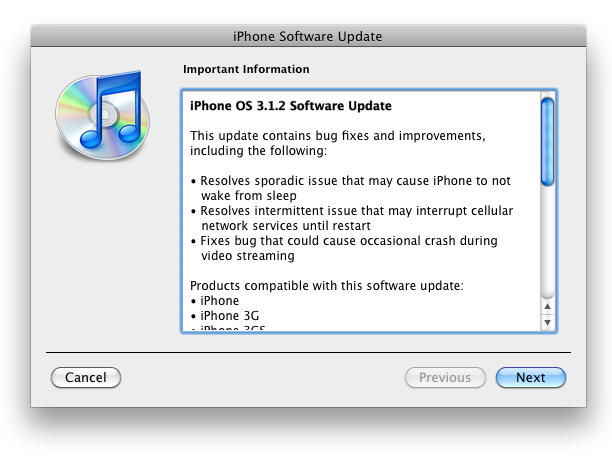
Screen shot 2009-10-08 at 11.40.04 AM

Apple has just released a new firmware update, version 3.1.2 for the existing iPhone and iPod Touch range, which contains no new features but fixes an important issue with cellular network reception. The new software fixes dropped cell connections until the iPhone is restarted, according to Apple.

However, it looks like the update does contain a new baseband version in order to fix the issue, therefore if you have an unlocked iPhone 3G or iPhone 3GS, do not update until there is confirmation from a trusted source, like the iPhone DevTeam. If you’re planning to jailbreak, you should wait as this firmware version is currently incompatible with the latest jailbreak tools. But updates will soon be released to resolve the compatibility problem, according to the iPhone DevTeam.

The complete-ish list of changes, according to Apple’s cryptic update notes, is as documented below:

  • Resolves sporadic issue that may cause iPhone to not wake from sleep.
  • Resolves intermittent issue that may interrupt cellular network services until restart.
  • Fixes bug that could cause occasional crash during video streaming.

Clearly, it indicates no new features, unless there are some hidden ones. ;)

To download the new firmware for your iPhone, select the model below to download it directly from Apple’s server or open iTunes and click iTunes –> Check for Updates in the menu bar.

About the author

Sayam Aggarwal

Sayam Aggarwal is a 16-year-old student living in India who has been an Apple fan for almost 5 years. He has worked with ModMyi, one of the leading iPhone communities, as an author for more than a year. He spends most of his free time on the Internet fetching the latest news regarding Apple and its entire product range. Follow him on Twitter!


Email the author | Read more posts by Sayam Aggarwal.

9 comments

    Cellular Data Network settings are gone.

    well, i was going to jailbreak this weekend, but since i need to install 3.1.2 to get rid of the “coma” issue i guess i’ll have to wait to jailbreak for the dev team to catch up.

    Does it break my Jailbreak, for real??????????????

    /facepalm

    After updating, there is a dialog box asking permission to update the carrier settings. This is different than the carrier settings that enabled MMS.

    I had been having trouble with my visual voicemail (read: it stopped working completely) after enabling tethering and then updating to 3.1. I eventually deleted the mobileconfig file I downloaded from benm.at, and visual voicemail was working again. Of course, tethering was gone, but my visual voicemail was more important. Now, I’ve updated to 3.1.2 and applied the carrier settings afterward. Believe it or not, the tethering option is back! Does this mean AT&T will be enabling tethering very soon? I have yet to try it out, but it is interesting.

    Update failed the first time and scared the crap out of me. Luckily there was an update done before that. Second update works fine, can’t wait to give it a try in the subway tunnels in Singapore and see I get better reception than before.

    Like a freaking idiot, when I plugged my phone in just to sync calendars, I innocently clicked OK to the sweet suggestion to update my iPhone…. after discovering that all my cool stuff was gone and I was back to the boring iPhone display, only then did I start reading about the warning NOT to update yet…

    I really miss my MUB theme… waiting for the Dev Team’s update to jailbreak… good lesson to learn

    I was wondering why my AV cables don’t work anymore after updating to 3.1. Anyone know how to get around this problem? or if this will be fixed in the future?

    For those of you that regret updating ur already jailbroken device into an unjailbroken version 3.1.2, id try youtube, it tell you how downgrade ur version number so then u can update to 3.1.1 and jailbreak again.

    For third party AV cables if you are using the 3.0 or higher software, you need to purchase the Apple cords. I did, fortunately I found a set on ebay for way less than Apple charges.

Add your comment

Name(Required)

Mail (required, but not published)

Website

Comment

Buy Inside Steve's Brain Buy from Amazon.com Buy from Barnes & Noble