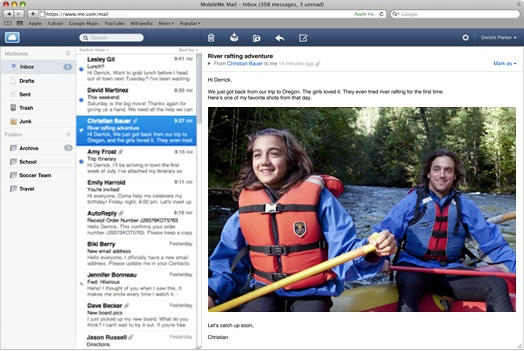
Apple has taken MobileMe Mail out of beta and made it available to all me.com members.
The iPad-inspired three-column view is especially nifty. See the screenshot above.
The new web mail also includes a couple of features not available in the beta: mail forwarding from another account and improved junk mail filtering.
Here’s the full list of features:
Apple: The New MobileMe Mail. Now Available to All Members
The all-new MobileMe Mail at me.com is now out of beta and available to all members. We’d like to thank the many people who used the beta and provided us with feedback.
Here’s a summary of what’s new in the Mail web application, including a couple of new features we’ve added since the beta went live:
Widescreen and compact views. When reading your mail at me.com, the new widescreen view lets you see more of each message with less scrolling. Choose compact view to hide your folders or classic view to see more of your message list.
Rules to keep your email organized everywhere. Mail rules help you reduce inbox clutter by automatically filing messages into folders you select ahead of time. Set them up at me.com, and your rules organize your incoming email on the web and everywhere else — on your iPhone, iPad, iPod touch, Mac, and PC.
Single-click archiving. Click the Archive button and the selected message is quickly filed into the Archive folder where it’s always available for future reference.
Formatting toolbar. You can create great-looking email messages using formatting buttons to bold or italicize text, change font color, insert images, and more. You can even create formatted web links to hide long URLs.
Faster performance. Mail at me.com loads your inbox and messages faster. And with interface refinements such as the ability to scroll through your entire inbox without having to manually click to load the next set of messages, you’ll be able to work more efficiently.
Increased security with SSL. With MobileMe Mail, accessing your email on the web is more secure than ever. Your inbox is protected to prevent anyone from eavesdropping on your webmail. As always, you receive SSL protection when you use your MobileMe Mail account on your iPhone, iPad, iPod touch, Mac, and PC.
Support for external email addresses (new since the beta). Reading all your email in one place is easy with MobileMe Mail. You can receive email from another service by having the email forwarded to your me.com address.* And when you reply to a message using webmail, you can choose to send it from the address it was sent to, or from your MobileMe account.
Improved junk mail filtering (new since the beta). MobileMe Mail places suspected spam messages directly in the Junk folder. If you see an email that you actually want, click the “Not Junk” button on me.com. MobileMe moves the message to your Inbox and makes sure that messages from that sender are not sent to your Junk folder again.
To use the new MobileMe Mail, just sign in to your account at me.com.
*Check with your mail service provider to see if forwarding is supported.

Leander Kahney is the editor and publisher of Cult of Mac.
Leander is a longtime technology reporter and the author of six acclaimed books about Apple, including two New York Times bestsellers: Jony Ive: The Genius Behind Apple’s Greatest Products and Inside Steve’s Brain, a biography of Steve Jobs.
He’s also written a top-selling biography of Apple CEO Tim Cook and authored Cult of Mac and Cult of iPod, which both won prestigious design awards. Most recently, he was co-author of Cult of Mac, 2nd Edition.
Leander has been reporting about Apple and technology for nearly 30 years.
Before founding Cult of Mac as an independent publication, Leander was news editor at Wired.com, where he was responsible for the day-to-day running of the Wired.com website. He headed up a team of six section editors, a dozen reporters and a large pool of freelancers. Together the team produced a daily digest of stories about the impact of science and technology, and won several awards, including several Webby Awards, 2X Knight-Batten Awards for Innovation in Journalism and the 2010 MIN (Magazine Industry Newsletter) award for best blog, among others.
Before being promoted to news editor, Leander was Wired.com’s senior reporter, primarily covering Apple. During that time, Leander published a ton of scoops, including the first in-depth report about the development of the iPod. Leander attended almost every keynote speech and special product launch presented by Steve Jobs, including the historic launches of the iPhone and iPad. He also reported from almost every Macworld Expo in the late ’90s and early ‘2000s, including, sadly, the last shows in Boston, San Francisco and Tokyo. His reporting for Wired.com formed the basis of the first Cult of Mac book, and subsequently this website.
Before joining Wired, Leander was a senior reporter at the legendary MacWeek, the storied and long-running weekly that documented Apple and its community in the 1980s and ’90s.
Leander has written for Wired magazine (including the Issue 16.04 cover story about Steve Jobs’ leadership at Apple, entitled Evil/Genius), Scientific American, The Guardian, The Observer, The San Francisco Chronicle and many other publications.
Leander has a postgrad diploma in artificial intelligence from the University of Aberdeen, and a BSc (Hons) in experimental psychology from the University of Sussex.
He has a diploma in journalism from the UK’s National Council for the Training of Journalists.
Leander lives in San Francisco, California, and is married with four children. He’s an avid biker and has ridden in many long-distance bike events, including California’s legendary Death Ride.
You can find out more about Leander on LinkedIn and Facebook. You can follow him on X at @lkahney or Instagram.

