 You know how it is: You press and hold the Home button to set a quick timer and Siri comes back all loud, “OK! Setting the timer! I’m in suspense!”
Or some such nonsense. Sure, you want to confirm that Siri’s not, say, adding an event to your calendar or calling your Aunt Tilly instead of setting a timer, but maybe you don’t need Apple’s AI helper to be all chatty about it.
Here’s how you can tamp down Siri’s sometimes-annoying banter.
If you want to manage Siri’s vocal responses to your queries, you’ll need to drop into your Settings app. Open it on your iPhone or iPad with a tap, then tap the General button.
Next, swipe down to Siri and tap on that button to get to Siri preferences. Once in there, tap on Voice Feedback. You’ll get three options: Always On, Control with Ring Switch, and Hands-Free Only.
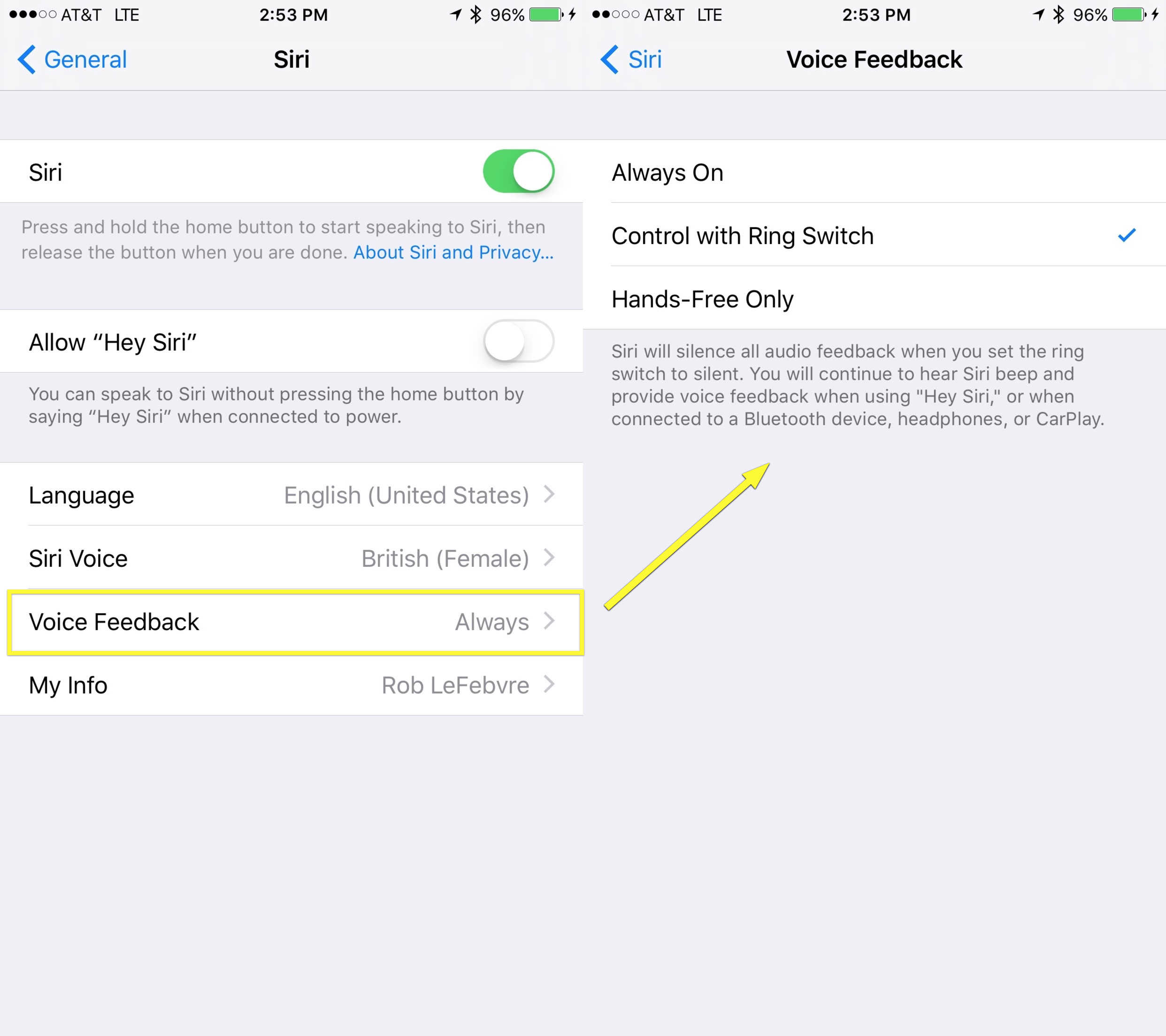
Photo: Rob LeFebvre/Cult of Mac
Always On means Siri will cheerfully respond to your queries and commands with voice, even if you’ve set the iPhone to silent using the hardware Ring Switch.
If you set it to Control with Ring Switch, when you toggle your iPhone to vibrate/silent, Siri will silence all audio feedback. You’ll still hear the beep, and Siri will provide voice feedback when you use the “Hey Siri” command or when connected to a Bluetooth speaker, headset or CarPlay.
Finally, if you set this option to Hands-Free Only, Siri will only beep when you invoke it, but will still provide voice feedback when using Hey Siri or connected to a Bluetooth device or CarPlay.
Now you know al your choices when it comes to how mouthy Siri is. Pick one and have at it!
Via: Pocket Lint

Rob LeFebvre is an Anchorage, Alaska-based writer and editor who has contributed to various tech, gaming and iOS sites, including 148Apps, Creative Screenwriting, Shelf-Awareness, VentureBeat, and Paste Magazine. Feel free to find Rob on Twitter @roblef, and send him a cookie once in a while; he’ll really appreciate it.


4 responses to “Pro Tip: Use Siri without all the loud play-by-play”
I hurt your business because i use adblocker? Awww…. you butthurt? Here, i have something for you to play with _(_. Don’t worry, I’ll make sure not to visit this shit anymore.
Ad blocking. Tell you what. Quit serving up video that autoruns when I load a page on your site and I’ll stop blocking ads on your site. Be nice to me and I’ll be nice to you.
I agree!
I’m pretty sure it’s been removed.
It still exists if you say “Hey Siri”, or if it’s an iPad or iPod touch (I guess the Apple TV and Apple Watch, too, but I don’t own the latest version of either, so I can’t say), and if Siri needs more information, it will make the beep, but for the iPhone (generally),… nope. Gone.