
Anyone wanting to see what productivity tools would look like on an iPad with stylus need look no further than Microsoft’s updated OneNote iOS app.
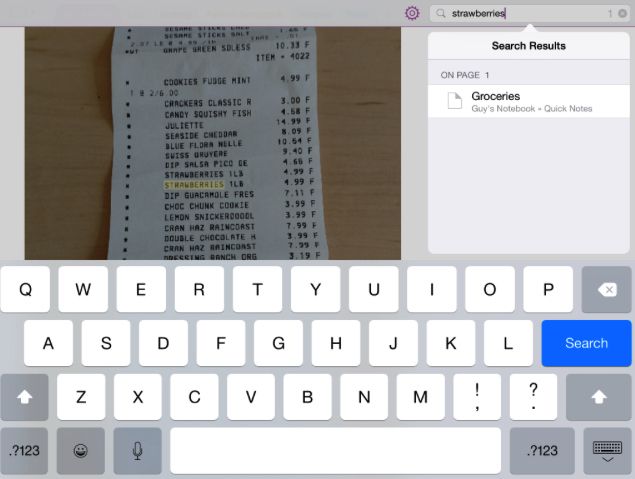
Having just updated its OneNote app for Mac, the iPad app adds OCR scanning of text within images, alongside the neat ability to add handwritten notes — either using your finger or, better still, a third-party stylus. While this feature has previously been available for the Windows and Android versions of the OneNote app, this is the first time iPad users can get in on the fun.
To use the new tool, simply hit the Draw tab, choose a writing implement, and then add as many handwritten notes or sketches as you want. “We’re constantly working to make our interface more natural for note-takers,” a spokesperson for Microsoft said. “OneNote for iPad reflects lessons we’ve learned over the years by from studying and understanding how people use pens.” This includes a variety of color options, an endless digital canvas, and other features.
OneNote is a great app for note-taking, and the new ability to important photos and then scan them for words, as well as to use a stylus, really adds to what was already a great offering from Microsoft. Check out the video below for more details, and then download the app using the link at the bottom of this page.
https://www.youtube.com/watch?v=bOpxNVJ7tZ4
Source: OneNote

Luke Dormehl is a U.K.-based journalist and author, with a background working in documentary film for Channel 4 and the BBC. He is the author of The Apple Revolution and The Formula: How Algorithms Solve All Our Problems … and Create More, both published by Penguin/Random House. His tech writing has also appeared in Wired, Fast Company, Techmeme and other publications.


4 responses to “OneNote update shows why iPad would benefit from a stylus”
What pen was used in that video?
NoteShelf has every one of the features the video shows, and more. You can read and annotate all kinds of documents, not just photos. And copy and paste your writing too. It doesn’t have OCR recognition, though.
I’ve been using a stylus with iPads since 2011. I lecture to 300 – 600 students, and my iPad screen is shown on the classroom projector. So I write the lecture notes on the iPad (with Noteshelf), instead of on a blackboard.
You really have to have a stylus for that, because you have to write very quickly, yet it must legbile enough for 300+ other people to read. Your finger is fine if you’re the only one who has to be able to read your quickly-scribbled writing, but you need a stylus for others.
Any cheap stylus will do: I’ve experimented with many, and all of them work mighty fine.
Don;t buy Ipad… The credit card requirement make it worthless and impossible to download anything. Also there is no way to opt out of this on my model. This way they stick on hidden charges. They have been sued for this but they still do it.
I always buy pre-paid Apple cards…. Never used a creditcard with it. Even for my icloud space