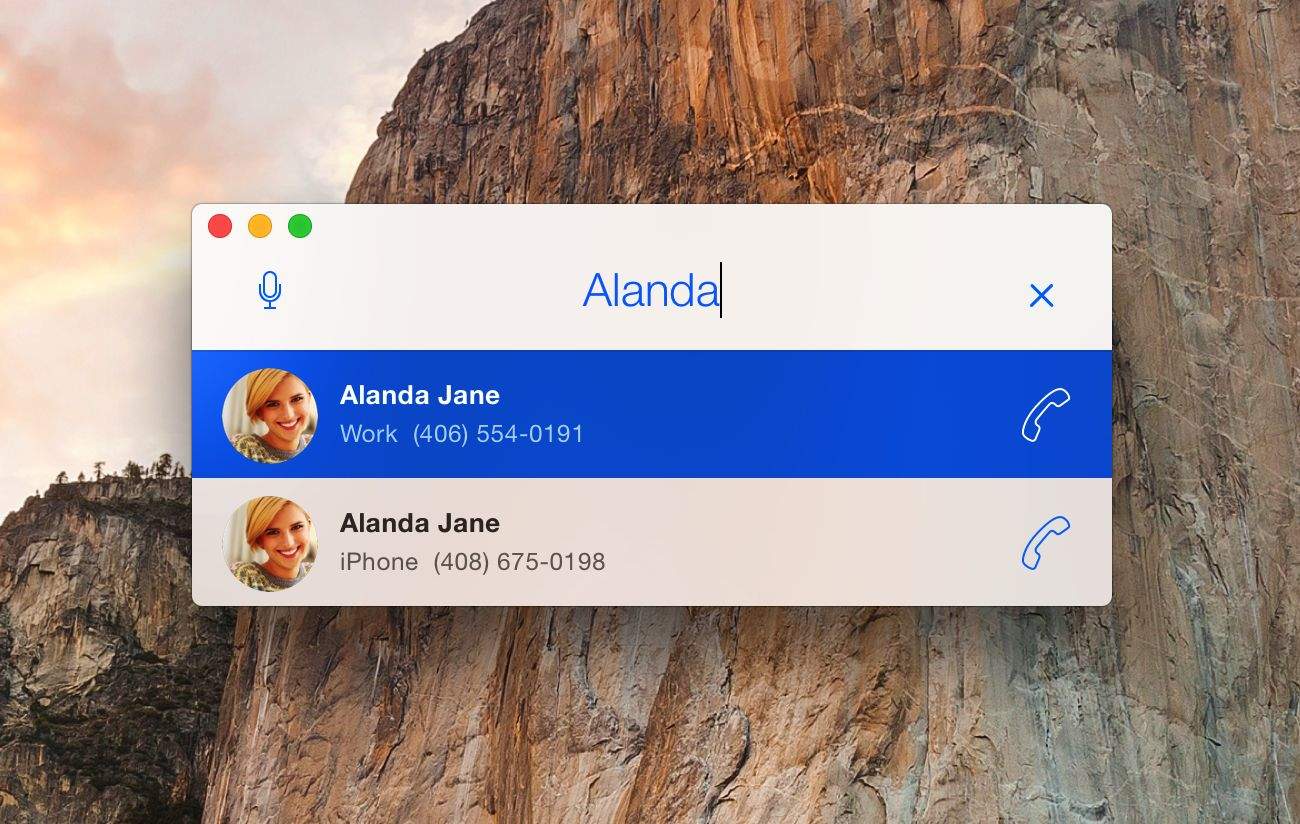
One of the best features launched with OS X Yosemite this year was the ability to make and receive phone calls from your Mac, provided it is paired with a compatible iPhone.
But while it’s usually great receiving phone calls with the feature, making outgoing calls yourself is not so straightforward: You must launch the FaceTime app, turn on your webcam and then maneuver through an interface that’s clearly more complex than it needs to be.
Thankfully, this is where DockPhone app comes to the rescue. If you use your Mac to makes calls with any regularity whatsoever, consider this an early Christmas present to yourself.
Costing just 99 cents, DockPhone promises to transform the way you make phone calls. All you have to do to use it is type or speak a number or name into a simple dialog box, then hit “Dial” to connect. The app then connects to your iPhone and dials the number.
This feels so integral to Yosemite that it would be no surprise whatsoever if Apple added it in a future version of OS X. Until they do, however, you can download DockPhone from the Mac App Store at the link below.
(Please note that there are a few requirements you’ll need to fulfill, such as having an iPhone 5 or newer, a Mac with Bluetooth 4.0 LE, and FaceTime activated with the same iCloud account on both the Mac and the iPhone. Provided all of these are checks, you’re good to go!)
Source: iTunes
Via: TechCrunch

Luke Dormehl is a U.K.-based journalist and author, with a background working in documentary film for Channel 4 and the BBC. He is the author of The Apple Revolution and The Formula: How Algorithms Solve All Our Problems … and Create More, both published by Penguin/Random House. His tech writing has also appeared in Wired, Fast Company, Techmeme and other publications.


24 responses to “The quickest and simplest way to make calls on your Mac”
While I like the idea – It needs a keypad for input. If I am researching something and want to call a company, I might want to paste the number out of google or just type it in and hit enter to dial.
Cobook can also do this. By right clicking on a phone number you have the option to call using iPhone or FaceTime.
Good to Know – but if the developer is listening – I’ll fork over the 99c when they add a dial pad. I’m not sure how this was overlooked but it is an essential feature especially in these days of “dial one to be ignored” or “dial two to be hung up on” phone systems.
Er.. I have NEVER HAD TO LAUNCH FACETIME??. if you go to Spotlight settings you can move the contacts results to nearer the top of the results. Then just type a persons name in Spotlight and their Contact card will be shown. Right in Spotlight you can dial any of their numbers.
So, just like on the phone I almost never call anyone that is not in my phonebook. And with that in mind:
Pressing ⌘+space gives me the spotlight,
typing a name gives me the contact info,
from there I can call normal calls and FaceTime calls.
Sounds about as easy as using this app.
(you can also call numbers from home pages by selecting them, a stitched box appears with calling options)
For the rare occasion where I want to call a random number I have to open up the FaceTime app. But I fail to see the need for one more app running when the operating system does just fine 95% of the time.
Making this a app *most* people don’t need :(
Not against the app tho, it has a nice design and if you want a separate dialler, go for it, it’s a dollar!
To the people complaining that caller apps don’t have dial pad. I wouldn’t be surprised if that’s a problem apple has to fix, these dial up apps are sending the call information to the operating system. Then FaceTime app does the actual calling and there might not be a way to intercept that yet.
why would you need Bluetooth 4.0? I have a MacBook pro mid 2010 with 2.1 Bluetooth and I make and receive iPhone calls just fine on my mac….the one continuity feature I can use….
It’s listed as a requirement on the App Store page?
I start typing a person’s name in Spotlight, which opens the contact in the address book. You then have the option to make a FaceTime, FaceTime Audio or regular audio call. That’s not so difficult in my opinion.
I’m still looking for a touch tone keypad – need it often to make selections in automated phone systems. I.e. “Press 2 for … etc”.
You don’t need Bluetooth for calling and text messaging, for that, all you need is to be on the same WiFi Network… You keep making the same mistake! Bluetooth 4.0 LE is only required for instant hotspot and handoff…. Please check your facts before you post an article for an app we don’t really need…. Continuity Keypad is also quite nice and does offer a keypad AND a search function…
You should direct your anger at the developer instead, since that requirement is on the app’s page. Also, don’t be angry.
I wasn’t angry, but then the developer should know better. Also the editor who wrote the article should have seen the error… Right? Perhaps my words came across a bit harsh… Wasn’t meant that way, but when you see the same mistake on this website over and over again, it does start to get annoying…
Maybe his app requires Bluetooth LE? You’re just guessing based on Apple’s requirements, when he might have developed the app to work that way. Again, it’s not the author’s fault since this is up in the App Store with those requirements. Take it up with the developer if you think it’s wrong, but don’t post this whiney BS before thinking about who’s actually at fault.
Who’s being whiney here? Why would a developer require more than Apple would for the same functionality? Doesn’t make sense. So, I just think it’s a simple mistake (be it either on the developer’s or author’s part, that doesn’t matter). Nothing wrong with that, can happen, but who’s being angry and whiney now? Your comments sure make me seem a lot nicer and calmer than you at the moment. And I do think the author could have still checked if these requirements were actually needed. That’s what being a journalist is about. Fact checking. So even if the developer requires it then for the app, it could say in the article “the developer says the app requires bluetooth LE, but seemed to function just fine over just WiFi”. I haven’t been able to test it myself yet, but I don’t think that’s my job. I’m sure the author is a nice man, who tries to do his job the best way he can, but if you write about software, you may want to check if other possibilities also work, even though they might work less well. That’s also the fun of writing about tech right?
Ahh yes, turning focus on the person that called you out. The sign of someone who has nothing to backup his claims.
Who’s to say the author didn’t check? He probably found it to be true based on the wording of the article. If you’re a developer, send DockPhone’s creator a message. If not, shut the hell up. You’re b*tching at the wrong person. Tell Luke’s bosses you can write better than him and see how far that gets you (I’ll give you a hint: nowhere). I’m tired of you whiney commenters thinking you can do a better job than people that are PAID to do this.
I’m turning focus on you because you are the one doing all the f*cking whining here. If you’re so tired of commenters I have a quick tip: stop reading comments.
Nope, still you. Try again.
Troll
Now you’re just throwing out terms you don’t know how to use. Go home Ramón, you’re drunk.
Go look in the mirror, you’ll see what I mean…
Nope, all I see is someone who’s clearly smarter than you. It’s good you’re bailing out before you make yourself look any worse.
Being an asshole and a bully doesn’t equate being smarter. If you truly believe that, you might just want to go back to school and get some more education. Anyway, asshat, enjoy your life. Probably not worth much if you feel the need to be an asshole to people. Read your comments to other people. All told me the exact same thing. Anally retentive asshole. Ain’t nobody got time for that. I made some valid points, but you were dumb enough to believe all that the oh so wise journalists write down on paper and thus it must be true. A true smart person stays inquisitive and questions what’s true and what’s not and also listens to other people in order to learn. The only thing I’ve learned from you so far is that some people are just gigantic assholes. Just because you act like you know better doesn’t mean it’s true.
Nope, nothing constructive from you. Your original comment was an asshole remark and I called you out. Now you’re all butthurt. Maybe you could use some of this to heal that burn:
I’m done with this childish shit, go bother someone else.