Why Camera Genius Is The Go-To Camera App For iPhone [Review]

CG Icon

With limited space on the home screen of my iPhone, only the best apps get any real estate. Well, Apple’s Camera app has had its spot officially usurped by Camera Genius ($1.99). And for good reason.

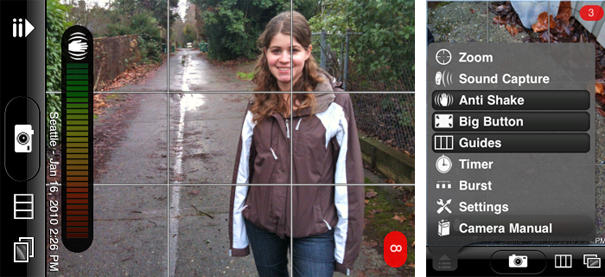
Published by CodeGoo, Camera Genius is full of extra camera features that leave you wondering, why didn’t Apple think of these? Notable favorites include digital zoom, six different line guides, a timed shutter, and most useful, a feature dubbed “Big Button” that turns your entire screen into a shutter button―super useful when you’re trying to take a self portrait with your friends or significant other. Other cool features include a burst mode, sound activated shutter, and anti-shake.
CG screenshots

Now, with all the useful features Camera Genius has to offer, you may be temped to forever delete Apple’s Camera app from your iPhone (as if it were possible), but don’t try it just yet.

While it’s true Camera Genius is a photo-taking whiz, it doesn’t do video.

And I’d be remiss if I didn’t also mention a couple of quirks I found. First, its location stamp feature (which, if turned on, imprints location data onto your photos) is buggy and doesn’t always work. But more annoyingly, while its picture previewer (camera roll) works fine for viewing photos, it won’t let you actually delete any of them—you’ll still need to use Apple’s Photo Album or Camera app to do that.

DON'T MISS
Home Run Hits For Your iPhone Home & Volume Up Buttons [iOS 5]

But even with these small quirks, the sheer usefulness of Camera Genius’ extra features make it much more useful than Apple’s Camera app. And so to the victor go the spoils… well played Camera Genius! You have secured your place in one of the coveted spots on my iPhone’s home screen.

The Camera Genius iPhone App is good enough to replace the built-in Camera app on your Home screen.

Rating: ★★★★☆

Cult of Mac Black Turtleneck rating system:

5: Insanely Great! • 4: Steve Approves • 3: Needs Work • 2: Sugared Water • 1: Dogsh*t frosting


Model: Camera Genius
Company: Code Goo
Compatibility: iPhone 2G, 3G and 3GS
List Price: $1.99
Buy Now: The Camera Genius is available from the App Store for $1.99.

About the author

erfonErfon Elijah is a technology enthusiast of average height, a writer, photographer, and the founder of the Seattle indie brand Might Tees. When not designing graphic tees or recording podcasts, you’ll find him on Xbox Live hunting Modern Warfare 3 foes like the Predator. Some have quietly proclaimed he also has an overactive twitter...

(sorry, you need Javascript to see this e-mail address)| Read more posts by .

Posted in Cameras, iPhone Apps, Reviews, Top stories |

  • http://ihbs.co.uk Ben

    good app, might get it to replace my apple camera app as well. i did get gorilla cam, but the icon is so hideous i got rid of it! if you want video, give qik a look, its actually really good.

    One thing i dont get though, why do all the camera apps and video apps seem to think i need an additional, slow, buggy place to store my pictures? rather than with all of the others in the photos app?

  • reader5272

    All well and good but… who stole her hands?

  • http://daveday.me Dave Day

    I was disappointed with this app. Yes you gain the ability to press anywhere on the screen to fire the shutter, grid guides, timer and digital zoom but it comes at a cost.

    Firstly, as you mention, you loose the ability to shoot video. Then you loose GPS and other EXIFF embedded data. You loose ‘tap to focus’ when in big button mode and not to mention it’s much slower to save photos to the camera roll (due to Apple’s API).

    All ok if you’re a first gen iPhone user but too much of a trade-off for 3GS users.

  • Bree

    Gorillacam does much of that (no voice capture or location marking IIRC) and it’s free: http://itunes.apple.com/us/app/gorillacam/id342972390?mt=8

  • http://reddogrambling.squarespace.com Red Dog

    Agree with Bree. Gorillacam became my go to when they added anti-shake. Love its timelapse feature as well!

  • lfom

    Looks good, but I think Ultimate Camera Free does the same (or even more) but it’s free (although it shows a pink banner when you are shooting telling you to buy the full version).

    I do like 10x Camera Tools too, but what I miss is a camera program with both anti-shake feature and that saves the GPS info and correct EXIF info saying it was taken by an iPhone. None does this. Why not? iPhone SDK limitation?

  • http://mighttees.com erfon

    @Ben – I know it might sound dumb to a lot of people, but I’m the same way. I hate poorly designed icons, and I have a hard time putting an ugly one on my home screen no matter how useful the app

  • http://mighttees.com erfon

    @Dave – GPS is a great catch, i actually hadn’t considered that at all and it’s a feature I definitely use.

    I rarely use any EXIF from my iphone photos though, so that’s no biggie to me…

  • http://www.codegoo.com CodeGoo

    Thanks very much for reviewing our app. I just wanted to comment on the few issues that were brought up. First we are working on video, so its coming soon it just isn’t quite up to the quality we want yet.

    On the location stamp, it probably won’t work well if you are indoors. That is a limit of GPS as it will not receive signals inside. If you had another problem with it please contact us and we will try to troubleshoot the problem.

    Third on deleting images. We would love to add that unfortunately apple doesn’t allow third party developers to delete from the camera roll yet. Hopefully they will add the ability in the future.

    @ Dave On the EXIF data saving its another thing that isn’t allowed yet for third party apps by apple. If they let us append EXIF data in the future we will add it. Tap to focus works fine with 3gs phones unless you have big button active. But think about this for a second, how are we suppose to distinguish between a tap to focus tap and a tap that you want to actually snap the photo? So in this case big button overrides tap to focus. If you need to use tap to focus with big button you can temporarily turn off big button.

    Thanks very much for the positive write up!

  • Patrick Thompson

    I used CameraGenius for a long time as a default but recently found 321 Photo and like it much better.

  • http://mighttees.com erfon

    @patrick – thanks for the hottt tip. i’m going to check that one out.

