As it turns out, I end up having to sign a lot of documents, such as contracts, IRS forms, and the like. Many of these are in PDF form (bravo), and some even let me fill them out via my keyboard (even better).
Unfortunately, they still expect us to print these babies out, sign them with a pen, and then get them back into some sort of digital format, via a scanner or picture with our iPhone or something.
Luckily, Apple’s own Preview makes all that superflous. It’s super easy to get your pen and paper signature onto a PDF. Here’s how.
Launch Preview, and grab a form you need to sign. Open the form in Preview, and then click on the Annotations button in the upper right of the document’s window. All the tools to annotate your PDF will drop down, including the signature button.
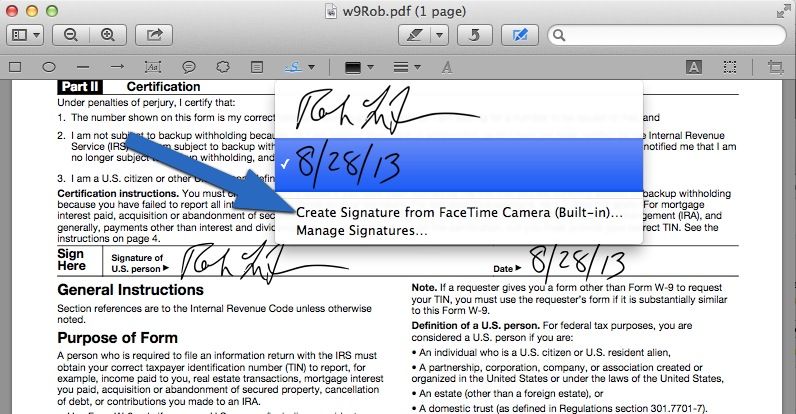
Click on the little triangle next to the icon that looks like an underlined script S. You’ll have the option to create a signature from the FaceTime camera, one that’s built in to every current Macbook and iMac.
Next, sign your name on a white piece of paper, and hold it up to the FaceTime camera so that it fits within the highlighted area and on top of the line. You’ll see a great preview of the signature to the right. When you do, put the signature paper down and click on Accept. You’ll now be able to click on the signature icon and then click anywhere in your document to add the signature.
It’s not just for signatures, either, as you can see in the screenshot above. You can use the same feature to write down the date and digitize it as well.
Got a great tip? Need some help using OS X? Shoot us an email or hit us up on Twitter @cultofmac.

Rob LeFebvre is an Anchorage, Alaska-based writer and editor who has contributed to various tech, gaming and iOS sites, including 148Apps, Creative Screenwriting, Shelf-Awareness, VentureBeat, and Paste Magazine. Feel free to find Rob on Twitter @roblef, and send him a cookie once in a while; he’ll really appreciate it.


6 responses to “How To Sign A PDF Form On Your Mac Without Printing It [OS X Tips]”
I don’t get why it doesn’t have a simple free-writing function.
Respect to the tipster! Just saved me hours!
Thanks!