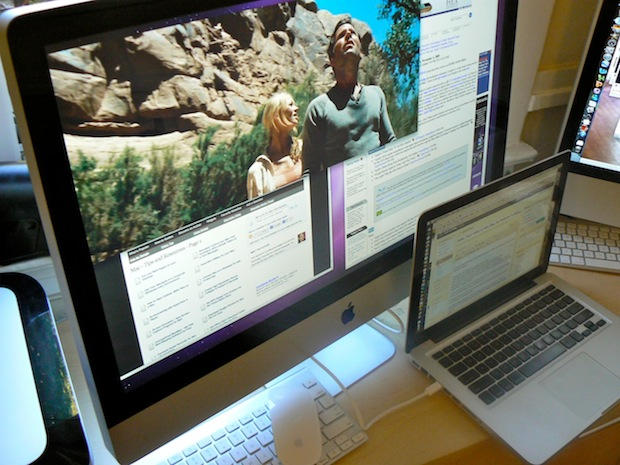
Video: 27-Inch iMac in Action as External Monitor

imac_external_display

Here’s a couple of videos of the new 27-inch iMac in action as an external display. The new iMac is the first that can act as a monitor for another machine, but will only work with devices that output DisplayPort video, like newer MacBooks.

In these videos I’ve hooked my MacBook Pro (13-inch) to the iMac using Belkin’s Mini DisplayPort to Mini DisplayPort cable, which is available from Apple’s retail stores for $29.99.

Previously I tried to hook up the iMac using DVI and HDMI cables (and appropriate adaptors), but it didn’t work.

See the monster iMac in action after the jump.

Thanks Emil. And thanks Dane for fixing the videos.

BTW: Don’t miss our comprehensive review of the humungous new 27-inch iMac.

Here’s how to hook up the iMac an external monitor; you simply the Mini DisplayPort to Mini DisplayPort cable into the back of the iMac, and then into the MacBook. The iMac auto detects the connection and switches into “target display mode.”

Note: the iMac needs to be booted to act as an external display.

DON'T MISS

Here’s the iMac in action as an external display. As you can see, it’s simply huge. You can have two full-size documents open on the iMac and a third on the MacBook, and there’s still plenty of space on both screens for background windows.

The Command/F2 key combination flips the iMac between target display mode and normal mode. Here’s how it works:

About the author

Leander Kahney

is the editor and publisher of Cult of Mac, and author of three books about technology culture: Inside Steve’s Brain, the New York Times bestseller about Steve Jobs; Cult of Mac; and Cult of iPod. Leander has written for Wired, MacWeek, Scientific American, and The Guardian in London. Follow Leander on Twitter @lkahney and Facebook.

(sorry, you need Javascript to see this e-mail address)| Read more posts by .

Posted in Apple, iMac, News |

  • Joe

    Perhaps they can fix the video? Unless the MacBook Pro has flipped the ports to the other side, the apple logo has changed and the Belkin box is printed backwards – the video is flipped horizontally.

  • Matt

    Cool, but will it work with older MBP’s with DVI?

  • http://cultofmac.com Leander Kahney

    @Joe — that’s me. the video was recorded using Photo Booth, which flips the video. I didn’t have a tripod handy.

  • Brian

    I assume the MBP would output to the iMac if it (the MBP) were closed and you were using an external keyboard? Just as you can do with a conventional external monitor?

  • Church of Apple

    Who’s gunna watch 5 videos at once? I wish my G5 could play one without stuttering… =(

  • Emil

    You followed my tip! Great! Even though the text above the last video doesn’t match with whats on the video. :P

    Great test btw, not technical tests like others do but simple tests that will happen to “ordinary people”. Thats very good!

  • http://deoclicianocgiportfolio.wordpress.com Deocliciano Okssipin Vieira

    Each day, the iMac look like a TV, very fishy by !

  • Sean

    Um… flip the video in iMovie.

  • Thomas

    Out of curiosity.. Why on earth would you use the iMac as an external monitor in the first place?

    I understand that it is nice to have an external big monitor for a small laptop like the 13″ MBP, but why not work on the iMac instead if you got both?

    I am sure the iMac would be faster in most ways, so I simply don’t get the point of it?

  • Kurt

    I was thinking of trying a slightly different set-up. I want to know if it would work (or work but be slow) to start the MBP in drive mode, connect it to the iMac as a USB or Firewire drive, and run the apps installed on my macbook from the iMac. Then, when I travel, I would disconnect the MBP and all docs and apps would be up to date. I would gain speed and monitor size while at my desk and have a fully in sync PB while on the road.

  • Pablo

    Hi, awesome this new imac!!!
    Thanks for the test! Could you tell me the name of the movie trailer in the second clip?

    Thanks

  • http://www.rabboyce.com rab

    can you confirm that processes continue to run in the imac when in traget display mode? and that all functions are available?

    -Rab

  • ged

    yeah i’m going to use my quad core imac as a monitor for my macbook ASAP

    makes total sense to ‘upgrade’ this way

  • derekaw

    @ Thomas

    I look forward to getting my next iMac because then I can use my old 27inch iMac as a secondary display with a handy built in Mac.

  • http://heilage.net Heilage

    Hi. Just googled this external monitor issue and ended up here, and I was wondering if you could test something. Assuming that you own or know anyone who owns a regular PC with a native DisplayPort output on their graphics card, can you try it with a Displayport -> Mini-Displayport cable? I’m kind of on the edge of my seat until I can figure out if this works.

    Thanks in advance :)

  • Daniel

    Neat, thanks. Is there something special about the Belkin cable or would a generic version from monoprice work the same? http://www.monoprice.com/products/product.asp?c_id=102&cp_id=10246&cs_id=1024602&p_id=5991&seq=1&format=2

  • Graham

    I see that you can use the external display when the iMac is on and booted up into the OS. Can the 27″ be used as an external monitor even when the iMac is shut down?

    Related… does cmd-f2 work from bootcamp? If so, I could run Windows on the iMac side and OS X on the laptop and switch between them.

  • http://www.xero.com Rod

    A few questions

    - Does it all work when macBook is in clamshell mode?
    - I assume no tri-cable yet that allows the same easy connection as the 24″ Monitor does? I.E can you power the Mac off the iMac
    - I assume the keyboard and the mouse of the iMac are used for both?

    Thanks

  • applex

    Hi, just wondering, since the Belkin’s Mini DisplayPort to Mini DisplayPort cable works, can one end of the Belkin cable be cut and rewired to a Female Mini DisplayPort?

    Like this one :
    http://www.cpustuff.com/Mini-Displayport-to-Mini-Displayport-Extension-Cable-p-16242.html

    Connect to: http://www.cpustuff.net/index.php?l=product_detail&p=24

    Then connect a Mini Display Port to HDMI Adapter to the Belkin cable rewired with a Female Mini DisplayPort to get imac to display HDMI?

    Thanks!

  • applex

    Seems to have an answer here for those who are interested in connecting console to imac : http://bigmacky.wordpress.com/2009/10/25/connecting-a-playstation-3-to-your-imac/

  • Simon

    Would this work for a mac pro (desktop not macbook)? if so GREAT, but id like to know before i blow £900 getting one just to find out it cant be used as a monitor.

  • Nick

    I’d be very grateful is someone using the new 27″ imac as an external monitor can answer my question below:

    Does the imac go to sleep when the displayport switches to an external device? I want to buy a 27″ imac for two purposes: 1. A display for my macbook pro. 2. to use the imac HD as network disk that my macbook can access (timemachine backups etc).

    I was wondering if anyone with both devices connected to LAN can tell me if they can share access the imac’s HD from a macbook when the imac is in external monitor mode?

    Thanks,

    Nick

  • Neander

    Please can u answer this simple question.
    Can you get the imac 27 to display the entire desktop of the macbook? Cos I see you’re dragging some windows there, one is the internet, the other a movie, but I’m interested to know if I can get the entire macbook desktop to be what is displayed as the imac desktop.
    Thanks.

  • Flosja

    The 27 inch iMac as an external monitor is perfect for gamers who wanna game at that glorious 2560×1440 resolution :)

  • mat

    Wow thank you this is the perfect setup for me. I’m at a university and my department’s 27in imac has no useful software, so it’s the ideal monitor for my MBP!

    It works exactly as advertised and the 3x the screen area makes an enormous difference.

  • Mulholland

    Has anyone tried this with Bootcamp and Windows 7? I have a 27″ iMac and a 13″ MacBook Pro…the mini-display cable doesn’t work by just plugging it in, but I am unsure if I need to do something in the configs on the Windows side.

  • http://None Joshua

    That is incredible. I’ve been wondering, if I hooked a pc up to the 27″ iMac would it work as an external monitor for pc? Reason I ask is I have 4 dvi out ports on my pc. I currently am running 2 24″ and one 22″. I am planning on purchasing a 27″ iMac and was just curious if I could use that as 4th monitor or in place of one of the others?

    Great find though. Goal is to switch completely to Mac but just hate only running iMac monitor and only one more.

    Also, curiously, could you set the MacBook to be the second monitor (reverse what you did).

    Thanks, Mac noob,

    Josh

  • Steve

    Is it possible to use the 27″ iMac as an external monitor for a Dell laptop PC? I have a Dell laptop for work and it would be great if I could use the 27″ iMac as an external monitor for work at home. I just have no idea how to do it ….or if a 3rd party has developed a method.

  • jon

    can the 27″ imac be used as a display with a pc, using a dvi-mini display port converter cable?

  • Patrick

    Scenario:
    You have two imacs of that 27 inch class.
    You are a User working with Video Edititng or 3d/Postprodction.
    You use the 2nd Imac as Monitor

    Would it be possible to use the 2nd imac as rendernode, while being configured to be used as monitor?

    regards

  • Bobby

    Anyone have any suggestions for the issue below? Ran into the same problem:

    “Has anyone tried this with Bootcamp and Windows 7? I have a 27″ iMac and a 13″ MacBook Pro…the mini-display cable doesn’t work by just plugging it in, but I am unsure if I need to do something in the configs on the Windows side.”

  • JW

    I’d like to answer a few of the questions above:

    1) The 27″ iMac does NOT go to sleep when you’re using it as a second monitor. So you can continue to use the 27″ for filesharing, running applications, serving, even use screen sharing(!) to connect back to the 27′s “Desktop” while you’re in target display mode.

    2) Yes, this work with the Macbook in clamshell mode

    3) I used a really cheap cable from Amazon: http://www.amazon.com/gp/product/B002YHYTI6/ref=oss_product “Mini DisplayPort Male to Mini DisplayPort Male 32AWG Cable (Gold Plated Connectors) – 6ft” and it works fine

    4) I’ve tried this on a 15″ mid-2009 Macbook Pro, a 24″ iMac (aluminum, about 2 years old not sure the exact model) and another 27″ iMac.

    5) On the macbook and 24″ imac, as soon as you plug the cable in, the 27″ goes into target display mode. However, when you plug two 27″ iMacs together, you have to hit the Command+F2 key combo to switch whichever one you want to be the “slave” into target display mode.

    6) To folks who say “why would you do this!?” – well, for example if you have a Macbook for work and a 27″ at home, it’s nice to be able to use the big screen when you’re home (or vise versa) and other similar situations (at work we have a second 27″ iMac for specific uses and I use it with my macbook when I’m there and it’s available). It’s wonderful.

    Admin: If you’re able to do so, please consider pushing this post to the top

  • Craig

    whats the diffrence between the 27″ imac and a early 2009 24″ imac ? Is it purely an software update that enables the 27″ to act as a display or is it something elce?

    • Anonymous

      Hey Craig, I know it’s been three weeks since you posted that, but to reply to your comment: The 27″ iMac is the only iMac that has a two-way MiniDisplayPort… port. As a result, this mode will not work on any other iMac.

      • JC

         Does this work with the new 27″ iMac that was just released? 

      • Anonymous

        I have the early 2009 version as well.  Is there some update that can be done to allow these older versions to be our monitor for our laptops?  I really hate having 2 large monitors on my desk and cannot afford a new MAC.  Would love to know if there is an update to the hardware, firmware, anything?  Thanks…

  • Johnforz

    hi, thanks for the info.. very helpful. But do you perchance know of a good method, or a particular KVM switch/product that will allow me to take my mouse/keyboard/wacom tablet with me between computers?

    Also, I assume there is know way to stop the window reformatting/repositioning when I switch the iMac from target mode to normal mode?

    thanks so much in advance!
    John

    • http://twitter.com/TreyRust TreyRust

      I don’t have time to look it up, but from what I remember, you should check out synergy. Its a program that allows the same keyboard/mouse (and inherently, tablet) across multiple PCs

  • Leo Studer

    Hi
    do you have any idea whether this is also working with the new iMacs with a thunderbolt port?

    Thanks in advance
    Leo

  • Paul

     30 dollars for a proprietary cable. Apple hard at work again ;)

  • Paul

     30 dollars for a proprietary cable. Apple hard at work again ;)

  • Paul

     30 dollars for a proprietary cable. Apple hard at work again ;)

  • Paul

     30 dollars for a proprietary cable. Apple hard at work again ;)

  • Paul

     30 dollars for a proprietary cable. Apple hard at work again ;)

  • Wtfapple

    This is totally stupid and hilarious.. WTF APPLE engineers…. hello ??? never heard of VGA or DVI…. ?? It’s cheap and work with any computers. And, ooh, the imac needs to be turned on ??? OH MY GOD… then why not simply open the file direcly on the imac,, no need to waste running 2 computers !!!!.. Apple you deceive me a lot… this reminds me the black days of apple back in the end 90s..

    • George2

      You sound a bit angry.

  • Emelia

    Would this work with a 24″ iMac 2.8ghz Intel2 Duo?
    Emelia

  • http://BivouacRecording bivouacmusic

    The new thunderbolt port is based on displayport technology so I am assuming that to connect another external monitor you would use this port. 

    Heres the question:Since the new 27″ imac has two of these ports, does that mean you can connect up to two external monitors?Has anyone tried?

  • Mat Weller

    I hope this means they’re moving toward making it so that one day you will be able to set your Startup Disk as something like “None (monitor only)” or even just kick a physical switch in the back and then slave it to another Mac. It’s important and helpful for many reasons, but these are mine…

    1) It’s a HUGE waste to throw away a top-functioning flat screen monitor just because the computer is obsolete or not functioning as well as you need. You’re not even supposed to put computer parts in landfills, but the iMac begs you to throw fully functional machines away. I still have an eMac in my basement that’s running strong as another hard drive on my home network and a DVD/streaming movie player over my treadmill and a tangerine iBook that I pull out occasionally because I find it fun to write on and because booting OS9 makes me smile. The idea of throwing away a new iMac with this beautiful display gives me cramps.

    2) Apple’s no longer pricing computers even close to reality for most home users. I like to have one at home so that I can bring home work files if I want to. It used to be true that the quality of a Mac was so far beyond a PC that the extra price had value, but the separation isn’t that far anymore, and the difference between a high-end Dell laptop at $500 and a bottom of the line MacBook at $1000 is hard to swallow. The difference between desktop computers is even greater. I won’t be able to afford another new Mac for home, even my current MacBook was bought used, but I would consider over extending myself for an iMac if I knew that after it was past its prime I could use the monitor for a Mini, and then another Mini after the first became obsolete. It would be especially cool if the monitor conversion setup just bypassed the motherboard so that you could simultaneously turn the hard drive into an external for the new ‘puter you were plugging in.

    I know people think it’s stupid to worry about throwing these away, but when a comparable TV this size costs $300, it’s hard to chuck an iMac knowing it’s about 10 minutes of programming work away from being an awesome bedroom TV or a monitor for a new Mini.

