Using iMac As Monitor Requires Very Specific Cable

P1040511

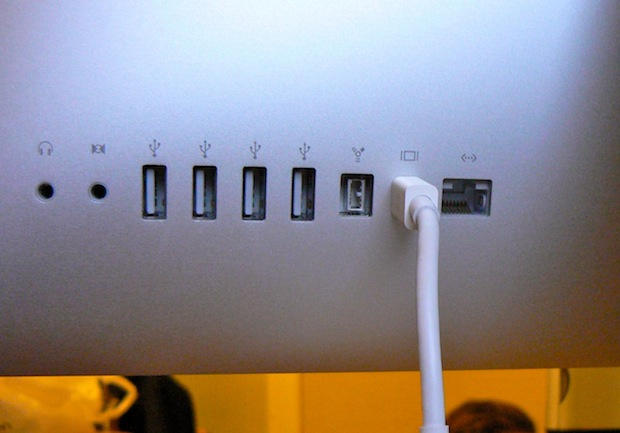
To use the new 27-inch iMac as an external monitor requires a very specific cable to work: a Mini DisplayPort to Mini DisplayPort cable, to be exact.

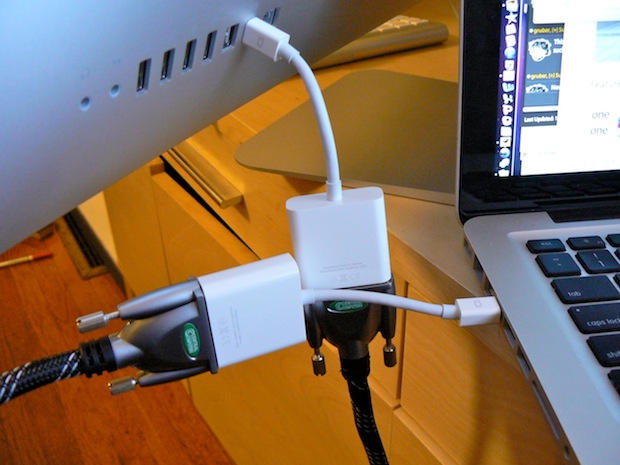
It does not work with a HDMI cable or a DVI cable, even when they are strung between a pair of Apple-branded Mini DisplayPort adapters.

There seems to be a lot of confusion about the issue on the web and even at Apple’s retail stores.

The staff at the main San Francisco Apple store were confused about the cables needed to use the iMac as an external monitor for a compatible MacBook Pro. The iMac works only with devices that output video through DisplayPort, which the MacBook does.

To use the new iMac as a monitor, it must enter “target display mode,” which appears to happen automatically when the correct DisplayPort cable is plugged in.

There appears to be only one cable on the market capable of connecting compatible devices to the new iMac: Belkin’s Mini DisplayPort to Mini DisplayPort cable, which is available from Apple’s retail stores for $29.99.

The store didn’t have any in stock, so the staff happily sold me a pair of Mini DisplayPort to DVI Adapters ($29 a pop) — and told me to string them together with a standard DVI cable.

DON'T MISS
Video: 27-Inch iMac in Action as External Monitor

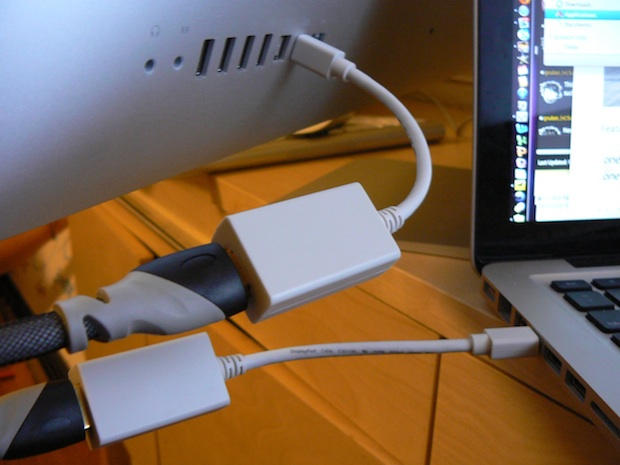
I had to go to another store to find a DVI cable to connect them (another $20). At this store, I found a pair of DisplayPort to HDMI dongles, so I picked them up (another $15 each) and a $12 HDMI cable to connect them.

Neither of these MacGyver solutions worked.

I’ll try to pick up one of the Belkin cables tomorrow and will post the results here.
P1040502

I tried to use a new 27-inch iMac as an external display for a compatible MacBook. I connected them with a HDMI cable connected to two Mini DisplayPort to HDMI adapters. It didn't work.

P1040504

Neither would a DVI cable strung between two Mini DisplayPort to DVI Adapters.

About the author

Leander Kahney

is the editor and publisher of Cult of Mac, and author of three books about technology culture: Inside Steve’s Brain, the New York Times bestseller about Steve Jobs; Cult of Mac; and Cult of iPod. Leander has written for Wired, MacWeek, Scientific American, and The Guardian in London. Follow Leander on Twitter @lkahney and Facebook.

(sorry, you need Javascript to see this e-mail address)| Read more posts by .

Posted in Apple, iMac, MacBook Pro, News |

  • MacRat

    The downside of Apple secrecy.

    A product comes out and the staff haven’t been able to kick the tires and learn how it really works.

  • Porkchop1234

    I hope this isn’t a stupid question

    Is it possible to take a external blu-ray player/burner drive and hook it up to the new 27″ monitor and rip a movie to the system or is that also out of the question?
    Is it even possible to watch a movie through a blu-ray drive on the new 27″ system via the external hard drive?

  • jakejake123

    In those bottom two pics your lovely new iMac appears to be precariously balanced on the edge of the table. Scary stuff.

  • ChuckEye

    In answer to question one, no. It would appear the video signal is bypassing the iMac’s CPU entirely and just goes straight to the monitor, so ripping from that input would not be possible without serious hackage.

    In answer to question two, it would appear from Leander’s testing that the ONLY video input the 27″ can receive is from another Mini DisplayPort, so if you had a PC laptop with a Blu-Ray player, the iMac is still not the external monitor for you.

  • John Gebhardt

    You might want to try one of these and let us all know how it works.
    http://www.atlona.com/Atlona-DVI-to-Mini-DisplayPort-Converter-p-17859.html

  • mattmattmatt

    Yeah, I researched this when the new iMacs were first announced and found that Atlona converter. I believe Belkin also makes one as well. Both were at least $200. I am trying to connect an older MacBook that only has miniDVI out.

    I concluded that I could get an external 24″ monitor with DVI and HDMI inputs for the cost of the $200 converter, so it wasn’t worth it for me.

    What I really want is an iMac and then a second display that looks exactly like the iMac. The best solution I’ve found is having two computers and using Teleport.
    http://abyssoft.com/software/teleport/

  • Kolja

    Is there any way that iMac could be used as an monitor for a PS3 ?

    I should buy the new iMac soon,and i dont know should i buy a ps3 with it or not

  • http://balexandre.com Bruno Alexandre

    1. But I read somewhere (Apple website?) we could attach an external Video Source (BR, DVD Player, etc) with what cable configuration is this possible?

    2. And how about the other way around … having a 2nd screen attached to the iMac 27”? normal Mini-Displayport / DVI or Mini-Displayport / HDMI will do?

    or there’s a secret as well ?

  • http://balexandre.com Bruno Alexandre

    I’m so sorry… I’m so rude!

    Thank you for the wonderful images :) I’m in love with the iMac 27” and here is where I stand up minutes and minutes looking to all the rendered pixel of your pictures Leander :)

    Thanks a bunch !

  • Segenthaler Warefield
  • Segenthaler Warefield

    Use this one:

    http://store.apple.com/us/product/TX706VC/A?fnode=MTY1NDA3Ng&mco=MTMzODYwNzk&p=2&s=topSellers

    It is $29.95 and supports for resolution from any Mini DisplayPort capable Mac.

  • ZacPro

    The reason why the adapters won’t work is because mini display port technology is packet based. Other connector types (such as DVI, HDMI, VGA, etc) all transmit images in lines.

    Previous macs with Mini Display ports have worked with adapters because they internal video had the ability to also transmit out in the older line-based transmission – essentially the mini display port just became a carrier for an entirely different type of signal.

    The new macs no longer have this capability. The only way it can be performed is with much pricier converter boxes, which can be had for 200$-400$.

    Mini display port technology definitely has some advantages, however. Because it is packet based you are able to daisy chain multiple displays without regard to the video card’s capability, where as with previous technologies this is not possible.

    Apple is just way ahead of the industry curve.

  • Porkchop1234

    Thats to bad that you can’t hook up a blu ray drive to the new Mac. I’m sure if you did the ripping on some low end PC there’s a way you could get the data onto the mac though. Just got to be creative.

  • http://blog.purplearth.net ObbieZ

    I use a KVM switch with as many as four computers, and our top-end computer is due for an upgrade. Apple gave me hope with its limited ability to render video from other machines on the beautiful iMac screen, but to shut out older video streams (vga, dvi, etc.) is a deal-breaker.

    As much as I’d love that iMac, I can’t justify having two screens on my desk. Unless this gets fixed, it’ll have to be a Mini and a third-party flat-screen monitor.

  • Byran Newell

    The reason the adapters don’t work is that they aren’t bidirectional. It’s not about packet-based tech or anything else (sorry ZacPro!). You can go out, just not in. The cables work, because with cables having the same ends, they are inherently bidirectional.

  • Juan

    If I hook a MacBook Pro to the iMac 27 inch and use it as a monitor only, is the iMac smart enough to power down its internal computer parts, saving energy and just use my MacBook Pro as the CPU?

    I asked this very question to several employees at the Apple stores and I got several blank looks. :)

  • http://moonclimbing.com Ben Moon

    Forgive me if I am being stupid but I read that if you connect the iMac and the Macbook with a firewire cable, start the Macbook in target mode and then start the iMac whilst holding down the alt key you can use the iMac as a monitor for the Macbook.

  • Yombo

    Kind of topic here but I was wondering if you have had any issues using you Imac mini display to hdmi dongle to a LCD TV or Plasma? My mouse seems to start acting funny when I use it.

  • Jon

    Does this connection by-pass the motherboard of the iMac totally? I ask as I have a dying iMac which would cost $500+ to fix – but could I cat a new Mac Mini and transfer all my files etc to that and use **just** the monitor of the iMac?

  • Nitrus

    Did you try pushing CMD+F2? (long shot, but you never know) Had to ask. I have ready many successful attempts at this, not quite sure yours isn’t working. Must be your cables.

  • neil
  • Paul Aco

    I want to use TV as a display on my iMac 2009.
    Is it possible?

  • http://www.edutopia.org/ Billy

    This article makes specific reference to the new 27″ iMac. Does anyone know if this solution would work for older 22″ and 24″ iMacs as well?

  • Felix

    Would connecting a xbox 360 work? I’d be using a mini displayport to hdmi converter and then connecting that via hdmi cable to a hdmi connection on the xbox.. Would this work?

  • ctrlesc
  • pepe

    Have you tried hitting Command+F3 while you have, eg, a ps3 plugged in via hdmi to mini display? I’ve been told it works that way

  • http://www.fyistudio.com Distraxtion

    Wow, duped by Apple. Its been awhile for me. Last time was when I was told my Apple TV streamed 720p. Oh well. I bought my iMac 27 thinking I would be able to hook up my older G5 PPC to switch back and forth if I wanted to but alas no. Can anyone at least point me in the direction of those $100 options. Its worth it to me now because I still need access to the G5 even thought its just a server now. And I don’t want two monitors just to do that. ….really bummed…

  • Thomas

    If you have an intel based imac, you must use a mini-dvi cable. I just went through this and a there is no mini-display port on the intel based imacs

  • 666

    is it posible to connect a xbox360 with any cord in some way to display on my 27” i mac

  • 666

    i have a VGA cable but want to know if it is posible

  • Coolig

    ok,what about older imac with miniDVI out, can this one be use at external monitor ???
    also wants to knoe if can be use as extenal monitor for PC with ATI Radeon HD 5770 ( has Display Port out )
    Please let me know !!! tahnks

  • Pavel

    I’m trying to hook up my asus laptop to my imac using an hdmi cable and a generic mini display to hdmi; with 0 luck…. FML

    • http://pulse.yahoo.com/_FEYTZFXB67OW45WZ5765AB52QU Robert Stothard

      I found the simplest solution was to just remote desktop to the PC.  I have plugged an Ethernet cable direct from iMac to Laptop no need even for a switch.  Ok, I don’t get to use both the laptop and the imac screen but I do get to use this amazing screen for my laptop.

      • http://www.facebook.com/mohdfikreefauzi Mohd Fikree Mohd Fauzi

        looks like a good idea, but is it work, what software ure using, yesterday i build a new pc, then try to connect to iMac as Display… but can’t working… 
        (iMac late 2009, c2d extreme 3.06, hd3650, 6Gb RAM, 1TB) (PC – phenom am3 X6, 8Gb, 1TB, fx 3450)

  • Lingraham

    I am trying to use my MacBook laptop computer as a screen for my desktop PC. Can I do this with the special MAC adapter cord that goes from the PC to the laptop? I don’t want to wreck anything. Thanks

  • Joel Nichols

    @Lingraham: That won’t work. This only works with the 27″ iMac.

  • Anonymous

    In my experience it doesn’t work even if you have the right cables. I have the Belkin cable and have tried several different MacBook Pros with every configuration of display settings I could think of. Is there any confirmation this works at all?

  • kisiel

    The adapters pictured above are unidirectional, i.e. from mDP to HDMI/VGA/DVI only. iMac 27 will work only a mDP output singal. So unless the video card of your device outputs mDP you will need a converter/scaler to use your iMac 27 as a monitor. This is a rather expensive set up as a these units sell around $200 plus the mDP to mDP cable.

  • Leyi Zhang

    Any result updated?

  • http://twitter.com/astraub Andreas Straub

    You have to put the iMac in Target mode (reboot and push the “T” key) and you have to use a displayport connection.

  • http://wenzelsopinion.de/ watzlav

    Does this also work with the 21.5” Model?

  • http://www.facebook.com/vinnie.venkov Vinnie Venkov

    I am looking cable or product for monitoring iPhone4 on my iMac.Somebody knows the  solution…? 

  • http://www.facebook.com/vinnie.venkov Vinnie Venkov

    I am looking cable or product for monitoring iPhone4 on my iMac.Somebody knows the  solution…? 

  • Erich

    This is a similar problem to one of the posted Apple support forums relative to using a TV as a monitor.  The forum I found started in 2009, and 22 pages later, in August, 2011, there seems to be no valid answer!  Apple clearly is not a service-oriented company, and it’s products do not perform as advertised, at least in this regard.
    It’s interesting to note that my old, should-have-been-retired-long-ago G4 laptop works perfectly using my TV as a monitor with a cheap DVI to HDMI cable.  My 2010 iMac cannot be made to work in the same manner.  It’s mini displayport to DVI to HDMI cable’s signal can’t be recognized my the TV.

    • Guest

      I have used my TV as a display for my MacbookPro.  I was taught this in an Apple store.  I used the miniport to HDMI cable to connect the devices.  Then in the preferences on the Macbook, I went to displays.  It shows an arrangement tab. When I opened that tab, it shows two screens side by side.  I was taught to select the thin white rectangle (the menu bar) and drag it onto the larger screen (the TV).  The cursor can move between the two screens, but you have to figure out which side it comes in on.  If I take this system to hotels, etc., I will sometime have to reset the sound output in preferences as well.  
      You can also check “mirror” and you will see the same output on both devices.

    • Guest

      I have used my TV as a display for my MacbookPro.  I was taught this in an Apple store.  I used the miniport to HDMI cable to connect the devices.  Then in the preferences on the Macbook, I went to displays.  It shows an arrangement tab. When I opened that tab, it shows two screens side by side.  I was taught to select the thin white rectangle (the menu bar) and drag it onto the larger screen (the TV).  The cursor can move between the two screens, but you have to figure out which side it comes in on.  If I take this system to hotels, etc., I will sometime have to reset the sound output in preferences as well.  
      You can also check “mirror” and you will see the same output on both devices.

      • Erich

        Yeah, thanks anyway, but many, many of us get nothing showing in the display preferences.  If you’ve not nothing showing, your computer is not recognizing the TV (and vice versa).  It’s a bit hard to believe, but it must be so, that iMacs simply can’t use TVs as a display monitor.  I’ll repeat myself:  My old G4 Laptop works with the TV as a monitor, buy my new iMac doesn’t.

      • Pepilurose

        Thank YOU so much!!!!!

  • Ant

    I think the main issue here is that it simply won’t work with the older style macbook;s (2008 or earlier) that only have DVI out. Display port has connectivity to signal the iMac to become a monitor… those signals arn’t passed through DVI out. It’s a guess, but i’ll bet money on it.

  • Maxim Litvinov

    IMO MiniDP-to-HDMI and MiniDP-to-DVI adapters allow host only on MiniDP end.
    If that’s the case, then putting couple of them on both ends of another cable would be useless.