On the internet, comments can be as important as the content being articulated about. Of course, comments can also be rude, hateful, or just plain ridiculous. You know, like much of the content on the internet, as well.
So, if shared Photo Streams are like little photo social networks that contain only the people you invite, comments should never be a problem, right? Well, I don’t know about your friends and family, but mine can be both irreverent and irregular in their commenting activities. That’s why it’s handy to be able to delete comments that the original Photo Stream poster doesn’t want any more.
Here’s how to get rid of those commenting curiosities.
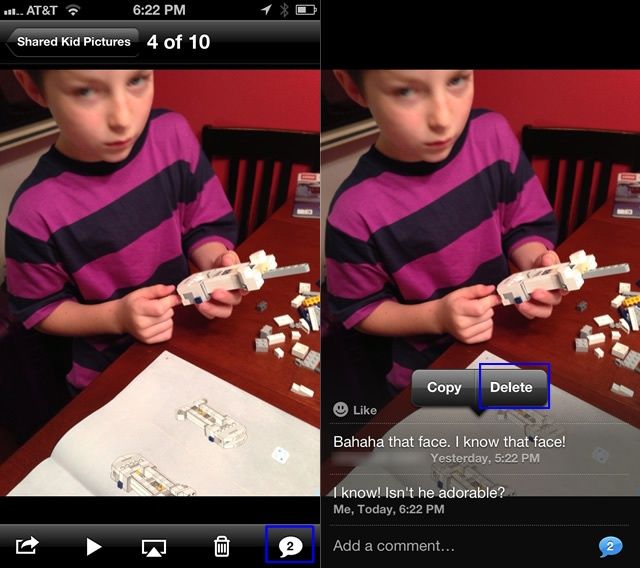
Launch your Photos app, and tap on the Photo Stream button at the bottom. Tap a shared Photo Stream you want to edit the comments from, and then tap on the comment bubble in the lower right hand corner. Tap and hold on the comment you wish to delete, and a popup menu will appear, with a Copy and a Delete option. Choose the Delete option with a tap, and the comment will disappear.
You can delete comments that you have made, as well as those from others in the shared Photo Stream that you created. You can’t delete a comment from a Photo Stream that you didn’t originally share.
Pretty cool, right?
Got an iOS 6 tip of your own? Need help troubleshooting your iPhone, iPod touch or iPad ? Drop me a line or leave a comment below.
Source: Apple Support

Rob LeFebvre is an Anchorage, Alaska-based writer and editor who has contributed to various tech, gaming and iOS sites, including 148Apps, Creative Screenwriting, Shelf-Awareness, VentureBeat, and Paste Magazine. Feel free to find Rob on Twitter @roblef, and send him a cookie once in a while; he’ll really appreciate it.

