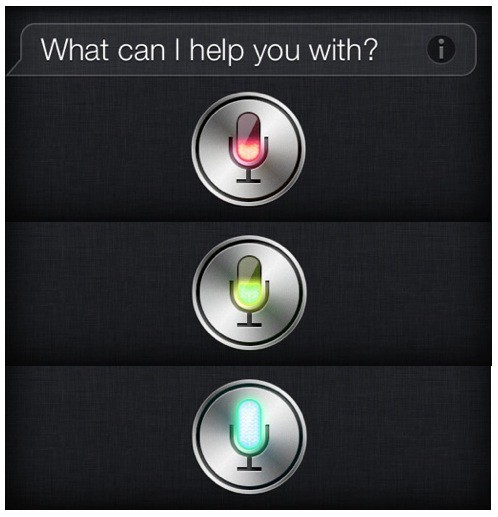
Purple Siri is soo boring. Why not change it up a bit? If you’ve jailbroken your iPhone 4S, then you can take advantage of a fun tweak called Siri Mic Colors. Once installed for free in Cydia, this simple package spices up your iPhone’s digital assistant with some rainbow flair.
Siri Mic Colors is special because it changes colors based on the intensity of your voice. Instead of purple, the little mic icon will change colors as you talk. The end result is pretty cool.
You won’t find this tweak by just searching in Cydia; you’ll need to add the following repo: https://repo.technetec.com
This repo can be added under Manage > Sources in Cydia. If the rainbow vibe isn’t your thing, you can install a single custom color to replace Apple’s purple skin for Siri. There are blue, green, red and yellow versions of Siri Mic Colors available for free as well.
(via iDownloadBlog)

Alex Heath is a journalist who works for Tech Insider. He’s the former co-host of The CultCast. He has been quoted by the likes of the BBC, KRON 4 News, and books like “ICONIC: A Photographic Tribute to Apple Innovation.” He lives in Lexington, Kentucky. If you want to pitch a story, share a tip, or just get in touch, additional contact information is available on his personal site. Follow him on Twitter.


5 responses to “How To Change Siri’s Color On A Jailbroken iPhone 4S”
Too bad widows version wasn’t real eased yet, or this would be mine :/
It might be better to get an unlocked iPhone 4S for now if you intent to
change it to the iPhone 5 in less than a year (assuming it comes out in
August. Take note that when you the iPhone 4S on a contract,
pathetic – that is what gets you excited about jailbreaking?
This message has been deleted.
Warning: apparently it overwrites the original, so you can’t go back. I don’t plan on leaving my green one, but just a fair warning to anyone who isn’t sure.