As a follow-up to last week’s super guide of everything we expected at WWDC 2011, here’s everything Steve Jobs and Apple actually did announce at this year’s WWDC, from Lion’s exciting new features to the revolution of iOS 5 and iCloud.
OS X Lion
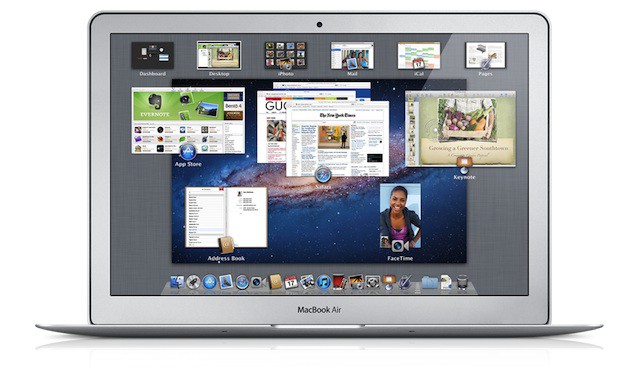
• Release: Mac OS X 10.7 Lion will be released in July, exclusively on the Mac App Store. It will not be available as a DVD or USB Drive except, perhaps, with the purchase of a new Mac.
• Price: $29.99 per user, available on every machine linked to that iTunes account.
• Hardware Requirements: Lion requires an Intel-based Mac with a Core 2 Duo, i3, i5, i7 or Xeon processor and 2GB of RAM. (To check your processor, go to > About This Mac)
• Server Will Be Mac App Store download: Although Apple did not announce the price, Lion Server will be an App Store download. The discrepancy between Snow Leopard ($29) and Snow Leopard Server ($499) is quite high, but Lion Server will cost just $49.99.
• Mac App Store will become more iOS-like: With Lion, the Mac App Store won’t just be fully integrated. It’s going to get in-app purchases, push notifications, sandboxing, and “Delta Updates”… or automatic, OTA updates pushed down to users.
• New Mail.app: The new Mail.app will have an improved search that will give you smart search suggestions (for example, it’ll recognize the difference between a person’s name and a search term). It’ll also have both two and three column views, a conversation view, and anew brushed steel icon.
• iCloud Integration: Lion will sync, at the very least, your Pages, Keynote and Numbers documents with Apple’s new iCloud service, as well as your last thirty days worth of iPhotos.
• iTunes WiFi Sync: iTunes will now sync over WiFi with your iOS device.
• iTunes Match: iTunes will now scan your local library, match your tracks with the 18 million song available on iTunes and, if it finds matches, automatically mirror them in the cloud for streaming on any device for just $24.99 a year.
• Just a drop in the bucket: For the full list of iTunes’ new features, see here.
iOS 5
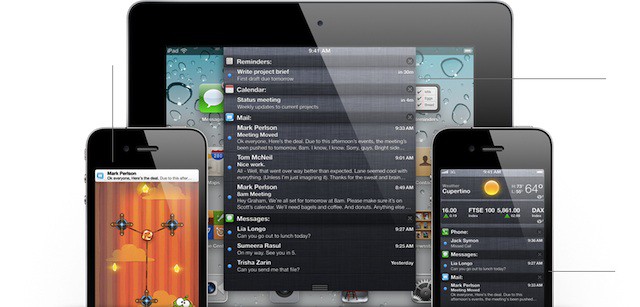
• Better Notifications: iOS 5 will allow you to access app notifications anywhere, without interruption. They appear on the top of the display, and can be made visible with a single swipe downward. Any app can plug into the new notification system, and certain iOS 5 apps like Weather and Stocks will support it by default. Notifications also now display on the lock screen, allowing you to see what’s happening on your iPhone at a glance.
• Newsstand: An iBookstore for magazines and periodicals, Newsstand will allow you to subscribe and automatically download the latest issues of your favorite magazines without keeping track of a million different apps. Watch this one: this could revolutionize publishing.
• Twitter Integration: Tweet photos with just a tap. Same works for sharing links from Safari or YouTube, or posting directions or business from Maps. You can even Tweet contact details.
• Mobile Safari: Mobile Safari — on the iPad, at least — is getting a nice new tabbed browsing interface much more akin to what we already see on OS X. A Reading List functions as Apple’s own version of Instapaper, allowing you to save articles offline for reading later. Safari Reader support also comes to Mobile Safari in iOS 5.
• Reminders: iOS 5 will allow you to set reminders for yourself, creating to-do lists and lists of tasks which can be associated with times, people and even locations. Once a reminder goes off, it pops up in iOS 5’s Notification Center.
• Better Photography: You can now take photos right from the lock screen by just tapping a button and going right to the camera. The iPhone is also getting a hard shutter volume, thanks to volume up button which will double on the lock screen or in Photo.app as a ‘take picture’ button. The iPhone is also getting some simple native photo updating functionality, including cropping, red eye reduction, quick enhance and more.
• System-Wide Dictionary Integration: Look up a word in any app.
• Revised Mail.app: You can now format text in rich text, add indentations to messages, drag addresses, flag important messages and search the content of your mailbox. Enterprise customers will get S/MIME support, as well as certificate encryption.
• Portrait Thumb Typing on iPad: Taking a cue from the latest demo of Windows 8, typing on the iPad in portrait mode now allows you to access a split keyboard for easy thumb typing.
• iTunes-Free At Last: With iOS 5, you won’t even have to have a PC to use an iOS device. All devices update wirelessly over the air, which Apple calls Delta Updates. You don’t need to ever plug your iPhone into a computer at all. We’re in the Post PC age.
• iMessage: Apple has just announced their own secure messaging platform, a la Blackberry Messaging. You can send text, photos, videos, group messages or contacts directly between two devices, complete with delivery receipts, read receipts, typing notifications, and more. It’s all encrypted, and all works through Apple’s own servers. This is going to be HUGE in enterprise.
• Wi-Fi Sync to iTunes: You can now sync your iPhone to iTunes through WiFi, no USB cable required.
• Availability: Dev Preview today, widescale release in September (alongside the iPhone 5?)
iCloud
• Mail, Contacts, Calendar… Rewritten From The Ground Up: MobileMe’s three core apps are becoming free to everyone with an iOS device, and they’ve been rewritten from the ground up to work in the cloud, automatically pushing all updates to your devices.
• Documents Sync: iCloud will automatically sync your documents between apps, PC and Mac, thanks to document syncing. Create a document on a Mac desktop app and it’ll be available on your Mac as well. Document sync will debut with Pages, Keynote and Numbers, but will become available to all apps with iOS 5 and Lion’s dev APIs.
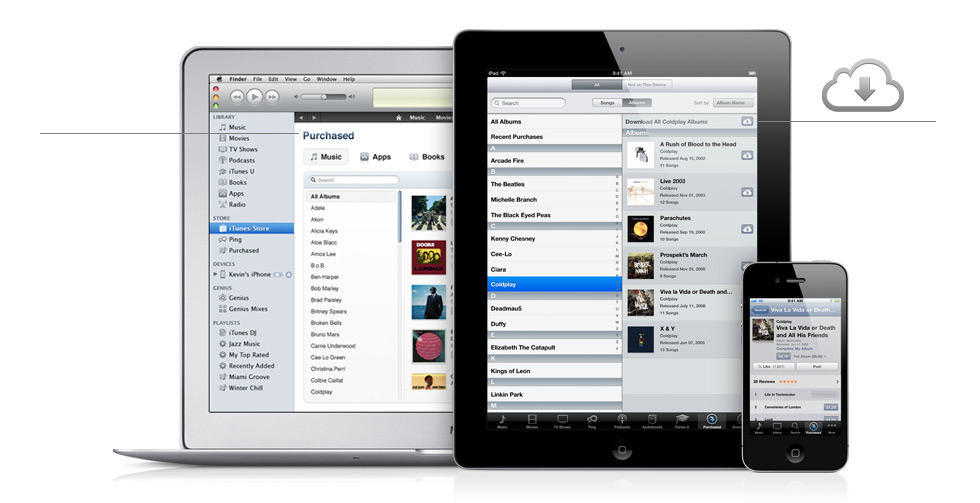
• Easily Download Any Purchased Item To Any Device: You can now see everything you’ve ever purchased on your iOS Device and re-download it easily. There’s no longer any confusion about what apps you’ve bought or what you can’t. The same is true with music and video, as well as iBooks. In addition, iBooks will now allow you to save your notes and bookmarks across devices, like Amazon’s Kindle Whispersync.
• Photo Stream: Your last thirty days of photos taken on your PC, Mac or iOS Device will now be stored in the iCloud, automatically, You can access the Photo Stream by punching a button in Camera or Photos on an iDevice. On the Mac, it’s built into iPhoto; on the PC, it’ll be in the Pictures folder. It’ll even be available on the Apple TV.
• Automatically Backup Your iOS Device: Once a day, iCloud will automatically back up your purchased music, apps, books, photos, device settings and app data, without ever once syncing to iTunes.
• iTunes Match: iTunes will automatically scan your library and match any track it finds with Apple’s 18 millions song library. Once your songs are found, they’ll be mirrored in the cloud for download (not streaming) to any other connected device, at 256kbps AAC. If your songs aren’t found, iTunes will upload the tracks automatically. It takes just minutes.
• Release, Price and Space: iCloud will debut in September along with iOS 5, with a dev preview coming today. It’ll be free with the purchase of any iOS devuce, and you’ll get 5GB of storage free, without counting apps, books, etc. iTunes Match and iTunes In The Cloud will be a separate service, and it’ll cost $29.99 per year for unlimited storage space.
Anything we missed or forgot? Let us know in the comments!

John Brownlee is a writer for Fast Company, and a contributing writer here at CoM. He has also written for Wired, Playboy, Boing Boing, Popular Mechanics, VentureBeat, and Gizmodo. He lives in Boston with his wife and two parakeets. You can follow him here on Twitter.

