Mobile menu toggle

Search results for: Apple One

Fast Moon Rising iLunascape Browser for iPad

By

mzi.xzhsgqry.512x512-75

The iPad is hands down the best mobile internet browsing device I’ve ever owned. Its design, shape, and the easy to use iOS interface make surfing the web feel a lot more natural and less awkward than a notebook. Therefore, it is nice that Apple is allowing alternatives to the default Safari browser which lacks features we’ve been used to using on our computers.

One of those alternatives is a new browser called iLunascape from Lunascape, Inc. and it is available for free (iTunes link) in the iTunes App Store.

This browser takes a new approach to browser user interfaces (UI) on the iPad and I’m wondering why no one else has thought of this yet. The developer’s new specialized UI called the “In Reach Interface” has clustered most common movements and tabs down near the bottom of the iPad display where the user generally holds the device. In addition to this the iPad user experience is the center of attention, but now includes desktop-class tab browsing, easy screen capture and storage, fast and smooth scrolling, simple bookmarking, and iPad rotation controls.

Holding iLunascape in portrait mode on an iPad. Note clustered controls at the bottom.

iLunascape may not be for everyone, since not everyone holds their iPad the same way. However, if you are looking to replace Safari this app is a good start with its unique interface and useful desktop like features. Its free and if you care about your browsing experience on the iPad — go get it.


Overheating iPod Stops Japanese Rush Hour Train

By

post-55250-image-6699055645f8f3d248f5809d90dd7d16-jpg

Overheating iPods have been consistently making the news in Japan over the last week. First, Apple admitted that their first-generation iPod Nanos can suffer meltdowns, and offered free replacements to any Japanese iPod owners who’ve experienced the problem. On the heels of that comes this story from Reuters, in which an iPod going nuclear knocked a Tokyo rush hour subway train out of commission.

If not for the bad timing, the story’s pretty funny. Around 8:20am, a train in Tokyo’s Setagaya Ward was stopped by officials who noticed a strange, burning smell in the train. Staff members quickly investigated, only to be approached by a sheepish and embarrassed commuter with a smoldering, burst-apart iPod in her hands.

It’s not clear at this point what model iPod burst apart yesterday morning, and it’s almost definitely just a fluke, but one thing’s for sure: Apple Japan is going to have a public relations debacle on their hands if iPods don’t stop melting down.

Mine’s Faster Than Yours [Sponsored Post]

By

500x_clearispot


This Post is Brought to you by our advertiser, CLEAR(R).


Feel like you’re always playing catch up with your techie pals when it comes to sporting the latest Apple mobile devices? Now it’s your turn to take the lead by initiating warp speed. Enter the CLEAR iSpot(TM),  a 4G speed personal hotspot, that takes your mobile experience into hyperdrive.

Exclusively for iPhone, iPad, and iPod Touch users, the iSpot can connect up to eight WiFi-enabled Apple mobile devices in any Clear(R) coverage area. Password protection keeps pesky outside users out of your hotspot so you’re ensured a secure connection.

Because style is important to you – you’re part of the Cult, after all – the small, sleek, all-white look syncs well with Apple designs. As for practicality, it fits in your pocket, so you’re always guaranteed a connection, and a super fast one at that. Plus, the battery life and rechargability guarantees you hours of continuous use. Think of the iSpot(R) as bringing balance to the force of iPhone’s notorious low battery issues (sorry, Steve, but it’s true).

And how’s this for on-the-go awesomeness — you can even connect from the car! Just don’t surf and drive! Streaming Pandora(R) music or live sports radio, though, now that’s totally acceptable. Other cool uses include streaming unlimited video and staying connected with work and social media contacts.

The iSpot is available nationwide from https://www.clear.com, and available in CLEAR(R) retail stores and authorized dealers.

Motorola’s Droid 2 Falls Victim to ‘Antennagate’ Complaints

By

androidiphone

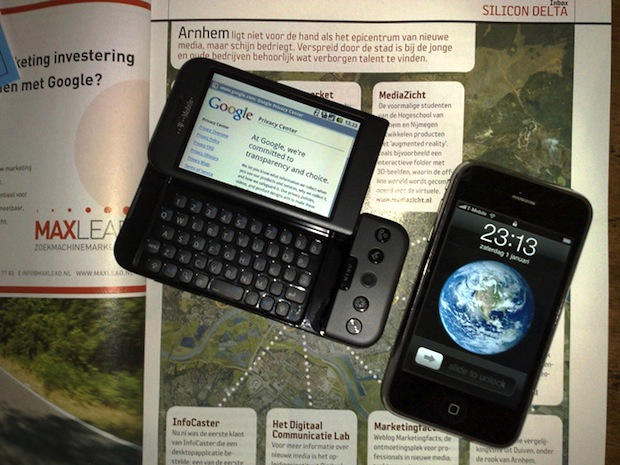
Recall all the fuss made when smartphones, such as the BlackBerry and the Droid were lumped in with the iPhone 4 by Apple to prove all phones had reception problems? Although the Cupertino, Calif. company eventually removed the pages from its site, Apple is getting some unexpected support – From Droid 2-manufacturer Motorola.

TechCrunch cites “a good number of reports” from users of the Droid 2 (sold by Verizon) about lost signals, even without touching the phone. The report also points to an Engadget review that demonstrated “endless fluctuating bar counts” and other problems.

MacBook Air Innards Merged With Wireless Keyboard and Magic Trackpad

By

macbook_air_project

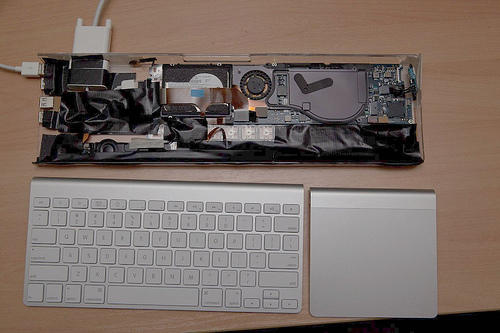
Genius. In the style of Atom-embedded computer-in-a-keyboard solutions like the Asus EEE Keyboard, a plucky modder gutted a partially dead MacBook Air and crammed its workings into an old, heavily modified Apple Keyboard casing, precisely topped by an Apple Wireless keyboard and Magic Trackpad snuggled together.

The result? The MacBook Air Project, an all-in-one Mac-in-a-keyboard: just plug in a monitor to the MacBook Air keyboard’s DVI port and you’re ready to rip. Hey Apple: this is what the next Mac mini should look like!

This Week’s Must-Have iOS Apps & Games

By

post-52925-image-f1f3d27dfaceb2de288a34a93324cb2a-jpg

With hundreds of thousands of applications and games already in the App Store, and more and more added daily, it’s often hard to notice some of the great apps that are available for your iOS device. That’s where Cult of Mac’s weekly must-have shortlist comes in: we’ll compile a list at the end of each week to showcase a few of our favorites and pick out the best of the bunch. Check out this week’s after the break!

Axon Haptic Tablet Is Darwin-Compatible And Begging To Be Hackintoshed

By

Axon-Haptic

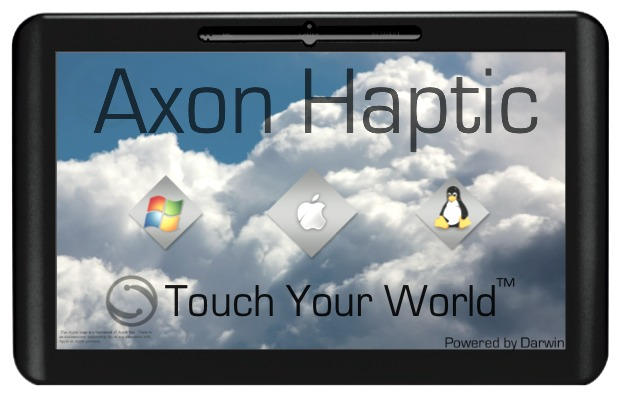
Were you one of the many prospective customers disappointed that the iPad didn’t run OS X? Axon’s got your cover: their forthcoming Haptic tablet is designed from the ground up to run any Darwin-based operating system… which means it can be Hackintoshed to run OS X.

The stats make it clear that the Axon Haptic is strictly a netbook on the inside:

• 1.6GHz Atom N270
• 10″ 1024×600 LED-backlit LCD
• Resistive touchscreen w/ built-in stylus
• 2 200-pin SO-DIMM slots (2GB standard)
• 2.5″ HDD bay (320GB standard)
• 1.3MP webcam
• Wi-Fi (A/B/G/N)
• 3G SIM slot (AT&T or Verizon)
• Built-in speaker
• 3x USB, Headphone, mic, ethernet, VGA ports, card reader
• On-screen keyboard and handwriting recognition
• Removable battery (3000mAh, ~3hrs)
• 0.9kg (just under 2lb)

For $800 bucks, that’s some pretty woeful performance, particularly when it comes to battery life. Worse, if you do decide to break Apple’s EULA and install Snow Leopard on this thing, the operating system isn’t really designed to be useable on a tablet.

The bottom line is that while this tablet’s interesting from a hackability perspective, if you want a Hackintosh, you’re better off with a netbook, and if you want an Apple tablet, the iPad is going to be superior in performance and functionality in almost every way. For collector’s only, we’d say.

Is Steve Jobs Playing The Odds On Driving Without License Plates?

By

500x_jobs-car

Steve Jobs is famous for driving without his tags. Many theories have been floated as to why that is and how he’s getting away from it, but Gizmodo’s got a better one: since a car doesn’t need to have plates for the first ninety days of ownership, and since Jobs’ drives pristine-looking cars he’s just playing the odds that cops won’t pull him over.

Public records only reinforce the fact the Jobs has absolutely no problems rolling plateless. A comprehensive search of traffic records in Santa Clara (where he lives) and other adjacent counties show the CEO has successfully avoided plate-related fines for the past four years. At least. Santa Cruz, San Mateo, and San Francisco county courts-all show no evidence that Jobs has ever been cited for not displaying a license plate. Zilch…

Since most of Jobs’ daily driving is done to the Apple campus twenty-two miles away round trip, Jobs’ is counting on the unlikelihood of being pulled over for driving tagless on a car that looks pristine. Most trips further afield are done by helicopter, and as for Apple’s new product announcements…

For big events like these -which, given the car’s low mileage, are likely the longest road trips it takes-the company’s in-house security always works in close conjunction with police, who have to cordon off intersections and direct traffic to make sure that their keynote speaker isn’t held up by San Francisco’s notorious gridlock. In those cases, you can be sure that traffic officers know, and think differently, about hitting that silver Benz with a ticket.

Canny, Mr. Jobs! But does a license plate really gall your sense of aesthetics so much that it needs to come at the expense of legal road accountability?

Adobe Photoshop Express Comes To iPad

By

photoshopipad

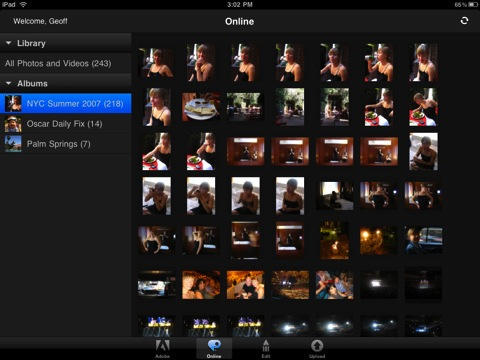
If you’re a photo editing professional, the news that Photoshop has finally come to the iPad will probably produce some swelling of ebullience within your breast, but you’d best be served by tamping your enthusiasm down: it is not the finger-controlled Photoshop for iPad that you’ve been dreaming of.

Rather, all we’re looking at here is an updated binary of the old Adobe Photoshop.com Mobile app for the iPhone and iPod Touch, bringing native iPad support to the mix. That app will allow you to do some cropping and rotating and color adjustment on your photographs, but not much more than that.

If that’s all you want from an iPad photo-editing app, fantastic: Photoshop.com Mobile is absolutely free. I just wish we’d seen a more meaty update to indulge my desire for more substantial couch-side putzing about.

Geek Trend: Old Macs Thwarting Death, Getting Recycled as iPad Stands

By

iPad-Collage

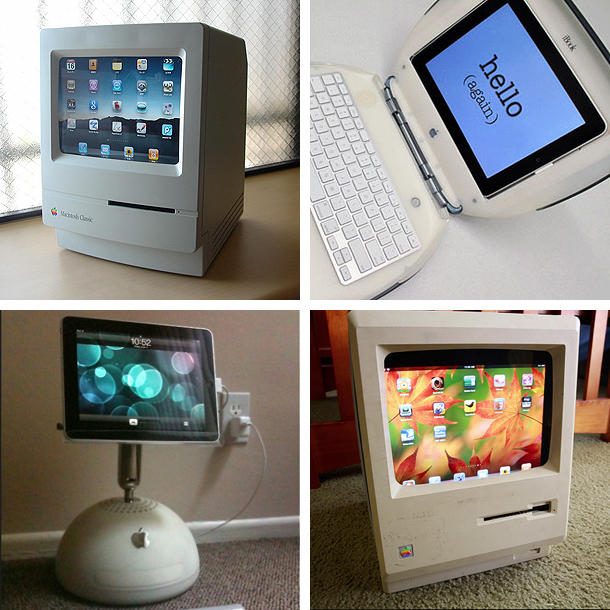
Rising from the dead like a Newton running Mac OS 9, a new form of Mac Zombie is evolving in the wilds of Apple Geekdom: recycled old Macs being used as iPad stands.

One way for old computers to beat mortality is emulation: early Macs had Apple II emulators, PowerPC Macs running Mac OS X had Classic mode, even the venerable Lisa has an emulator.  Software emulation gives life to vintage machines long after the actual hardware ceases to function.

A new trend seems to be developing with the iPad: rather than running software within iOS, the iPad is making a home for itself inside the modified cases of old Macs!  We’ve covered these items before, but taken in aggregate a new form of Mac recycling seems to be evolving within the Cult of Apple.