Mobile menu toggle

Search results for: Apple One

WTF App Of The Week: Badger Face

By

20101011-badgerface.jpg

People who have been desperate to turn friends into badgers – your prayers have finally, finally been answered.

Because for you, Badger Face is likely to be the best dollar you’ve ever spent on an iPhone/iPod touch application with turning-people-into-badgers functionality.

For the rest of us? Well, for the rest of us, Badger Face will make us momentarily double-take as we browse the App Store for amazing stuff. It will make us choke on our badger burgers as we read the app description. Badger Face is simultaneously the weirdest thing we have seen this week, and it is this week’s Best (Badger-Related) Thing Ever.

Who knows what will come next? The user comments suggest Dinosaur Face, but why stop there? What about Panda Face? Squirrel Face? Unicorn Face? And for A-Team fans, Face Face?

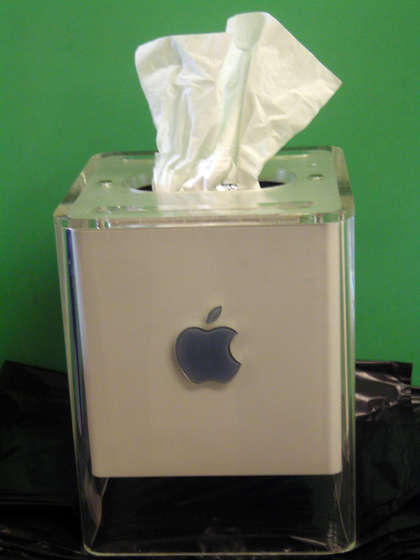
DIY PowerMac G4 Cube Tissue Dispenser

By

Apple-G4-CUBE-Tissue-Box

The hardware inside the old Apple PowerMac G4 Cube might not be good for much anymore, but the gorgeous plastic case is still one of the most notable triumphs of Apple’s well-honed sense of design. Why not humiliate it, then, by shaking out all the electronic guts, cutting a hole in the top and turning it into a tissue dispenser? Instructables has the instructions.

I can think of more ignominious ends for a G4 Cube… toilet brush holder comes immediately to mind.

Scosche sneakPEEK II Pumps Video From Your iPad To Your Television Without AirPlay

By

post-62668-image-122db9b1487cd002c92459fa1964df97-jpg

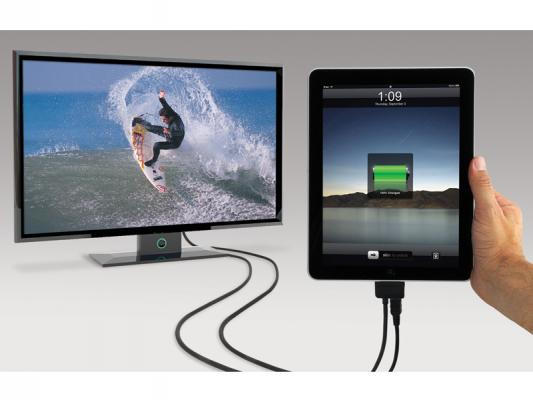
The timing of Scosche’s new sneakPEEK II accessory seems curiously timed.

You can’t fault it’s functionality, really. The sneakPEEK II allows you to pump content from your iPad or iPhone to your television easily by just connecting it to your device via their umbilical. On one end is the standard Apple docking connector and, on the other, composite and component inputs for plugging into pretty much any television out there. It’ll even charge your iPad while you watch a movie or play a game, thanks to an integrated micro USB connector and AC adapter.

That’s not bad functionality, but when iOS 4.2 rolls around, isn’t the point of a cable like this going to be pretty much obviated when AirPlay allows you to stream video or audio from any app to any AirPlay-compatible device… including Apple’s own $99 AppleTV?

The sneakPEEK II, of course, is cheaper than an AppleTV, but at $59.99, the price discrepancy is so minimal that we can’t help but feel there aren’t a lot of people who will opt for Scosche’s solution over Apple’s sexy black box. In fact, about the only thing to recommend it over an AppleTV is if you want to pump video from a classic iPod up to your television, or if your television lacks an HDMI port.

Limera1n Angers Jailbreaking Community

By

limetime

The iPhone jailbreaking community likes to maintain solidarity within its ranks. After all, while hackers love being the first to discover a new technique or exploit, the jailbreaking community has an enemy — Apple — who would like nothing more than to shut them down for the count.

That threat, in turn, has made the jailbreaking community a pretty tight-knit bunch: at any given time, there are a few working exploits that hackers are sitting on, waiting for Apple to invalidate a currently working jailbreak technique through a software patch before they release the next one. Why? Because the world doesn’t need more than one jailbreak at a time, and if all the known exploits are all in the wild at the same time, Apple can fix them all at once, leaving jailbreakers with nothing up their sleeves.

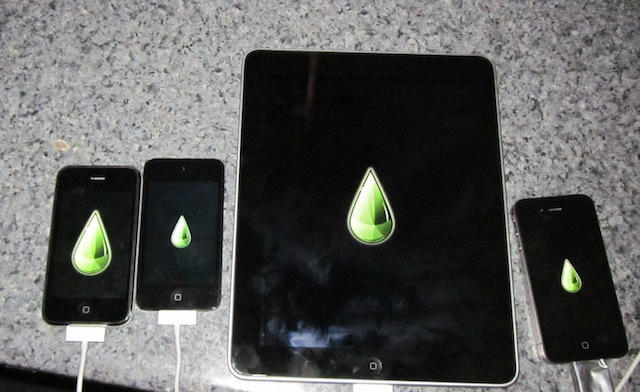
That’s why the jailbreaking community is so steamed up about the surprise Limera1n jailbreak geohot released over the weekend… the day before the Dev Team released their own highly publicized 4.1 jailbreak that used a totally different exploit. Geohot essentially barged ahead in line by releasing his jailbreak exploit unannounced, which risked alerting Apple to the methodology used in the Dev Team’s exploit.

Halloween Goes High Tech in Salem with Haunted Happenings App

By

Salem Haunted Happenings

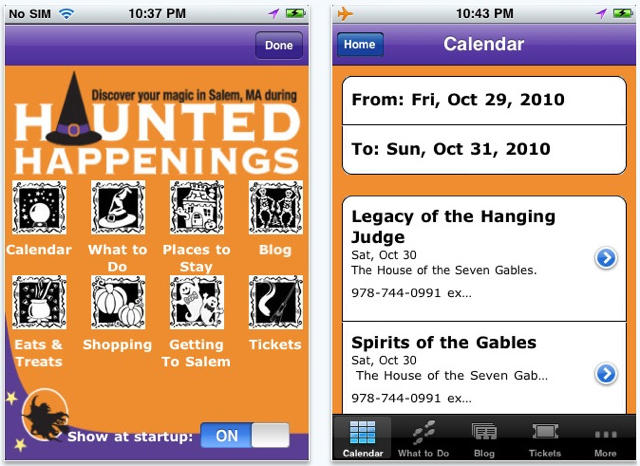
Halloween is Big Business in historic Salem, Massachusetts.  It’s now High Tech too.  For the 29th Haunted Happenings Celebration, the annual festival of witches, ghosts, and fall in New England, the town has created a new Haunted Happenings App for the iPhone, iPad and iPod touch.

The app features info about the Festival Calendar of Events, local attractions and museums, restaurant and retail listings, and directions on how to get to Salem (tip: plan ahead and leave time).  Users also have an opportunity to purchase tickets for some events and attractions directly from the app.

Let the Frightful Fun Commence!  [via boston.com]

This Week’s Must-Have iOS Apps: Gordon Ramsay Cook With Me, Esquire & More!

By

post-62525-image-2e8b33fb5004da2241741fc9dd78411d-jpg

One of our favorite iOS apps this week is Gordon Ramsay’s Cook With Me, which features 52 mouth-watering recipes, with simple to follow steps for cooking up gorgeous dishes.

Esquire‘s new magazine app for the iPad is another featured this week: see the World Trade Centre being built, complete with information on how it all will happen.

We also have an amazing new painting application for the iPad!

This Week’s Must-Have iOS Games: Sonic 4, Cut the Rope, Modern Combat 2 & More!

By

post-62447-image-2e53d97d1539de5d3480943e2623300f-jpg

This week’s must-have iOS games features Sega’s latest Sonic the Hedgehog 4 that many of us have been eagerly awaiting. It’s been described as the best Sonic for iOS yet, with improved controls, smoother gameplay and a genuine Sonic feel.

Another of our favorites is Chillingo’s Cut the Rope – the addictive puzzle game that knocked Angry Birds off the top of the paid charts this week. It combines realistic physics with simple, precise touch controls to create a wonderfully challenging puzzler.

Black Pegasus is the latest Modern Combat 2 game from Gameloft, and also features in our favorites this week. Its console quality graphics together and excellent production make it one of the most impressive first-person shooters to arrive on the iPhone.

We also have some classic ZX Spectrum gaming!

Quick-Tunes Makes Playing Music A Breeze [Review]

By

quick-tunes

Let’s face it — for a multi-purpose device heavily weighted toward music, the iPhone’s music-player interface is crap. Dealing with those tiny buttons crammed onto the bottom of the screen is bad enough under most conditions, worse for meaty-fingered users and infuriating when the iPhone is docked or when movement is involved.

Enter Quick-Tunes, a $1 app that replaces the iPhones native chintzy soft controls with a big, meaty, attractive buttons. It also adds cool additional functions around the main play/pause button that let the user play more songs from the same artist, genre or album.

Handicap? Psha! Golf Vision Plots Your Putt [New App]

By

post-62452-image-e6c709c0b3ff1124d9bd1842afb5d306-jpg

in case you missed it, last month saw the debut of Golf Vision Green Analyzer, an app that uses the iPhone’s accelerometer to calculate the perfect putting angle to sink a ball on the green; just measure the slope angle at the hole and at the ball by laying the iPhone on the ground, then set the green speed, and the app does its magic calculations and overlays the premium angle graphically over a still photo of your view to the hole.

Skeptical? That’s ok, the developers have just released a free version to try before considering the $5 full version. Unfortunately, the free version uses a generic photo to overlay the calculations on, and more importantly, only allows for slope measurements at one end, so results may not be as accurate as with the full version.