Mobile menu toggle

Search results for: Apple One

Leather Ouija-Board iPad Case

By

ouija.jpg

Hello? Hello? Is there anybody there?

True story: When my mother was pregnant with me, she and her friends got together to do a Ouija board. The story goes that the glass moved around, and then smashed. My mother told everyone that they should finish things up properly, and “put the spirit away,” or some such thing.

They laughed, and ignored her. Over the next few weeks, everybody present at the séance had an accident. My mother fell out of her car while leaning out the door to reverse. Luckily, her hair was styled in a bun, which cushioned the impact.

Did this make me superstitious? Nope. In fact, the first thing I thought when I saw this Ouija Book Cover Case (€66 or $87) from Etsy maker Joe V was “if you’re able to look into the future and communicate with the other side, Mr.V, then why the hell is the screen of your iPad so scratched up? Surely you should have seen that coming?”

Skepticism aside, the leather book cover looks like the perfect Christmas gift for Cult of Mac’s own resident mysticist John Brownlee aka. Dr.Crypt. Or should I say “pagan midwinter fertility-festival gift”? The hefty tome is etched with the alphabet, numbers from one to zero and — of course — the words “yes” and “no.” Thus equipped, our hard-working editor will be able to check up on us minions without even entering our Cult of Mac chatroom.

“Will Charlie finally write a serious post?” he will chant in monotone, as the empty diet Coke can moves all by itself over to “no,” yet again.

“Whose post will get the most page views next week?” he will continue, and the can will scrape drily across the leather towards the letter “B.” Then, as it slides down and right towards the “U,” Dr. Crypt will hurl the can aside in petulant frustration. “Damn you, Buster Heine,” he’ll shout, “Damn you and your interesting, reader-friendly posts!”

Then, as Mr. Brownlee’s harsh words float down onto the aging cowskin, something happens on the other side of the country. As Buster picks up his morning beverage and relaxes with his iPad to read the news, the air suddenly grows chill, and the screen doors start to flap and slam in the rising breeze. Buster looks up to see the livid, contorted face of his editor swirling in the mists now whipping in through the open windows. He starts, and the iPad slips from his hands, cracking the screen in one corner.

If only he’d had it in a sturdy, witchcraft-proof case.

Face Recognition Photo App Hopes To Sidestep Basic Flaw With A Blink [Review]

By

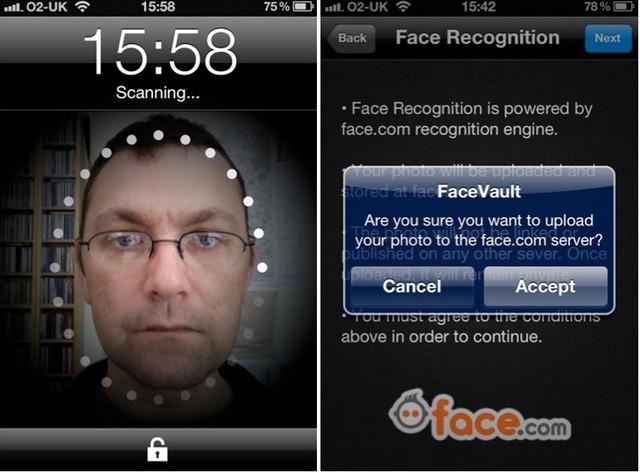
Dare you show your face?

Facevault is a one-dollar photo archive app that can only be unlocked by one person – the one with the right face.

It sounds neat, and yes, it works. But the face recognition features come at a price, and are hindered by a flaw that affects other apps using the same technology: it can’t tell the difference between real faces, and photos of real faces.

New Windows Conficker Infections Put Flashback In Perspective, Offer Warning

By

Continued Conficker threat offers perspective/warning on Mac malware

News, information, and commentary of the Flashback malware threat has ricocheted around the web over the past few weeks. The news of dangerous Mac malware has spread from the Apple and tech media into the mainstream. While not downplaying the seriousness of the threat, a Microsoft announcement yesterday does offer some perspective.

Microsoft made it clear that the Conficker worm is still infecting millions of PCs worldwide – three years after fears about Conficker’s potential damage and the estimated level of infections (estimates ran as high 12 million PCs at the time) created a media frenzy.

Screeshot Journal Is Like iPhoto For Your iOS Screenshots

By

IMG_1705.jpg

The world's greatest screenshot

Screenshot Journal was created “with iOS designers and developers in mind,” but it is useful for anyone who takes a lot of screenshots. For instance — and I’ll pick a completely random example here — tech bloggers.

The (universal) app does one thing: gather all the screenshots from your camera roll and organize them for your viewing pleasure.

Make Sparrow Your Default Mail Client & Introduce Push Notifications With Sparrow+ [Jailbreak]

By

post-163559-image-5e15a6e0e9d74a32c5b3e0a71b259939-jpg
Sparrow+ fixes two of Sparrow's biggest issues.

Sparrow is possibly the best iPhone app I’ve purchased so far this year; it has completely replaced the built-in Mail client on my device. But it does have a couple things missing: It doesn’t yet support push notifications, and of course, it’s impossible to make it your iPhone’s default mail client.

However, a new tweak for jailbroken devices called Sparrow+ fixes both of these things.

The New iPad Makes Its Way To Another Nine Countries, China Not Included

By

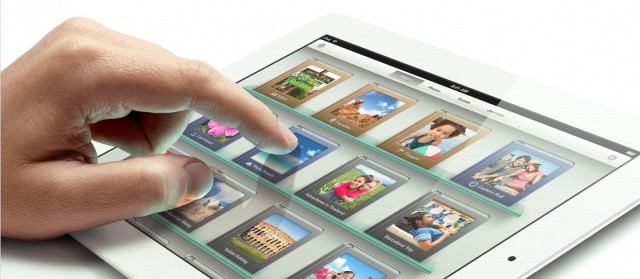
The new iPad is now available in 57 markets worldwide, China not included.

Apple continues its rollout of the new iPad in nine additional countries today, making the sought-after tablet available in 57 markets worldwide. This is now the fourth phase of rollouts since the device made its debut on March 16, but one of Apple’s key territories is still without it.

Mac IT Lessons From Microsoft’s Botched Office 2011 Update

By

The recent Office 2011 issues highlight the importance of testing all updates before deploying them
The recent Office 2011 issues highlight the importance of testing updates before deployment

Last week, Microsoft pulled its Service Pack 2 update for Office for Mac 2011. As we reported earlier in the week, the update could result in the corruption of the Office database and issues with Office identity files could make resolving the problem difficult. After initially posting advice about the update and its potential problems, Microsoft pulled it from the company’s update servers.

Microsoft has now re-released the update. In addition to not creating the problems that plagued the original update, the new version will also correct problems for users that had downloaded the initial.

The entire situation illustrates why most tech companies, including Apple, advise business customers to wait before rolling out any new updates.