Mobile menu toggle

Search results for: Apple One

iOS 6 Finally Adds Retina Shutdown Spinner Graphic
By

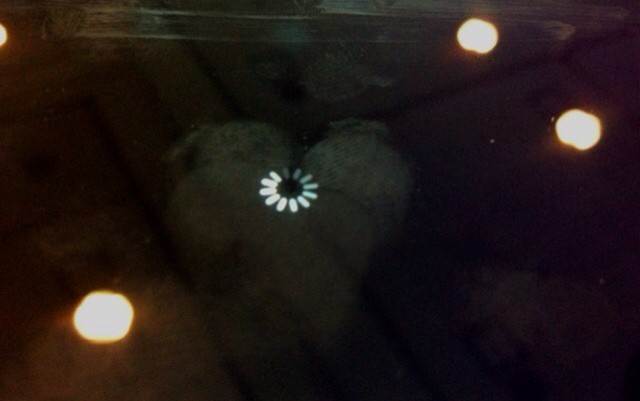
It's Retina, not that you can tell. Photo The Next Web

You know the shutdown spinner on your iPhone, iPad or iPod touch? If you own latest-generation hardware, it probably drives you crazy every single time you see it. Why? Because it is a lone holdout of non-Retina UI on Apple’s otherwise beautifully high-res OS. Now, in iOS6, this has – finally – been fixed.

Ping Will Be Sent To The Grave When The New iTunes Ships Later This Year [Report]

By

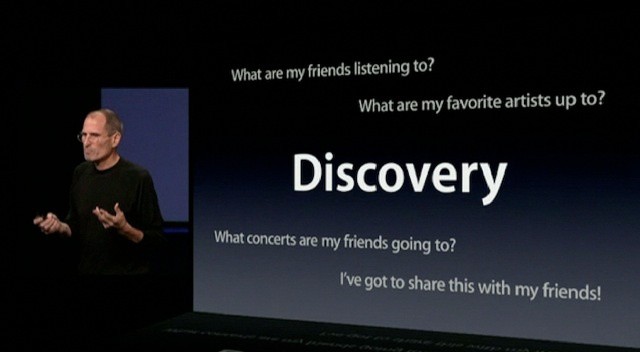
Steve Jobs announced Ping as a music
Steve Jobs announced Ping as a music "discovery" tool in September of 2010.

Poor Ping. Apple’s failed iTunes social network experiment just hasn’t caught on. Ping didn’t get off to a good start when Apple was unable to partner with Facebook years ago, and the service has become a running joke amongst the Apple fan community.

According to a new report, Ping will be killed once and for all later this year when Apple debuts the next major version of iTunes.

New MacBook Pro’s Retina Display Allows You To Switch Between Graphic Clarity And More Desktop Space On The Fly

By

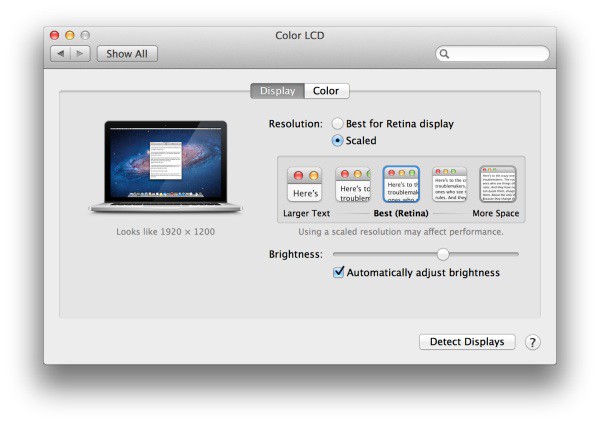
Screen Shot 2012-06-11 at 4.29.36 PM_575px

Over at Anandtech, they’ve posted a fantastic first look at the MacBook Pro’s Retina display, which naturally confirms that Apple’s new laptop display is every bit as gorgeous and futuristic as we all think it is. What I was most interested in, however, was the new settings panel for the Retina display, which actually gives users the option to choose on-the-fly between having clearer graphics or more desktop space. What a great idea.

Here Are All Of The Hi-Res Wallpapers From The Latest OS X Mountain Lion Beta

By

A pretty new wallpaper in OS X Mountain Lion.

Apple released its fourth developer preview of OS X Mountain Lion yesterday, and you can get all of the gorgeous wallpapers from Apple right now. There are 34 total, and we’ve uploaded them all for you to download and use on your Mac.

Mountain Lion will be available in the Mac App Store next month for $20. While you’re waiting, why not check out some great new wallpapers?

In iOS 6, The Status Bar Changes Color To Match The App You’re Running

By

Status bars are all kinds of colors in iOS 6.

We’ve already shown you a whole host of new iOS 6 features that Apple didn’t get time to mention during its WWDC keynote yesterday, and here’s another one. In fact, this is probably one of the coolest in the bunch. Notice how the status bar above certain stock apps — like Settings or Mail — is now blue? Well, that actually changes color to match the theme of the app you’re running.

New In iOS 6: Passwords No Longer Required For App Store Updates & Previous Purchases

By

I didn't need to enter my password to download this, because I already owned it.

I’ve never really like the way in which the App Store handles security. Sure, I like the fact that if my iPhone is stolen, thieves can’t run up a huge iTunes bill. But I don’t understand why I have to enter my password each and every time I need to download updates or previous purchases. These have already been paid for; why is this necessary?

Thankfully, in iOS 6 and OS X Mountain Lion, it isn’t.

New In iOS 6: More Emoji Icons, Banners For “New” Apps, Badges For Reminders App

By

We're still digging up new iOS 6 features. Image courtesy of William Gamache (madmonorailprods@bell.net).
iOS 6 contains plenty of new features that Apple didn't mention at WWDC. Image courtesy of William Gamache ([email protected]).

We’re still trawling through the new iOS 6 beta releases that Apple pushed out after its WWDC keynote yesterday, and we continue to find nice new features and improvements. If you’re as excited about iOS 6 as we are, you’d probably like to hear about them.

Here’s a few changes Apple has made to emoji, Reminders, and more.