Mobile menu toggle

Search results for: Apple One

Troubleshoot Getting Passes On The Lock Screen Using Passbook [iOS Tips]

By

Passbook Lock Screen

Apple’s Passbook app and system lets you use passes that contain time-sensitive or location-sensitive information. For example, you might have a pass that triggers when you enter a specific store, like Target. Or, you might have airplane tickets going through Passbook, if you use that specific airline’s iOS app.

The ideal here is that the passes show up on your lock screen, so you don’t have to launch an app. This doesn’t always work, however. What can you do when it doesn’t? I’m glad you asked.

This Amazing Pizza Compass App Will Point You To The Nearest Slice

By

pizzacompass

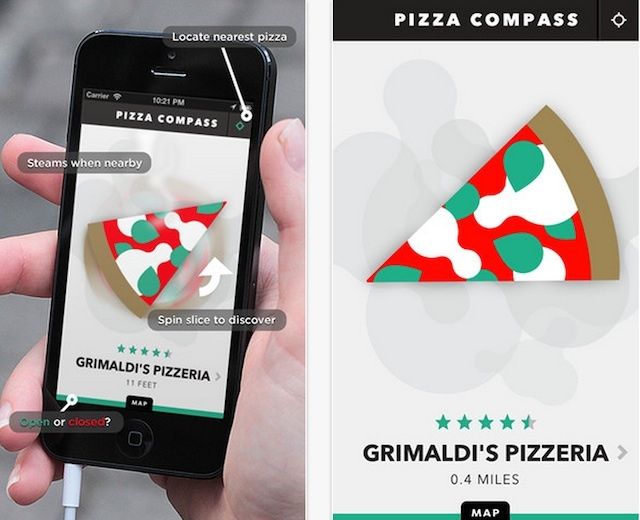
Finding pizza late at night can be difficult. You go to one restaurant and it’s closed. By the time you make it to your next option you realize it sucks and there’s something better down the way. There’s a new app that’s going to change all that, and it’s called Pizza Compass.

Pizza Compass isn’t just an app, it’s a tool for slice success. The app basically helps you find the nearest pizza joint in a hurry. You can spin the pizza slice to discover pizza joints nearby and the slice will steam when you’re close to a good place.

You can share you favorite pizza spots with friends, find restaurant hours and see reviews so you know you’re not going to eat something that tastes like cardboard. It sounds like a silly app, but it’s probably the greatest tool ever invented for those that like to do some late night drinking on the town.

Check out the Pizza Compass promo video and just try and tell me you’re not excited to give into your next pizza craving:

You Won’t Believe How Gorgeous Your Mac Will Look With RAW BKNY’s Wooden Keys

By

54e7ce556582c74efced471bb6019ddb_large

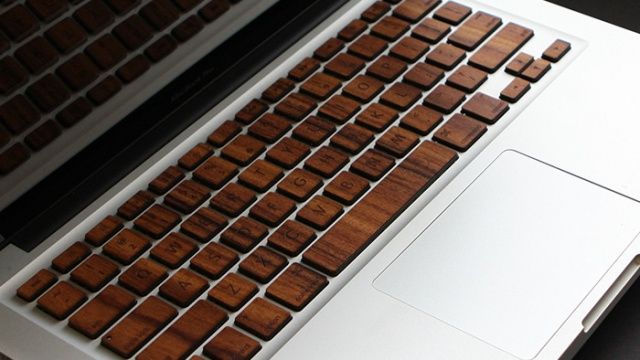
It might just be the dozen-odd years I was spent chained to the wall in my grandmother’s basement, a stain on the orange shag carpet my only friend, but I have a natural affinity for slapping wood panneling on any gadget I have. Especially Apple products.

One of the companies that has helped me in this quest of mine is RAW BKNY, a Brooklyn-based woodworking and laser-etching shop which has put out some really bitching wood veneers for the iPhone and Macbook.

Now they’ve got a new Kickstarter, and I’m super psyched about it: how’d you like wooden keys for your Mac?

Mastering Notification Center: Only See Certain Types Of Calendar Events [OS X Tips]

By

Sweet customization!

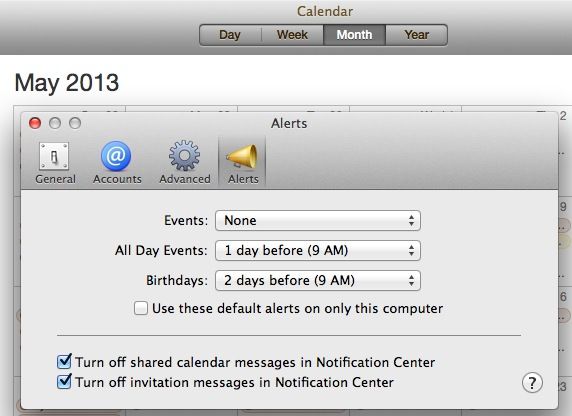
In OS X Mountain Lion, you can set a Calendar notification for a repeating event on your iPhone, then get that notification on your Mac. Heck, you can even set a Calendar event on your Mac and get it when you’re out and about with your iPhone or iPad. It’s all a part of Apple’s iCloud integration, and it works pretty well, most days.

But what if you really don’t want to be notified of a certain type of event when you’re on your Mac? With OS X Mountain Lion, at least, you have a few more options for notifications that come from Calendar. Check it out.

Viber Is Now Available On Mac & PC

By

post-226469-image-ddf8b2d160f2581abf31a49e6840f96c-jpg

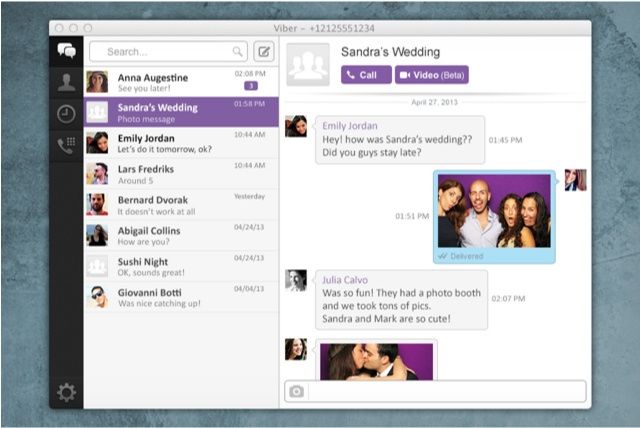
Viber, the popular cross-platform messaging service for smartphones, is no longer just for smartphones. The company has today launched new desktop applications that allow you to chat with friends; send stickers, emoticons, and photos; and make calls from a Mac or PC.

This Very Pretty iOS 7 Concept Shows Off Jony Ive’s New App Switcher [Video]

By

post-226452-image-f5e339a761fcb03abe1c345da4cfb066-jpg

Update: And it looks like Ran Avni, the guy taking credit for this video, might have stolen it from Isaac Royo over at Device Station. We’ve replaced the video.

This lovely burble of a concept video isn’t just as soothing as a new-age noise machine, it shows off a new concept for a new multitasking system in iOS 7.

It looks pretty, and no doubt many of you would like to see this on your iPhone, but just to tamp expectations down into a low-burning dottle, Apple’s never going to release something like this.

Photo+, A Lightning-Fast Photo Browser App For Mac

By

photoplus.jpg

Sometimes all you want to do is flip through a folder full of photos, maybe cropping a few of them and deleting the worst ones. That’s exactly what Arcsoft’s new Photo+ for OS X is for. You just drag a single photo onto the app and you’re off – able to use the arrow keys to navigate every other image in the folder, cropping and deleting as you go.