Mobile menu toggle

Search results for: Apple One

What is the best PDF app for students and educators? 

By

Quit struggling with PDFs. An easy-to-use PDF editor like PDFelement takes the hassles out of using PDFs.
An easy-to-use PDF editor like PDFelement takes the hassles out of using PDFs.
Photo: Wondershare

This post on PDF apps is brought to you by Wondershare.

The popularity of the PDF file format increases day by day. PDFs make it simple and reliable to share documents. However, despite the file format’s many amazing features and capabilities, many users show remain reluctant to use PDF files.

The reason behind this is the rigidity of PDF files. If you don’t have a dedicated app, it can prove maddeningly difficult to make changes.  Here, we are going to introduce you to what might be the best PDF editor app: Wondershare PDFelement. This app will let you make all desired changes to a PDF file. Let’s get to know more about this app.


Save $100 on the biggest and best iPad Pro

By

iPad needs to be redesigned to be landscape-first
Save some cash on the iPad Pro right now.
Photo: Roberto Nickson/Pexels CC

You can now save a bundle on the latest 12.9-inch iPad Pro. This tablet is powerful enough to be a notebook alternative, and now it’s available for $100 below the usual cost.

There are also a nice deal on the 11-inch iPad Pro, iPad Air and other Apple tablets.

Crank out a fantastic thesis in a flash with this top-rated Mac app

By

This top-rated app makes writing your thesis a breeze - and it’s less than $20 right now.
This thesis writing app is a must-have for students and costs less than $20.
Photo: Cult of Mac Deals

Enjoyable thesis writing: For many students, it may sound like an oxymoron. But using a great app that eliminates the fuss around writing and editing papers can be key to making the whole process quick and painless.

MonsterWriter is one of the best-reviewed Mac writing apps out there. And right now, you can purchase a lifetime license on sale for just $19.99 (regularly $34).

Maintain your privacy everywhere with best-of-web pricing on Windscribe VPN

By

Keep your Macs safe with Windscribe VPN Pro.
Safeguard the data on your iPhone and other devices with Windscribe VPN Pro.
Photo: Cult of Mac Deals

Putting a case on your iPhone or MacBook is a no-brainer for protection against scratches and scuffs. However, web-based threats can be far more damaging — and not just to your device. Getting hacked can empty your wallet and ruin your reputation.

A virtual private network like Windscribe can help you stay safe online, and Pro Plans are currently on sale starting at $39 (regularly $69).

Hidden iOS 16 features make us love it even more [The CultCast]

By

Hidden iOS 16 features make us love it even more - The CultCast Apple podcast
The iOS 16 upgrade makes even old iPhones feel brand new.
Image: Cult of Mac

This week on Cult of Mac’s podcast: iOS 16 makes our year-old iPhones feel fresh again. And the various “hidden” features flying under the radar make the iOS 16 experience even more impressive.

Also on The CultCast:

  • We can’t wait for our first trip to the iPhone 14 Pro’s Dynamic Island.
  • Is the iPhone 14/iPhone 14 Plus really a failure? (Even Steve Jobs’ daughter is dissing this year’s “upgrade” to Apple’s midrange iPhones.)
  • What to expect at Apple’s October event.

Listen to this week’s episode of The CultCast in the Podcasts app or your favorite podcast app. (Be sure to subscribe and leave us a review if you like it!) Or watch the video live stream, embedded below.

Our sponsor: CultCloth

Get the only cleaning cloth you need: CultCloth!

New Logi webcams feature ‘Show Mode’ and a take on Center Stage

By

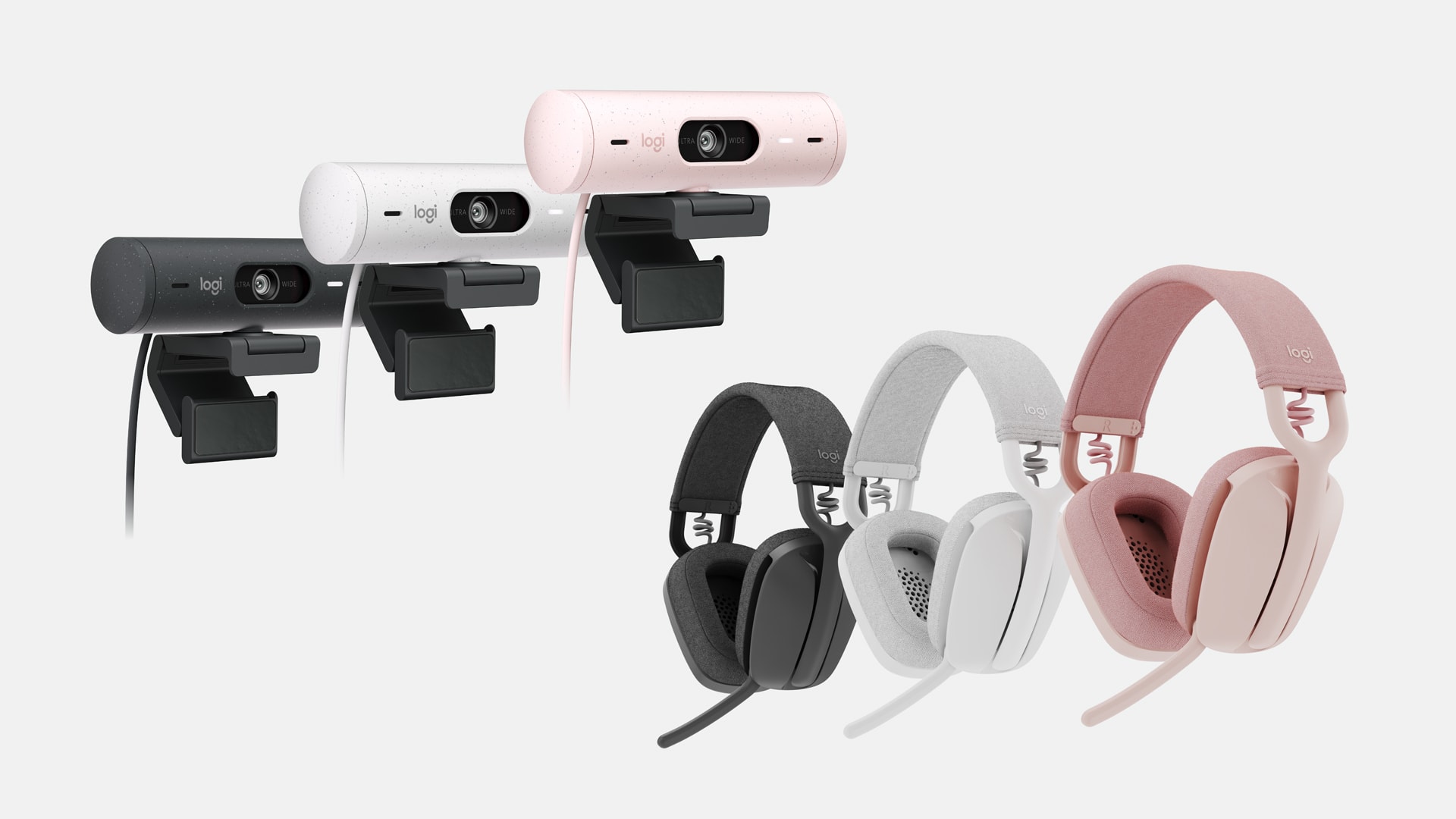
Logitech Brio 500 webcam series and Zone Vibe headphones series are designed for hybrid workers.
Photo: Logitech

Logitech unveiled its new Brio 500 webcam series and Zone Vibe headphones series for hybrid workers Thursday. The company said “they bring quality, style, affordability, and sustainability to today’s workers for ultramodern collaboration experiences.”

“Many remote and hybrid workers are still underequipped and grappling with pre-pandemic era solutions,” said Scott Wharton, Logitech Video Collaboration general manager. “Our innovative new genre of Brio webcams and Zone Vibe headphones answer the call of modern workers who need business-grade quality, style, and affordability for work and play.”

BookFusion iOS app: A better way to read and manage your ebooks

By

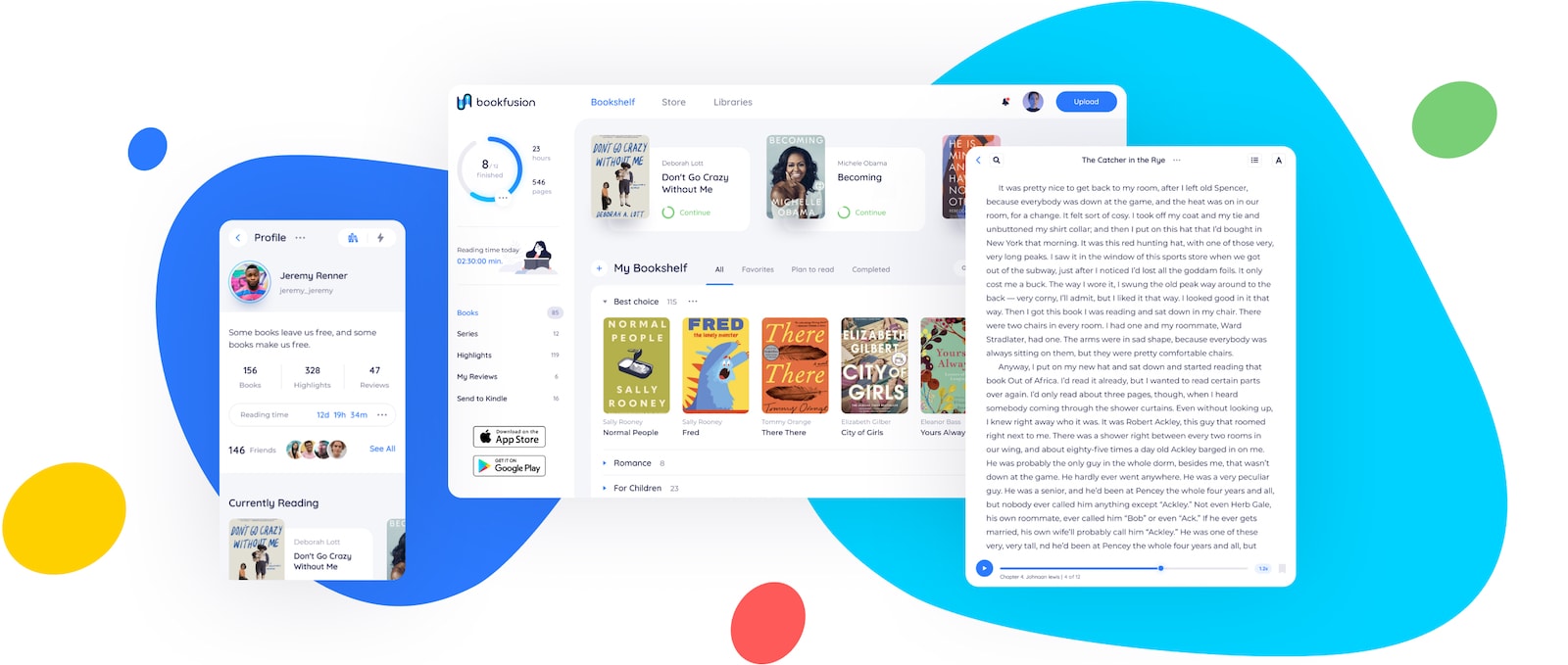
BookFusion can replace the apps you use for e-book reading and management.
BookFusion offers advanced features that make reading ebooks and managing your digital library easier than ever.
Image: BookFusion

This post about ebook reader and management apps is presented by BookFusion.

If you love reading, BookFusion may be the ideal app for you. It allows you to have your entire ebook collection at your fingertips on any device you own. You can easily upload, organize, sync, read and share ebooks across all your devices.

All that, and the reading experience is pretty great, too. In fact, you can replace apps like Marvin 3, Kybooks and Calibre Companion with just one iOS app — BookFusion.

New emoji? Talk to the hand!

By

Proposed new emoji list shows we already have all the emoji we need
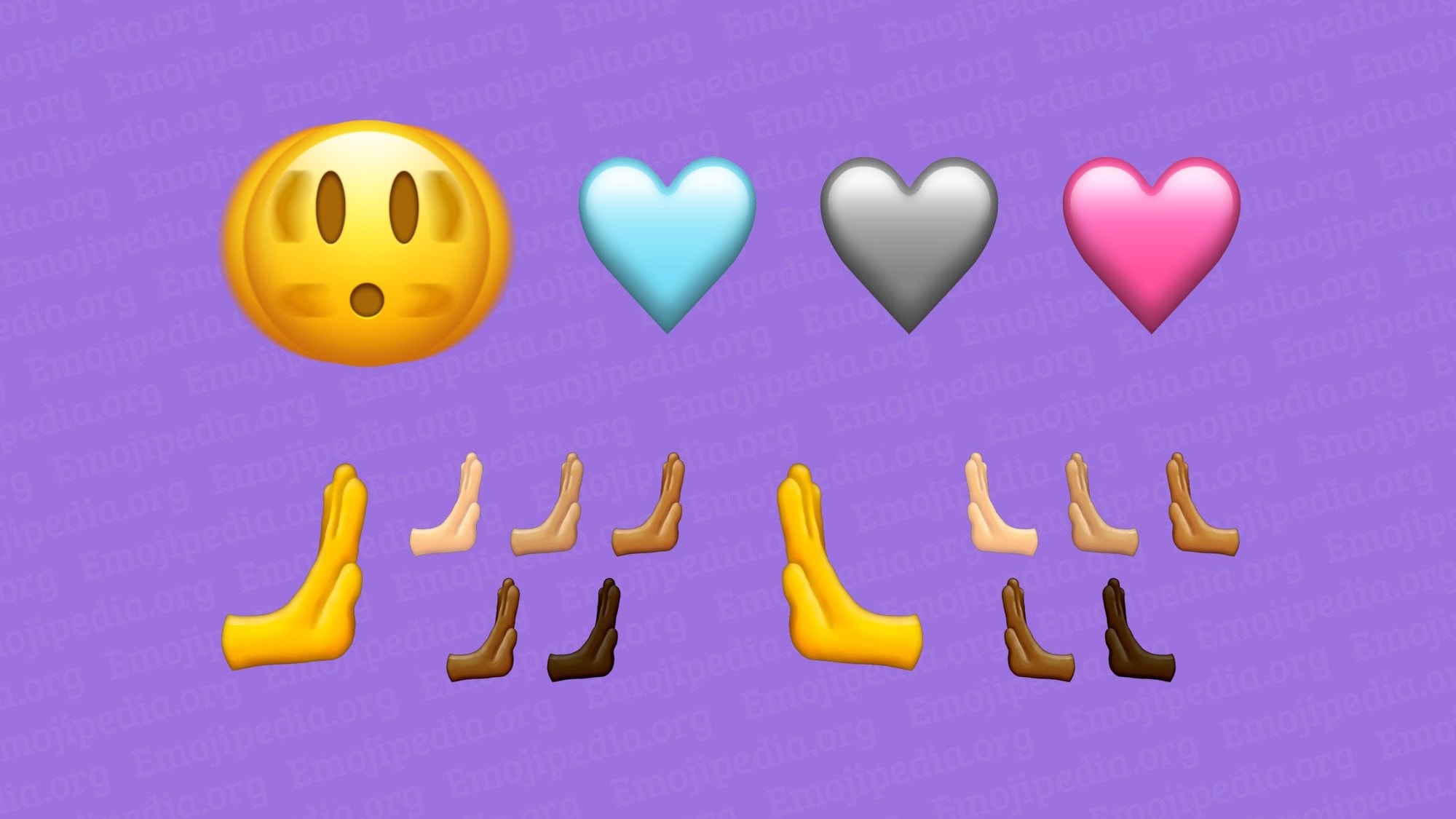
These are some of the emoji coming to Apple devices... probably in 2023.
Image: Emojipedia

Emoji are about visual communication, and the some of the new ones just approved say “Talk to the hand.” And there’s a new way to express love, too. Or there’s good news for everyone desperately waiting on a moose emoji.

Other new additions approved by the Unicode Consortium include a shaking face, a donkey, a jellyfish and a flute.

M1 Mac mini marshals 3 dazzling displays [Setups]

By

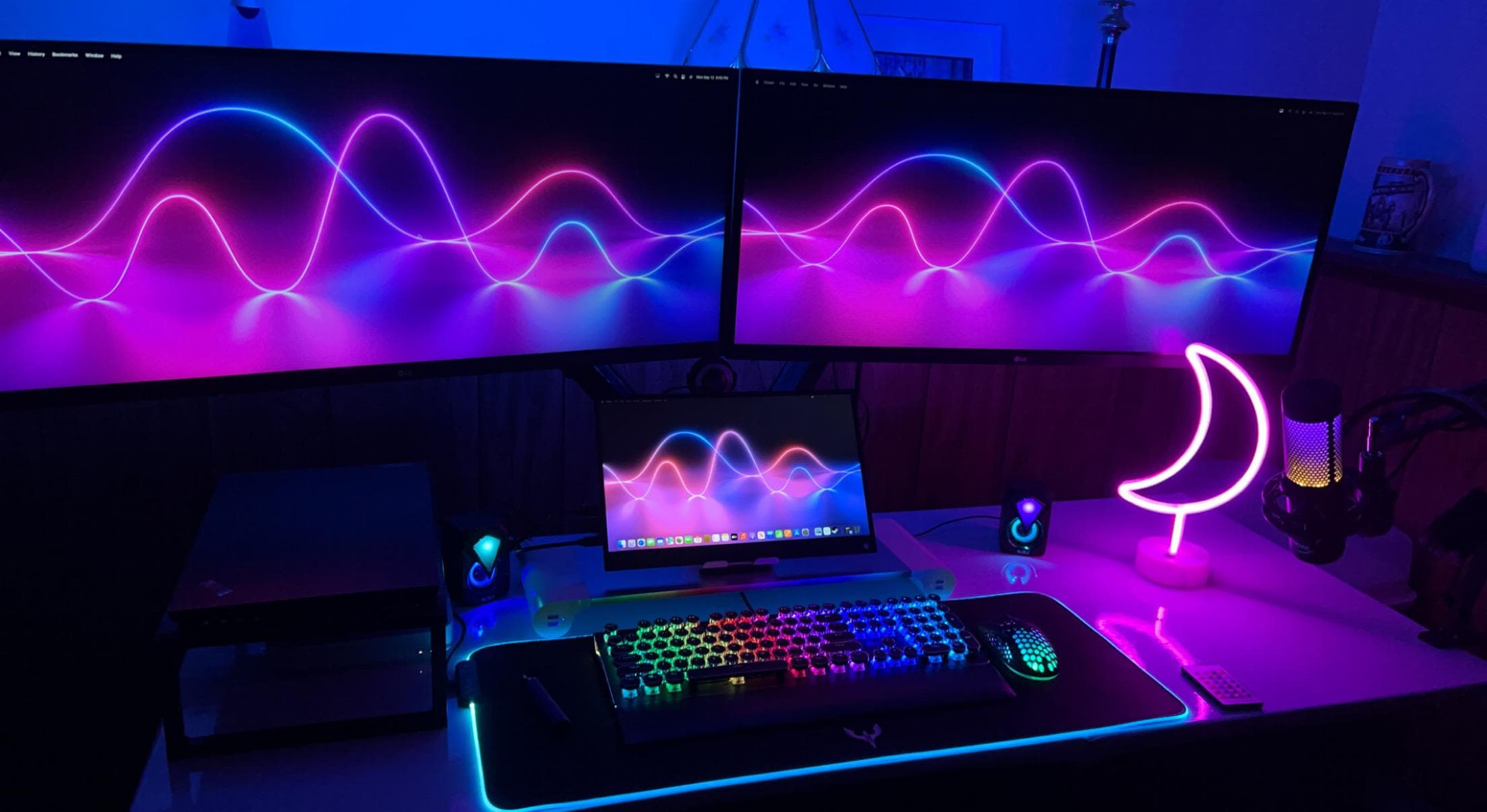
Using Running two ultra-wide displays and a portable monitor with an M1 Mac mini isn't very difficult.
Photo: [email protected]

We’ve covered many computer setup with multiple displays, even as many as six. But we don’t come across many purpose-built portable displays, perhaps because iPads often serve that purpose.

But today’s featured gaming setup uses an M1 Mac mini to drive two LG UltraWide monitors and a 15.6-inch Full HD portable screen, claiming no lag or latency. If you’re searching for the best monitor for Mac mini, check out this guide on top display options.

The secret? Well, as is often the case, it’s in the hub.