A while back, I compared BBEdit 9 and Coda 1.5, testing the old warhorse against its young competition. However, while quick overviews are all very well, the only way to find out whether applications are any good is under real-world conditions, so I spent 30 days working with BBEdit, to see if it still doesn’t suck. Find out more after the break…
Overview
Although it’s designed for all text-based use, there was literally no way BBEdit was going to usurp the amazing WriteRoom from my writing work—I have to put food on the table, etc. But I did put the application to the test, to see if it could barge all my other web apps out the way and get me through 30 days.
Day 1
Reviewing BBEdit 9 for a British magazine, I start working my way through all of its major features for the nth time, just to make sure that I haven’t missed anything.
I’m starting to hate the text-completion and the preferences UI sucks—when you need a search dialog in your preferences, something has gone terribly wrong. However, the non-modal search/find/replace dialogs are making me grin like a loon, despite the fact that the sensible side of me is well aware that this is the way BBEdit should have been for years.
Day 3
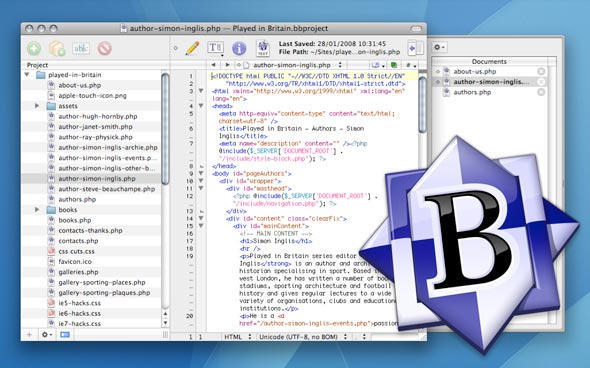
Being a long-time user of BBEdit, I resolutely turned off most of BBEdit 8’s workflow ‘enhancements’, which shoved open documents into a single open window, switchable via a drawer. Today, I’ve decided to try something new: creating a BBEdit Project and using the drawer to switch between open documents.
Overall, the experience is… interesting. Projects are clunky (it’s way too easy to open files) and with the drawer also open, BBEdit grabs an absurd amount of screen real estate, but… I think I like this.
Apparently, though, my eyes are going bad—I today had to up BBEdit’s default text size to 10. I expect to be wearing a pair of binoculars after my next trip to the optician.
Day 4
Yeah, I’m really hating the text-completion now. It’s so massively inferior to equivalent features found in other applications that it’s just not funny. In fact, I hate it so much that it’s being turned off, so bye!
Oddly, I dimly recall talking to the Bare Bones head-honcho about adding this kind of feature when BBEdit 8.something was released. Now I kind of which it hadn’t materialized. The feature tries to be too clever for its own good, but isn’t obviously configurable to mere mortals, and it absolutely sucks for CSS.
Day 7
Still liking Projects, although I wish there was a more space-efficient tab system, like with Coda and Adobe’s apps. The pop-up menu on the toolbar isn’t great, and the drawer takes up too much screen space.
Day 8
Late in the day, BBEdit excitedly tells me it needs to download 15.7 MB of updates, snappily titled BBEdit 9.0.1, to stop my Mac from exploding. (It might have said something about bug fixes, to be honest, but no-one reads those update notes, right?) The install works. My Mac survives. Phew!
Day 10
Projects tip: drop folders and not the contents of folders into the projects pane, because stuff actually updates. This is almost certainly in the manual, and is definitely something I should have realized days ago, but who reads manuals these days? Not me! (The fact that I should is neither here nor there.)
I’m missing the ability to do proper file management in the Projects pane now, though—and so while it’s great for collecting and moving rapidly through a selection of items, you still need Finder for fairly basic tasks.
Day 14
Thought I’d have a play with custom code colors today, something added to BBEdit in version 8. I then swiftly realized it doesn’t enable you to save sets of colors—only revert to the originals if your creation looks like an explosion in a painted fonts factory. That’s a big ol’ fail there, guys. (And, yeah, I know about the third-party add-ons that can sort of automate this, but this feature should be built-in by now.)
Day 17
Loaded up CSSEdit for the first time today, to do a bunch of CSS validation. Sorry, Bare Bones guys, but you should really have added this function to your app. Still, I managed over two weeks before ‘breaking’.
Day 19
OK, so screen real-estate is becoming a real problem with BBEdit Projects—it should have tabs for ‘Files’ and ‘Open’ in the Project pane, or embolden open items, putting the little close icon next to them. And ‘Open Recent Project’ needs its own menu item.
Days 21 through 30
Nothing new happened, apart from a dawning realization that after three weeks, you’re not likely to find new things to say about an app like this. Move along! Nothing more to see!
Conclusion
So, 30 days of non-pain, which is what I like to see, but also 30 days that kind of proved that BBEdit 9 sadly doesn’t entirely have what it takes to convince me to stick with it forever.
I grew to like Projects a whole lot more than I thought I would, but the interface takes up too much space, especially when compared to the streamlined UI of Coda, and the code-completion is just dire. BBEdit 9.something also seriously needs to enable some kind of file management within Projects and let you define syntax color sets.
Overall, the app rates as a ‘good’ on my personal scale, but isn’t quite good enough to qualify for a spangly Cult of Mac ‘recommended’ badge.
For the next part of the experiment, over to Coda. I’ll report back in about a month.

Craig Grannell was once Cult of Mac’s designer and an occasional contributor. Find out whatever he’s doing now on Twitter @CraigGrannell or his website, craiggrannell.com.

