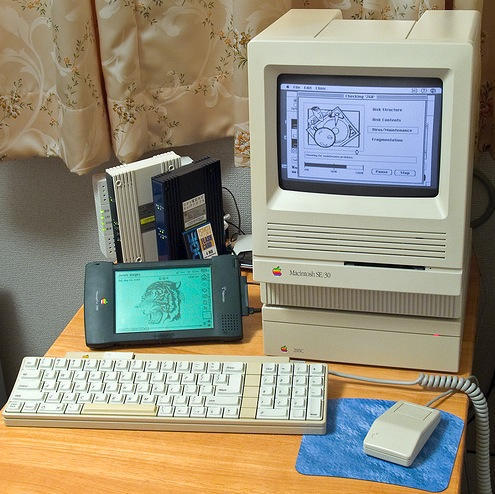
James Wages is a man on a mission. Where you and I might see a tired old computer that’s not much use to anyone anymore, he sees a decent machine with plenty of potential.
The results of his tinkering are spectacular; this ancient SE/30 is in regular use by the Wages family, for writing things, drawing things, and (most impressively, I think) getting online.
This little puppy is as maxed out as an SE/30 can get. These machines originally appeared in 1989, running System 6 and costing only $6,500. Blimey. Now you can pick them up for nothing – or even cheaper – and if you’re prepared to put the work in, maybe you can get yours doing all the stuff James has got his doing.
This machine was built before the web was invented, but he’s got it surfing quite satisfactorily. How did he do it?
I asked him.
“It connects to the net via its MacCon PDS Ethernet card. I
then connect a cable to my 10/100BT Ethernet Hub, which in turn connects via a 100Mbps fiber optic modem to the net. Of course, I cannot take full advantage of my fiber connection with the SE/30 alone, but downloads through Netscape 2.0 are about 57kbps, which is pretty good.“I’ve not found download speeds increase or decrease when using other browsers either, and I’ve tried MS Internet Explorer 2.0 and 4.0, Netscape 3.0 and 4.0.8, and iCab (68k version). I’ve also tried some text based browsers, but those are unusable for me.
“Netscape 2.0 is simply the fastest 68k “graphical” browser available. I think iCab is promising, which is why I wrote to the author more than 2 years ago about keeping up the 68k version, but apparently there is insufficient demand for him to do that. It’s a shame too because iCab has the potential to support all the bells and whistles of a modern web page on
68k Macs.“Netscape 2.0 is no slouch, but it cannot parse CSS well and some sites are a real mess when viewed on screen. Of course, graphics are all converted to B&W so they are not a thing a beauty, that’s for sure. But I must say that when my wife is on my G4 Cube and I am eager to get on the net, my SE/30
serves me well enough. But again complex CSS sites are not very usable – Netscape 2.0 is best to view sites that are built with “table layouts.”
Wonderful stuff. But what can you use a machine like this for? Can it still be useful? James says it certainly can.
“I do most of my main email work in Entourage on my G4, so I don’t use my SE/30 so much for that. But again, if my wife is on the other computer, I can use my SE/30 to access email. Rather than use an email client though, I just fire up the browser and use the web interface to access mail. That way
I don’t need to keep local copies of mail on my SE/30, since my SE/30 is not my primary email machine.“MS Word 5.1 is fast. I would say wicked fast, even on a stock 16MHz SE/30. WriteNow 4 is a tad faster, but both apps load and work faster than any modern word processor on OS X today. And yes, I’ve composed many text documents on my SE/30.
“My 5 year old daughter likes MacPaint and some other educational software I’ve got on the SE/30. She thinks it’s a cute computer, which makes playing on it fun. It also lacks color, which sometimes can be an advantage. With too much color on a big screen, she sometimes doesn’t know what to click on. But the SE/30 is more straightforward for her to use because it’s simpler.
“I guess I use the SE/30 most often with my Newton, to add packages to the Newton and to backup all my Newton files on the SE/30. There’s an incredible amount of Newton software out there, especially for the 2000/2100 series. NewtonTalk is a popular forum that I participate in to learn about the latest and greatest.
“Although the Newton can synch with modern computers and even OS X using some special software that Newton enthusiasts have developed through the years, I still find that a serial connection to my SE/30 is the most reliable and enjoyable experience. I even have a Newton patch that allows serial transfers at 57,600bps, which is faster than the maximum 34,800bps that Apple’s Newton Connection Utilities would originally allow.”
This machine has been through a lot of upgrading. James had better tell you the details:
“I filled all the slots with 16MB SIMMs to give the SE/30 128MB RAM, the maximum the machine allows. This was an unthinkable amount of RAM at the time the machine made its debut, and even when 16MB SIMMs later come on the scene they were so expensive few upgraded SE/30s to that much RAM. But lots of RAM allows me to load any 68k software I want, including RAM-hungry Photoshop.
“The stock SE/30 has a 16MHz 68030 processor, which is certainly no slouch relative to the 8MHz 68000 the original Mac 128k came with in 1984. Even so, I found the 16MHz a bit slow for web browsing so I installed a 50MHz DiiMO accelerator. This makes all operations snappy and web browsing usable. I also own a 40MHz Daystar 68040 accelerator, but I found that some programs were incompatible even with the 040 cache disabled, so I fell back to the DiiMO. I really like the DiiMO because its just as compatible as the stock SE/30, yet faster.
“I have a 4.5GB SCSI hard disk attached. Originally, that hard drive was fitted internally, but to reduce heat I moved it into the external zero footprint enclosure you see
under the Mac in my photo.“I partitioned the drive 3 ways in order to retain System 6 compatibility. System 6 cannot see anything over 2GB. I
have a boot partition with System 6.0.8, System 7.1, System 7.5.5, System 7.6.1 and OS 8.1. I use System Picker to switch among them.“System 6 is just plain fast. It boots in 13 seconds and all apps (such as Deneba Canvas 3.5.6) are so fast it blows the mind. But I still keep newer Systems on the machine for compatibility reasons – some programs just won’t work under 6.
“I can network to my G4 via System 6.0.8 too, but only when I am booted into OS 9 on the G4. It works well though.
“The other thing I use my SE/30 for is a link between my ancient Mac 512k and my Cube. I can read my 512’s floppies in the SE/30, and I can also connect to the SE/30 via LocalTalk (PhoneNet).
“I actually have two older 512s, one is a stock 512 (a 128k machine actually that has the 512k motherboard upgrade, but with the original 64k ROMs) that has an external Apple HD20,
20MB hard disk. My other 512 is has 20MB GCC internal HyperDrive in it.“The SE/30 always comes in handy to grab older Macs software off the net, convert it to 400k floppies and allows me to use it on the 512s in no time. Without the SE/30, it would be much more troublesome to prepare older software for these ancient Macs.”
All I can say is: wow. I’ve played with plenty of vintage kit in my time, but I’ve never had the patience or the ingenuity to make a success of a project like this. If anyone ever tells you there’s no point putting retro computers to good use, point them in James’ direction and see what they say then.
(Picture used with permission. Many thanks to James for his help and friendly co-operation.)

Giles Turnbull is a freelance writer in England. He also writes for the Press Association and The Morning News. You can find out more at his website, and follow him on Twitter @gilest.

