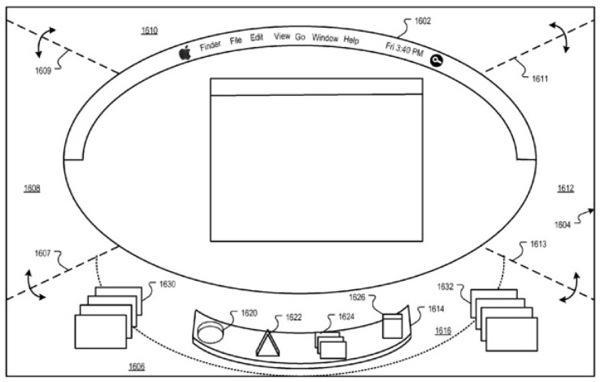
Soooo, this 3D interface that everyone’s been going crazy about; allow me to add a brief comment:
Arrrrrrrrgghghggghghhhhh.
Now, allow me to justify that. You see, I’m one of those people who really dislikes the default 3D Dock that you get with Leopard. One of the very first things I do when installing Leopard on a machine is to switch the Dock back to something that doesn’t make me want to rip my own eyes from their sockets. Then hide it, because even when it’s 2D I still don’t want it getting in my way.
The thought of having the ENTIRE UI made of similar 3D glassiness gives me the shivers. And the shakes. Then gets me thinking that eyeball thing all over again.
OK, I’ll stop being sarcastic and try to be objective and serious for a moment.
If something like this does appear in future versions of OS X, I have no doubt that I will take a look at it, but I remain very doubtful that I would use it. This is for two reasons:
-
It just looks much more complex than what we have already, and one of the things I like most about OS X is the simplicity of everything. I like the way I don’t have to have a desktop buzzing with widgets and controls and windows, and most of the illustrations of Apple’s patent filing published by AppleInsider show exactly that. Yes, it looks 3D all right, but it also looks many times more complicated to work with. I don’t want complexity.
-
I’m an old fuddy-duddy and I’m stuck in my ways. This would be a factor with any significant change to the OS X desktop, not just this 3D sketch. I’ve been using my computers in a particular way for many years and I have no interest in changing that. It works for me, so there’s no reason for me to start using something new. I’ve no doubt, though, that many younger or more flexible people would dive into a new 3D interface and get a lot out of it. I’m sure my son would love it. He’s only six right now, and I’m very interested to know what kind of computing he’s going to grow up liking.
Looking over the patent application sketches that AppleInsider published (and all due respect to them for getting the scoop), my impression is of a modal feature rather like Time Machine or Dashboard. I suspect that the traditional flat 2D workspace would still remain in place for much of the time, and that this 3D box would appear (complete with an appropriate FWOOP sound) when invoked with a particular key or mouse gesture.
One possible avenue for exploration here might be the use of mouse or trackpad gestures, and maybe hand gestures too. One might be able to invoke the 3D box by holding up all five fingers before your computer’s iSight. Then maybe you might be able to use one finger to literally point at the objects you want to manipulate within the box.
I’m just thinking aloud here, and perhaps some of what I’m thinking might make me more interested in at least TRYING a 3D desktop once it appears.
I still hate that default Leopard Dock though. Euw, euw, and double euw.
Remember, kids:
defaults write com.apple.dock no-glass -boolean YES

Giles Turnbull is a freelance writer in England. He also writes for the Press Association and The Morning News. You can find out more at his website, and follow him on Twitter @gilest.

