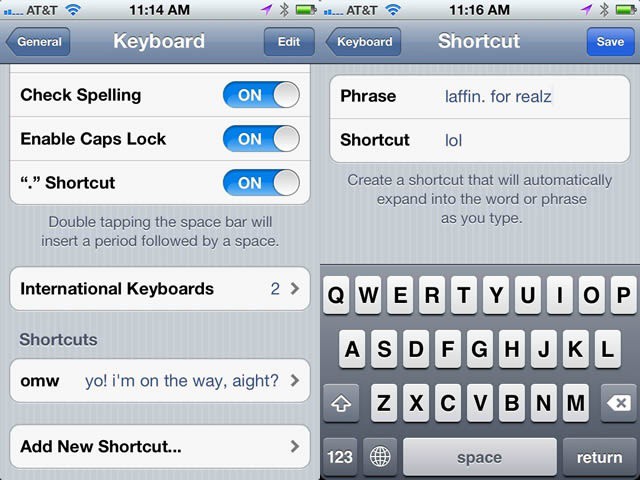
Look, I know some folks like the auto-expand of omw to “On My Way!,” but honestly? I’m rarely that enthusiastic when sending a text about my plans to head over to a buddy’s house. Just sayin’. If this bugs you as well, here’s the way to fix it, as well as add others to your texting repertoire.
Hop on over to our favorite app, Settings. Tap on the General tab, then scroll down to Keyboard and tap through to Shortcuts. The omw shortcut is already there. Tap it, and change it to whatever you want it to say. Be sure to hit the Save button in the upper right, or you’re back to square one.
Want to add your own shortcuts? That’s pretty easy, too. Simple tap the Add New Shortcut… field at the bottom of the Keyboard settings pane, and add one in. Try to keep your shortcut (bottom field) 2-4 letters, or it’s really more of a longcut, right? The top field contains the actual phrase you want the shortcut expanded to. Try not to get them confused, like I did the first one I added. You’ll get an error saying your Shortcut cannot contain spaces. That will be the tip you’ve gotten it backward.
Got a tip? Need help with an iOS problem? Shoot me an email, or drop a comment below.

Rob LeFebvre is an Anchorage, Alaska-based writer and editor who has contributed to various tech, gaming and iOS sites, including 148Apps, Creative Screenwriting, Shelf-Awareness, VentureBeat, and Paste Magazine. Feel free to find Rob on Twitter @roblef, and send him a cookie once in a while; he’ll really appreciate it.

