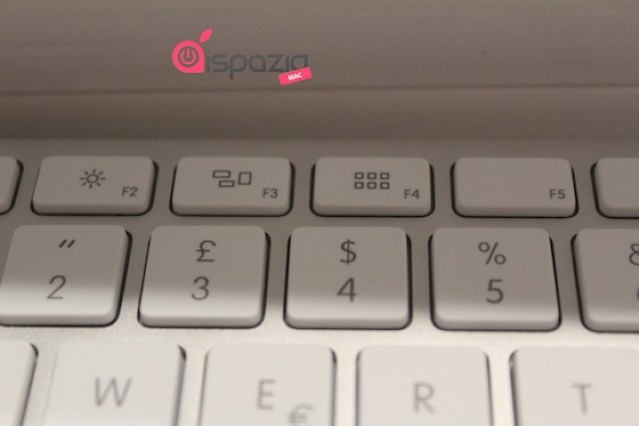
Following the release of Lion on Wednesday, Apple has updated some of the keys on its standalone keyboard to reflect their new functions in the latest Mac OS X operating system.
The F3 key has received a minor change that removes the frame previously surrounding the collection of windows, as noted by iSpazio. This key is now used for Mission Control rather than Expose.
More notable is the removal of the Dashboard icon from the F4 key. This key is used for Launchpad under Lion and is now emblazoned with what looks like a collection of app icons. For those that miss their shortcut to Dashboard, remember that this can now be accessed through Mission Control and the F3 key.
The new keyboard is reportedly compatible with Mac OS 10.6.8 and above only. It’s currently unclear whether Apple’s wireless Bluetooth keyboard has also been updated as the images in its online store are yet to be changed, however, both keyboards have had their model numbers updated.
So not only is my MacBook Air now outdated, so is my wireless keyboard. Damn you, Apple!
[via MacRumors]

Killian Bell is a freelance writer based in the U.K. He has an interest in all things tech and also covers Android over at CultofAndroid.com. You can follow him on Twitter via @killianbell.

