Mobile menu toggle

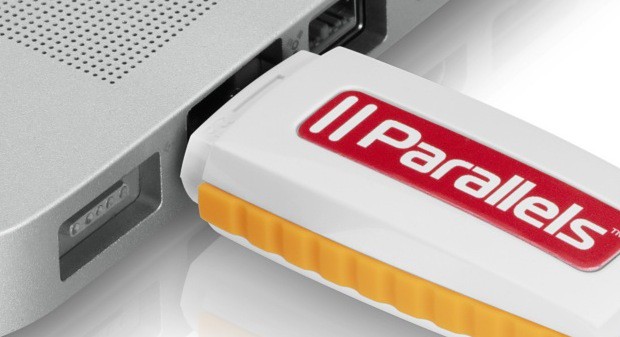
Apple.com Shows USB Drive Mistakenly Jammed Into A MacBook Pro’s Ethernet Port

By

apple-usb-in-ethernet-oops

Yes, that is a Parallels Desktop 6 USB stick jammed into a MacBook Pro’s ethernet port, as seen on the official Apple Store page. I wouldn’t give Apple (or Parallels, who likely supplied the image) too much guff about it, though: I’ve made the same mistake a couple of times myself.

[via OS X Daily]

  • Subscribe to the Newsletter

    Our daily roundup of Apple news, reviews and how-tos. Plus the best Apple tweets, fun polls and inspiring Steve Jobs bons mots. Our readers say: "Love what you do" -- Christi Cardenas. "Absolutely love the content!" -- Harshita Arora. "Genuinely one of the highlights of my inbox" -- Lee Barnett.

23 responses to “Apple.com Shows USB Drive Mistakenly Jammed Into A MacBook Pro’s Ethernet Port”

  1. GregsTechBlog says:

    My mom once complained about how her USB drive didn’t work with the iMac. She started complaining about how different everything has been since she switched to Mac OS a few days prior. 

    After looking for the drive in disk utility, I then decided to make sure it was plugged in correctly. It was jammed in the ethernet port of her brand new iMac (I hope no damage was caused). 4 USB ports, and she hits the big ethernet port.

  2. Robert Menes says:

    Sorry, gotta say it: Apple FAIL.

  3. jellymelly says:

    my mum made that mistake a few times hhaha
    i, too, hope no damage was made

  4. CharliK says:

    Given the number of products they have, it is possible that they don’t actually create those photos themselves and probably don’t spend a lot of time double checking them. 

    so this would be more likely a Parallels Fail. 

  5. robpickering says:

    To be fair it doesn’t really have to be “jammed”.  I’ve accidentally done it on all of my MacBook Pros.  The fit is just “snug” and since you never quite know which direction a USB stick should be to put in the port, you tend to push a little harder than you probably should.

    Just try it. I’ve never experienced any damage from doing it. The ethernet “pins” just sit on top of the USB male connector, so it would be hard to actually damage the port.

  6. Un_FollowMe says:

    So umm, whats the point of this article again? 

  7. John Ward says:

    I’ve made that mistake, customers of mine make that mistake but to fluff it up that bad in a promotional shot is pretty special.

  8. Michael Carr says:

    Honestly, though: they had time to set it up and take a close-up photograph, and *nobody* ever noticed?

  9. LukealiciousX says:

    Yup. Chatting with an Apple Expert right now and he says that it would go into the USB port. But your information is incorrect. You would need to click on the picture that shows it and then it rotates itself and shows you it’s in the USB slot. They are using an older version of the MacBook Pro.

  10. nthnm says:

    Usually it’s save to assume the side of the USB plug with the symbol faces up. …At least it’s been that way in any product I’ve ever owned.

Leave a Reply

