Mobile menu toggle

Missing Lion Install Disks Cause Frustrated MacBook Air Users To Struggle With System Restores

By

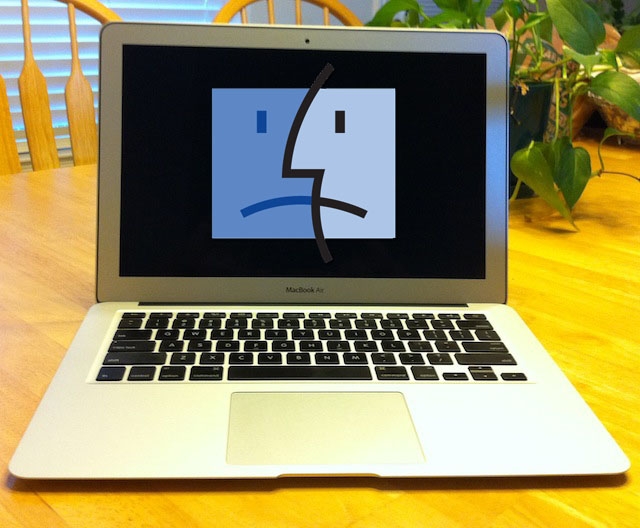
MacwithBlkscreenAngryNew

Apple’s decision to not include a USB Stick containing a copy of Mac OS X Lion for system recoveries with the new Mid-2011 MacBook Air might be causing the company a bit of a public relations issue this week. A fair number of MacBook Air users are venting their frustrations over the matter on Apple’s Support Community forums.

The discussion titled “When trying to reinstall Lion OS on new mid 2011 Macbook Air, error msg ‘This version of Mac OS X 10.7 cannot be installed on this computer’ comes up. What should I do to reinstall? ” has seen approximately 3,675 views and 88 posts.

The  heavily viewed and lengthy thread includes complaints from some users regarding problems they encounter when attempting to downgrade the version of Mac OS X 10.7 Lion build 11A2063 to the 11A511 build that Apple shipped via the Mac App Store or when they try to downgrade to Mac OS X 10.6 Snow Leopard. Unfortunately neither of these versions of Mac OS X are compatible with the new MacBook Air and therefore they will not install on it.

However, once users became aware of this some of them attempted to reinstall Mac OS X 10.7 Lion build 11A2063 using either their Recovery HD partition via CMD+R or Lion Internet Recovery via CMD+OPT+R during a restart. This is where things began to get interesting, because some users still reported problems while attempting to restore their MacBook Air.

One of the most interesting comments that a user named Rpagat1 made was:

I believe Chas is correct. For some reason, some of the 2011 MacBook air are having issue retrieving the lion build 11A2063. I can see in the log “Couldn’t find app store version, falling back to hardcoded 1.1.1”. AppleCare support told me that they’ll send out a thumb drive installer of Lion which in the first place Apple should have included in the package!!! I have to wait 3-5 days for it to arrive 

Although unconfirmed I think that this comment is very interesting because it indicates that there might be a problem accessing Apple’s servers once in a while or that something else was going on. Remember Lion Internet Restore requires two things: internet access to Apple’s servers and validation by those same servers. The latter tells Apple that you are eligible to re-install Mac OS X Lion. In this case it appears that the user was prevented from doing either of these steps and so AppleCare offered to send them something that many of us, myself included, believe should have been included in the box — a USB thumb drive containing the restoration and installer utilities for Mac OS X Lion.

Compounding the frustration about recovery issues was the rumor that AppleCare would send end users a USB thumb drive if they are unable to use Lion’s built-in recovery tools according to this article on 9To5Mac.
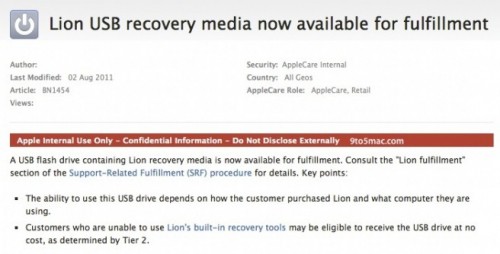
Credit: 9to5Mac

Well it turns out that the aforementioned USB stick won’t be sent out to Mid-2011 MacBook Air users because it is not compatible with that computer. It will only work according to one post on the discussion forum on older Macs shipped prior to July 2011. I checked with AppleCare and confirmed with them that there isn’t, at present, a USB stick available for fulfillment that is compatible with either the MacBook Air or the Mac Mini that shipped in July 2011. Luckily users with older Macs running Mac OS X Lion can build their own USB stick.

Additional problems that users encountered with Lion Internet Recovery appeared to be connectivity or latency problems between their Mac and Apple’s servers.  I even encountered the problem myself as you can see below when attempting to perform an internet recovery via CMD+OPT+R.
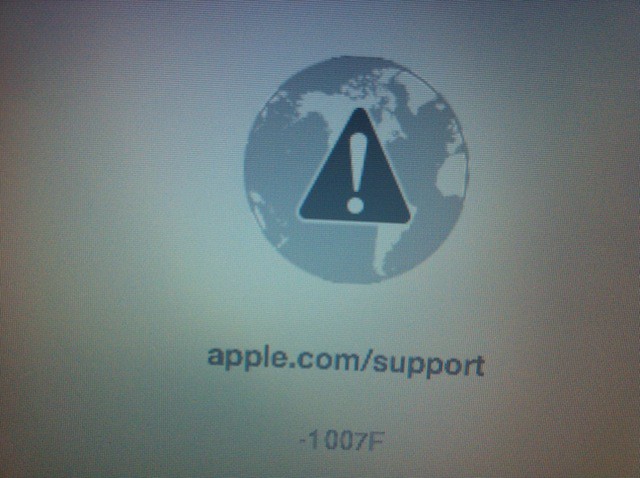
The errors encountered included: -1006F, -1007F, and -2002F. I attempted to get information about what these errors meant from AppleCare a few days ago, but as of today they have not replied to me with an answer. I received the -1007F error while attempting to perform a restore using a 3G Mifi 2200 device as mobile hotspot I suspect the problem in this case may have been latency, but that hasn’t been confirmed.

Apple’s decision to not include restoration media in the box with new 2011 MacBook Air computers might be a decision that will backfire on the computer maker as mounting  user complaints grow about restoration problems on the new MacBook Air.

The lack of a USB thumb drive users can use to restore their Macs with has caused users on the discussion forum to band together to find a solution. Some of them claim to have found a way to capture the Mac OS X 10.7 Lion build 11A2063 in order to make their own USB thumb drives and others agree that their methods work. I haven’t had a chance to try any of them yet. Many of those same users are also asking other concerned Mac users to drop Apple a note via https://www.apple.com/feedback to vent their frustrations about the whole situation.

Apple’s Lion Internet Recovery might see like a good idea, but it doesn’t look like the world is ready to give up control of their computer recoveries to Cupertino. Users, including myself, would prefer to be able to restore their computers themselves with or without an internet connection or when ever they damn well feel like it.

What do you think about the whole situation or the future of Lion Internet Recovery? What will you do if you need to recover your Mac and you don’t have internet access? Share your thoughts by leaving a comment.


  • Subscribe to the Newsletter

    Our daily roundup of Apple news, reviews and how-tos. Plus the best Apple tweets, fun polls and inspiring Steve Jobs bons mots. Our readers say: "Love what you do" -- Christi Cardenas. "Absolutely love the content!" -- Harshita Arora. "Genuinely one of the highlights of my inbox" -- Lee Barnett.

72 responses to “Missing Lion Install Disks Cause Frustrated MacBook Air Users To Struggle With System Restores”

  1. dsjr2006 says:

    I’m not a fan of them not including a recovery thumb drive, but it seems most of these people tried dong something they probably should have researched first and caused their own problems.

  2. fuck face says:

    The majority of users don’t even know what a restore is. they will bring their broken macbook air to the Apple Store.

    Only people who know how to use a computer would like to recover it or do a clean install.
    So.. Apple don’t care.

  3. Ciclismo says:

    Apple released a tool one or two days ago that allows you to recover from a USB stick – problem solved, no? And this way they can do it at a lower cost to you as the end consumer because they don’t have to organise USB sticks with software on ’em to be shipped.

  4. Charles Lowndes says:

    Try this, http://support.apple.com/kb/DL

    Should fix ya right up. 

  5. GDal says:

    A few days ago I agreed completely with what Apple has done. Now though, due to the downloading and these failures, I have to rethink my position. This will be a major hinderance in corporate IT acceptance if an easily implemented solution is not produced soon.

    I believe they use the download requirement to ensure that only the latest version is used. Not a bad idea. But If I have to download the OS, I should be able to store it on a USB drive. If there are updates, then the install process should update it for me. If I can’t connect to the Internet, I should still be able to restore the OS.

    If DRM is the issue, add an AppleID-linked lock to the installation process. Once I type in the valid username:password, then allow me to install. I doubt Apple will try to control the OS installation that way though, as they have never used DRM before. I could be wrong though.

    Also, an option to get updates from a local server should be available too. Prevent excessive Internet data transfer.

  6. Steven Chaffer says:

    Their not holding it right. 

  7. prof_peabody says:

    How is it Apple’s fault that the users want to downgrade their systems?  What kind of fool would want to buy a brand new computer and then roll it back to the old version?  It says right on the box what you are buying.  A *new* computer with the *new* operating system on it.  As far as I recall it says nothing about “and every previous operating system as well.”

  8. prof_peabody says:

    If you read the article carefully though you can see that there are actually no “failures.”  The failures are cases wherein the user was unable to do something (roll back the OS) that the machine wasn’t ever intended to do.  

  9. Doug Bursnall says:

    All those items you request (server copy, USB drive copy etc.) are available, you need only download once, make a backup/restore disc/drive. Do a quick search, many many how-tos on this site included.

  10. Howie Isaacks says:

    I think that this is more proof that Apple decided to abandon physical media too soon.  The least that they could have done was make sure that their servers check what Mac is contacting them for a Lion download.  That would ensure that the correct build is being downloaded.  If Apple had started out distributing Lion on USB disks as well as through the App Store, that would have been a better choice.  I had to do a complete erase and install two days after upgrading.  I booted from a Snow Leopard external hard drive, erased my internal drive, then ran the Lion installer from the App Store again.  How many people have a Snow Leopard bootable hard drive lying around?  We should not have to go through this much trouble.  This is very un-Apple.  Even Windows PCs don’t make you go through this much trouble.  A lot of them offer to help you burn a restore disk after the first boot.  I’ve been an Apple customer for over 20 years, starting with the Mac SE.  This is the first major Apple OS release that has caused me disappointment.  I love Lion, but I hate what Apple has done to the reinstall process.

  11. oakdesk23 says:

    How is it Apple’s fault Apple made an operating system people don’t want to use? What kind of fool would want to buy a brand new computer and then use an operating system they are familiar with. A “new” computer with the “unwanted” operating system on it. As far as I recall it says nothing about “not being able to use any other operating system or even the one it shipped with when something goes wrong.”

  12. oakdesk23 says:

    Wasn’t the point of internet recovery that people could get back to a working state without a disc or USB drive? If Apple had included a USB drive these people who messed up their systems could have gotten them back working again.

  13. oakdesk23 says:

    A 4GB USB drive sells for under $10. Apple with their huge purchases of flash memory probably pays a fraction of that. Apple didn’t do this to save money, they did it to maintain control over the computer you supposedly own.

  14. EdwinWheeler says:

    I just paid $ 23.86 for an iPhone and my girlfriend loves her Dell laptop that we got for $ 38.76 there arriving tomorrow by UPS I will never pay such expensive retail prices in stores again. Especially when I also sold a 42 inch LED TV to my boss for $ 665 which only cost me $ 62,81 to buy. Here is the website we use to get it all from, GrabPenny.com

  15. Ciclismo says:

    Sure it may cost them less as they buy in bulk, but then add labour for re-packaging after they have been flashed, shipping, taxes, duties (not the same thing as taxes), retail mark-up and suddenly a $5 part becomes very quickly a $25 item on the shelf.

  16. GDal says:

    I read the bit about the roll-back, and that I accept as not being an issue. It’s the next part that concerned me. Not being able to re-install Lion itself.

    There’s certainly more to this issue than this article reveals and in the next few days I expect to see clarification. Maybe it is a non-issue.

  17. GDal says:

    I understand that there are methods available to do what I wanted, but from what I understand these are not Apple produced solutions. What I want is a properly devised solution from Apple. Not that I think the other options aren’t good, but the installation process should be simple. A monkey should be able to do it. It should eliminate the need for complicated extra steps and expensive tools. I don’t want to have to buy tools like Ghost, as it’s not 1998.

  18. GooneyGooGoo says:

     Ha ha, Apple sucks again.

    http://bit.ly/dI3hcF

  19. RAS says:

    Your correct and those $100 shoes have about $7 in material in them.

  20. kyle m says:

    I’m glad my Macbook Pro came with Snow Leopard & the install disc for it. On top of that I got Lion free through the Up To Date program! 

  21. syzygy808 says:

    The initial problem was that only one Build of Lion was available on the Apple servers–and that version was not compatible with the latest MacBook Air or MacMini.  No one at AppleCare, including the senior techs, were aware of this problem.  Finally Apple installed the version that would work with the newest Macs–and also the older ones.  Now one can install a working Lion on a properly-formatted USB drive (needs to be larger than 8 GB) and use that to boot and run third party utilities, such as DiskWarrior.

  22. dsjr2006 says:

    Yes, but it seems most of these people messed up the Internet recovery feature by trying to install and incompatible version of Lion.

  23. firesign says:

    Boy that just never gets old, does it? The word you’re looking for is “They’re” no “Their”. Using the wrong word makes your lame trolling look even stupider.

  24. pgb0517 says:

    You meant “not.” What about using the wrong word …? Also, quotation marks go outside the period. And you need a comma after “They’re.” And you need a comma after “Boy.”

  25. oakdesk23 says:

    Are you insane? I can walk into a store and buy a flash drive for under $10. It would not cost Apple $25 to include one with each system they sell. They included discs for years, and the previous MacBook Air included a USB drive. Are you seriously trying to say that these parts were a $25 sinkhole?

  26. oakdesk23 says:

    The Internet Recovery is part of the firmware. It is supposed to work even when you replace the hard drive. What people tried to install should not break a feature designed to save you from disaster. (not that I think installing another OS actually broke internet recovery, I don’t think it ever worked right in the first place)

  27. Hoser Man says:

    When I purchased my new MBA last week I did not realize how difficult it would be to migrate my old MBP through the air since there is no FWire on the new MBA. Since I did not want to move everything onto my new MBA because it is a smaller disc drive than what I had on my MBP. Also, I wanted to upgrade some of my four-year-old iWork apps and then only move over the documents and files that I need to upgrade to the new app. Does migration Ass work, NO! There is no options to move over apps and user files that you want to move. So here it is, nearly two weeks later I am still moving individual files, user data, etc. onto my new machine. That is after I had to erase and start over by downloading Lion and then selecting my files that I wanted.

    I don’t have a problem with Lion, so far, I think getting used to the new work flow will take time. The one thing I do not like is Launchpad, I know is is iPad’ish and maybe for iPad it works fine, but for a computer that has twenty or thirty applications? No way. Its too cluttered. In fact, it reminds me of my boss’s windoze computer on his desk where all you see is application icons. Once I asked him how in the hell does he navigate that pile of crap? He asked me if I wanted a raise. I didn’t say anything else.

  28. Ryan Villanueva says:

    I agree. A thumb drive recovery media is the most practical and simple solution not some complicated internet recovery scheme. 

  29. idroid84 says:

    Anyone wanting this build to download visit:
    http://www.ictofficers.co.uk/b

  30. J.e. Aldana says:

    As usual, Prof. Peabody lives with the Utopian idea that Apple can do no wrong. You may love Lion, but the very fact that this issue has arisen means that not everyone does. What kind of fool does not understand that right or wrong not everyone has the same priorities and likes. Here is an easy one: new Air means backlit keyboard and better processor, but Lion means no legacy support for business apps that are still used.

  31. guardian angel says:

    Would you be willing to clarify the method your speaking of? Your saying that to boot a new air from external thumb drive is possible but the external drive still must use the same version of lion that the airs internal drive requires, or can any build of 10.7 be booted from the usb drive? thanks 

  32. Chaan Beard says:

    WTF!! Are they stark raving MAD?? I just received my new machine today and promptly hosed OS X like I always do, and when I reached for the media pack (sic) all I got was two apple logos and a coronary thrombosis when there was no media at all. Even worse my purchased OS X Lion for my other Macs does NOT work on this machine………

    Grrrrrrrrrrrrrrrrrrrrrrrrrrrrrrrrrrrrrrrrrrrrrrrrrrrrrrrrrrrrrrrrrrrrrrrrrrrrrrrrrrrrrrrrrrrrrrrrrrrr!!

    Steve!!!!!!!!! Help!!!

  33. mrbell1984 says:

    There is now a way to restore your Macbook Air 11A2063 offline.  
    Visit my blog – http://www.ictofficers.co.uk

  34. Sethi says:

    No bloody install disk!??!??!  That’s is just BS. How is a person suppose to reinstall the OS, for whatever reason, if you don’t have or you don’t have access to the internet?  That is just plain stupid on apple’s part. 

  35. Brenda says:

    The new MacBook Airs have NO hidden recovery partition.  Without this none of the suggestions below help.  They are not doable period.  The USB key for sale at Apple Store is incompatible with the new MacBook Airs.  Versions on the Apple Servers are irrelevant if your Lion came with the MBA and you did not ‘purchase’ it.  The Recovery Disk Assistant, Recovery HD Update all such items only work if you already have an existing hidden recovery partition.  Without this you can not::  create a USB key; create a bootable external hard drive; enable ‘Find My Mac’ in iCloud options.  You are hooped.  Left flat out without a paddle in the rapids.  There’s no life jacket.  Internet recovery takes hours and further it defaults to wireless so even if you have an ethernet adapter it doesn’t find/use it.  All of us who paid top dollar for the latest MBA with upgrades are left bereft of the most basic abilities to recover.  It won’t even recover from a full system Time Machine back up without internet access.  This is the worst decision EVER and there’s no way around it.  Apple techs are disbelieving when I tell them there is no recovery partition – until they check with their team leaders that is.  Yep – it’s true.  No recovery partition, no USB key for purchase that is the correct version for new MBA’s, no safety ‘net’ except rhe ‘internet’ which is no safety net at all.

    Brenda

  36. androidno1 says:

    I know Apple won’t care how their customers think since IT’S NOT THE CUSTOMER’S JOB TO KNOW WHAT THEY WANT’, they will assume you wouldn’t need to reinstall WTF!~~~ so what i can do now is to keep trying internet recovery until success, then build a clean backup for future use… and strongly recommend for new users who just bought a MBA, do it immediately before installing any of your own software!

  37. Brenda Mintz says:

    This advice has a caveat.  It may do more harm than good.  The new MBA’s come with Lion preinstalled and a hidden recovery partition.  If one makes the ‘Recovery Partition Assistant’ USB key then when restarting with the Command R option you boot directly to the utilities options… rather than waiting for 1/2 hour or more to get the same menu.  From there you have to use internet restore.  It’s NOT what we want but if one has done a Time Machine backup prior to installing software there’s an option to restore from Time Machine.  Sound good?  It isn’t.  There is a bug – a big one.  Time Machine backup and full restore ****wipes out the hidden partition*****.  What does that mean to users?  Find my Mac and Back to my Mac rely upon the hidden partition.  lf it’s not there, those functions for iCloud are unavailable.  And getting the hidden partition back is a difficult process.  You have to wipe the drive clean.  Re-download Lion for the new MBA’s from the internet.  Then create the USB recovery assistant USB and then use **MIGRATION** with apps and documents (if you have any) ticked and NOT the system files.  So while your suggestion makes sense on the surface it will not act as a LION reinstall backup properly  It’s not just that Apple did not provide medial. On top of that they rolled out iCloud functions in a way that creates the above described problem for new MBA users.  So for those of you that use iCloud – beware of restoring from TMacine in the usual way.

    Brenda

Leave a Reply

