Mobile menu toggle

iCloud - page 17

Apple’s Ingredients For An ‘iTV’ Experience Could Be Simpler Than You Think

By

Screen Shot 2012-10-11 at 5.05.47 PM

What is Apple’s perfect recipe for the living room TV experience? The tech industry has been asking itself that question since rumors of an Apple-branded TV set started circulating months and months ago. While ‘iTV’ rumors have died down recently due to the iPhone 5 and iPad mini hype, Apple has quietly been trying to work out licensing deals with Hollywood for a mysterious iCloud, TV-ish service. Will it be baked into iTunes, the current Apple TV, or come packaged in a totally new device? These are the questions.

While Apple’s real plans are obviously shrouded in mystery, there’s a very strong case to be made for using existing ingredients to make the TV experience Apple ultimately desires. The recipe is actually a lot simpler than you may think. An Apple TV set-top box and iOS device may be all it takes.

Free Up Space In Your iCloud Backup Right From Your Mac [OS X Tips]

By

iCloud Storage Options

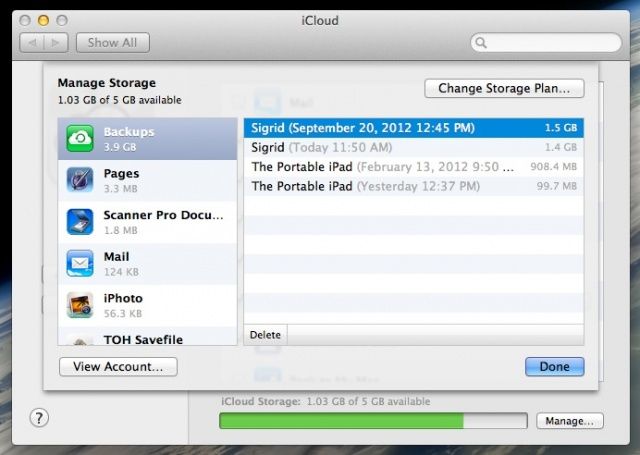
Running out of storage space in iCloud? I don’t blame you. Since iCloud keeps backups of your Mac and/or iOS files, the free space can fill up pretty darn quick. Luckily, it’s pretty easy to manage right from your Mac, letting you deal with the backup data from both Mac computers and iOS devices you might have connected to iCloud with your iTunes account.

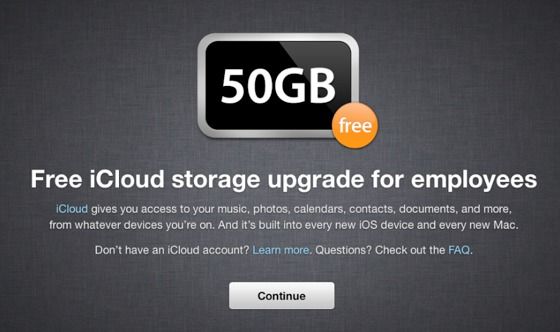
Former MobileMe Users Find Free 20GB iCloud Storage Extended Until 2050

By

a4ewy-acyaahycl

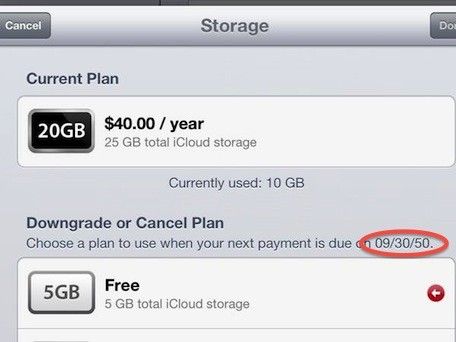
When Apple was doing its damnedest to kick people out of MobileMe in June this year and get them to use iCloud instead, one of the incentives they gave the soon-to-be disposessed was a free offer that former MobileMe members would get 20GB of iCloud storage gratis, instead of the 5GB Apple gives the rest of us suckers. But it was only for a limited time, until September 30, 2012.

Looks like Apple may have extended their offer, though. Some iCloud usersare now noticing that they’ve got 25GB of iCloud storage to play around with until September 30, 2050, when their free 20GB should have been snatched away from them yesterday. Even more interesting is that some non-MobileMe users are seeing the same deal, and have found themselves getting a free 20GB bump in storage.

EA Sports Brings FIFA 13 To The App Store With Online Multiplayer

By

FIFA 13 promises
FIFA 13 promises "groundbreaking visuals" and the most responsive control system yet.

As a massive soccer fan, I love EA Sports’s FIFA Soccer series. So imagine my delight when I opened up the App Store this morning to find FIFA 13 staring back at me. This is the FIFA game I’ve been waiting for for iOS. Why? Because it’s the first to boast online multiplayer, allowing you to play against your friends over the Internet.

Make Sure Your Credentials Are Up To Date, New iCloud Password Security Rules Are Tight

By

Make sure you have what you need to restore your password.

Having a tough time remembering your iCloud password? Do you rely on iForgot a bit too much? Well, according to a new post at MacRumors, you may be in for a world of hurt should you try and call Apple to get your iCloud credentials reset.

In the wake of the Mat Honan hack last month, Apple responded with both temporary and more permanent security rules to make sure users aren’t taken advantage of in a similar way again. However, according to some Apple customer support representatives who spoke to MacRumors, this is making it hard on legit users, too.

Apple Notifies Previous MobileMe Customers That Their Free iCloud Storage Is Ending

By

Ex-MobileMe customers must now pay to enjoy their existing 25GB iCloud plans.

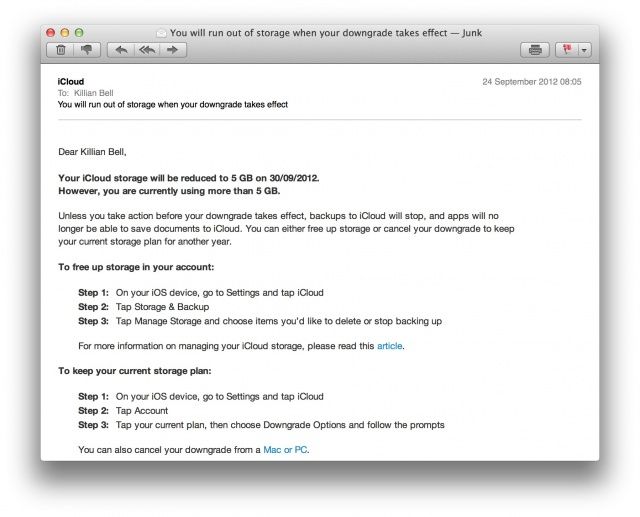
When Apple launched iCloud last year, it killed off MobileMe and provided paid subscribers with 20GB of free iCloud storage when they migrated to the new service. Most of us have been using that storage to back up our iOS devices, but like most good things, it’s coming to an end. The company has now begun emailing previous MobileMe customers to inform them that their free storage will be no more come September 30.

Apple’s Podcast App Updated With iCloud Sync And iOS 6 Support

By

podcast

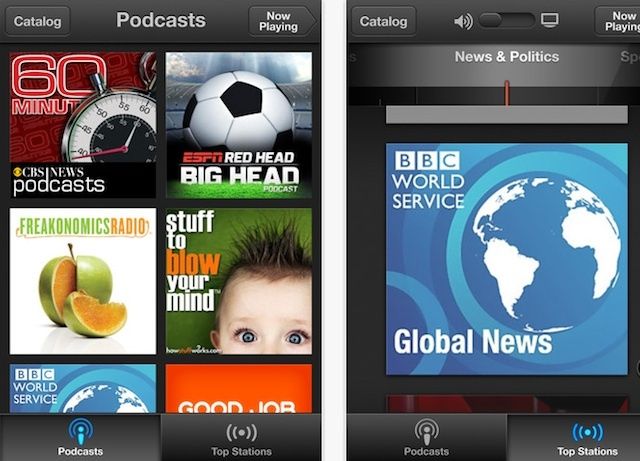
Along with iOS 6, and a Mountain Lion update, Apple has just pushed out an update for their new Podcast app for iOS. The update allows users to keep subscription up to date between iOS devices using iCloud. iOS 6 support has also been added to the app, along with a few other improvements.

Here are the full details for what’s new in Podcasts version 1.1:

Every Single Feature That Is New In iOS 6 [Mega-Guide]

By

iphone5
iOS 6 drops today!

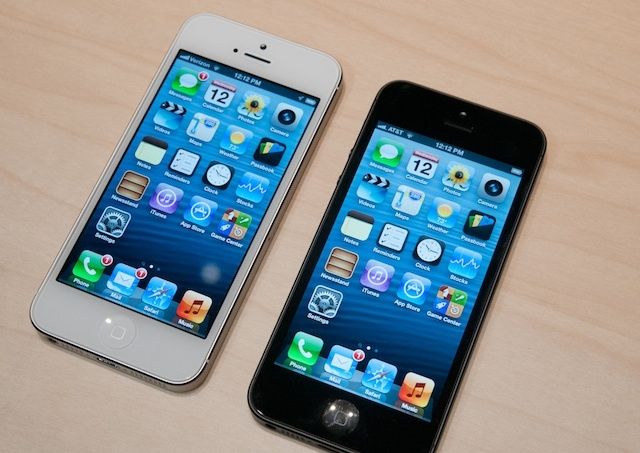
We’ve all been itching to get our hands on iOS 6 since it got its first unveiling at WWDC back in June, and today, three months after that announcement, the software finally gets its public debut. Apple’s packed a ton of new features into this update, including some major new features like Map and Passbook, plus some enhancements to existing apps and features, such as new Siri capabilities and a VIP inbox in Mail.

Apple’s been promoting some of these features on its website, but there are tons you may not have heard about. With that said, here’s your comprehensive guide to everything that’s new in iOS 6.

Use LaunchBar To Browse And Open iCloud Documents

By

cult_logo_featured_image_missing_default1920x1080
LaunchBar makes iCloud useful.

One of iCloud’s biggest problems comes from its iOS origins: There’s no easy way to open, say, a TextEdit document in another app for viewing and editing. To do this, you need to either open the source app (TextEdit, in this case), use the iCloud document picker and then drag the file to the target app, or you need to go digging around inside your (hidden) Library folder to find the local copies of your iCloud documents.

The first is a real pain. The second is — as anyone who has ever dug around inside an iPhoto bundle will tell you — a really, really bad idea. Luckily, for LaunchBar users, the answer is (literally) a few taps away.

iCloud Outage Leaves Users Without Mail For Second Day

By

Will iCloud be fixed before Apple's big keynote begins?

An iCloud outage affecting Apple’s Mail service is now leaving users without email for the second day. Apple has acknowledged that access to the service is “slow or unavailable,” but the number of users affected continues to rise, and there’s little sign that a fix is on its way.

Change Mountain Lion’s Save Default Away From iCloud [Video How-To]

By

Screen Shot 2012-09-04 at 8.49.45 PM

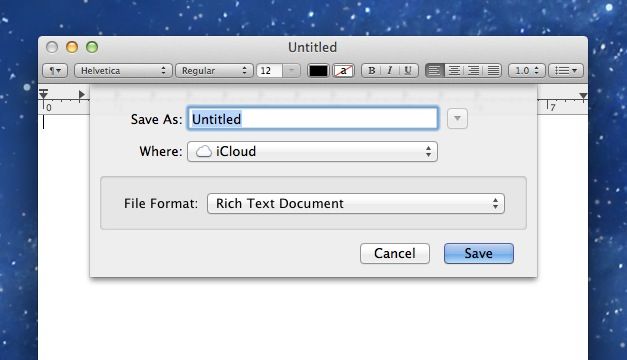
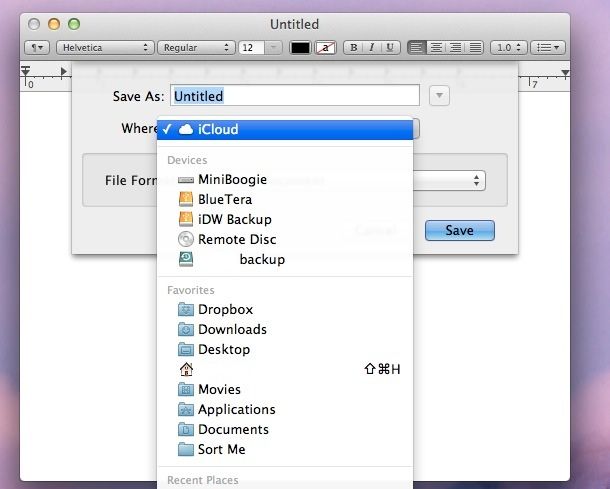
For me, one of the most annoying tweaks in OS X Mountain Lion was the change of the default save location for many of apps I use on a regular basis. Any app that uses iCloud now displays its save dialog box differently than it would have before its integration into OS X. Due to this, upon saving files in many applications, instead of being presented with a view of the filesystem, the default save location is now just “iCloud”, and saving the file anywhere else has become somewhat of a chore. Thanks to some Terminal commands, though, this behavior can be reverted to its pre-Mountain Lion state, as i’ll show you in this video.

Change From iCloud As Default Save Location In Text Edit Mountain Lion [OS X Tips]

By

NoMoreiCloud

If you’ve upgraded to OS X Mountain Lion, you’ll have realized as soon as you launched Text Edit, Apple’s basic text editing program, that the default location for saving files is iCloud. Which is all very fine and dandy, but what if you don’t want to save all your random Text Edit stuff in iCloud? Are you out of luck?

Nope, of course not! Why would we even be writing this tip if you were?

There’s a simple Terminal command which will set the default to your local hard drive instead of the cloud, via iCloud. You can still save to iCloud; it just won’t be the first place that shows up when you hit “Save” while in Text Edit (or in other iCloud-enabled apps).

Genius: You Can Now Speak To An Apple Specialist Through Your Web Browser

By

You can now speak to an Apple specialist without leaving the house.

The Genius Bar is a great way to get help and support for the problems you’re having with your Mac and iOS devices. The problem is, with only 375 Apple stores worldwide, you usually need to live close to a big city to be close to a Genius Bar. But that’s no longer the case, because you can now speak to am Apple specialist from the comfort of your own home, via the company’s online store.

What IT Wants To See In iOS 6 [Feature]

By

iOS 6 will deliver a lot of business features, but what about enterprise/IT integration?

It’s been over two years since Apple unveiled iOS 4 with mobile management features designed to make the iPhone and iPad a significantly better corporate citizen. During those years, the landscape of business and enterprise mobility has changed dramatically. RIM has collapsed and will never truly recover, Microsoft has doubled down on the interface it launched late in 2010 with no guarantee of success, and Android has become much more enterprise friendly. Perhaps more important is the fact that idea of mobile management and security has shifted from a focus on devices to a focus on securing data and managing mobile apps.

As all this has happened, Apple’s mobile management framework, which is the system that all mobile management vendors plug into in order to secure and manage iOS devices, has essentially stagnated. With iOS 6 on the horizon, lets look at the areas that Apple needs to address if it wants iOS to remain one of the preferred mobile platforms for business.

Why Business Users Will Love iOS 6 [Feature]

By

iOS 6 has some great features for business users.

The release of iOS 6 just weeks away. The new release includes a range of new features. Some seem tailor-made for business use like the new VIP contacts feature in Mail. Others are clearly designed for a mass-market consumer audience. Even those consumer-oriented additions have a lot of potential for use in the office, however.

Track Notes On Your iPhone And Mountain Lion Mac Via iCloud [OS X Tips]

By

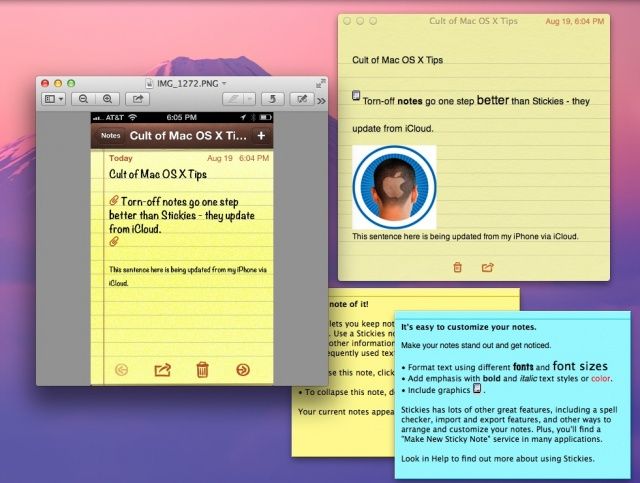
Stickies are still cool, but Notes synced via iCloud may actually be more functional.

I have to admit, I’ve been a big fan of the Stickies app that Apple has included with its operating system since way back in System 7.5. It’s fantastic to be able to have a little floating place to type notes and keep track of things right on the Mac, without having to resort to anything as mundane as an actual sticky note.

The one thing Stickies hasn’t had was a good way to access those notes when away from the computer. With OS X Mountain Lion, however, you can make this happen using Notes and iCloud.

Pixelmator 2.1 For Mac Brings Retina Graphics, iCloud Syncing, New Effects & More

By

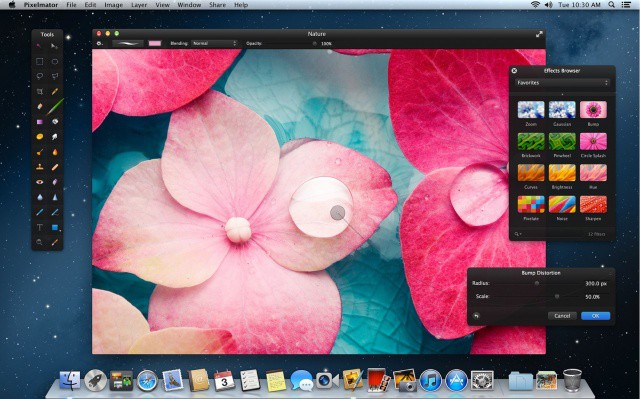
Pixelmator now looks even more incredible on a Retina MacBook Pro.

Pixelmator, a wonderful image editing app for Mac OS X, just received a major update that introduces some great new features. As well as Retina graphics for the new MacBook Pro, version 2.1 brings iCloud syncing, a new Effects Browser with new effects, OS X Mountain Lion support and more.

iOS 6 Allows Apps To Use ‘Wi-Fi Plus Cellular’ Connections

By

Finally!
Finally!

Have you ever watched your iPhone attempt to load a webpage with a poor Wi-Fi connection, and wondered why it doesn’t just switch to 3G automatically? In currently iOS releases, your device can’t do that. If you’re connected to a Wi-Fi network, it will only use the Wi-Fi network. But iOS 6 changes that. You’ll soon be able to use “Wi-Fi Plus Cellular” connections, which allows apps to switch to a cellular data connection automatically when Wi-Fi is poor.

Apple Responds To Journalist Victim of “Epic” Apple ID Hack

By

Mat Honan of Wired.
Mat Honan of Wired.

Last week, Wired columnist Mat Honan’s digital life was destroyed by hackers who were able to connect to his Apple ID and remotely erase all of the data on his iPhone, iPad, and MacBook.

Apple responded today to Honan via a spokesperson, Natalie Kerris. In a statement to Wired, where Honan posted an account of his experiences, Apple promised to look into how users can protect their data and security better when they need to reset their account passwords.

No One Knows What’s Inside This New Secret Apple Building

By

secretcompoud

See that big building right there? It’s part of Apple’s huge new data center over in North Carolina that powers all the iCloud magic that makes your iOS experience possible. Apple’s data center compound is massive. It comes with a 500,000 square foot data center, a 100-acre solar farm, a 4.8-megawatt fuel cell array, and a few other little buildings sprinkled all over.

The little 21,000 square foot building in the picture above is what Apple’s calling a “tactical data center.” No one knows just what it’s supposed to be, and of course Apple’s not going to tell anyone. So Wired jumped in their spy plane to get a closer look, and this is what they found out:

This iCloud Shaped House Might Be The Ultimate Apple Fantasy [Gallery]

By

icloudhouse

Don’t you just love iCloud and how it seamlessly keeps all of your information synced up, making you feel all warm and light and free? Don’t you just want to marry it, or maybe live inside a nice fluffy iCloud synced world? Maybe not. But now you can, if you move to Melbourne, Australia and buy this gorgeous house that’s shaped like the iCloud logo.

Do you see it? How the structure makes an iCloud shadow there on the pool? Ok, we put that there to help you visiualize it, but seriously, this house looks almost exactly like the iCloud logo, and it’s just as crazy on the inside as the outside.

Apple Issues Final Reminder For iWork.com Closedown

By

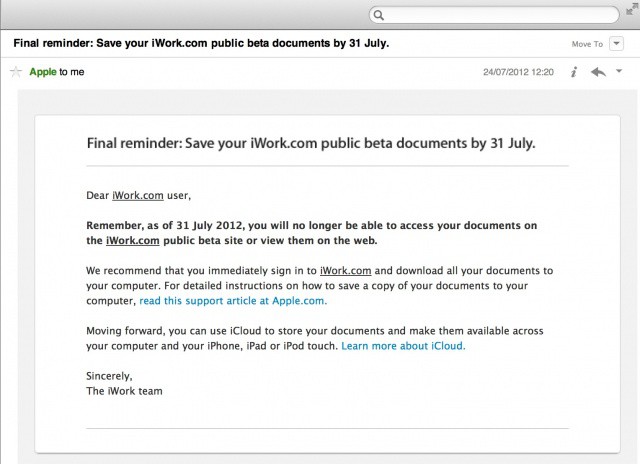
Just 7 days left to rescue your iWork.com documents.

Apple has issued iWork.com users with a final reminder to warn them that the service will be closed down on July 31. The company states that as of this date, “you will no longer be able to access your documents on the iWork.com public beta site or view them on the web.”