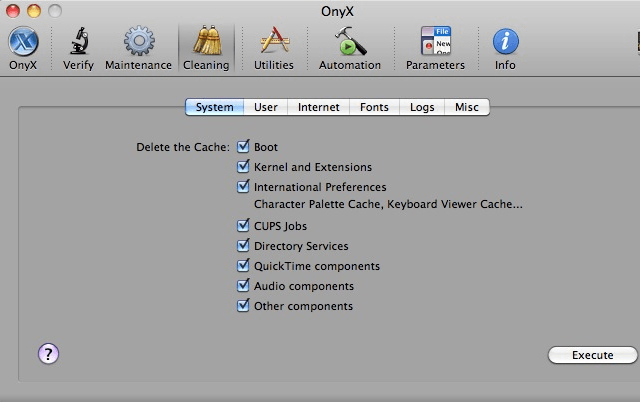
It happens to everyone. After time, your Mac will start to slow down. This can get awfully frustrating, but it’s not the end of the world. The free application OnyX can help your Mac run just like it did the day you bought. With some simple maintenance, your Mac will be just like new! In this video, you can find out how to get Onyx and use it to tune up your system.
53 responses to “Keep Your Mac Mac Running Like A Mean Machine [Video How-To]”
I haven’t used it, but that is one bad looking UI. It looks like something off of a Windows machine.
The program is presumably for users that don’t know how to clean things themselves manually, yet it presents a confusing array of click boxes about things that the user has no way of knowing about? How does your mum, or a non-technical user even know what they are doing when they tick a box that says “other components” under “system cleanup”??
Bad design IMO.
I noticed the Cocktail has added something that OnyX has’nt yet. A new “purge inactive memory and optimize virtual memory usage”. I’m wondering how this might help when swapping between RAM and virtual memory if you open and close applications constantly?
At 2:22 of the video: “The volume needs to be repaired.”
You may want to look into that, Michael.
it won’t always be rainbows and butterflies.
but yeah i agree with you, it still sucks.
I’ve had my mac for 2 years now, and I never noticed a slow down. But that might be just me… Since I switched to mac I forgot about virus scans, register cleaners, defrags, and all that tools that I thought were essential for performance! OS X is a very solid OS.
in Mac OS X there is no registers like in Windows, but there is automatic defragmentation, so you don’t have to worry about that
I used to use Onyx and I never found any increase in speed or any other value except for cleaning the Caches. As the video showed they are automatically cleaned at night if your computer is not asleep. An easier way to clean your caches is to use ‘Cache Out X’. The beauty of Unix is that it does all of these maintenance functions in the background. You can repair the permissions using Disk Utility.
Could someone tell me what a “Mac Mac” is?
Ditto, tinch… And while there are many reasons I will never go back to PC, this stands out. My MacBook Pro performs as well today as it did right out of the box, and with virtually no maintenance on my part…
Don’t know what your doing, but slowing down is something that happens to Windows boxes, not Macs. All my systems (iMac, MacBook (2007) and Mac Mini (2006)) run as fast as they did when I bought them. Faster even because several OS updates improved operations considerably.
Slowing Macs is a myth.
J.
Thanks!
I’d be worried about clicking something that says ‘execute’
All I heard was “…you don’t have to worry about that…” and “…just click execute…”.
what a shitty thing, i just used it and it slows my computer like hell, what the hell was in your mind when you made this article, i dont know how to get my fast system back, what this stupid app executed i dont know, man im f**ked
http://www.longhaircaretips.co…
Hmmmm. Crappy useless software being sold to us as something desirable and useful? Smells like a sponsored article Michael. Maybe a disclosure is in order…
I’ve used Onyx for years on several of my Mac products. Does it do anything useful? I perceive slight performance enhancements afterwards. Does it do anything the Mac isn’t doing for itself? I have no clue. It was free, has a track record of positive reviews going back many years and I do not mind running some maintenance on my daily workhorse.
Use it if you like or feel free to not.
Not sponsored
You’ll just have to restart your computer, maybe a few times. When opening up certain applications for the first time after running Onyx, they may seem slow (they are rebuilding a cache) but they should speed up afterwards.
hey thnx for your concern, u r right its getting better after couple of restarts, but still not the same, but if after doing it and system gets slow and needs 3-4 restarts that the purpose of this software is fail, if fast booting needs those caches then why we need to clean up system with this, im not impressed, its not good.
maintenance has been running for 5 hours should i be worried????
Thank you!!! It definitely helped speed up my oldest iMac. I appreciate it.
it’s free
Your point being?
In that case, maybe more research is called for before posting such articles. This product falls into the same category as snake oil and tornado fuel economy optimizers.
CleanMyMac is better.

