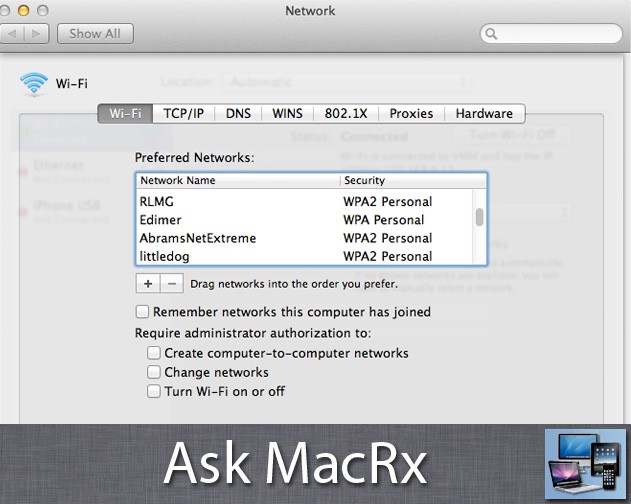
Apple likes to make things as easy as possible to join WiFi networks, especially when the network isn’t password protected. However in one reader’s case this isn’t a good thing but rather a major headache:
Is there a way to RESTRICT joining certain wifi networks to certain OS X user accounts?
When using my MacBook Pro, I have two basic OS X logins. One for known SECURE wifi networks, and one for INSECURE wifi networks. The problem is that Airport settings always remember the INSECURE network, and almost always tries to connect my SECURE OSX login to the INSECURE wifi, at which point Mail (or other apps) start up and shoot my logs/passes across the air for all to see.
I know I can manually remove the insecure networks each time, but that’s painfully annoying. Likewise, for requiring manual approval to joining a network.
Scott
Hi Scott,
I’ve had my own share of frustrations with Macs joining networks other than what I prefer also. Airport seems to love open, non-password protected networks and will join “Linksys” or “D-Link” when I really want what I’ve used before.
I don’t know of a way to restrict access to specific WiFi network by user account, only by the machine’s MAC (ethernet or WiFi) address on the network. That said you do have some control over the process.
Once you have the secure and insecure networks remembered on the Mac, go to the Network System Preference Pane, select Airport (or WiFi), then click the Advanced button. You’ll see a list of networks the Mac has previously joined, which you can drag in order of preference. Put the ones you want at the top, remove the rest, then uncheck the box to Remember networks this computer has joined. That should behave more consistently.

Adam Rosen is an Apple certified IT consultant specializing in Macintosh systems new and old. He lives in Boston with two cats and too many possessions. In addition to membership in the Cult of Mac, Adam has written for Low End Mac and is curator of the Vintage Mac Museum. He also enjoys a good libation.

