Mobile menu toggle

Facebook - page 16

Not using Paper yet? Facebook’s new update will change your mind

By

10333120_306875736154543_1400468750_n

Most people use Facebook’s official iOS app to obsessively check their news feeds. But there’s another option that has a much better design and no ads. It’s called Paper, and it has been available for the iPhone since January.

Made by a special group within Facebook called Creative Labs, Paper is an experiment in how to use Facebook within a more media-rich, gesture-driven, elegant interface. If you haven’t heard of it yet, then you definitely need to check it out after the huge update it received today in the App Store.


Facebook for iPad wants to be your hub for game discovery

By

facebookiPad

Facebook is trying to transform its News Feed into more than just a hotbed of baby pictures and Buzzfeed quizes and its first move is a new side panel to help users discover more timely content.

To make the app more relevant for the way people use tablets, Facebook for iPad is adding a new channel on the right-hand side of your news feed featuring trending topics, videos and tons of game suggestions to try to get users to read more news, watch more videos and play games in the app. And you can bet there will be plenty of ads to compensate.

Virtual reality is going to make everyone sick — including companies that dump billions into it

By

The awe you feel will be cut fairly short. Photo: Sergey Galyonkin/CC

When my kids and I walked into a coffee shop one sunny day last month, we were greeted by a row of tables holding laptops with gaming demos.

My son gravitated toward the biggest display, a huge TV screen with a giant, face-obscuring set of goggles set in front of it. This was the Oculus Rift, the latest fad gaming device that places two stereoscopic images in front of your eyes to simulate virtual reality.

He slid the massive black eyewear onto his face, picked up the connected Xbox controller, and started moving his head around. The rest of us could see the game on the TV — an abstract shooting gallery in three dimensions, with my boy at the center, first-person style.

After about five minutes of waving his head around and pressing buttons on the controller, my son pushed the goggles up and off his head and said, “Dad, I think I’m going to be sick.”

Tim Cook, tech leaders urge Senate to curb government surveillance

By

reg34rg
reg34rg


Congress has dropped the ball on surveillance reform, according to Tim Cook and a host of other top tech CEOs throughout the country.

In a full-page ad printed in today’s Washington Times, the tech companies tell the Senate it’s been a year since revelations on the NSA’s over reach were made known to citizens, but Congress has failed to pass a version of the  USA Freedom Act that would restore the confidence of internet users.

Here’s the full ad:

Write’s smart toolset makes note-taking easier on your Mac

By

Write-app-Mac

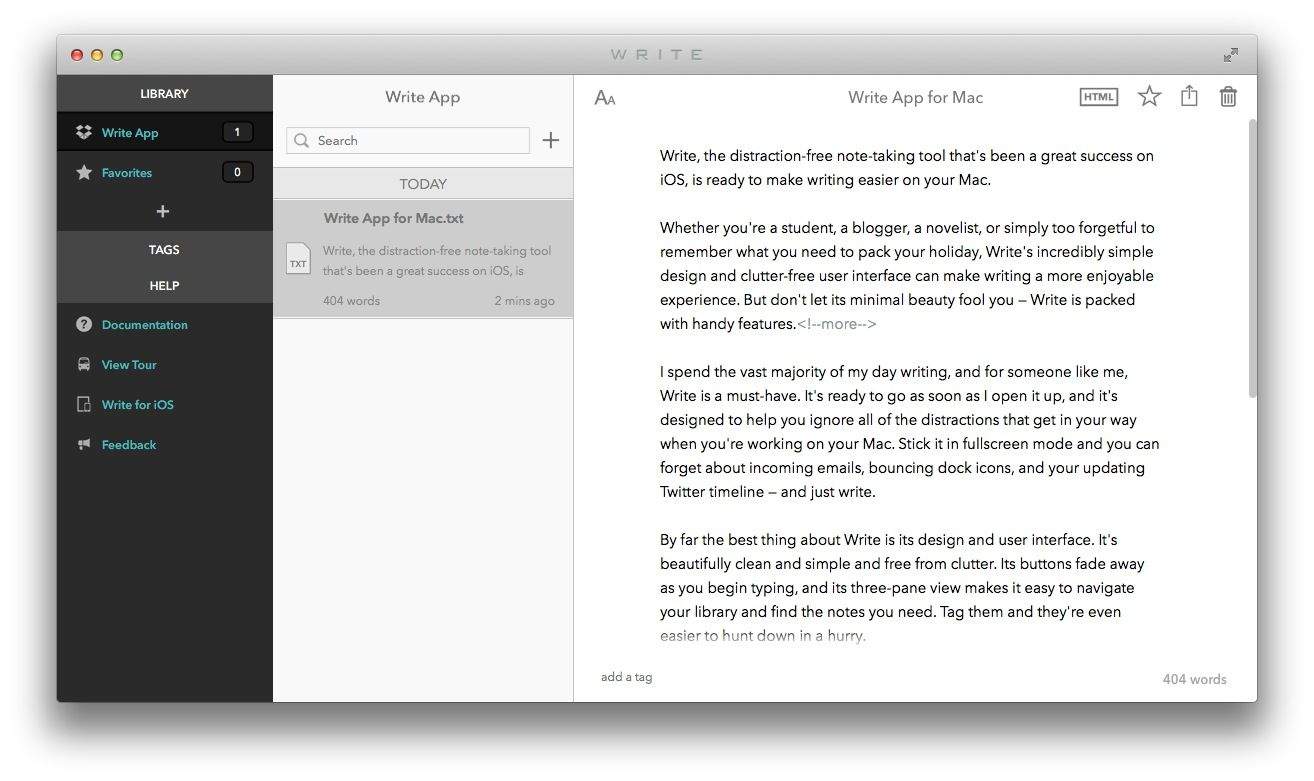
Write, the distraction-free note-taking tool that’s been a great success on iOS, is ready to make writing easier on your Mac.

Whether you’re a student, a blogger, a novelist, or simply too forgetful to remember what you need to pack your holiday, Write’s incredibly simple design and clutter-free user interface can make writing a more enjoyable experience. But don’t let its minimal beauty fool you — Write is packed with handy features.

This jailbreak tweak gives iMessage head, Facebook-style

By

Screen Shot 2014-05-26 at 7.58.39 PM

Facebook’s Chat Heads first debuted back in April, 2013 as a central UI element in the new Facebook for Android, the Facebook app on iOS, and the laughably ill-received ‘Facebook phone,’ the HTC First. Just like it sounds, a Chat Head is a bubble-like chat indicator that hovers over everything else until you read the message and then dismiss it by dragging it to the trash.

Some people love Chat Heads as a whimsical alternative to the omnipresent UI indicator. Some people despite it as the perfect example of design excess: a disruptive nagging ‘feature’ that forces a user to go through a tedious interaction every time a message is received in order to dismiss it. However you feel about Chat Heads, though, you can now have them on your iPhone’s default Messaging app… if you have a jailbroken device, that is.

iCloud hacked, an ‘iPad killer’ and the rest of this week’s biggest news

By

post-280719-image-d8e5152b63a0cb1290fdf00407216571-jpg

With another week full of news in the past, your host Joshua Smith is here to give you a wrap-up on some of the latest and biggest features. Facebook’s alleged Snapchat competitor, Microsoft’s latest attempt at an ‘iPad killer’ and iCloud’s hacking are among just some of the featured stories in today’s rundown.

Take a look at the video and be sure to return next week for another. Subscribe to CultOfMacTV on youtube.com to catch new episodes of the roundup and other great video reviews, how-to’s and more.

Every vintage picture tells a story, don’t it?

By

Courtesy of @savefamilyphotos

Rachel LaCour Niesen’s passion for vintage photos started when she walked down her grandmother’s wood-paneled hallway to look at a bedroom wall that held a carefully edited family history.

There she saw a photo of her father standing proud in his cap and gown on graduation day, an aunt sitting poolside during a swim meet and a happy couple cutting their wedding cake. The imprint those pictures left on LaCour Niesen lies at the heart of her @savefamilyphotos project on Instagram, where she curates a collective history. She invites people from around the world to send her a digital copy of a cherished family photo and brief story that, in many cases, gives the photo its emotional muscle.

“The treasure is not just the photo but the story that comes with it,” LaCour Niesen told Cult of Mac. “I believe stories are the currency of our past, present and future. Without them, we are bankrupt. Our family photos trigger those stories. They are like glue that holds my story — and our stories — together over time.”

Throwback Thursday, Facebook and Instagram have made personal blasts from the past a weekly — if not an hourly — ritual. The web is awash in fuzzy Polaroids, vintage Kodachromes and black-and-white snaps, uploaded by individuals with hard drives full of memories and shared by everyone.

Facebook is getting Shazam-style music and TV tagging

By

a-new-optional-way-to-share-and-discover-music-tv-and-movies_2-e1400689223922

Your Facebook app is about get a lot smarter at knowing what you’re listening to and watching on TV.

In an upcoming update in the App Store, Facebook will add the ability to automatically tag music and TV shows within a status update. The Shazam-like feature will have to be manually enabled by the user, and links to songs and shows will be attached to statuses in the News Feed. Facebook hopes the feature encourages people to share more, while it’s sure to cause some users to worry about sharing too much.

Facebook’s new messaging app will go head-to-head with Snapchat

By

facebook-mark-zuckerberg

Facebook vs. Snapchat: round 2… fight!

After turning down a $3 billion acquisition offer late last year, Facebook is reportedly working on out-Snapchatting Snapchat with a new video messaging app, referred to internally as “Slingshot.”

The service — which lets user send short messages to one another with just a few taps — could be launched as early as this month, although as of yet Facebook has not signed off on it.

Facebook update makes it easier to avoid oversharing

By

Screenshot

Facebook is fine-tuning not only how you share stuff, but what content you see after you share.

That’s the goal of an update to its iOS app that is designed to cut down on accidental oversharing by giving users a preview of their posts before they go live. It could be something you don’t want the whole Facebook world seeing, like the embarrassing TV show you’re currently watching.

In a related experiment, some users of the main Facebook app are also seeing additional content suggestions from Facebook after posting.

Tweak your Facebook lists to filter your freaky friends

By

We’ve all got them: the freaky friends. Those who comment on and like every. single. status update.

Those who post long, ranting political polemics to your happy cat poster images. The friends that creep you out in a subtle, yet plausibly deniable way.

Or maybe there’s the friends you want to get your freak on with who really don’t need to see you in those embarrassing photo updates that you send to your frat brothers.

However you rank your friends, Facebook has some non-intuitive list tools to help you finely tune your groups of friends. Here’s how to use them, and then how to view your profile through the lens of any specific person on your friends list, to make sure your list tweak was effective.

Instapaper’s new highlights feature revitalizes the app. Here’s how to make the most of it

By

Instapaper v5.2 adds familiar yellow-marker highlights to your saved articles. This doesn’t sound like much, but it will change how you use the read-later service. Instapaper is the O.G read-it-later app, letting you save those longer articles you find on the web, in Twitter, in your RSS reader or anywhere else. You send these articles off to Instapaper via a bookmarklet (or using the third-party integration from many apps), whereupon they are cleaned of clutter and saved for you to read off line.

This seemingly small update changes the game. Before, Instapaper was a transient place for long-form articles — you’d read them and then archive them. Now it’s a place to organize and revisit articles, turning your collection of clippings into a library of annotated notes. And for the makers, it represents a way to make more money for the app, by finally adding a killer reasons for us to buy the $1-per-month subscription.


Unlike: Facebook throws in the towel on failed Poke and Camera apps

By

poke

Remember Facebook Poke? It’s become nothing more than a faint memory since its introduction in December 2012. But for some reason the iPhone app has stayed on the App Store until now.

Today Facebook decided to do some spring cleaning in the App Store by pulling not only the Poke app, but Facebook Camera as well.

Apple will now alert you when the NSA wants your data

By

iOS 8 is Apple's most privacy-conscious mobile OS yet.

The data-hungry tentacles of the NSA have managed to choke America’s top tech firms into silent submission on data requests, but after months of demanding more transparency, Apple is ready to defy authorities and let you know when the NSA wants your data.

Prosecutors warn that such a move will undermine investigations by tipping off criminals and allowing them to destroy sensitive data, but according to the Washington Post, Apple and others have already changed their policies.

Hide your Facebook online status from your nosy boss

By

Illustration: Walter Appleton Clark/Library of Congress

Chatting on Facebook has become rather de rigueur for many of us these days, as the social networking giant makes it easier and easier to stay in touch via its blue and white website and dedicated mobile apps.

If you’re anything like me, chances are that your buddies chat you up as often on Facebook Messenger as they do on iMessage. This multiple platform chatting solution is all fine and dandy when you’re just dealing with your friends, but what about the boss? Your mother in law? That friend who is trolling your Facebook page to see why you’re not at her party?

You need a way to hide the fact that you’re online and chatting from these folks, and we’re going to tell you how.

Thursday Deals: Romo the iOS Robot and Keyboard Maestro [Deals]

By

redesign_romo_mf

Cult of Mac Deals has unveiled some great offers today, keeping aligned with our goal of delivering phenomenal deals every single day!

If you’re looking for something on the leisure side, then Romo the iOS Robot companion is worth exploring. At only $129, you’ll get a personal robot that uses your smartphone as its brain. And we’ve also got the productivity-boosting app Keyboard Maestro, a powerful macro program for Mac OS X, for just $19.99!

Please note: The offer for Romo the iOS Robot is only available to customers in the continental United States. The sale price includes shipping and all sales are final. To review all terms and condition surrounding that particular offer, visit the Deals page.

RescueTime: Measure Your Digital Life And Your Productivity [Deals]

By

redesign_rt_mf

Let’s cut to the chase: if you’re not using RescueTime then you’re not being as productive as you could be. After all, RescueTime users typically see at least a 10% improvement in productivity.

Aside from the fact that RescueTime has been used by more than 800,000 people worldwide, it has been featured in a slew of publications. RescueTime is also incredibly easy to use and you can get one year of RescueTime Premium available from Cult of Mac Deals for $39 during this limited time offer.

Heartbleed Bug: How To Update All Your Passwords In Just 10 Minutes

By

(photo Buster Hein, Cult of Mac)

By now you’ve heard all about the catastrophic Heartbleed bug and how it has siphoned passwords, credit card numbers, emails and other data to the vampires who would drain all of us dry. From your love life (OKCupid) to your tax returns, there’s a lot at stake.

Since 66% of web servers are vulnerable to the bug, that means you’re faced with only task more fun than decluttering the garage: changing your passwords.

To help you on your password resetting chores, we’ve compiled the best tools to make the process as quick and painless as possible. Also, they’ll sync your new passwords to your iPhone — all in under 10 minutes. Leaving you time to watch Silicon Valley again.  You’re welcome.

Here’s how: