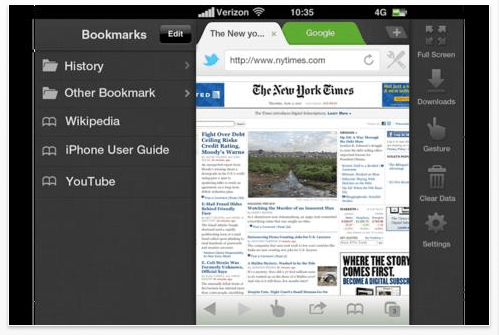
The best mobile browser for Android has just hit iOS. Called Dolphin, the browser specializes in being a gesture-based way to navigate the web, but does Dolphin have what it takes to go head-to-head with the competiing alt-browsers… let alone Mobile Safari?
Here’s Dolphin’s feature set:
✓ Gestures
You can simplify the way you navigate the mobile web without going through complicated clicks. On the bottom menu bar, you can find the gesture button (finger shape), which enables the gesture mode. In gesture mode, you can draw a sign or add a new gesture. For example, in any web site, if you input “v” gesture in the gesture mode, you can go to the bottom of the web site.✓ Webzine
Bring out the beauty of the web and with Dolphin Webzine users can experience the web like never before.✓ Tabbed browsing
Real tabbed browsing. Feel like you are on a desktop. Add tabs within Dolphin just like you would on a desktop.✓ Sidebar
We implemented two side bars for you to access Bookmark and Tool Bar without going through complicated clicks; you can access Tool Bar simply by swiping from the right edge of iPhone screen to left. You can access Bookmark simply by swiping from the left edge of iPhone screen to right.✓ Speed Dial
Put favorite sites on Speed Dial. Stop looking around in your bookmarks. Forget about typing out long URL. Just put your favorite sites on Speed Dial.✓ Smart Address Bar
Smart and effortless browsing by auto-completing URL and context menus When you type the first few characters of a URL, Dolphin auto-complete the URL by displaying all results from both bookmarked items and your browsing history.✓ Bookmark Folder
We implemented Folder in Bookmark. Now you can organize your bookmarks into different folders, as you currently are doing with your desktop web browsers!✓ Desktop Mode
Switch between desktop view and mobile view according to your needs Need to view the full site of facebook sometimes on mobile? Dolphin helps you do that.
I really love Dolphin on Android, and I can’t wait to try it under iOS.
Dolphin Browser can be downloaded for free by clicking this link.

John Brownlee is a writer for Fast Company, and a contributing writer here at CoM. He has also written for Wired, Playboy, Boing Boing, Popular Mechanics, VentureBeat, and Gizmodo. He lives in Boston with his wife and two parakeets. You can follow him here on Twitter.


15 responses to “Android’s Best Alt-Browser, Dolphin, Is Now On iOS”
Meh. I haven’t tried it but it doesn’t look like anything I’m looking for. My only complaint with Safari is that the interface is already a bit too much.
I’d like a browser with *less* UI chrome and a lower profile than Safari. This one looks like it would get in my way a lot more.
I deleted it after just a few minutes. Not that it’s bad, it’s actually quite nice, but iCab has a lot more features.
Mobile Safari is good enough for me except it cannot download like its desktop version. Know any good browsers?
360 web browser http://bit.ly/pc2myo
but I use download manager pro and set it to open the most used site I use for downloads each time it is opened. The app plays pretty much any file format and files can be opened in other apps or wirelessly transferred to any computer or other internet connect device.
http://bit.ly/oFOKVy
This browser is a fail on the iPhone.
I’m not kidding, try it, and after 15 mins you’ll be frustated. trust me.
No fullscreen mode? Any iPhone browser that doesn’t have fullscreen is useless. Atomic Web and iCab Mobile are still the best.
there’s clearly a fullscreen button in the pic above. You drag the screen to the left to expose the tools on the right and there’s a fullscreen button right in the upper right.
I like dolphin, but downloading browsers on iOS leaves a bit to be desired. If you click a link in another app, you’re sent to safari.