It seems Adobe is beginning to accept the slow demise of Flash with the release of a brand new tool for creating HTML5 animations and webpages. The first beta of ‘Edge’ is available to download now from Adobe’s Lab website, but is a little limited in its current form.
Might be time to get rid of this vector for security exploits, yeah? Photo: Adobe
Shortly after OS X Lion hit the Mac App Store, Adobe promptly blamed Apple’s new operating system for a number of issues with its applications that users are experiencing after upgrading. One of its claims was that Lion disables hardware video acceleration, which has a huge impact on its Flash Player and results in it eating up a whole lot more of your processing power than it previously did.
It hasn’t taken long for Adobe to issue a retraction on that claim.
Wondering why your laptop’s battery life has dropped and its CPU temperature has gone through the roof now that you’ve installed OS X Lion, especially when watching YouTube videos or browsing Flash-heavy sites?
Surprise, surprise: Adobe Flash is having more problems post-Lion, as Apple’s favorite punching bag has sheepishly admitted that there seems to be an issue with Flash Player under OS X 10.7.
Despite Apple’s renowned hatred for Adobe’s Flash, Adobe remains an ally and continues to throw the Cupertino company 30% of a number of its software sales by releasing new products through the App Store for iOS devices. Today Adobe also entered the Mac App Store with a slightly watered-down version of Photoshop Elements 9.
In a bid to tempt unhappy customers away from Apple’s Final Cut Pro X, Adobe has slashed by the price of its Premiere Pro professional video editing software by 50%… but will its ploy be a success?
Adobe just released an update to its Flash Builder and Flex development tools, and for the first time developers can use the programs to create apps for distribution through the App Store for iOS devices. But are cross-platform Flash apps on the iPhone and the iPad really a good idea?
PDF Expert is a popular iOS app from Readdle that promises to be the ultimate solution to all your PDF needs. In addition to its excellent ability to let you read and annotate PDF documents, its latest update allows you to finalize documents on the go with support for signature fields.
Ouch! Adobe CEO Shantanu Narayen took stage today at the All Things Digital D9 conference to be interviewed by Walt Mossberg.
Watch the smug get slapped right off of Narayen’s face after he laughably tries to claim that contrary to Steve Jobs’s argument that Flash is a dead technology, it’s currently running on 130 million Android devices.
At the top of this week’s list of must-have iOS applications is one of our favorite instant messaging tools: IM+ Pro. It has already featured in our list of the ‘Best iOS Apps for Instant Messaging‘, but the introduction of its new Neighbors service meant we couldn’t help but shout about it again.
TweetyPop is a super new Twitter application from TapFactory that allows you to view and interact with your tweets in a unique new way. It throws away the chronological list you get with every other Twitter client and delivers a 3 dimensional Twitter space.
Adobe first announced its first three Photoshop Touch applications at Photoshop World back in March, and they’re now available to download from the App Store. Color Lava, Eazel and Nav are all designed for the iPad and aim to enhance your desktop Photoshop experience with the help of a touch-based device.
Find out more about the applications above and check out OmniOutliner – this week’s final must-have – after the break.
Adobe first announced its first three Photoshop Touch applications at Photoshop World back in March, and they’re now available to download from the App Store. Color Lava, Eazel and Nav are all designed for the iPad and aim to enhance your desktop Photoshop experience with the help of a touch-based device.
Here’s a little bit about each of the applications:
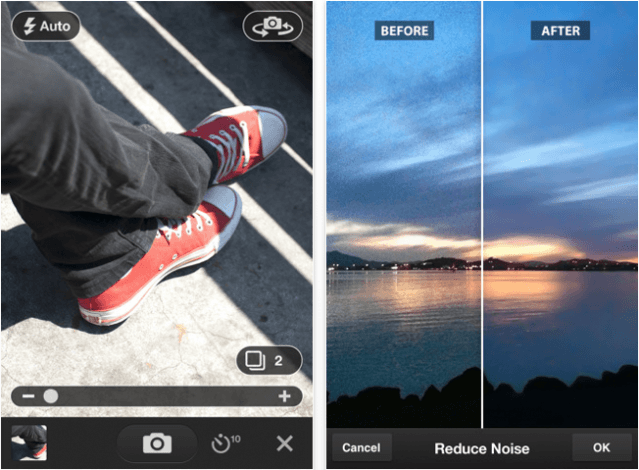
Adobe’s Photoshop Express application for iOS has been recently updated to version 2.0, and introduces a brand new camera pack available through an in-app purchase. The camera pack costs $3.99, and for that you get three great features that promise to deliver professional results and better photos, including noise reduction, a self timer, and an auto review mode.
Find out more about these features after the break!
New beta Release Candidates of Lightroom 3.4 and Camera Raw 6.4 are available for immediate download on Adobe Labs.
Adobe:
The Release Candidates bring raw file support to seven popular camera models including Canon EOS Rebel T3i and Olympus E-PL1s, improve on lens correction profiles introduced in the Lightroom 3.3 and Camera Raw 6.3 releases, and add over 10 new lens profiles to help photographers automatically correct unwanted distortion and chromatic aberration.
Punch drunk Adobe has just released the latest beta of their Flash Player for Mac, and while we wouldn’t be caught dead installing it on our new Airs, for the rest of Mac owners, it may very well represent a substantial performance improvement over Flash Player 10.1.
The biggest new feature in Flash Player 10.2 is “Stage Video” which Adobe claims will allow for high-performance video playback while using “just over 0 percent CPU usage.” Basically, Stage Video is a full embrace of the GPU, offloading the entirety of the video rendering pipeline — from H.264 decoding to color conversion and scaling — to your Mac’s graphics chip.
Unfortunately, Stage Video has a hitch: it’s not backwards compatible, so websites will have to update to use the latest APIs for their video players before you see any improvement using Stage Video.
If you’re interested in giving the latest Beta a try, it can be downloaded here.
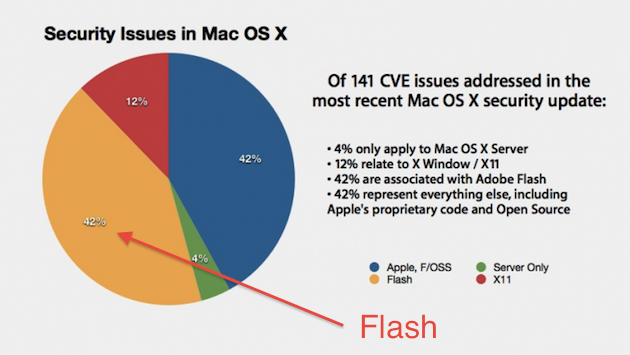
Apple’s decided not to bundle OS X with Flash anymore, and could this chart make the reasons for that any clearer? 42% of the security updates in Mac OS X 10.6.5 were dedicated to fixing problems with Flash. Add in the fact that on the new MacBook Air, merely stripping Flash from the default OS X install adds two hours to the battery life, and the message is clear: Flash is a product of garish incompetence and staggering ineptitude, and the quicker it dies, the better.
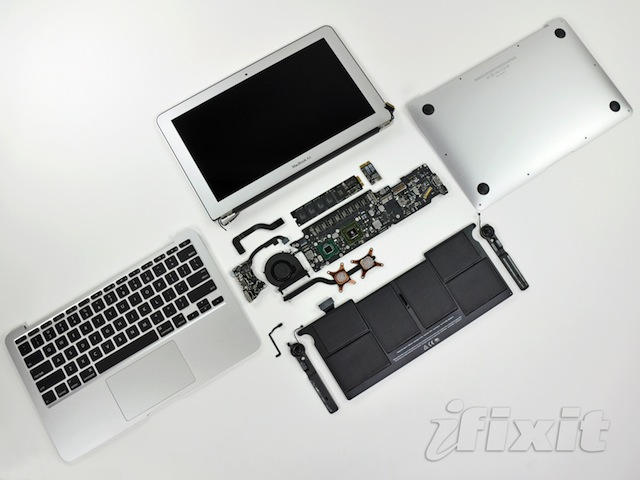
I don’t many people who have disputed Adobe Flash Player’s impact on battery life — especially since Ars Technica discovered that merely having Flash installed on the new MacBook Air took two hours off the battery life — but nonetheless, Adobe CTO Kevin Lynch thinks it’s somehow indicative of a coordinated Apple plot to put them out of the business of interactive web content.
Here’s a simple how to that will lead you and your computer to an internet without Flash just like on your iPhone, iPad, or iPod touch. I think most of you won’t miss it, but if you do you can reinstall it.
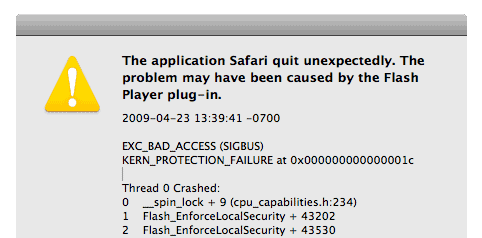
I’ll have to say that when I went cold turkey and kicked the Flash habit, that I’ve had for years, I didn’t suffer from withdrawals. In fact, I found my browsing experience with Safari to be a whole lot better and definitely more stable than before. I don’t have any regrets about it so far.
Some people might recommend, ClickToFlash, which is a Safari plug-in that blocks flash content and doesn’t allow it to run unless you allow it or you add specific sites to a “white list. ” It’s a great plug-in, but I prefer to use fewer plug-ins and no Flash. You on the other hand might think otherwise so ClickToFlash might worth a look for you.
Ars Technica stumbled upon an interesting tidbit while reviewing their 11-inch MacBook Air. They found a compelling reason for Apple to not install Adobe Flash on the MacBook Air and it wasn’t just because they wanted to make sure users always had the latest version of Flash.
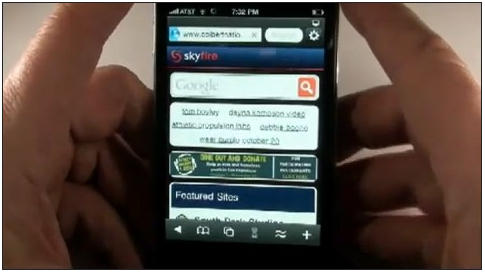
At 9 AM ET on Thursday, November 4, the Skyfire Browser will be coming to iOS and will allow users to watch Flash video on their iPhone, iPad, and iPod Touch by converting it to HTML5.
Priced at $2.99, Skyfire Browser has been available on Android devices since May 2010, and has been incredibly popular with 1.5 million downloads. Now, after a “rather rigorous review,” Apple has finally approved the app for iOS devices, and it will soon be available in the App Store.
Six months ago, Steve Jobs wrote his Thoughts on Flash, which argued that Flash was a dying technology and that HTML5 was the future of video on the web.
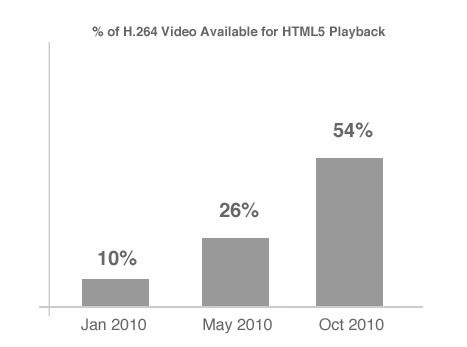
See those graph numbers up there? They were put together by MeFeedia and show that HTML5 has gone from serving up only 10% of the videos on the web earlier this year to over half of them in October. HTML5 video has, in fact, doubled its share of the web video pie in just five months.
Looks like Steve was right. Not that any of us should be surprised: even if Flash wasn’t a dying technology, Steve flat out calling it one would be enough to almost magically make it so. When Apple’s CEO talks, the tech world sits up and listens.
Despite the wary uncertainty of several Secret Service agents, Sylvester Cann was able to get President Obama to autograph his iPad at a recent rally at the University of Washington in Seattle. Much to Apple’s chagrin, the autograph was captured through their arch-nemesis Adobe’s Adobe Ideas app.
Obama — cool as a cucumber — seems to have been a sport about it all: he reportedly thought autographing an iPad was pretty awesome.
Last week, we reported that Apple’s new MacBook Airs were shipping without Adobe Flash preinstalled… a radical departure from the norm for Apple, which has been bundling Flash with OS X (and OS 9 before it) as the default for seemingly ages. Was it a fluke, or is this Apple’s new policy?
Nope, not a fluke, according to Apple, who say that Adobe Flash will not come preinstalled on any of their machines in the future.
Apple’s hissy catfight with Adobe over the future of Flash on the web has reached storied proportion at this point, with Apple claiming that Flash is buggy and slow and Adobe… well… not so much saying otherwise as whining about the unfairness of it all.
Given Apple’s strong feelings about Flash, it’s hard not to give perhaps undue importance to word that the new MacBook Airs are actually shipping without Adobe Flash pre-installed… even though it’s been preloaded on all of Apple’s past hardware.
We can now easily jailbreak the iPhone 4 running iOS 4.1 using Geohot’s Limera1n along with the easy How To written by fellow Cultist Sayam Aggarwal. Once you’ve completed the jailbreak your iPhone 4 can be customized in many ways. However, more importantly you have the ability to add features via apps that Apple doesn’t endorse. You won’t see these apps in the regular iTunes App Store on your iPhone 4. Instead you’ll have to download or purchase these apps like Frash, an app that puts Adobe’s Flash player on your iPhone 4, from the Cydia store instead.
Today, I will show you how to add Flash playback to your jailbroken iPhone 4 in three easy steps using an app called Frash by Comex.
Adobe’s just released a new version of their Flash Player for Mac into the wild. Called “Square,” the latest version enables native 64-bit support on OS X, which Adobe hopes will result in a substantial speed boost for users running modern Macs.
On our end, we haven’t seen much improvement, short of a marginal (and perhaps imaginary) performance boost under 64-bit Safari. It still seems to take up just as many system resources as before.
Are any of our readers experiencing varying mileage with Adobe Flash Square? Let us know in the comments: we keep on rooting for Adobe to prove Steve Jobs wrong, but it still remains a slow and unacceptable system hog.
Heartened by Apple’s recent decision to loosen their restriction on outside frameworks for the development of iOS apps, Adobe has announced that it will be resuming work on its Flash-to-iPhone compiler.
Apple’s announcement today that it has lifted restrictions on its third-party developer guidelines has direct implications for Adobe’s Packager for iPhone, a feature in the Flash Professional CS5 authoring tool. This feature was created to enable Flash developers to quickly and easily deliver applications for iOS devices. The feature is available for developers to use today in Flash Professional CS5, and we will now resume development work on this feature for future releases.
Meant to be a headlining technology in their Flash CS5 software, Adobe was forced to abandon development of the compiler after a change to Apple’s iPhone Developer Program License Agreement prohibited the use of translation tools in app development.
Apple’s change of heart again makes development in Flash — if not Flash on iOS proper — a viable option again, and is a rare victory for Adobe in their conflict with Apple.